
1. Ifihan
This manual provides detailed instructions for the setup, operation, and maintenance of your Koss HG857 Portable CD System. The HG857 is a versatile audio system featuring a CD player, digital AM/FM tuner, and dual cassette decks, designed for both portable use and as a compact stereo system. Please read this manual thoroughly before using your unit to ensure proper operation and to maximize its performance.

olusin 1: Iwaju view of the Koss HG857 Portable CD System with the CD compartment open, showing the main unit and detachable speakers.
2. Eto
2.1 Ṣiṣii silẹ
Carefully remove all components from the packaging. Ensure you have the main unit, two detachable speakers, the remote control, and this instruction manual. Retain the packaging for future transport or storage.
2.2 Nsopọ Agbọrọsọ
The Koss HG857 features detachable speakers. Connect the speaker wires from each speaker to the corresponding speaker terminals on the rear of the main unit. Ensure correct polarity (red to red, black to black) for optimal sound.

olusin 2: Ẹyìn view of the Koss HG857 system, showing the main unit with detachable speakers connected, highlighting the speaker terminals and power input.
2.3 Agbara Unit
AC Agbara
Connect the AC power cord to the AC inlet on the rear of the unit and then plug it into a standard AC 120V, 60Hz wall outlet.
Agbara Batiri
For portable use, the unit requires 8 D-size batteries. Open the battery compartment on the bottom of the unit and insert the batteries, observing the correct polarity (+/-) as indicated.
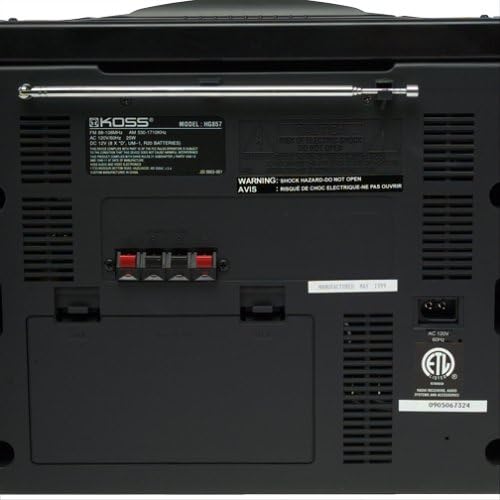
Nọmba 3: Alaye view of the Koss HG857 rear panel, showing the AC power input, speaker terminals, and the extendable FM antenna.
2.4 Eriali Oṣo
For FM reception, extend the telescopic antenna fully. For AM reception, the unit uses a built-in ferrite bar antenna; rotate the unit for best reception.
3. Isẹ
3.1 Ipilẹ idari
- Bọtini AGBARA: Tẹ lati tan-an tabi PA kuro.
- IWỌ NIPA: Rotate to adjust the overall sound level.
- Iṣakoso Iwontunwonsi: Adjusts the balance between the left and right speakers.
- DYNAMIC BASS BOOST (DBB): Activates or deactivates enhanced bass response.
3.2 CD Player isẹ
- Ṣii ideri iyẹwu CD.
- Gbe CD kan sii pẹlu ẹgbẹ aami ti nkọju si oke.
- Pa ideri CD kompaktimenti.
- Tẹ awọn CD/AUX bọtini lati yan ipo CD.
- Tẹ awọn ERE/SINMI bọtini lati bẹrẹ ṣiṣiṣẹsẹhin.
- Lo RIP / W SE buttons to navigate tracks or fast forward/rewind.
- ETO: Allows programming up to 20 tracks in a desired order.
3.3 Iṣẹ́ Àtúnṣe Rédíò
- Tẹ awọn OWO button to select AM or FM band.
- Lo awọn TUNTUN awọn bọtini lati tune si ibudo pẹlu ọwọ.
- Tẹ mọlẹ TUNTUN awọn bọtini fun wiwa ibudo laifọwọyi.
- TITUN: Store and recall up to 20 AM/FM stations.
3.4 Iṣẹ́ Àwòrán Káàsìtì
The unit features dual cassette decks (Deck A and Deck B).
Sisisẹsẹhin
- Ṣí ilẹ̀kùn kásẹ́ẹ̀tì náà kí o sì fi kásẹ́ẹ̀tì sínú rẹ̀.
- Tẹ awọn Teepu button to select tape mode.
- Tẹ ERE on either Deck A or Deck B to start playback.
- Lo TUNTUN, Siwaju Siwaju, ati Duro/EJECT awọn bọtini bi ti nilo.
Gbigbasilẹ
You can record from CD, Radio, or Tape A to Tape B.
- Insert a blank, recordable cassette into Deck B.
- Select the desired source (CD, TUNER, or TAPE A).
- Tẹ awọn Igbasilẹ button on Deck B. Playback from the source will begin automatically.
- Tẹ DURO on Deck B to end recording.
3.5 Iṣakoso latọna jijin
The included remote control allows convenient operation of most functions from a distance. Ensure the remote has working batteries and is pointed towards the main unit's sensor.
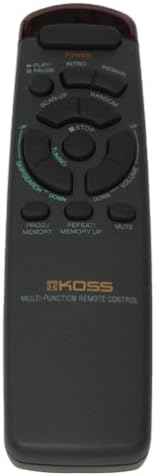
Figure 4: The multi-function remote control for the Koss HG857, showing various buttons for CD, tuner, and tape operations.
3.6 Jack agbekọri
A stereo headphone jack is provided for private listening. Plugging in headphones will mute the speakers.
4. Itọju
4.1 Ninu
Wipe the unit with a soft, dry cloth. Do not use abrasive cleaners or solvents. For the CD lens, use a specialized CD lens cleaner.
4.2 Batiri Rirọpo
If using battery power, replace all 8 D-size batteries when the unit's performance degrades. Ensure proper polarity.
4.3 CD and Cassette Care
- Mu awọn CD mu nipasẹ awọn egbegbe wọn lati yago fun awọn ika ọwọ ati awọn họ.
- Store cassettes away from direct sunlight and heat.
- Periodically clean cassette heads with a head cleaner.
5. Laasigbotitusita
| Isoro | Owun to le Fa | Ojutu |
|---|---|---|
| Ko si agbara | Kò sí okùn AC tó so mọ́ ọn; Àwọn bátìrì ti bàjẹ́ tàbí wọ́n ti fi sínú rẹ̀ lọ́nà tí kò tọ́. | Check AC connection; Replace batteries, ensuring correct polarity. |
| Ko si ohun | Volume too low; Headphones connected; Speakers not connected properly. | Increase volume; Disconnect headphones; Check speaker connections. |
| CD fo tabi ko ṣiṣẹ | CD dirty or scratched; CD inserted incorrectly; Unit in wrong mode. | Clean CD; Reinsert CD label side up; Select CD mode. |
| Gbigba redio ti ko dara | Antenna kò gùn/wà ní ipò gíga; Àmì tí kò lágbára. | Extend and adjust FM antenna; Rotate unit for AM; Try a different location. |
| Awọn oran ṣiṣiṣẹsẹhin kasẹti | Tape tangled or damaged; Heads dirty. | Ṣayẹwo ipo teepu; Mọ awọn olori kasẹti. |
| Isakoṣo latọna jijin ko ṣiṣẹ | Batteries depleted or incorrectly inserted; Obstruction between remote and unit. | Replace remote batteries; Ensure clear line of sight to unit's sensor. |
6. Awọn pato
- Awoṣe: HG857
- Orisun Agbara: AC 120V, 60Hz; 8 x D-size batteries
- Akọrin CD: Top-loading, 20-track programmable
- Redio Tuner: Digital AM/FM, 20 station presets
- Àwọn Àpò Kàsẹ́ẹ̀tì: Dual cassette, recordable
- Awọn agbọrọsọ: Detachable 3-way speakers with Dynamic Bass Boost
- Asopọmọra: Jack agbekọri sitẹrio
- Awọn iwọn (isunmọ): 27.8 x 12.5 x 11.6 inches (Awọn iwọn idii)
- Ìwọ̀n (isunmọ́): 16.7 poun (Iwọn nkan)
- Olupese: Koss Audio & Video
- Akọkọ Wa: Oṣu Kẹsan Ọjọ 4, Ọdun 1999
7. Atilẹyin ọja & Atilẹyin
For warranty information and customer support, please refer to the warranty card included with your product or visit the official Koss webojula. Tọju iwe-ẹri rira rẹ bi ẹri rira.
Koss Official Webojula: www.koss.com


