
THOMSON TM 9850
Thomson TM 9850 Radio User Manual
Model: TM 9850
Ọrọ Iṣaaju
This manual provides essential information for the safe and efficient operation of your Thomson TM 9850 Radio. Please read it thoroughly before using the device and keep it for future reference.
Alaye Aabo
- Ma ṣe fi ẹrọ naa han si ojo tabi ọrinrin lati yago fun ina tabi mọnamọna.
- Ma ṣe dina awọn ṣiṣi atẹgun. Rii daju pe aaye to peye ni ayika ẹyọ naa fun ṣiṣan afẹfẹ to dara.
- Lo ipese agbara ti a sọ fun ẹrọ yii nikan.
- Maṣe ṣii casing. Tọkasi gbogbo iṣẹ si oṣiṣẹ oṣiṣẹ.
- Jeki ẹyọ kuro lati orun taara, awọn orisun ooru, ati awọn aaye oofa to lagbara.
Ọja Pariview
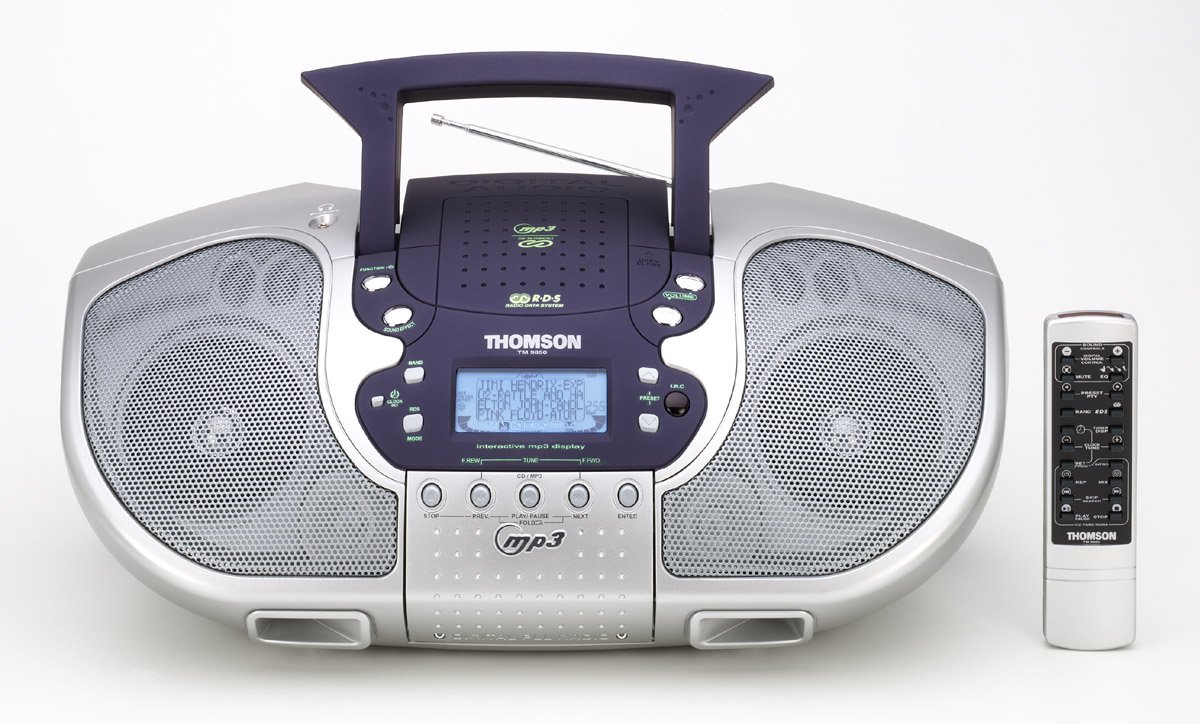
olusin 1: Iwaju view of the Thomson TM 9850 Radio with its accompanying remote control. The radio features dual speakers, a central control panel with an LCD display, and a top-mounted handle and telescopic antenna. The remote control is slender and white with various function buttons.
The Thomson TM 9850 is a portable radio designed for versatile audio playback. It features an integrated CD/MP3 player, an FM/AM radio tuner, and a clear LCD display for easy navigation. The unit also includes a remote control for convenient operation from a distance.
Ṣeto
Asopọ agbara
- Rí i dájú pé a gbé ohun èlò náà sí orí ilẹ̀ tí ó dúró ṣinṣin, tí ó tẹ́jú.
- So okun agbara AC pọ si Jack IN Jack lori ẹhin ẹyọ naa.
- So opin keji okun agbara AC sinu ibudo ogiri boṣewa (AC 230V ~ 50Hz).
- Alternatively, for portable use, insert 8 x "C" size batteries (not included) into the battery compartment located on the bottom of the unit, observing correct polarity.
Atunṣe Antenna
- For FM reception, extend the telescopic antenna fully. Adjust its position for optimal signal reception.
- For AM reception, the unit has a built-in ferrite bar antenna. Rotate the unit itself for best reception.
Awọn ilana Iṣiṣẹ
Isẹ ipilẹ
- Titan/Apapa: Tẹ awọn AGBARA bọtini lati tan tabi pa kuro.
- Iṣakoso iwọn didun: Yiyi awọn Iwọn didun tẹ bọtini ni apa aago lati mu iwọn didun pọ si, ni ọna lodi si aago lati dinku.
- Aṣayan iṣẹ-ṣiṣe: Tẹ awọn IṢẸ button to switch between CD/MP3, FM, and AM modes.
Ise Redio (FM/AM)
- Select FM or AM mode using the IṢẸ bọtini.
- Tẹ awọn BAND button to select the desired frequency band (FM or AM).
- Lo awọn TUNE +/- buttons to manually tune to a station. Press and hold for automatic scanning.
- To store a preset station: Tune to the desired station, press ETO, lẹhinna lo TẸTẸ +/- lati yan nọmba tito tẹlẹ, ko si tẹ ETO lẹẹkansi lati jẹrisi.
- To recall a preset station: Press TẸTẸ +/- to cycle through stored stations.
CD/MP3 Sisisẹsẹhin
- Ṣii ideri iyẹwu CD.
- Place a CD or MP3 CD with the label side facing up.
- Pa ideri yara CD naa.
- Select CD/MP3 mode using the IṢẸ button. The display will show "READING" then the total number of tracks/folders.
- Tẹ ERE/SINMI to start playback. Press again to pause.
- Tẹ ITELE to skip to the next track/file. Tẹ PREV to go to the beginning of the current track or the previous track.
- Tẹ DURO lati da ṣiṣiṣẹsẹhin duro.
- For MP3 CDs, use FIDI +/- buttons to navigate between folders.
Itoju
- Ninu: Mu ese kuro pẹlu asọ ti o gbẹ. Ma ṣe lo abrasive ose tabi epo.
- Abojuto lẹnsi CD: If the CD lens gets dirty, use a commercially available CD lens cleaner. Do not touch the lens.
- Ibi ipamọ: If not using the unit for an extended period, remove the batteries and store it in a cool, dry place.
Laasigbotitusita
| Isoro | Owun to le Fa | Ojutu |
|---|---|---|
| Ko si agbara | Okun agbara ko sopọ; Awọn batiri ti dinku tabi fi sii lọna ti ko tọ. | Check power cord connection; Replace batteries or ensure correct polarity. |
| Ko si ohun | Volume too low; Mute function activated. | Increase volume; Deactivate mute. |
| Gbigba redio ti ko dara | Eriali ko tesiwaju / titunse; Alailagbara ifihan agbara. | Extend and adjust telescopic antenna (FM); Rotate unit (AM); Try moving the unit to a different location. |
| CD/MP3 not playing | Disc inserted incorrectly; Disc dirty or scratched; Incorrect function mode. | Insert disc with label side up; Clean or replace disc; Select CD/MP3 function mode. |
Awọn pato
- Awoṣe: TM 9850
- Orisun Agbara: AC 230V ~ 50Hz or 8 x "C" size batteries (UM-2)
- Iwọn Igbohunsafẹfẹ: FM 87.5 - 108 MHz, AM 522 - 1620 kHz
- Awọn ọna kika Disiki ti o ni atilẹyin: CD, CD-R/RW, MP3-CD
- Ijade ohun: Sitẹrio
- Awọn iwọn (W x H x D): (Approximate, based on typical boombox size) 400mm x 200mm x 250mm
- Ìwúwo: (Approximate, based on typical boombox weight) 2.5 kg
Akiyesi: Awọn pato jẹ koko ọrọ si iyipada laisi akiyesi fun ilọsiwaju.
Atilẹyin ọja ati Support
This Thomson TM 9850 Radio comes with a standard manufacturer's warranty. Please refer to the warranty card included in the original packaging for detailed terms and conditions. For technical support, service, or inquiries, please contact Thomson customer service through their official webaaye tabi alaye olubasọrọ ti a pese pẹlu rira rẹ.
For the latest information and support resources, please visit the official Thomson webojula: www.thomsonconsumer.com
Ask a question about this manual
Ask about setup, troubleshooting, compatibility, parts, safety, or missing instructions. Manuals+ will review the question and use this page’s manual context to help answer it.