
1. Ifihan
Thank you for choosing the Grundig RRCD 4305 Freaxx 50 CD/MP3 Cassette Radio. This manual provides essential information for the safe and efficient operation of your device. Please read it thoroughly before use and retain it for future reference.
2. Awọn ilana aabo
- Orisun Agbara: Rii daju pe ipese agbara voltage matches the rating indicated on the unit.
- Afẹfẹ: Ma ṣe dina awọn ṣiṣi atẹgun. Gba aaye to peye ni ayika ẹyọkan fun ṣiṣan afẹfẹ to dara.
- Omi ati Ọrinrin: Ma ṣe fi ẹrọ naa han si ojo, ọrinrin, tabi awọn olomi ti n rọ/ti ntan. Jeki kuro lati awọn orisun omi.
- Ooru: Yẹra fún gbígbé ẹ̀rọ náà sí ẹ̀gbẹ́ àwọn orísun ooru bíi radiators, àwọn ìwé ìforúkọsílẹ̀ ooru, àwọn stovu, tàbí àwọn ẹ̀rọ míràn tí ń mú ooru jáde.
- Ninu: Disconnect the unit from the power source before cleaning. Use a soft, dry cloth.
- Ṣiṣẹ: Ma ṣe gbiyanju lati ṣe iṣẹ fun ẹyọkan funrararẹ. Tọkasi gbogbo iṣẹ si awọn oṣiṣẹ iṣẹ ti o peye.
- Awọn batiri: Follow proper polarity when inserting batteries. Do not mix old and new batteries or different types of batteries. Remove batteries if the unit is not used for extended periods.
3. Ọja Ipariview
Familiarize yourself with the main components and controls of your Grundig RRCD 4305 Freaxx 50.
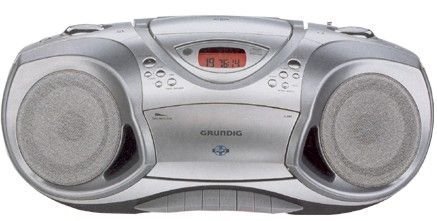
olusin 1: Iwaju view of the Grundig RRCD 4305 Freaxx 50, showing the CD compartment, cassette deck, and control buttons.
Awọn idari ati Awọn itọkasi:
- Bọtini agbara: Yipada ẹyọ naa tan tabi pa.
- Iṣakoso iwọn didun: Ṣe atunṣe ipele iṣelọpọ ohun.
- Aṣayan iṣẹ ṣiṣe: Switches between CD, Radio, Cassette, and AUX modes.
- Tuning Knob (Radio): Ṣe àtúnṣe ìgbóhùnsáfẹ́fẹ́ rédíò.
- Band Selector (Radio): Selects AM/FM radio bands.
- CD/MP3 Controls: Play/Pause, Stop, Skip Forward/Backward, Folder Up/Down.
- Àwọn Ìṣàkóso Kásẹ́ẹ̀tì: Mu ṣiṣẹ, Duro/Jade, Sare siwaju, Dapada sẹhin, Gbigbasilẹ.
- Ifihan: Ó ń fi ipò ìsinsìnyí, nọ́mbà orin, tàbí ìgbóhùnsáfẹ́fẹ́ rédíò hàn.
4. Eto
4.1 Ṣiṣii silẹ
- Fara yọ kuro lati inu apoti rẹ.
- Check for any damage that may have occurred during transit. If damaged, do not operate the unit and contact your dealer.
- Daduro awọn ohun elo iṣakojọpọ fun irinna ọjọ iwaju tabi ibi ipamọ.
4.2 Asopọ agbara
A le lo agbara AC tabi awọn batiri fun ẹrọ naa.
Agbara AC:
- Connect the supplied AC power cord to the AC IN socket on the rear of the unit.
- Pulọọgi awọn miiran opin ti awọn agbara okun sinu kan boṣewa iṣan iṣan.
Agbara Batiri:
- Ṣii ideri iyẹwu batiri ni isalẹ ẹyọ.
- Insert the required number of 'C' size batteries (not supplied), ensuring correct polarity (+/-).
- Pa ideri batiri naa ni aabo.
4.3 Eriali
- For FM reception, extend the telescopic antenna fully. Adjust its position for optimal signal reception.
- For AM reception, the unit uses a built-in ferrite bar antenna. Rotate the entire unit for best AM reception.
5. Awọn ilana Iṣiṣẹ
5.1 Ipilẹ isẹ
- Tẹ awọn AGBARA bọtini lati tan ẹrọ naa.
- Ṣatunṣe awọn Iwọn didun ṣakoso si ipele gbigbọ ti o fẹ.
- Tẹ awọn AGBARA bọtini lẹẹkansi lati pa awọn kuro.
5.2 Radio isẹ
- Ṣeto awọn Ayanfẹ iṣẹ to 'RADIO'.
- Select the desired band (AM or FM) using the BAND yiyan yipada.
- Yiyi awọn TUNTUN knob to find your desired radio station.
- Ṣatunṣe eriali fun gbigba ti o dara julọ.
5.3 CD/MP3 Playback
- Ṣeto awọn Ayanfẹ iṣẹ sí 'CD'.
- Open the CD compartment cover by pressing the 'OPEN' button.
- Place a CD or MP3 disc onto the spindle with the label side facing up.
- Pa ideri CD iyẹwu naa. Ẹyọ naa yoo ka disiki naa.
- Tẹ awọn ERE/SINMI bọtini lati bẹrẹ ṣiṣiṣẹsẹhin.
- Lo awọn Siwaju/Sẹhin awọn bọtini lati lilö kiri laarin awọn orin.
- For MP3 discs, use the FÓÒSÌ SÍSÍLẸ̀/SÍLẸ̀ buttons to navigate between folders.
- Tẹ awọn DURO bọtini lati da sẹhin duro.
5.4 Sisisẹsẹhin kasẹti ati Gbigbasilẹ
Sisisẹsẹhin:
- Ṣeto awọn Ayanfẹ iṣẹ to 'TAPE'.
- Tẹ awọn Duro/EJECT bọtini lati ṣii yara kasẹti.
- Fi teepu kasẹti kan sii pẹlu eti ṣiṣi ti nkọju si ọna oke.
- Pa yara kasẹti naa.
- Tẹ awọn ERE bọtini lati bẹrẹ ṣiṣiṣẹsẹhin.
- Lo Siwaju Siwaju or TUNTUN awọn bọtini lati yara gbe nipasẹ teepu naa.
- Tẹ Duro/EJECT to stop playback and open the compartment.
Recording (from Radio/CD/AUX):
- Fi teepu kasẹti ti ko ni ofo sinu yara naa.
- Select the desired source (RADIO, CD, or AUX) using the Ayanfẹ iṣẹ.
- Start playback on the source (e.g., play a CD, tune a radio station).
- Tẹ awọn Igbasilẹ button (usually red) and the ERE button simultaneously on the cassette deck. Recording will begin.
- Tẹ awọn Duro/EJECT bọtini lati pari gbigbasilẹ.
5.5 Ìbáṣepọ̀ Ìrànlọ́wọ́ (AUX)
- So ẹrọ ohun afetigbọ ita (fun apẹẹrẹ, foonuiyara, ẹrọ orin MP3) si AUX IN Jack nipa lilo okun ohun afetigbọ 3.5mm (kii ṣe ipese).
- Ṣeto awọn Ayanfẹ iṣẹ to 'AUX'.
- Control playback from your external device. The unit will output the audio.
6. Itọju
6.1 Ninu Unit
- Yọọ ẹyọ kuro nigbagbogbo lati iṣan agbara ṣaaju ṣiṣe mimọ.
- Lo asọ ti o tutu, ti o gbẹ lati nu awọn ita ita.
- Ma ṣe lo abrasive Cleaners, waxes, tabi epo bi wọn ṣe le ba ipari jẹ.
6.2 CD lẹnsi Itọju
- Do not touch the CD lens.
- If the lens is dirty, use a commercially available CD lens cleaner.
6.3 Cassette Deck Care
- Periodically clean the tape heads, capstan, and pinch roller using a cotton swab lightly moistened with isopropyl alcohol.
- Demagnetize the tape heads regularly with a tape head demagnetizer to prevent sound degradation.
6.4 Batiri Rirọpo
- When battery power is low, the unit's performance may degrade. Replace all batteries with new ones.
- Refer to section 4.2 for battery insertion instructions.
- Sọ awọn batiri ti a lo ni ifojusọna ni ibamu si awọn ilana agbegbe.
7. Laasigbotitusita
| Isoro | Owun to le Fa | Ojutu |
|---|---|---|
| Ko si agbara | Okun AC ko ni asopọ; Awọn batiri ti dinku tabi fi sii lọna ti ko tọ. | Check AC cord connection; Replace batteries, ensuring correct polarity. |
| Ko si ohun | Iwọn ti o kere ju; Ti yan iṣẹ ti ko tọ; Agbekọri ti sopọ. | Increase volume; Select correct function (CD/Radio/Tape/AUX); Disconnect headphones. |
| CD/MP3 disiki fo tabi ko ṣiṣẹ | Disc dirty or scratched; Disc inserted incorrectly; Lens dirty. | Clean or replace disc; Reinsert disc correctly; Clean CD lens. |
| Gbigba redio ti ko dara | Eriali ko tesiwaju / titunse; Alailagbara ifihan agbara. | Fa ati ṣatunṣe eriali FM; Yiyi kuro fun gbigba AM; Gbiyanju gbigbe ẹyọ naa lọ si ipo ọtọtọ. |
| Sisisẹsẹ kasẹti ti bàjẹ́ | Tape heads dirty or demagnetized; Worn tape. | Clean and demagnetize tape heads; Try a different tape. |
8. Awọn pato
- Ibi ti ina elekitiriki ti nwa: AC 230V ~ 50Hz or DC 9V (6 x 'C' size batteries)
- Igbohunsafẹfẹ Redio:
- FM: 87.5 - 108 MHz
- Àárọ̀: 522 - 1620 kHz
- Akọrin CD: Supports CD-R/RW, MP3 playback
- Dekini Kasẹti: Stereo playback and recording
- Iṣawọle Olohun: 3.5mm AUX-IN Jack
- Agbara Ijade: [Specific wattage, if known, otherwise omit or state 'Typical']
- Awọn iwọn (W x H x D): [Specific dimensions, if known, otherwise omit]
- Ìwúwo: [Specific weight, if known, otherwise omit]
Specifications are subject to change without notice for continuous product improvement.
9. Atilẹyin ọja ati Support
Grundig products are manufactured to high quality standards and are warranted against manufacturing defects. For detailed warranty information, please refer to the warranty card included with your purchase or visit the official Grundig website. For technical support or service inquiries, please contact your local Grundig service center or authorized dealer.
O le wa alaye diẹ sii ati atilẹyin ni Grundig Brand Store.


