Ọrọ Iṣaaju
This manual provides detailed instructions for the setup, operation, and maintenance of your Pentax Optio MX4 Digital Camera. The Optio MX4 is a versatile 4.0-megapixel digital camera equipped with a powerful 10x optical zoom lens and a 1.8-inch swiveling LCD monitor, designed for capturing both high-quality still images and MPEG-4 video.
Please read this manual thoroughly before using your camera to ensure proper handling and to maximize its features.
Ohun ti o wa ninu Apoti
Verify that all the following items are included with your Pentax Optio MX4 camera:
- Pentax Optio MX4 Camera
- CR-V3 Lithium Battery
- Lens Cap O-LC37
- Okùn (O-ST17)
- USB Cable (I-USB17)
- AV Cable (I-AVC7)
- CD-ROM software
- Iwe afọwọkọ iṣẹ (iwe yii)
- Serial Number Card
- Service Network Directory
Ṣeto
1. Fifi sori batiri
The Pentax Optio MX4 uses a CR-V3 Lithium Battery. Ensure the battery is inserted with the correct polarity as indicated inside the battery compartment.
- Locate the battery compartment door on the camera body.
- Fi latch naa si lati ṣii ilẹkun yara naa.
- Insert the CR-V3 battery, aligning the positive (+) and negative (-) terminals correctly.
- Close the compartment door securely until it clicks into place.

olusin 1: Apa view of the camera, illustrating the location of the battery and memory card compartment.
2. Fifi sori kaadi iranti
The camera supports SD memory cards (not included). A memory card is required to store photos and videos.
- Open the battery compartment door (as described above). The memory card slot is typically located adjacent to the battery.
- Insert the SD card into the slot with the label facing the correct direction, usually towards the front of the camera. Push gently until it clicks into place.
- Pa ẹnu-ọna iyẹwu naa ni aabo.
3. Attaching the Strap and Lens Cap
Attach the provided strap to prevent accidental drops. Secure the lens cap to protect the lens when not in use.
- Thread the camera strap through the strap lug on the camera body.
- Attach the lens cap to the lens using its tether, if available, or place it directly on the lens when the camera is off.
Awọn ilana Iṣiṣẹ
1. Agbara lori / Paa
Press the power button, usually located on the top or side of the camera, to turn the camera on or off. The lens will extend upon power-on.

olusin 2: Top-isalẹ view highlighting the camera's controls, including the power button and mode dial.
2. Lilo LCD Monitor ati Viewoluwari
The camera features a 1.8-inch swiveling LCD monitor for composing shots and reviewing images. An optical viewfinder is also available for traditional framing.
- Atẹle LCD: Rotate the LCD monitor to your desired angle for comfortable shooting from various perspectives. Its low-glare control mechanism improves visibility in direct sunlight.
- Opitika Viewoluwari: For situations where the LCD is difficult to see or to conserve battery, use the optical viewoluwari.
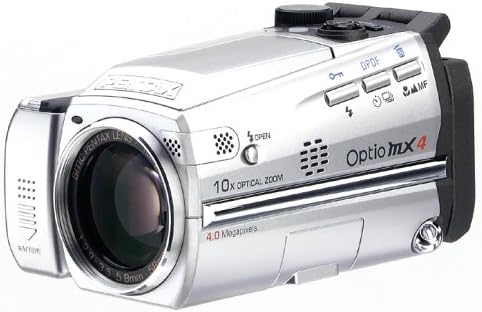
Figure 3: The Pentax Optio MX4 with its LCD monitor articulated upwards, demonstrating its swiveling capability.
3. Selecting Shooting Modes
Use the mode dial to select from various shooting modes:
- Ipo aworan: Standard automatic shooting.
- Ipo Eto: Kámẹ́rà ṣètò iyàrá ìṣípo àti iyàrá ìṣípo, ṣùgbọ́n ó ń gba àwọn àtúnṣe mìíràn láàyè.
- Iṣaju Shutter: O ṣeto iyara oju, kamẹra ṣeto iho.
- Aperture Priority: O ṣeto iho, kamẹra ṣeto iyara oju.
- Ipo afọwọṣe: Full control over both aperture and shutter speed.
- Igbasilẹ ohun: For audio recording.
- Awọn ọna aworan: Includes Landscape, Flower, Portrait, Self-Portrait, Surf & Snow, Sunset, Night Scene, Soft, Illustration, and Panorama Assist for specific scene optimization.
4. Focusing and Zooming
- Idojukọ: The camera uses a TTL contrast detection autofocus system with 5-point wide-focus, spot focus, and infinity landscape mode. Half-press the shutter button to engage autofocus.
- Idojukọ Afowoyi: For precise control, switch to manual focus mode.
- Sun-un: Use the zoom lever to adjust the 10x optical zoom (38mm-380mm equivalent). The camera also features 10x digital zoom.
- Super Macro: Capture subjects from as close as 0mm (up to 5.9 inches) for detailed close-up shots.

Figure 4: The Pentax Optio MX4 demonstrating its lens capabilities, potentially with an accessory lens attached.
5. Movie Recording
The Optio MX4 can record enhanced MPEG-4 video at 30 frames per second in VGA (640x480 pixels) resolution.
- Select the movie recording mode using the mode dial.
- Tẹ bọtini titiipa lati bẹrẹ gbigbasilẹ. Tẹ lẹẹkansi lati da.
- Recorded videos are saved in MPEG-4 format.
6. Image Playback and Management
Switch to playback mode to review your photos and videos. You can delete unwanted files tabi view slideshows.
7. Connecting to a Computer and Printing
- Asopọ USB: Use the supplied USB 2.0 cable (I-USB17) to connect the camera to your computer for rapid image download.
- Software: The included software CD-ROM contains applications like ACDSee for Windows and Mac, and ACD ShowTime for movie editing.
- Titẹ sita taara: The camera supports PictBridge and Epson Print Image Matching II technology for direct printing to compatible printers.
Itoju
- Ninu ara Kamẹra: Lo asọ ti o rọ, ti o gbẹ lati nu ara kamẹra nu. Fun idoti alagidi, die-die dampen aṣọ pẹlu omi. Yago fun lilo Organic epo.
- Cleaning the Lens and LCD: Use a lens brush or a soft, clean microfiber cloth specifically designed for optical surfaces. Do not use abrasive materials.
- Itọju Batiri: Remove the battery if the camera will not be used for an extended period. Store batteries in a cool, dry place.
- Ibi ipamọ: Store the camera in a dry, well-ventilated area, away from direct sunlight, high temperatures, and humidity.
Laasigbotitusita
| Isoro | Ojutu |
|---|---|
| Kamẹra ko ṣiṣẹ. |
|
| Awọn aworan jẹ blurry. |
|
| Aṣiṣe kaadi iranti. |
|
| Filaṣi ko ina. |
|
Awọn pato
| Ẹya ara ẹrọ | Ẹ̀kúnrẹ́rẹ́ |
|---|---|
| Orukọ awoṣe | Optio MX4 |
| Ipinnu sensọ Fọto | 4 MP |
| Fọto sensọ Technology | CCD |
| Sun-un Optical | 10x |
| Digital Sisun | 10x |
| Ipari Ifojusi ti o pọju | 370 mm |
| Ipari Ifojusi Kere | 37 mm |
| Iwon iboju | 1.8 inches |
| Ipinnu fidio | 640 x 480 (VGA) ni 30 fps |
| Fidio Yaworan kika | MPEG-4 |
| Iduroṣinṣin Aworan | Digital, Optical |
| Atilẹyin File Ọna kika | JPEG |
| Flash Memory Iru | SD/MMC kaadi |
| Batiri Iru | CR-V3 Lithium |
| Asopọmọra Technology | USB 2.0 |
| Iṣakoso ifihan | Program, Aperture Priority, Shutter Priority, Manual |
| Idojukọ aifọwọyi | TTL Contrast Detection (5-point wide-focus, spot focus, infinity) |
| Iwọn Nkan | 0.83 iwon |
| Nọmba awoṣe | OPTIO-MX4 (Manufacturer Part Number: 18037) |
| UPC | 027075086692 |
Atilẹyin ọja ati Support
For detailed warranty information, technical support, and service inquiries, please refer to the warranty card included with your product or visit the official Pentax webojula.
O le wa alaye diẹ sii ati awọn orisun atilẹyin ni aaye naa Pentax Store on Amazon.