
1. Ifihan
This manual provides comprehensive instructions for the safe and proper installation, operation, and maintenance of your Vogel's EFF1140 LCD/Plasma TV Floor Stand. This floor stand is designed to securely hold flat panel televisions ranging from 25 to 42 inches, offering optimal viewing flexibility with its turn function and integrated cable management.
Please read all instructions carefully before assembly and use to ensure proper functionality and to prevent damage or injury.
2. Alaye Aabo
- Agbara iwuwo: Do not exceed the maximum weight capacity specified for this stand. Refer to the Specifications section for details.
- Iwon TV: A ṣe àgbékalẹ̀ ìdúró yìí fún àwọn TV láàárín 25 sí 42 inches. Rí i dájú pé TV rẹ wà láàrín ìwọ̀n yìí.
- Iduroṣinṣin: Always ensure the stand is placed on a stable, level surface. Uneven surfaces can lead to instability and tipping.
- Apejọ: Follow all assembly instructions precisely. Incorrect assembly can result in product failure and potential injury.
- Awọn ọmọde: Keep children away from the assembly area. Small parts can be a choking hazard. Do not allow children to climb on or play with the stand or mounted TV.
- Iṣakoso USB: Utilize the integrated cable inlay system to prevent tripping hazards and maintain a tidy appearance.
- Awọn irinṣẹ: Lo àwọn irinṣẹ́ tó yẹ fún ìtòjọ. Má ṣe fi àwọn skru dí i jù.
3. Package Awọn akoonu
Before beginning assembly, please verify that all components are present and undamaged. If any parts are missing or damaged, contact Vogel's customer support.
- Ipilẹ mimọ
- Ọwọn Support akọkọ
- TV Mounting Rails (2x)
- Horizontal TV Mounting Bar
- Glass Shelf (optional, if included)
- Mounting Hardware (screws, washers, spacers, bolts for TV attachment)
- Àwọn Irinṣẹ́ Àkójọpọ̀ (fún àpẹẹrẹ, kọ́kọ́rọ́ Allen)
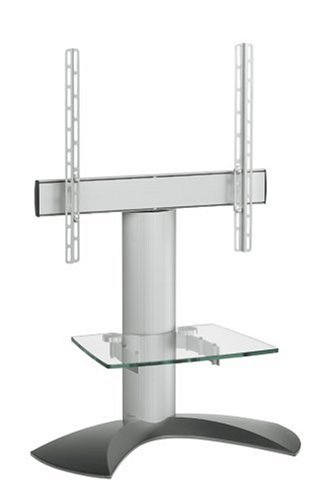
Olusin 1: Pariview of Vogel's EFF1140 TV Floor Stand components. This image displays the main parts including the base, central column, TV mounting bracket, and a glass shelf.
4. Eto ati Apejọ
Follow these steps carefully to assemble your Vogel's EFF1140 TV Floor Stand.
4.1. Base and Column Assembly
- Attach the main support column to the base plate using the provided screws and tools. Ensure it is securely fastened and stable.
4.2. Attaching TV Mounting Rails to TV
The EFF1140 uses VESA MIS-F compliant mounting rails. Select the appropriate screws, washers, and spacers from the hardware kit that match your TV's VESA mounting holes.
- Farabalẹ gbe oju TV rẹ si isalẹ lori rirọ, dada mimọ lati ṣe idiwọ ibajẹ iboju.
- Align the two vertical mounting rails with the VESA mounting holes on the back of your TV.
- Secure the rails to the TV using the correct screws and spacers. Do not overtighten.
- Note: Some TV brands, such as Panasonic, may require specific bolt kits not included with the stand. Please check your TV's manual or contact the TV manufacturer if the provided bolts do not fit.
4.3. Mounting TV to Stand
- With assistance, carefully lift the TV with the attached mounting rails.
- Hook the mounting rails onto the horizontal mounting bar of the stand. Ensure the TV is securely seated and level.
- Secure the TV to the horizontal bar using the safety screws or locking mechanism provided.
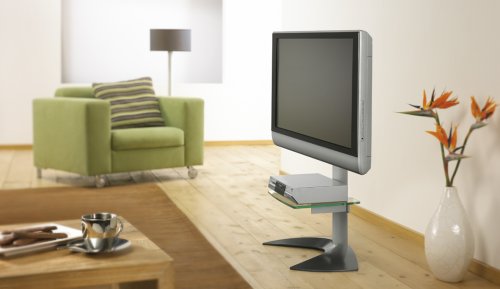
Figure 2: The Vogel's EFF1140 TV Floor Stand integrated into a living room, showcasing its design and how a TV is mounted.
4.4. Optional Glass Shelf Installation
If your model includes a glass shelf, install it onto the central column at the desired height. Ensure the shelf brackets are securely fastened. Note: Some users have reported issues with bracket alignment for the glass shelf. If you encounter difficulties, contact Vogel's support.
5. Ṣiṣẹ Iduro
5.1. Ṣíṣe àtúnṣe Viewing Angle (Turn Function)
The Vogel's EFF1140 features a turn function, allowing you to adjust the TV's horizontal viewigun ing fun ipo ti o dara julọ.
- Gently grasp the sides of the TV.
- Carefully rotate the TV to the desired left or right angle. The stand is designed to allow smooth rotation.
- Avoid forcing the TV beyond its intended range of motion.
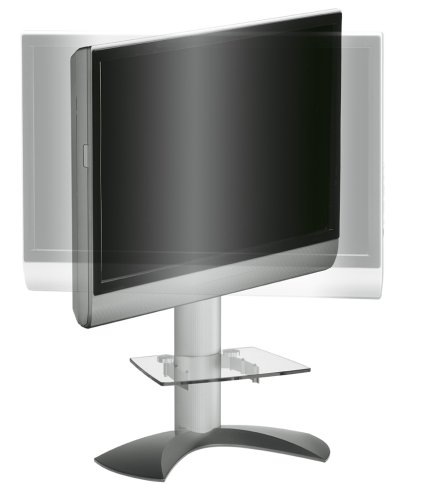
Figure 3: The Vogel's EFF1140 TV Floor Stand demonstrating its turn function, allowing the mounted television to pivot horizontally for flexible viewing awọn igun.
5.2. Iṣakoso USB
Utilize the integrated cable inlay system within the main support column to conceal and organize your TV and accessory cables. This helps maintain a clean aesthetic and prevents tripping hazards.
- Gather all cables from your TV and connected devices.
- Route them through the designated openings in the stand's column.
- Ensure cables are not pinched or under excessive tension.
6. Itọju
- Ninu: Mu ese duro pẹlu asọ ti o gbẹ. Fun awọn ami alagidi, die-die damp cloth with mild detergent can be used, followed by drying. Avoid abrasive cleaners or solvents.
- Awọn ayewo: Lokọọkan ṣayẹwo gbogbo awọn skru ati awọn asopọ lati rii daju pe wọn wa ni wiwọ ati aabo. Retighten ti o ba wulo.
- Glass Shelf: Clean the glass shelf with a glass cleaner and a soft cloth.
7. Laasigbotitusita
- TV Mounting Bolts Do Not Fit:
The stand includes a universal bolt kit. However, some TV manufacturers (e.g., Panasonic) may require specific bolts not supplied. Consult your TV's instruction manual or contact the TV manufacturer directly to obtain the correct bolt kit.
- Glass Shelf Brackets Do Not Align:
If you experience difficulty aligning the glass shelf brackets, double-check the assembly steps. If the issue persists, contact Vogel's customer support for assistance.
- Iduro farahan Aiduro:
Ensure the stand is placed on a completely flat and level surface. Verify that all assembly screws are securely tightened. Do not exceed the maximum weight capacity of the stand.
8. Awọn pato
| Awoṣe | EFF1140 |
| Brand | Vogel ká |
| Ibamu TV Awọn iwọn | 25"-42" |
| Ibamu VESA | MIS-F |
| Awọn iwọn Ọja (LxWxH) | 70.1 x 34.8 x 111.3 cm (27.6 x 13.7 x 43.8 inches) |
| Iwọn Nkan | 11.9 kg (26.2 lbs) |
| Àwọ̀ | Fadaka |
| Iṣagbesori Iru | Floor Oke |
| Awọn ẹya ara ẹrọ | Turn function, Cable inlay system, Optional second shelf support |
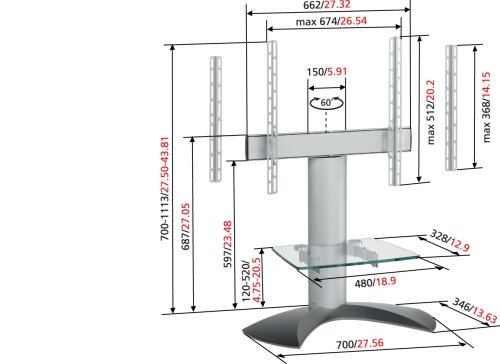
Figure 4: Technical drawing of the Vogel's EFF1140 TV Floor Stand with detailed dimensions in centimeters and inches.
9. Atilẹyin ọja ati Support
This Vogel's EFF1140 TV Floor Stand comes with a 5-odun atilẹyin ọja. For warranty claims, technical support, or inquiries regarding missing parts or assembly issues, please contact Vogel's customer service directly.
Please visit the official Vogel's webaaye fun alaye olubasọrọ ti o ni imudojuiwọn julọ ati awọn orisun atilẹyin.
Note: The warranty covers manufacturing defects and material flaws under normal use. It does not cover damage caused by improper installation, misuse, or unauthorized modifications.