
1. Ifihan
O ṣeun fun riraasing the GPX CDP6806DT Personal CD Player. This manual provides important safety instructions, operational guidelines, and maintenance procedures to ensure optimal performance and longevity of your device. Please read this manual thoroughly before using the product and retain it for future reference.
2. Alaye Aabo
Awọn Itọsọna Aabo pataki
- Ma ṣe fi ẹrọ naa han si omi tabi ọrinrin.
- Yago fun gbigbe ẹyọ naa si nitosi awọn orisun ooru gẹgẹbi awọn imooru, awọn iforukọsilẹ ooru, awọn adiro, tabi awọn ohun elo miiran (pẹlu ampliifiers) ti o gbe ooru jade.
- Má ṣe gbìyànjú láti tú tàbí ṣe àtúnṣe ẹ̀rọ náà. Tọ́ka gbogbo iṣẹ́ ìtọ́jú náà sí àwọn òṣìṣẹ́ iṣẹ́ tó péye.
- Use only the specified batteries (2 x AA batteries). Ensure correct polarity when inserting batteries.
- Yọ awọn batiri kuro ti ẹrọ naa ko ba ni lo fun akoko ti o gbooro sii.
- Yago fun gbigbọ ni awọn ipele iwọn didun giga fun awọn akoko gigun lati ṣe idiwọ ibajẹ igbọran.
- Nu kuro nikan pẹlu asọ gbigbẹ.
3. Package Awọn akoonu
Carefully unpack your GPX CDP6806DT Personal CD Player and ensure all items are present:
- GPX CDP6806DT Personal CD Player
- Afowoyi Olumulo (iwe-ipamọ yii)
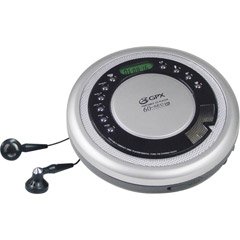
Figure 1: GPX CDP6806DT Personal CD Player. This image illustrates the compact design and general appearance of the device.
4. Awọn iṣakoso ati Awọn ẹya ara ẹrọ
Familiarize yourself with the controls and features of your GPX CDP6806DT for optimal use.
- Ifihan LCD: 6-digit display for track number, time, and FM frequency.
- PLAY/PAUSE (►/−): Press to start or pause CD playback.
- Duro (■): Press to stop CD playback.
- SKIP/SEARCH (◀◀/▶▶): Press to skip tracks. Hold to search within a track.
- IYE (+/-): Ṣe atunṣe ipele iṣelọpọ ohun.
- MODE/PROG: Selects playback mode (Repeat, Random) or programs CD tracks.
- FM TUNER (ON/OFF/BAND): Switches to FM radio mode, turns FM on/off, or changes FM band.
- PRESET (+/-): Navigates saved FM radio presets.
- Iyẹwu CD: Area for inserting audio CDs.
- Abala Batiri: Located on the bottom, holds 2 AA batteries.
- Jack agbekọri (3.5mm): Connects headphones for private listening.
Figure 2: GPX CDP6806DT Controls Layout. This image provides a visual reference for the location of various buttons and ports on the device.
5. Eto
5.1 Fifi sori batiri
The GPX CDP6806DT requires two (2) AA batteries (not included) for portable operation.
- Wa yara batiri ni isalẹ ti kuro.
- Gbe ideri iyẹwu batiri naa ṣii.
- Fi awọn batiri AA meji sii, ki o rii daju pe polarity (+ ati -) to tọ gẹgẹ bi a ti fihan ninu yara naa.
- Pa ideri batiri naa ni aabo.
5.2 Nsopọ Awọn agbekọri
For private listening, connect your 3.5mm stereo headphones (not included) to the headphone jack located on the side of the unit.
6. Awọn ilana Iṣiṣẹ
6.1 CD Sisisẹsẹhin
The unit supports CD and CD-R/RW disc formats.
- Open the CD compartment lid by gently pressing the OPEN button (if present, or lifting the lid).
- Fi CD kan si ibi ti ẹgbẹ aami naa kọju si oke lori spindle aarin.
- Ti ideri apoti CD naa mu ṣinṣin titi ti yoo fi tẹ.
- Tẹ awọn PLAY/PAUSE (►/−) button to begin playback. The track number and elapsed time will appear on the LCD display.
- Lati da ṣiṣiṣẹsẹhin duro, tẹ PLAY/PAUSE (►/−). Tẹ lẹẹkansi lati bẹrẹ.
- Lati da ṣiṣiṣẹsẹhin duro, tẹ awọn Duro (■) bọtini.
- Lati fo si orin atẹle, tẹ SKIP/SEARCH (▶▶).
- To go back to the beginning of the current track, press SKIP/SEARCH (◀◀) once. Press twice to go to the previous track.
- To search rapidly forward or backward within a track, hold down SKIP/SEARCH (▶▶) or (◀◀) lẹsẹsẹ.
- Satunṣe iwọn didun nipa lilo awọn IYE (+/-) awọn idari.
6.2 FM Radio isẹ
The unit features a digital FM tuner with station presets.
- Gbe awọn FM TUNER switch to the ON position or press the BAND bọtini lati tẹ FM mode.
- Tẹ awọn SKIP/SEARCH (▶▶) or (◀◀) awọn bọtini lati ṣe atunṣe pẹlu ọwọ si igbohunsafẹfẹ ti o fẹ.
- To auto-scan and save stations, hold down the PLAY/PAUSE (►/−) button (or refer to specific instructions for auto-scan if available on the device).
- To recall saved presets, use the PRESET (+/-) awọn bọtini.
6.3 CD Programming (24-Track)
You can program up to 24 tracks to play in a specific order.
- With the CD stopped, press the MODE/PROG bọ́tìnì náà. "PROG" yóò tàn lórí ìbòjú náà.
- Lo awọn SKIP/SEARCH (▶▶) or (◀◀) buttons to select the first track you wish to program.
- Tẹ MODE/PROG again to confirm the selection. The display will show the program number and the next available program slot.
- Repeat steps 2 and 3 to add up to 24 tracks to your program.
- After programming all desired tracks, press PLAY/PAUSE (►/−) láti bẹ̀rẹ̀ sí í ṣe eré tí a ti ṣètò.
- To clear the program, press the Duro (■) bọtini lemeji.
6.4 Anti-Skip Protection (ASP)
The GPX CDP6806DT features a 60-second Anti-Skip Protection system. This system buffers audio data to minimize interruptions caused by minor shocks or vibrations during CD playback. The ASP activates automatically when a CD is playing.
7. Itọju
7.1 Ninu Unit
- Mu ese ita kuro pẹlu asọ ti o gbẹ.
- Ma ṣe lo awọn afọmọ abrasive, waxes, tabi awọn nkanmimu.
- If the CD lens needs cleaning, use a specialized CD lens cleaner disc or a soft, lint-free cloth designed for optical lenses.
7.2 batiri Itọju
- Remove batteries if the unit is not used for an extended period to prevent leakage.
- Maṣe dapọ atijọ ati awọn batiri titun, tabi awọn oriṣiriṣi awọn batiri.
- Sọ awọn batiri ti a lo ni ifojusọna ni ibamu si awọn ilana agbegbe.
8. Laasigbotitusita
If you experience issues with your GPX CDP6806DT, please consult the following table for common problems and solutions.
| Isoro | Owun to le Fa / Solusan |
|---|---|
| Ẹka ko ni agbara lori. | Ṣàyẹ̀wò bóyá a fi àwọn bátìrì sí i dáadáa pẹ̀lú ìpele tó yẹ. Rí i dájú pé àwọn bátìrì náà jẹ́ tuntun tí kò sì ti bàjẹ́. |
| Ko si ohun lati olokun. | Ensure headphones are fully plugged into the headphone jack. Increase the volume level. Test with another pair of headphones. |
| CD skips or playback is interrupted. | Ensure the CD is clean and free of scratches or smudges. Clean the CD with a soft, lint-free cloth. Ensure the unit is on a stable surface or held steadily during use. |
| CD kò ṣiṣẹ́. | Ensure the CD is inserted correctly with the label side up. Close the CD compartment lid completely. Check if the CD is a supported format (CD, CD-R/RW). |
| Gbigba redio FM ko dara. | Extend the headphone cable as it acts as the antenna. Try moving to a different location. |
9. Awọn pato
- Brand: GPX
- Awoṣe: CDP6806DT
- Awọn ọna kika Disiki ti o ni atilẹyin: CD, CD-R/RW
- Idaabobo Atako-Rekọja: 60 aaya
- Ifihan: 6-nọmba LCD
- Redio: Digital FM Tuner with Presets
- CD Programming: 24-orin
- Orisun Agbara: Awọn batiri 2 x AA (kii ṣe pẹlu)
- Asopọmọra: 3.5mm Headphone Jack (Auxiliary)
10. Atilẹyin ọja ati Support
For detailed warranty information, please refer to the warranty card included with your original product packaging. For technical support, service inquiries, or to purchase replacement parts, please visit the official GPX website or contact their customer service department using the contact information provided in your product documentation.
Jọwọ ṣe idaduro ẹri rira rẹ fun awọn iṣeduro atilẹyin ọja.