
1. Ifihan
The Performance Tool W89720 is a non-contact infrared thermometer designed for measuring surface temperatures without direct physical contact. This device provides temperature readings in both Fahrenheit and Celsius, features a backlit digital display for easy readability, and includes a laser pointer for accurate targeting. A wrist strap is included for easy and safe use. It is suitable for a wide range of applications, from checking automotive components to identifying heat loss around windows and doors.
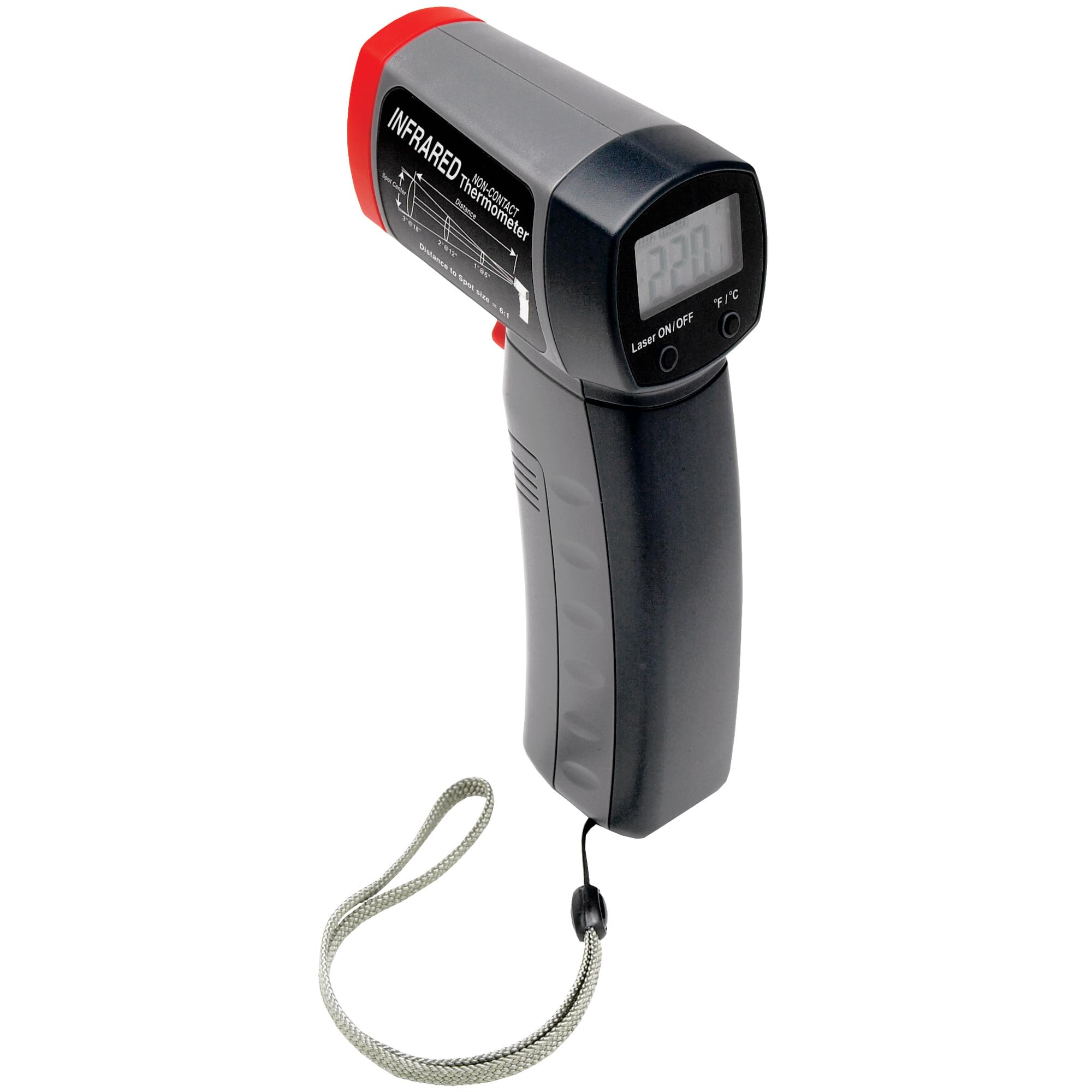
Nọmba 1.1: Performance Tool W89720 Non-Contact Infrared Thermometer. This image shows the overall design of the thermometer, featuring a pistol-grip handle, a trigger for activation, and a display screen at the top.
2. Eto
2.1 Fifi sori batiri
The Performance Tool W89720 thermometer requires a 9-volt battery for operation. A battery is typically included with the product.
- Locate the battery compartment cover, usually on the handle.
- Ṣii yara batiri naa.
- Insert a 9-volt battery, ensuring correct polarity (+/-).
- Pa ideri batiri naa ni aabo.

Nọmba 2.1: Product packaging indicating a 9-volt battery is included. This image highlights key features like the digital display and laser pointer, and confirms battery inclusion.
2.2 Ibẹrẹ Agbara-On
After battery installation, the device is ready for use. Point the thermometer at a surface and press the trigger to activate the display and take a reading.
3. Awọn ilana Iṣiṣẹ
3.1 Taking a Temperature Measurement
- Hold the thermometer by its handle.
- Point the infrared sensor (located at the front) towards the target surface.
- Press and hold the trigger. The laser pointer will activate to help aim at the desired measurement spot.
- The temperature reading will appear on the digital display. Release the trigger to hold the last reading on the screen.
For accurate readings, ensure the target area is larger than the thermometer's spot size at the measurement distance. The device has a distance-to-spot ratio of 12:1, meaning at 12 inches, it measures a 1-inch spot.

Nọmba 3.1: Diagram illustrating the 12:1 Distance-to-Spot ratio of the thermometer. This helps in understanding the measurement area at various distances.
3.2 Aṣayan Ẹka (Fahrenheit/Celsius)
The thermometer allows switching between Fahrenheit (°F) and Celsius (°C) temperature units. Refer to the device's buttons, typically located near the display, to toggle between these units. A dedicated button or a combination of buttons may be used.
3.3 Backlight Feature
The digital display includes a backlight for improved visibility in low-light conditions. This feature usually activates automatically when the device is in use or can be toggled with a specific button.
3.4 wọpọ Awọn ohun elo
- Checking temperatures of heater vents and air conditioners.
- Monitoring automotive components such as engines, radiators, mufflers, tires, and brakes.
- Detecting temperature variations around windows and doors to identify potential leaks or drafts.

Nọmba 3.2: Measuring engine temperature with the infrared thermometer. This demonstrates a practical application for automotive diagnostics.

Nọmba 3.3: Measuring temperature of a floor vent. This illustrates the thermometer's use for home energy efficiency checks.
4. Itọju
4.1 Ninu
To maintain the accuracy and longevity of your thermometer, wipe the device clean with a soft, damp asọ. Ma ṣe lo awọn olutọpa abrasive tabi fi omi mọlẹ kuro ninu omi.
4.2 Batiri Rirọpo
When the battery indicator shows low power, replace the 9-volt battery following the steps outlined in Section 2.1. Always dispose of used batteries responsibly according to local regulations.
4.3 Ibi ipamọ
Store the thermometer in a cool, dry place away from direct sunlight and extreme temperatures. If storing for extended periods, it is recommended to remove the battery to prevent leakage.
5. Laasigbotitusita
5.1 Wọpọ Oran ati Solusan
| Isoro | Owun to le Fa | Ojutu |
|---|---|---|
| Ẹrọ naa ko ṣiṣẹ. | Batiri ti ku tabi ti fi sori ẹrọ ti ko tọ. | Check battery polarity. Replace with a fresh 9-volt battery. |
| Awọn kika ti ko pe. | Dirty sensor lens, target too small, or outside operating range. | Clean the sensor lens. Ensure target is larger than spot size. Verify target temperature is within 0 to 960°F (-18 to 520°C). |
| Display shows "---" or error code. | Temperature out of range, sensor malfunction, or low battery. | Ensure target temperature is within specified range. Replace battery. If issue persists, contact support. |
6. Awọn pato
| Ẹya ara ẹrọ | Ẹ̀kúnrẹ́rẹ́ |
|---|---|
| Awoṣe | W89720 |
| Iwọn otutu | 0°F si 960°F (-18°C si 520°C) |
| Orisi wiwọn | Infrared Ti Ko Ni Olubasọrọ |
| Ifihan Iru | Digital pẹlu Backlight |
| Aṣayan kuro | Fahrenheit (°F) / Celsius (°C) |
| Atọka lesa | Yes, for accurate targeting |
| Ijinna si Iwọn Aami | 12:1 |
| Orisun agbara | 9-Volt Batiri |
| Ohun elo | Ṣiṣu |
| Gigun Nkan | 7 inches |
| Iwọn Nkan | 8 iwon |
7. Atilẹyin ọja & Atilẹyin
7.1 atilẹyin ọja Alaye
This product comes with a limited warranty. Please contact the manufacturer or retailer if you experience any issues within 30 days of receipt for assistance or replacement.
7.2 Onibara Support
For further assistance, technical questions, or to report issues beyond the initial warranty period, please refer to the contact information provided by Performance Tool or your product retailer. Keep your purchase receipt for warranty claims.