
1. Ọja Ipariview
The Sangean DT-120 is a compact AM/FM stereo pocket receiver designed for portable listening. It features PLL digital tuning for precise station selection, 15 preset stations (10 FM, 5 AM), and an auto search function. The radio includes a Deep Bass Boost (DBB) feature for enhanced audio and an automatic shut-off timer to conserve battery life. Its small size and lightweight design make it ideal for on-the-go use.
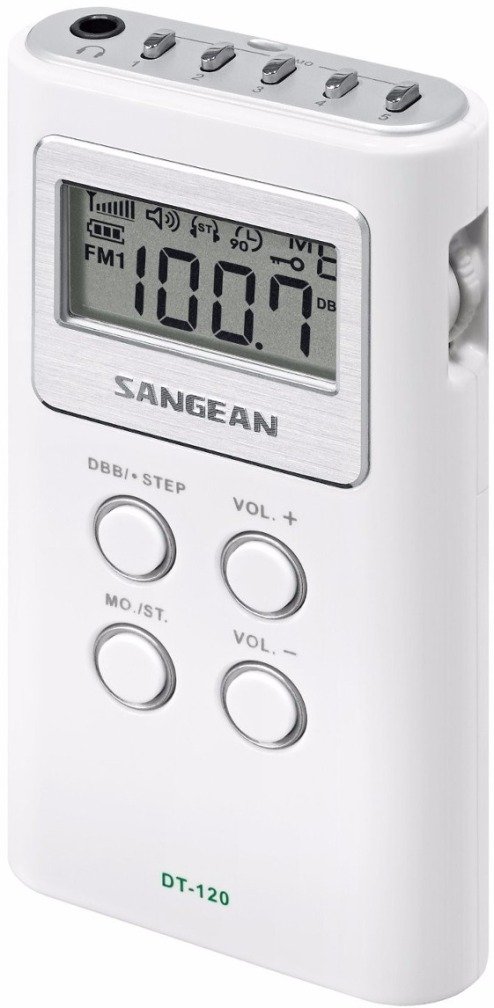
Aworan 1.1: Iwaju view of the Sangean DT-120 pocket radio, showcasing its compact design and white casing.
2. Alaye Aabo
- Ma ṣe fi iṣọkan si awọn iwọn otutu to gaju, oorun taara, eruku, tabi ọriniinitutu.
- Yago fun sisọ ẹyọ naa silẹ tabi fifisilẹ si awọn ipa to lagbara.
- Ma ṣe gbiyanju lati ṣajọpọ tabi yi ẹyọ naa pada. Tọkasi gbogbo iṣẹ si oṣiṣẹ oṣiṣẹ.
- Yọ awọn batiri kuro ti ẹyọ naa ko ba ni lo fun akoko ti o gbooro sii lati ṣe idiwọ jijo.
- Sọ awọn batiri ti a lo ni ibamu si awọn ilana agbegbe.
3. Package Awọn akoonu
Jẹrisi pe gbogbo awọn ohun kan wa ninu package:
- Sangean DT-120 AM/FM Stereo PLL Synthesized Pocket Receiver
- Okun gbigbe
- Iwe afọwọkọ eni (iwe yii)
4. Awọn iṣakoso ati Ifihan
Familiarize yourself with the buttons and LCD display on your DT-120 radio.

Aworan 4.1: alaye view of the Sangean DT-120's front panel, highlighting the LCD screen and button layout.
Awọn iṣẹ bọtini:
- Bọtini Titan / Paa (Top edge): Turns the radio on or off.
- DBB / STEP Button (Front, top left): Activates/deactivates Deep Bass Boost; also used for tuning step adjustment.
- VOL + Bọtini (Front, top right): Increases volume.
- MO./ST. Button (Front, bottom left): Switches between stereo and mono reception.
- VOL - Button (Front, bottom right): Decreases volume.
- Band Selector Button (Front, below display): Switches between AM and FM bands.
- Awọn bọtini Tuning (Front, below display): Used for manual tuning.
- Awọn bọtini tito tẹlẹ (Top edge, small buttons): Store and recall favorite stations.
LCD Display Indicators:
- Ifihan Igbohunsafẹfẹ: Shows the current radio frequency.
- Band Atọka: Displays AM or FM.
- Atọka batiri: Shows remaining battery life.
- Stereo Indicator: Lights up when FM stereo signal is received.
- DBB Indicator: Lights up when Deep Bass Boost is active.
- Tito nọmba: Indicates the currently selected preset station.
5. Eto
5.1 Fifi sori batiri
- Wa ideri iyẹwu batiri ni ẹhin redio naa.
- Gbe ideri ṣi silẹ ni itọsọna ti itọka tọka si.
- Insert two (2) AAA batteries (not included) into the compartment, ensuring the correct polarity (+ and -) as marked.
- Pa ideri batiri naa ni aabo.
- The battery indicator on the LCD display will show the current battery level.
5.2 Connecting Earbuds/Headphones
The DT-120 uses your earbuds or headphones as its antenna for FM reception. For optimal performance, ensure they are properly connected.
- Locate the headphone jack (3.5mm) on the side of the radio.
- Insert the stereo earbuds or headphones (not included) firmly into the jack.
- For AM reception, the radio uses a built-in ferrite bar antenna.
6. Isẹ
6.1 Agbara Tan / Pa
- Lati tan redio ON, press the Power On/Off button on the top edge.
- Lati tan redio PAA, press the Power On/Off button again.
6.2 Tuning AM/FM Stations
- Tẹ awọn Ẹgbẹ Selector button to choose between AM and FM bands.
- Itọsọna Afowoyi: Tẹ awọn Yiyi Up or Ṣiṣatunṣe isalẹ buttons repeatedly to adjust the frequency step by step.
- Auto Search System (ATS): Tẹ mọlẹ Yiyi Up or Ṣiṣatunṣe isalẹ bọ́tìnì náà fún ìṣẹ́jú díẹ̀. Rédíò náà yóò ṣe àyẹ̀wò láìfọwọ́kọ, yóò sì dúró ní ibùdó tó lágbára tó tẹ̀lé e.
6.3 Setting and Recalling Presets
The DT-120 allows you to store up to 15 stations (10 FM, 5 AM) for quick access.
Láti fi ibùdó ìpamọ́ pamọ́:
- Tune to the desired station using manual or auto tuning.
- Press and hold one of the small Awọn bọtini tito tẹlẹ (P1-P5 for AM, P1-P10 for FM) on the top edge until the preset number flashes on the display, indicating the station is saved.
To Recall a Stored Station:
- Tẹ ohun ti o baamu ni kukuru Bọtini Tẹlẹ (P1-P5/P1-P10) to instantly tune to the saved station.
6.4 Iṣakoso iwọn didun
- Tẹ awọn VOL+ bọtini lati mu iwọn igbọran pọ si.
- Tẹ awọn VOL - bọtini lati dinku iwọn didun gbigbọ.
6.5 Deep Bass Boost (DBB)
- Tẹ awọn DBB / STEP button to activate or deactivate the Deep Bass Boost function.
- When active, the DBB indicator will appear on the LCD display, enhancing low-frequency audio.
6.6 Sitẹrio/Mono Yipada
- For FM reception, press the MO./ST. button to toggle between stereo and mono modes.
- Switching to mono can improve reception clarity in areas with weak FM stereo signals.
6.7 Key Titiipa Išė
To prevent accidental button presses, the DT-120 features a key lock function.
- Si mu ṣiṣẹ the key lock, press and hold the Ẹgbẹ Selector button until a key lock icon appears on the display.
- Si mu maṣiṣẹ the key lock, press and hold the Ẹgbẹ Selector button again until the icon disappears.
6.8 Titiipa Aifọwọ́kọ
The radio is equipped with a 90-minute auto shut-off timer to conserve battery power.
- The radio will automatically turn off after 90 minutes of continuous operation.
- Si idojuk the auto shut-off and keep the radio on for longer, press and hold the Titan / Paa button for a few extra seconds when turning the unit on.
7. Itọju
7.1 Ninu
- Fi aṣọ rirọ, d díẹ̀ nu ìta rédíò náàamp asọ.
- Ma ṣe lo abrasive cleaners, waxes, tabi epo, bi awọn wọnyi le ba awọn ipari.
- Ensure no liquids enter the unit's openings.
7.2 batiri Itọju
- Rọpo awọn batiri nigbati itọka batiri kekere ba han loju iboju.
- Always replace both AAA batteries at the same time. Do not mix old and new batteries or different types of batteries.
- If the radio will not be used for an extended period (e.g., more than a month), remove the batteries to prevent potential leakage and damage.
8. Laasigbotitusita
| Isoro | Owun to le Fa | Ojutu |
|---|---|---|
| Redio ko tan. | Awọn batiri ti ku tabi fi sii lọna ti ko tọ. | Ropo pẹlu alabapade AAA batiri, aridaju ti o tọ polarity. |
| Poor FM reception or static. | Earbuds/headphones not fully inserted or acting as antenna. Weak signal. | Ensure earbuds are fully plugged in. Try repositioning the radio or switching to mono mode using the MO./ST. button. |
| Ko dara AM gbigba. | kikọlu tabi ifihan agbara alailagbara. | Rotate the radio for better reception, as the AM antenna is internal. Move away from electronic devices that may cause interference. |
| Ko si ohun. | Volume is too low. Earbuds/headphones faulty. | Increase volume using VOL + button. Test with different earbuds/headphones. |
| Awọn bọtini ko dahun. | Iṣẹ́ títìpa bọtini ń ṣiṣẹ́. | Deactivate key lock by pressing and holding the Band Selector button. |
| Radio freezes or behaves erratically. | Ibùgbé software glitch. | Remove batteries for a few minutes, then reinsert them to reset the unit. |
9. Awọn pato
| Ẹya ara ẹrọ | Sipesifikesonu |
|---|---|
| Brand | Sangean |
| Awoṣe | DT-120 |
| Awọn iwọn (L x W x H) | 1.93" x 0.69" x 3.64" (4.9 cm x 1.75 cm x 9.25 cm) |
| Iwọn | 0.14 Poun (isunmọ. 63.5 giramu) |
| Orisun agbara | 2 x Awọn batiri AAA (3V) |
| Tuner Technology | PLL Digital Tuning |
| Awọn ẹgbẹ Redio Atilẹyin | AM/FM |
| Iwọn Igbohunsafẹfẹ | FM: 87.5 - 108 MHz (typical) |
| Ipo Ijade Ohun | Mono, Stereo (via headphones) |
| Ifihan Iru | LCD |
| Asopọmọra Technology | Auxiliary (Headphone Jack) |
| Pataki Awọn ẹya ara ẹrọ | Built-In Clock, Portable, Deep Bass Boost (DBB), Auto Shut-Off (90 min), 15 Presets (10 FM, 5 AM), Auto Search System (ATS) |
| Awọn irinše to wa | Carrying Strap, Owner's Manual |
| Ohun elo apade | Ṣiṣu |
10. atilẹyin ọja Information
The Sangean DT-120 Pocket Receiver comes with a limited warranty of NINETY DAYS lati ọjọ ti o ra. Atilẹyin ọja yi ni wiwa awọn abawọn ninu awọn ohun elo ati iṣẹ ṣiṣe labẹ lilo deede.
Atilẹyin ọja naa ko bo ibajẹ ti o fa nipasẹ ilokulo, ijamba, iyipada laigba aṣẹ, tabi ibajẹ deede. Jọwọ pa ẹri rira rẹ mọ fun awọn ibeere atilẹyin ọja.
11. Atilẹyin
For further assistance, technical support, or warranty inquiries, please contact Sangean customer service or visit their official webojula.
- Sangean Official Webojula: www.sangean.com
- Sangean Store on Amazon: Visit the Sangean Store


