
1. Ifihan
This manual provides detailed instructions for the installation, operation, maintenance, and troubleshooting of your Antec TPQ-1000 TruePower Quattro 1000W Power Supply. Please read this manual thoroughly before installation and use to ensure proper functionality and safety.
The Antec TPQ-1000 is a high-performance power supply designed for demanding computer systems, featuring 1000 watts of continuous power, 80PLUS certification for efficiency, and a modular cable design for improved cable management.
2. Alaye Aabo
IKILO: Improper installation or use can lead to equipment damage, electric shock, or serious injury. Always follow these safety guidelines:
- Rii daju pe ipese agbara ti ge asopọ lati inu iṣan AC ṣaaju fifi sori ẹrọ tabi mimu.
- Maṣe ṣii ipese agbara casing. Iwọn gigatages are present inside, even when disconnected. There are no user-serviceable parts.
- Install the power supply in a well-ventilated area. Do not block any ventilation openings.
- Use only the modular cables provided with the power supply.
- Rii daju pe gbogbo awọn kebulu ti sopọ ni aabo ṣaaju ṣiṣe agbara lori eto naa.
- A ṣe àgbékalẹ̀ ọjà yìí fún lílo pẹ̀lú àwọn kọ̀ǹpútà ara ẹni. Má ṣe lò ó fún ète mìíràn.
3. Package Awọn akoonu
Jẹrisi pe package rẹ ni awọn nkan wọnyi ninu:
- Antec TPQ-1000 TruePower Quattro 1000W Power Supply Unit
- Modular Cable Set (including ATX 20+4 pin, EPS12V 8-pin, PCI-E 6+2 pin, SATA, Molex)
- AC Agbara okun
- Iṣagbesori skru
- Afowoyi Olumulo (iwe-ipamọ yii)
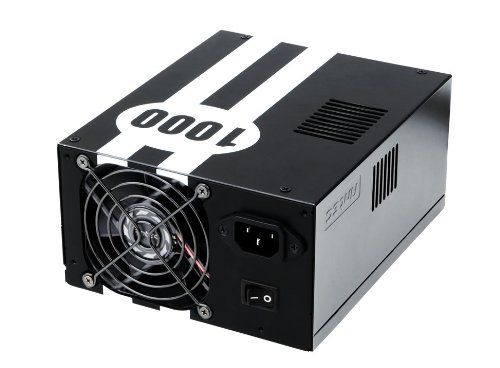
Image: The Antec TPQ-1000 TruePower Quattro 1000W Power Supply unit, typically shown with its modular cables. This image illustrates the main power supply unit and its various connectors.
4. Eto ati fifi sori
4.1 Akojọ aṣyn fifi sori ẹrọ tẹlẹ
- Ensure your computer case supports ATX power supplies.
- Kó àwọn irinṣẹ́ pàtàkì jọ: Phillips head screwdriver.
- Unplug your computer from the wall outlet and discharge any residual power by pressing the power button.
- Yọ ẹgbẹ ẹgbẹ ti ọran kọnputa rẹ kuro.
4.2 Fifi awọn Power Ipese
- Carefully place the Antec TPQ-1000 into the power supply mounting bay of your computer case. Ensure the fan is oriented correctly for optimal airflow (usually facing down if there's a bottom vent, or facing into the case if top-mounted).
- Ṣe aabo ipese agbara si ọran naa nipa lilo awọn skru iṣagbesori ti a pese.
4.3 Connecting Modular Cables
Connect only the necessary modular cables to the power supply and your components. This reduces cable clutter and improves airflow.
- 20+4 Pin ATX Motherboard Power: Connect the main ATX cable to the corresponding port on your motherboard.
- 4+4 Pin EPS12V CPU Power: Connect this cable to the CPU power connector on your motherboard. Modern motherboards typically use an 8-pin connector.
- 6+2 Pin PCI-E Power: For graphics cards. The TPQ-1000 provides multiple PCI-E connectors. Connect as many as required by your graphics card(s).
- Agbara SATA: Connect to SATA devices such as hard drives, SSDs, and optical drives.
- Agbara Molex: Connect to older peripherals or case fans that use Molex connectors.
Ensure all connections are firm and properly seated. Route cables neatly to avoid obstructing airflow.
4.4 Ibẹrẹ Agbara Lori
- Once all components are connected, replace the computer case side panel.
- So okun agbara AC pọ si ipese agbara ati lẹhinna si iṣan ogiri.
- Flip the power switch on the back of the power supply to the "ON" position (usually marked with "I").
- Tẹ bọtini agbara lori ọran kọmputa rẹ lati bẹrẹ eto naa.
5. Awọn ilana Iṣiṣẹ
The Antec TPQ-1000 TruePower Quattro is designed for continuous and stable operation once properly installed. It features:
- 80PLUS Certification: This indicates high power efficiency, reducing wasted energy and heat generation.
- Iṣawọle gbogbo agbaye: Automatically adjusts for 100V to 240V power grids, making it suitable for global use.
- Active Power Factor Correction (PFC): Improves power efficiency and reduces electrical waste.
- Multiple 12V Rails: Provides stable power delivery to critical components.
No specific user interaction is required during normal operation beyond ensuring adequate ventilation and a stable power source.
6. Itọju
Láti rí i dájú pé agbára ìpèsè rẹ pẹ́ títí àti pé ó ń ṣiṣẹ́ dáadáa, ronú nípa àwọn àmọ̀ràn ìtọ́jú wọ̀nyí:
- Pipa eruku: Periodically (e.g., every 6-12 months), disconnect the power supply from the AC outlet and use compressed air to gently clean dust from the fan grille and ventilation openings. Do not open the power supply casing.
- Afẹfẹ: Ensure that the power supply's fan and ventilation openings are not obstructed by cables or other components within the PC case. Maintain good airflow within the entire system.
- Iṣakoso USB: Keep cables tidy to prevent them from interfering with airflow or fan operation.
7. Laasigbotitusita
If you encounter issues with your Antec TPQ-1000 power supply, refer to the following common troubleshooting steps:
- Eto Ko Ni Agbara:
- Ṣàyẹ̀wò bóyá okùn agbára AC náà so mọ́ ibi tí agbára náà wà àti ibi tí agbára náà ti wà ní ògiri.
- Ensure the power switch on the back of the power supply is in the "ON" (I) position.
- Verify that the 20+4 pin ATX and 4+4 pin EPS12V CPU power cables are correctly and firmly connected to the motherboard.
- Ṣe ìdánwò ibi ìtajà ògiri pẹ̀lú ẹ̀rọ mìíràn láti jẹ́rìí sí i pé ó ní agbára.
- System Powers On but Shuts Down Immediately:
- This could indicate a short circuit or an overloaded component. Disconnect all non-essential components (e.g., extra drives, graphics card if integrated graphics are available) and try again.
- Ensure all modular cables are correctly seated at both the power supply and component ends.
- Aisedeede eto tabi Atunbere Laileto:
- Ensure adequate ventilation within the PC case to prevent overheating of components, including the PSU.
- Verify that your system's power requirements do not exceed the 1000W capacity of the power supply.
- Ṣayẹwo awọn asopọ okun alaimuṣinṣin.
If issues persist after performing these steps, contact Antec customer support or a qualified technician.
8. Awọn pato
| Ẹya ara ẹrọ | Sipesifikesonu |
|---|---|
| Nọmba awoṣe | TPQ-1000 |
| Ijade Wattage | 1000 Wattis |
| Fọọmù ifosiwewe | ATX12V |
| Ijẹrisi ṣiṣe | 80PLUS Certified |
| Iṣagbewọle Voltage | 100V - 240V (Universal Input) |
| Agbara ifosiwewe Atunse | PFC ti n ṣiṣẹ |
| Awọn iwọn (L x W x H) | 7.1 x 5.9 x 3.4 inches |
| Iwọn Nkan | 8.3 iwon |
| Ọna Itutu | Afẹfẹ |
| Asopọmọra Orisi | PCI-E, PCI-Express |
9. Atilẹyin ọja ati Support
Antec products are manufactured to the highest quality standards. This product is covered by Antec's limited warranty. For specific warranty terms and conditions, please refer to the warranty card included with your product or visit the official Antec webojula.
For technical support, troubleshooting assistance, or warranty claims, please contact Antec Customer Service:
- Webojula: www.antec.com/support (Eksample ọna asopọ, ọna asopọ gangan le yatọ)
- Imeeli: Refer to the Antec webaaye fun alaye olubasọrọ agbegbe.
- Foonu: Refer to the Antec webaaye fun alaye olubasọrọ agbegbe.
Please have your product model number (TPQ-1000) and purchase date available when contacting support.