
Ọrọ Iṣaaju
This manual provides detailed instructions for the proper use and maintenance of your Casio WV-59E-1AVEF digital watch. This timepiece features radio-controlled timekeeping, ensuring accurate time display by receiving time calibration signals. Please read this manual thoroughly to ensure optimal performance and longevity of your watch.
Key features include display illumination, world time function, 5-bar water resistance, and an automatic calendar.
Ọja Pariview
The Casio WV-59E-1AVEF is a robust digital watch designed for daily wear. It features a square case, digital display, and a comfortable resin strap. The watch is equipped with multiple buttons for navigating its various functions.
Nọmba 1: Iwaju view of the Casio WV-59E-1AVEF digital watch, displaying the time, date, and various mode indicators.
Awọn iṣakoso ati Ifihan
- Ifihan: Shows time, date, and function indicators.
- Awọn bọtini: Typically located on the sides of the watch for mode selection, adjustment, and illumination.

Nọmba 2: Apa view of the Casio WV-59E-1AVEF watch, highlighting the control buttons on the left and right sides of the case.

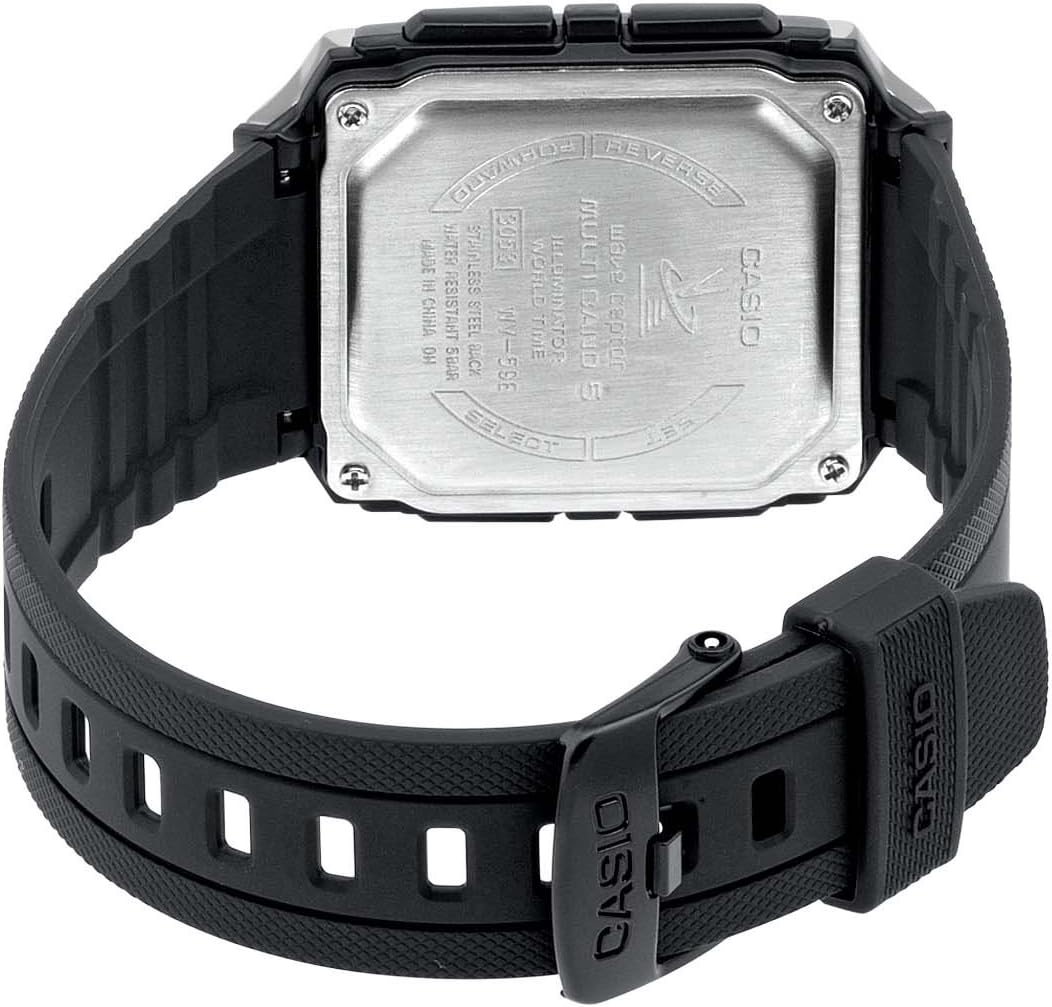
Nọmba 3: Ẹyìn view of the Casio WV-59E-1AVEF watch, showing the stainless steel case back with model number WV-59E, water resistance rating, and 'Wave Ceptor' branding.
Ṣeto
Initial Time Setting and Time Zone
Upon first use or after a battery change, you may need to set your home city (time zone) manually. This is crucial for the watch to receive the correct time calibration signal.
- Ni Ipo Itọju akoko, tẹ mọlẹ ṢAtunṣe button (usually top-left) until the city code starts to flash.
- Lo awọn Siwaju ati Yipada buttons (usually on the right side) to select your desired home city code. Refer to the world time map for city codes corresponding to your region.
- Tẹ awọn MODE button (usually bottom-left) to cycle through other settings like DST (Daylight Saving Time) and 12/24-hour format. Adjust these as needed using the Siwaju ati Yipada awọn bọtini.
- Tẹ awọn ṢAtunṣe button again to exit the setting screen.
Radio Signal Reception (Wave Ceptor)
Your watch automatically receives time calibration signals to maintain accurate time. Automatic reception typically occurs in the early hours of the morning. For best reception, place the watch near a window overnight.
To manually initiate signal reception:
- Ni Ipo Itọju akoko, tẹ mọlẹ GBA button (refer to watch diagram for exact button, often bottom-right) for about two seconds.
- The watch will display "RCV" or "GET" to indicate it is attempting to receive the signal.
- Keep the watch stationary and away from sources of interference (e.g., computers, televisions) during reception.
- Successful reception will be indicated by "OK" or "RCVD". If reception fails, "ERR" or "FAIL" will be displayed.

Nọmba 4: The 'Wave Ceptor' logo, indicating the watch's radio-controlled timekeeping capability.
Awọn ọna ṣiṣe
Tẹ awọn MODE button (usually bottom-left) to cycle through the different modes:
- Ipo Itọju akoko: Ṣe afihan akoko ati ọjọ lọwọlọwọ.
- Ipo Aago Agbaye: O faye gba o lati view the current time in various cities around the world.
- Ipo Aago iṣẹju-aaya: Àwọn ìwọ̀n ti kọjá àkókò.
- Ipo Itaniji: Ṣeto awọn itaniji ojoojumọ.
Ipo Aago Agbaye
Ni World Time Ipo, lo awọn Siwaju ati Yipada buttons to scroll through different city codes and view their current times.
Ipo Aago iṣẹju-aaya
- Enter Stopwatch Mode.
- Tẹ awọn Bẹrẹ/Duro button (often top-right) to start and stop the stopwatch.
- Tẹ awọn Tunto button (often bottom-right) to reset the stopwatch to zero.
Ipo itaniji
- Enter Alarm Mode.
- Lo awọn Siwaju ati Yipada buttons to select an alarm number (if multiple are available).
- Tẹ mọlẹ ṢAtunṣe button until the alarm time starts to flash.
- Lo awọn Siwaju ati Yipada buttons to set the alarm hour and minute.
- Tẹ awọn ṢAtunṣe bọtini lati fi eto itaniji pamọ.
- Tẹ awọn TAN/PA button (often top-right) to toggle the alarm on or off.
Itanna
Tẹ awọn Imọlẹ button (usually top-right or a dedicated button) to illuminate the display for easy viewwọ inu awọn ipo ina kekere.
Itoju
Batiri Rirọpo
The watch is powered by a Lithium metal battery. When the display becomes dim or functions become unreliable, it is time to replace the battery. It is recommended to have battery replacement performed by a qualified watch technician to ensure proper sealing and water resistance.
Water Resistance (50 Meters / 5 Bar)
Your watch is water resistant to 50 meters (5 bar). This means it is suitable for everyday use and can withstand splashes, rain, showering, and shallow swimming. It is kii ṣe suitable for diving, snorkeling, or high-impact water sports. Do not operate buttons while the watch is wet or submerged.
Ninu
Wipe the watch case and strap with a soft, dry cloth. For resin straps, you can use a mild soap solution and rinse thoroughly, then dry completely. Avoid using harsh chemicals or abrasive cleaners.
Laasigbotitusita
- Time is incorrect or not synchronizing:
- Ensure your home city code is set correctly for your time zone.
- Place the watch near a window overnight for automatic reception.
- Manually initiate signal reception (refer to "Radio Signal Reception" section).
- Check for strong interference sources nearby (e.g., electronic devices).
- The battery may be low and require replacement.
- Ifihan jẹ baibai tabi òfo:
- Batiri naa le ti dinku. Rọpo batiri naa.
- Ensure the watch is not in a power-saving mode (if applicable to your model).
- Awọn bọtini ko dahun:
- Rí i dájú pé aago náà kò sí ní ipò tí a ti tì (tí ó bá yẹ).
- If the watch is wet, dry it thoroughly before operating buttons.
- A low battery can affect button responsiveness.
Awọn pato

Nọmba 5: Diagram illustrating the dimensions of the Casio WV-59E-1AVEF watch face, with measurements in millimeters and inches for reference.
| Brand | Casio |
| Orukọ awoṣe | WV-59E |
| Nọmba awoṣe | WV-59E-1AVEF |
| Apẹrẹ Nkan | Onigun mẹrin |
| Ifihan Iru | Oni-nọmba |
| Case Material Type | Akiriliki |
| Titẹ Window Ohun elo Iru | Akiriliki |
| Band elo Iru | Resini |
| Band Awọ | Dudu |
| Kiakia Awọ | Dudu |
| Kilasi Iru | Idinku |
| Case Opin | 39 millimeters |
| Ọran Sisanra | 12.5 millimeters |
| Iwọn Iwọn | 18 millimeters |
| Iwọn Nkan | 40 giramu |
| Iṣipopada Iru | Kuotisi |
| Omi Resistance Ijinle | 50 Meters (5 Bar) |
| Orisun agbara | Battery Powered (1 Lithium metal battery included) |
| Pataki Awọn ẹya ara ẹrọ | Radio-controlled time, Stopwatch, Alarm, Illumination, World Time, Automatic Calendar |
| Awọn irinše to wa | Resin strap |
| International Ìwé Code | 04971850882220 |
Atilẹyin ọja ati Support
Fun alaye atilẹyin ọja ati atilẹyin alabara, jọwọ tọka si kaadi atilẹyin ọja ti o wa pẹlu ọja rẹ tabi ṣabẹwo si Casio osise webojula. Tọju iwe-ẹri rira rẹ bi ẹri rira.
For service or repairs, contact an authorized Casio service center.