
1. Ifihan
Thank you for choosing the TFA Dostmann Digital Weather Station 35.1065. This device provides accurate indoor temperature, humidity, time, date, and a weather trend forecast. Please read this manual carefully before using the device to ensure proper operation and to prevent damage.
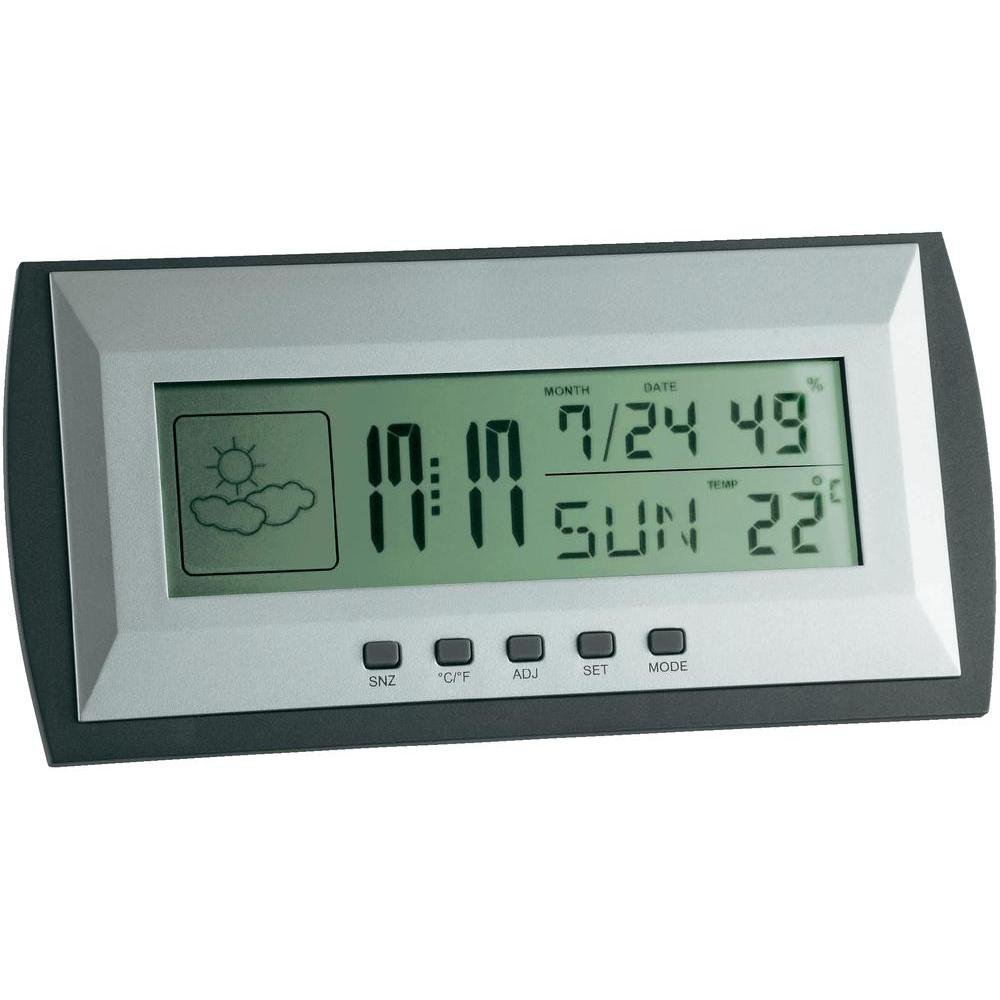
Figure 1: TFA Dostmann Digital Weather Station 35.1065 on a wooden desk. This image shows the weather station displaying time, date, and weather information in a typical home or office setting.
2. Alaye Aabo
- Jeki iwe afọwọkọ yii fun itọkasi ọjọ iwaju.
- Ma ṣe fi ẹrọ naa han si awọn iwọn otutu to gaju, gbigbọn, tabi awọn ipaya.
- Yago fun orun taara ati ọrinrin.
- Maṣe fi ẹrọ naa bọ inu omi.
- Do not attempt to repair or modify the device yourself. Contact qualified personnel for service.
- Sọ awọn batiri ti a lo ni ibamu si awọn ilana agbegbe.
3. Eto
3.1 Package Awọn akoonu
Rii daju pe gbogbo awọn nkan wa:
- TFA Dostmann Digital Weather Station 35.1065
- 2 x AA batiri
- Afowoyi Olumulo (iwe-ipamọ yii)
3.2 Fifi sori batiri
- Locate the battery compartment cover on the back of the weather station.
- Gbe ideri naa ṣii.
- Insert two (2) AA batteries, observing the correct polarity (+ and - markings).
- Pa ideri batiri naa ni aabo.
Ẹrọ naa yoo ṣiṣẹ laifọwọyi ati ṣafihan awọn kika akọkọ.
3.3 Initial Settings (Time, Date, Temperature Unit)
Upon first power-on or after battery replacement, you may need to set the time, date, and preferred temperature unit.
- Tẹ mọlẹ SET button for a few seconds to enter setting mode. The digit to be set will flash.
- Lo awọn ADJ button to adjust the flashing value (e.g., hour, minute, year, month, day).
- Tẹ awọn SET button again to confirm the setting and move to the next parameter.
- Repeat steps 2 and 3 until all desired settings (time, date) are configured.
- Láti yípadà láàrin Celsius (°C) àti Fahrenheit (°F), tẹ ° C / ° F bọtini.
4. Ṣiṣẹ Ibusọ Oju-ọjọ
4.1 Ifihan Loriview
The LCD display shows various information:
- Àkókò: Current time in 12-hour or 24-hour format.
- Ọjọ: Current month, day, and day of the week.
- Iwọn otutu: Indoor temperature, displayed in °C or °F.
- Ọriniinitutu: Indoor humidity percentage.
- Weather Forecast Icon: Indicates a trend forecast (e.g., sunny, cloudy, rainy). This is a prediction based on atmospheric pressure changes and may not always reflect actual weather.
4.2 bọtini Awọn iṣẹ
- SNZ (Dídúró): Activates the snooze function for the alarm.
- °C/°F: Yipada laarin Celsius ati Fahrenheit otutu ifihan.
- ADJ (Adjust): A lo lati ṣatunṣe awọn iye lakoko ipo eto.
- Ṣeto: Ó ń wọlé, ó sì ń jẹ́rìí sí àwọn ètò náà.
- Ipo: Switches between different display modes (e.g., time, alarm time).
4.3 Eto Itaniji
- Tẹ awọn MODE button repeatedly until the alarm time is displayed.
- Tẹ mọlẹ SET button. The alarm hour will flash.
- Lo awọn ADJ bọtini lati ṣeto aago itaniji ti o fẹ.
- Tẹ SET lati jẹrisi ati gbe si awọn iṣẹju.
- Lo ADJ to set the desired alarm minutes.
- Tẹ SET lati jẹrisi ati jade kuro ni eto itaniji.
- Lati mu itaniji ṣiṣẹ/mu ma ṣiṣẹ, tẹ awọn ADJ button while the alarm time is displayed. An alarm icon will appear/disappear.
5. Itọju
5.1 Ninu
Nu ẹrọ naa pẹlu asọ, damp cloth. Do not use abrasive cleaners or solvents. Ensure no water enters the device.
5.2 Batiri Rirọpo
When the display becomes dim or the device stops functioning, replace the batteries. Follow the steps in Section 3.2. Always replace both batteries at the same time with new AA batteries.
5.3 Ibi ipamọ
If the device will not be used for an extended period, remove the batteries to prevent leakage and damage. Store in a cool, dry place.
6. Laasigbotitusita
| Isoro | Owun to le Fa | Ojutu |
|---|---|---|
| Ko si ifihan tabi baibai àpapọ. | Awọn batiri ti lọ silẹ tabi ti fi sori ẹrọ ti ko tọ. | Rọpo awọn batiri pẹlu awọn tuntun, ni idaniloju polarity ti o pe. |
| Aago/ọjọ ti ko tọ. | A kò ṣètò àkókò/ọjọ́ dáadáa. | Refer to Section 3.3 to set the time and date. |
| Awọn kika iwọn otutu / ọriniinitutu ti ko pe. | Ẹrọ ti a gbe nitosi awọn orisun ooru, awọn atẹgun, tabi ni imọlẹ orun taara. | Relocate the weather station to a stable indoor environment away from extreme temperature fluctuations. Allow time for readings to stabilize. |
| Weather forecast icon seems incorrect. | Weather forecast is a trend prediction based on atmospheric pressure, not a real-time forecast. | Understand that the icon indicates a general trend over the next 12-24 hours, not current conditions. |
7. Awọn pato

Figure 2: TFA Dostmann Digital Weather Station 35.1065 with dimensions. This image provides a detailed view of the device, including its width (18 cm), height (9 cm), and depth (3.81 cm).
- Brand: TFA Dostmann
- Awoṣe: 35.1065
- Orisun Agbara: Battery-powered (2 x AA batteries, included)
- Ohun elo: Ṣiṣu
- Awọn ẹya pataki: Trend forecast
- Iru ifihan: LCD
- Awọn Iwọn Nkan (D x W x H): 3.8 cm x 18 cm x 9 cm
- Ìwọ̀n Nkan: 164 giramu
- Awọn eroja to wa: Weather station, batteries, user manual
- Iṣeduro Lilo: Ile, Office
- Awọn Lilo Pataki: Date, Humidity, Temperature, Time
- Ilu isenbale: China
8. Atilẹyin ọja ati Support
For warranty information, please refer to the documentation provided at the time of purchase or visit the official TFA Dostmann website. For technical support or further assistance, please contact TFA Dostmann customer service through their official channels.
Official TFA Dostmann Webojula: www.tfa-dostmann.de


