
1. Ifihan
This manual provides essential information for the safe and efficient operation of your Roline DesignSecure 525 Uninterruptible Power Supply (UPS). Please read this manual thoroughly before installation and use to ensure proper functionality and to prevent damage to the unit or connected equipment.
The Roline DesignSecure 525 UPS is designed to provide reliable emergency power for workstations and communication technology, protecting against power fluctuations, blackouts, and surges.
2. Alaye Aabo
IKILO: Ikuna lati tele awọn ilana aabo wọnyi le ja si mọnamọna, ina, tabi ipalara nla.
- Maṣe ṣii UPS casing. Ko si awọn ẹya ti olumulo-iṣẹ ninu. Tọkasi gbogbo iṣẹ si awọn oṣiṣẹ iṣẹ ti o peye.
- Do not connect appliances that could overload the UPS, such as laser printers or vacuum cleaners.
- Ensure the UPS is connected to a grounded power outlet.
- Maṣe fi UPS han si omi tabi ọriniinitutu pupọ.
- Position the UPS in a well-ventilated area, away from direct sunlight and heat sources.
- Disconnect the UPS from the power outlet before cleaning. Use a dry cloth for cleaning.
3. Ọja Ipariview
The Roline DesignSecure 525 UPS provides uninterruptible power and protection for your electronic devices. Key features include:
- Ipese Agbara Gbẹkẹle: Provides emergency power and protection against spikes, voltage variations, blackouts, interference, and overvoltage.
- Igbesi aye batiri ti o gbooro sii: Features a battery management system for efficient charging and a digital display for battery status.
- Agbara Agbara: Supports 2000 VA / 1200 W, offering a full power runtime of 2 minutes and 4 minutes at mid-power.
- Built-in AVR: Aifọwọyi Voltage Regulation protects against surges and undervoltages, regulating voltage variations via Buck and Boost technology.
- Sọfitiwia Abojuto: Includes built-in software for communication between the inverter microprocessor and a PC, compatible with common operating systems.
3.1. Awọn irinše
Below is an image of the Roline DesignSecure 525 UPS, highlighting its general appearance.
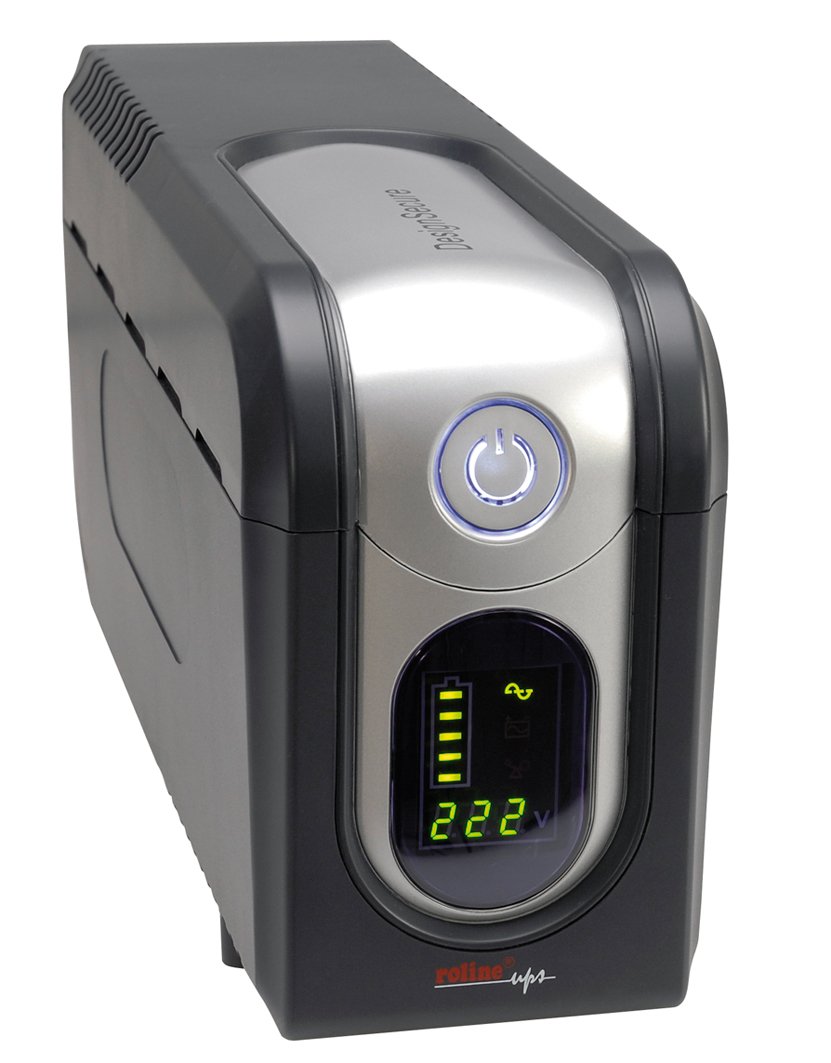
olusin 1: Iwaju view of the Roline DesignSecure 525 UPS. This image shows the main unit, including the display panel and power outlets.
The UPS typically includes:
- Port Input Agbara
- Output Power Outlets (Type B - 3 pin North American)
- Iṣakoso Panel / LCD Ifihan
- Ibudo Ibaraẹnisọrọ USB
- Telephone/Modem Protection Ports (RJ11)
4. Eto
4.1. Unpacking
Carefully unpack the UPS and inspect it for any shipping damage. Retain the packaging for future transport or storage.
4.2. Ifiweranṣẹ
Place the UPS on a flat, stable surface in a clean, dry, and well-ventilated area. Ensure there is adequate space around the unit for proper airflow. Avoid placing it near heat sources or in direct sunlight.
4.3. Nsopọ si Agbara
- Rii daju pe UPS ti wa ni pipa.
- Connect the UPS power input cable to a grounded Type B (3-pin North American) wall outlet.
- Allow the UPS to charge for at least 8 hours before initial use to ensure optimal battery performance.
4.4. Nsopọ ẹrọ
- Connect your computer, monitor, and other critical devices to the UPS output receptacles.
- For telephone/modem line protection, connect your incoming telephone/modem line to the "IN" port on the UPS, and then connect a cable from the "OUT" port to your telephone/modem device.
- Do not connect surge strips or extension cords to the UPS output.
4.5. Fifi sori ẹrọ Software (Aṣayan)
For advanced monitoring and management, install the provided smart monitoring software on your computer. Connect the UPS to your computer using a USB cable. Refer to the software's specific instructions for installation and configuration.
5. Awọn ilana Iṣiṣẹ
5.1. Turning On the UPS
Press and hold the power button on the front panel for approximately 2-3 seconds until you hear a beep and the display illuminates. The UPS will perform a self-test and then enter online mode.
5.2. Turning Off the UPS
To turn off the UPS, press and hold the power button for approximately 2-3 seconds until you hear a beep and the display turns off. Ensure all connected devices are properly shut down before turning off the UPS.
5.3. Awọn afihan Ifihan
The digital display provides real-time information about the UPS status, including:
- Iṣagbewọle Voltage
- O wujade Voltage
- Ipele Gbigba agbara Batiri
- Ipele ikojọpọ
- Operating Mode (Online, Battery, Bypass)
- Àwọn Kóòdù Àṣìṣe (tí ó bá wà)
Refer to the software manual for detailed explanations of all display indicators and error codes.
5.4. Aifọwọyi VoltagIlana (AVR)
The built-in AVR automatically corrects minor voltage fluctuations without switching to battery power, preserving battery life. If the input voltage goes too high or too low, the AVR will adjust it to a safe level for your connected devices.
5.5. Batiri Ipo
Ni iṣẹlẹ ti agbara otage, the UPS will automatically switch to battery power. An audible alarm will sound, and the display will indicate battery mode. The duration of battery backup depends on the load connected. The UPS will automatically shut down when the battery is depleted to prevent deep discharge.
6. Itọju
6.1. Itọju batiri
- To maintain optimal battery life, ensure the UPS is connected to a power source and charging when not in use.
- Yago fun loorekoore jin sisan.
- If storing the UPS for an extended period, fully charge it every three months to prevent battery degradation.
- Battery replacement should only be performed by qualified personnel.
6.2. Ninu
Ensure the UPS is turned off and disconnected from the power outlet before cleaning. Use a soft, dry cloth to wipe the exterior. Do not use liquid or aerosol cleaners.
6.3. Awọn ipo Ayika
Maintain the UPS in an environment with stable temperature and humidity. Extreme conditions can shorten battery life and affect performance.
7. Laasigbotitusita
This section provides solutions to common issues you might encounter with your Roline DesignSecure 525 UPS.
| Isoro | Owun to le Fa | Ojutu |
|---|---|---|
| UPS ko ni tan. | No input power; Low battery; Power button not pressed long enough. | Check power cord connection; Allow UPS to charge for several hours; Press and hold power button for 2-3 seconds. |
| UPS beeps continuously in online mode. | Overload condition; Internal fault. | Reduce connected load; Disconnect non-essential devices; If problem persists, contact support. |
| Akoko afẹyinti batiri kukuru. | Overload; Battery nearing end of life; Battery not fully charged. | Reduce connected load; Allow UPS to charge fully; Consider battery replacement if old. |
| Connected devices not receiving power. | UPS is off; UPS is in fault mode; Output receptacles are not active. | Turn on UPS; Check display for error codes; Ensure devices are connected to battery-backed outlets. |
If the problem persists after attempting these solutions, please contact Roline customer support.
8. Awọn pato
| Ẹya ara ẹrọ | Ẹ̀kúnrẹ́rẹ́ |
|---|---|
| Nọmba awoṣe | 19401205 |
| Ọja Mefa | 4.13 x 6.61 x 13.15 inches |
| Iwọn Nkan | 12.79 iwon |
| O wujade Voltage | 120 Volt (AC) |
| Power Plug Iru | Iru B - pin 3 (Ariwa Amerika) |
| Àwọ̀ | Dudu / Fadaka |
| Olupese | ROLINE |
| Ọjọ Akọkọ Wa | Oṣu Kẹjọ Ọjọ 20, Ọdun 2012 |
9. Atilẹyin ọja ati Support
9.1. atilẹyin ọja Information
Roline products are manufactured to high quality standards. For specific warranty terms and conditions, please refer to the warranty card included with your product or visit the official Roline webojula. Jeki ẹri rira rẹ fun awọn iṣeduro atilẹyin ọja.
9.2. Onibara Support
If you require technical assistance or have questions not covered in this manual, please contact Roline customer support. Contact information can typically be found on the Roline webaaye tabi lori apoti ọja.
When contacting support, please have your model number (19401205) and purchase date ready.


