
Ọrọ Iṣaaju
Thank you for choosing the RadioShack Lightweight Stereo Headphones, Model 33-1116. These headphones are designed for comfortable listening with clear audio. This manual provides essential information for setting up, operating, maintaining, and troubleshooting your headphones to ensure optimal performance and longevity.
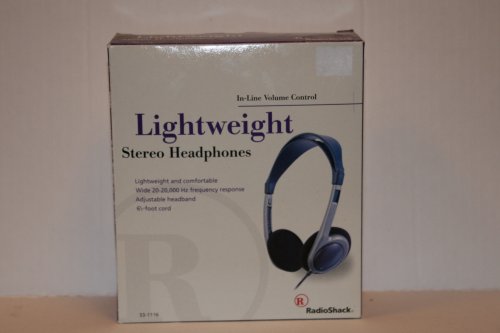
Image: RadioShack Lightweight Stereo Headphones, Model 33-1116. This image displays the headphones with an adjustable headband and a visible audio cable.
Alaye Aabo
- Idaabobo igbọran: Yago fun gbigbọ ni awọn ipele iwọn didun giga fun awọn akoko gigun lati dena ibajẹ igbọran.
- Imọye Ayika: Má ṣe lo agbekọri ni awọn ipo nibiti aisi lati gbọ awọn ohun afetigbọ le jẹ eewu, gẹgẹbi nigbati o ba n wakọ, gigun kẹkẹ, tabi rin ni opopona.
- Ninu: Lo asọ asọ ti o gbẹ fun mimọ. Maṣe lo awọn olutọpa olomi tabi awọn aerosols.
- Ibi ipamọ: Store headphones in a clean, dry place away from extreme temperatures.
Package Awọn akoonu
Jọwọ ṣayẹwo package fun awọn nkan wọnyi:
- RadioShack Lightweight Stereo Headphones (Model 33-1116)
Ṣeto
- Sopọ si Orisun Olohun: Insert the 3.5mm audio jack at the end of the headphone cable into the headphone output port of your audio device (e.g., smartphone, tablet, computer, stereo system).
- Ṣatunṣe Akọkọ: Place the headphones on your head. Adjust the sliding headband on both sides until the earcups comfortably cover your ears and the headphones feel secure without excessive pressure.
Ṣiṣẹ
- Orisun Ohun Agbára: Ensure your audio device is powered on and playing audio.
- Ṣatunṣe Iwọn didun: Use the in-line volume control located on the headphone cable to adjust the listening volume to a comfortable level. You may also need to adjust the volume on your audio source.
- Nfeti: Enjoy your audio.
Itoju
- Cleaning Earcups and Headband: Use a soft, dry, lint-free cloth to gently wipe the earcups and headband. Do not use abrasive cleaners, solvents, or spray directly onto the headphones.
- Itọju USB: Avoid sharply bending or twisting the 6.5-foot cable. Store the cable neatly to prevent tangling and damage.
- Ibi ipamọ: Nigbati o ko ba si ni lilo, tọju awọn agbekọri naa ni itura, aaye gbigbẹ.
Laasigbotitusita
Ti o ba pade awọn ọran pẹlu awọn agbekọri rẹ, tọka si awọn iṣoro ti o wọpọ ati awọn ojutu wọnyi:
- Ko si Ohun:
- Ensure the 3.5mm audio jack is fully inserted into your audio device.
- Check the volume level on both the in-line control and your audio device. Increase if necessary.
- Test the headphones with a different audio source to rule out a device issue.
- Ohun Yiyi:
- Lower the volume on both the headphones and your audio device. High volume can cause distortion.
- Rii daju pe Jack ohun afetigbọ jẹ mimọ ati ofe ti idoti.
- Test with another audio source or audio file.
- Ibamu ti korọrun:
- Adjust the headband sliders on both sides to achieve a comfortable and secure fit.
Awọn pato
| Brand | RadioShack |
| Nọmba awoṣe | 33-1116 |
| Asopọmọra Technology | Ti firanṣẹ |
| Idahun Igbohunsafẹfẹ | 20 Hz - 20 kHz |
| USB Ipari | ẹsẹ 6.5 (isunmọ awọn mita 2) |
| Afikun Awọn ẹya ara ẹrọ | Adjustable Headband, Lightweight Design, In-line Volume Control |
Atilẹyin ọja ati Support
For warranty information, please refer to the documentation included with your purchase or the retailer's policy where the product was acquired. For further support or inquiries, please visit the official RadioShack brand store or contact their customer service.
RadioShack Brand Store: https://www.amazon.com/stores/RadioShack/page/428CD7AB-87FF-4B6C-B5C3-96B7B297DFC4