
Ọrọ Iṣaaju
This manual provides essential information for the safe and efficient operation of your Samsung HL61A750 61-Inch 1080p LED Powered DLP HDTV. Please read these instructions thoroughly before using your television and retain them for future reference. This television features a 61-inch screen, 1080p resolution, and an LED light source, eliminating the need for lamp rirọpo.
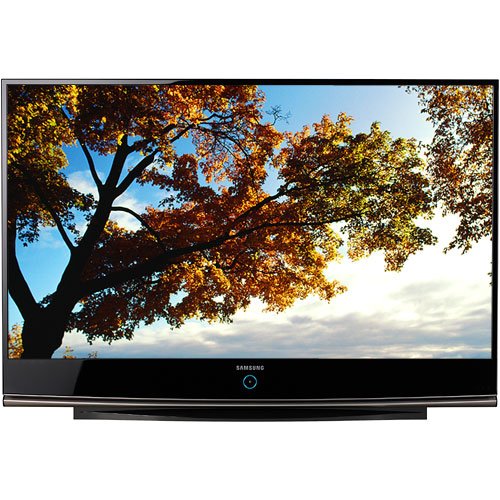
Aworan yii fihan iwaju view of the Samsung HL61A750 61-inch LED Powered DLP HDTV, highlighting its large screen and sleek design.
Ṣeto
1. Unpacking
- Carefully remove the television from its packaging.
- Ensure all included components are present: Remote Control, Stand, and TV.
- Place the television on a stable, level surface or mount it securely according to mounting instructions (mounting hardware not included).
2. Nsopọ Agbara
- So okun agbara pọ si titẹ agbara TV.
- Plug the other end of the power cord into a standard 110 VAC, 60 Hz electrical outlet.
3. Nsopọ Ita Awọn ẹrọ
Your Samsung HL61A750 HDTV offers multiple connectivity options for various devices.
- Awọn asopọ HDMI: Use one of the 3 HDMI inputs for high-definition devices such as Blu-ray players, game consoles, or cable/satellite boxes. HDMI-CEC is supported.
- Component Video Connections: Use the 3 component inputs for devices that support component video output.
- Composite Video Connections: For older devices, use the composite video input.
- Antenna/Asopọ USB: Connect your antenna or cable directly to the TV's RF input for over-the-air or basic cable channels.
4. Oṣo oluṣeto akọkọ
Nígbà tí o bá ti kọ́kọ́ tan-an, TV náà yóò darí rẹ láti mọ ọ̀nà ìṣètò àkọ́kọ́ rẹ. Tẹ̀lé àwọn ìtọ́ni tó wà lójú ìbòjú láti:
- Yan ede ti o fẹ.
- Ṣayẹwo fun awọn ikanni to wa.
- Set up network connectivity (if applicable for smart features).
Awọn ilana Iṣiṣẹ
1. Awọn iṣẹ Iṣakoso latọna jijin
The included remote control allows you to access all TV functions. Ensure batteries are correctly inserted. The remote requires 1 battery.
- Bọtini agbara: Tan TV si tan tabi paa.
- Iwọn didun Soke/Isalẹ: Ṣatunṣe ipele ohun.
- Ikanni Soke/Isalẹ: Ayipada TV ikanni.
- Bọtini titẹ sii/Orisun: Cycles through available input sources (HDMI1, HDMI2, Component, etc.).
- Bọtini Akojọ: Nwọle si akojọ aṣayan akọkọ fun awọn atunṣe eto.
- Awọn bọtini lilọ kiri (Soke/isalẹ/osi/ọtun) ati Tẹ sii: Ti a lo lati lilö kiri ni awọn akojọ aṣayan ati jẹrisi awọn aṣayan.
2. Ipilẹ TV Awọn iṣẹ
- Titan/Apapa: Press the Power button on the remote or the TV.
- Iṣatunṣe Iwọn didun: Lo awọn bọtini iwọn didun Up / Isalẹ.
- Awọn ikanni Iyipada: Use the Channel Up/Down buttons or enter the channel number directly.
3. Aṣayan Input
Si view content from an external device, press the Iṣawọle or Orisun button on your remote control. A list of available inputs will appear on screen. Use the navigation buttons to select the desired input (e.g., HDMI 1 for a Blu-ray player) and press Wọle.
4. Aworan Eto
Access the Picture menu to adjust settings such as Brightness, Contrast, Sharpness, Color, and Tint. You can also select preset picture modes like Standard, Movie, or Dynamic.
5. Ohun Eto
The Sound menu allows you to adjust settings like Bass, Treble, and Balance. You can also choose sound modes (e.g., Standard, Music, Clear Voice) or configure audio output options for external sound systems.
6. Smart Awọn ẹya ara ẹrọ
This TV supports internet applications such as a web browser and YouTube. Connect your TV to the internet to access these features. Navigate to the Smart Hub or Applications menu to launch them.
Itoju
1. Ninu iboju
- Pa TV kuro ki o yọọ kuro lati inu iṣan agbara.
- Fi aṣọ microfiber tó rọ̀ tí ó sì gbẹ nu ibojú náà lọ́ra.
- Fun awọn ami alagidi, fẹẹrẹ dampen asọ pẹlu omi tabi a specialized iboju regede (ma ṣe fun sokiri taara si iboju).
- Avoid using harsh chemicals, abrasive cloths, or paper towels, as these can damage the screen surface.
2. Gbogbogbo Itọju
- Jẹ́ kí tẹlifíṣọ̀n wà ní ibi tí afẹ́fẹ́ lè máa gbóná jù.
- Yago fun ṣiṣafihan TV si imọlẹ orun taara, awọn iwọn otutu ti o ga, tabi ọriniinitutu giga.
- Do not block the ventilation openings on the TV.
3. Awọn imudojuiwọn famuwia
Periodically check the Samsung support website for available firmware updates. Updates can improve performance and add new features. Follow the instructions provided with the update carefully.
Laasigbotitusita
Tí o bá ní ìṣòro pẹ̀lú TV rẹ, wo àwọn ọ̀nà tí ó wọ́pọ̀ wọ̀nyí kí o tó kàn sí iṣẹ́ náà.
Ko si Aworan tabi Ohun
- Rii daju pe okun agbara ti wa ni edidi ni aabo sinu TV mejeeji ati iṣan ogiri.
- Verify that the correct input source is selected (e.g., HDMI 1).
- Ṣayẹwo gbogbo awọn asopọ okun laarin TV ati awọn ẹrọ ita.
- Confirm that the external device is powered on and functioning correctly.
Isakoṣo latọna jijin Ko Ṣiṣẹ
- Ṣayẹwo ki o rọpo awọn batiri ni isakoṣo latọna jijin.
- Rii daju pe ko si awọn idena laarin isakoṣo latọna jijin ati sensọ latọna jijin TV.
- Tọkasi latọna jijin taara ni TV.
"Check Fan No. 3" Message
If you see a "Check Fan No. 3" message, turn the TV off and then back on. If the message persists, ensure the TV's ventilation areas are clear and not obstructed. If the issue continues, contact Samsung customer support.
Picture Ghosting or Misalignment (Convergence)
For issues with picture ghosting or color misalignment, especially with analog sources, ensure your input source is high-quality. While this model does not feature a user-accessible convergence adjustment in the menu, using high-definition digital inputs (like HDMI) will provide the best picture quality. If issues persist with HD sources, professional calibration or service may be required.
Awọn pato
| Ẹya ara ẹrọ | Sipesifikesonu |
|---|---|
| Orukọ awoṣe | HL61A750 |
| Nọmba awoṣe | HL-61A750 |
| Iwon iboju | 61 inches |
| Ifihan ọna ẹrọ | LED Powered DLP |
| Ipinnu | 1080p |
| Oṣuwọn sọtun | 120 Hz |
| Apakan Ipin | 16:9 |
| Ipin Itansan | High (e.g. 5000:1 or greater) |
| Viewigun igun | Awọn iwọn 170 |
| Lapapọ HDMI Ports | 3 |
| Àwọn Ìwọlé Àwọn Ẹ̀yà Ara | 3 |
| Asopọmọra Technology | Composite Video, HDMI |
| Awọn iṣẹ Intanẹẹti atilẹyin | Aṣàwákiri, YouTube |
| Iwọn Nkan | 70.1 iwon |
| Agbara agbara | 100 Wattis |
| Ila Voltage | 110 VAC 60 Hz |
| Awọn irinše to wa | Remote Control, Stand, TV |
| Tuner Iru | ATSC, QAM |
| Àwọ̀ | Dudu |
Alaye atilẹyin ọja
Your Samsung HL61A750 HDTV comes with a limited warranty. The warranty covers 1 Year for parts and 1 Year for labor from the original date of purchase. Please retain your proof of purchase for warranty claims. For full terms and conditions, refer to the warranty card included with your product or visit the official Samsung webojula.
Onibara Support
For further assistance, technical support, or service inquiries, please contact Samsung customer support. You can find contact information, FAQs, and additional resources on the official Samsung webojula:
Samsung Official Support Webojula
When contacting support, please have your TV's model number (HL61A750) and serial number ready.