
KLH KL-300i
KLH AUDIO KL-300i Nostalgia 5-n-1 System
Model: KL-300i
Ọrọ Iṣaaju
O ṣeun fun riraasing the KLH AUDIO KL-300i Nostalgia 5-n-1 System. This integrated audio system combines classic and modern audio playback capabilities, including a turntable, CD player, cassette player, AM/FM radio, and an iPod dock. This manual provides essential information for setting up, operating, and maintaining your system to ensure optimal performance and longevity.
Alaye Aabo
Jọ̀wọ́ ka gbogbo ìlànà ààbò dáadáa kí o tó lo ọjà yìí. Pa ìwé ìtọ́ni yìí mọ́ fún ìtọ́kasí ọjọ́ iwájú.
- Orisun Agbara: So ẹrọ naa pọ mọ ibudo agbara AC ti vol ti a sọ tẹlẹ nikantage.
- Afẹfẹ: Rii daju pe fentilesonu to peye. Ma ṣe dina awọn ṣiṣi atẹgun.
- Omi ati Ọrinrin: Ma ṣe fi ẹrọ naa han si ojo tabi ọrinrin. Ma ṣe gbe awọn nkan ti o kun fun awọn olomi, gẹgẹbi awọn vases, sori ẹyọ.
- Ooru: Maṣe gbe ẹyọ naa si nitosi awọn orisun ooru gẹgẹbi awọn imooru, awọn iforukọsilẹ ooru, awọn adiro, tabi awọn ohun elo miiran (pẹlu ampliifiers) ti o gbe ooru jade.
- Ninu: Yọọ kuro lati inu iṣan ogiri ṣaaju ṣiṣe mimọ. Lo asọ ti o gbẹ nikan.
- Ṣiṣẹ: Maṣe gbiyanju lati ṣiṣẹ ọja yi funrararẹ. Tọkasi gbogbo iṣẹ si oṣiṣẹ oṣiṣẹ ti o peye.
Package Awọn akoonu
Daju pe gbogbo awọn nkan ti a ṣe akojọ si isalẹ wa ninu package:
- KLH AUDIO KL-300i Main Unit
- Isakoṣo latọna jijin
- Cable Input Iranlọwọ
- AM/FM Antenna Wire
- Ilana Afowoyi (iwe yii)
Ọja Pariview
Familiarize yourself with the various components and controls of your KLH AUDIO KL-300i system.
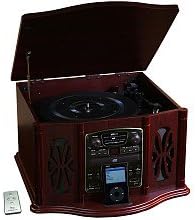
This image displays the KLH AUDIO KL-300i Nostalgia 5-n-1 System. The unit features a dark wood finish. The top lid is open, revealing a turntable. Below the turntable, the front panel includes controls for the CD player, AM/FM radio tuner, and an iPod dock. A small remote control is visible to the left of the main unit.
Awọn iṣakoso Igbimọ iwaju:
- Bọtini agbara: Yipada ẹyọ naa tan tabi pa.
- Aṣayan iṣẹ ṣiṣe: Switches between Phono, CD, Radio, iPod, and Aux modes.
- Bọtini Iwọn didun: Ṣe atunṣe ipele iwọn didun titunto si.
- Àwọn Ìṣàkóso Ohun Èlò Orin CD: Mu ṣiṣẹ/Dúró, Dúró, Fò síwájú/Sẹ́yìn.
- Redio Tuner: AM/FM band selector, Tuning knob.
- iPod Dock: Connector for iPod devices.
- Jack Aux-In: Ìtẹ̀síwájú 3.5mm fún àwọn ẹ̀rọ ohùn ìta.
- Jack agbekari: 3.5mm o wu fun ikọkọ tẹtí.
Igbimọ oke:
- Yipada: Láti gbá àwọn àwo orin vinyl.
- Ideri: Protects the turntable when not in use.
Igbimọ ẹgbẹ:
- Dekini Kasẹti: For playing audio cassette tapes.
Ṣeto
Follow these steps for initial setup of your audio system.
- Ibi: Place the unit on a stable, flat surface away from direct sunlight, heat sources, and excessive dust or moisture. Ensure there is adequate space around the unit for ventilation.
- Asopọmọra Antenna: For optimal AM/FM radio reception, connect the supplied antenna wire to the antenna terminal on the rear of the unit. Extend the wire fully for better reception.
- Asopọ agbara: Pulọọgi okun agbara AC sinu iṣan ogiri boṣewa kan.
- Agbara Ibẹrẹ Tan: Press the Power button on the front panel to turn on the unit.
Awọn ilana Iṣiṣẹ
Isẹ gbogbogbo:
- Titan/Apapa: Tẹ bọtini Agbara lati tan-an tabi pa ẹrọ naa.
- Aṣayan iṣẹ-ṣiṣe: Use the Function Selector knob or buttons to choose your desired audio source (Phono, CD, Radio, iPod, Aux).
- Atunse iwọn didun: Yi bọtini iwọn didun pada lati mu iwọn didun pọ si tabi dinku.
Isẹ ti o yipada:
- Lift the lid of the unit.
- Gbe igbasilẹ fainali kan sori apẹrẹ ti o yipada.
- Select the appropriate speed (33 1/3, 45, or 78 RPM) using the speed selector switch. For 45 RPM records, place the included adapter on the spindle if needed.
- Gently lift the tonearm and position the stylus over the desired starting groove of the record.
- Lower the tonearm slowly onto the record. Playback will begin automatically.
- To stop playback, gently lift the tonearm and return it to its rest.
Ṣiṣẹ ẹrọ orin CD:
- Press the Function Selector to CD mode.
- Press the Eject button to open the CD tray.
- Gbe CD kan pẹlu ẹgbẹ aami ti nkọju si oke sinu atẹ.
- Press the Eject button again to close the tray. The CD will begin playing automatically or display the track count.
- Use the Play/Pause, Stop, and Skip buttons to control playback.
Cassette Player Operation:
- Fi teepu kasẹti sinu iho kasẹti ti o wa ni ẹgbẹ ti ẹrọ naa.
- Tẹ bọtini Play lati bẹrẹ ṣiṣiṣẹsẹhin.
- Use the Fast Forward (FF) button to advance the tape quickly.
- To stop playback, press the Stop/Eject button. Pressing it halfway will eject the tape.
Iṣẹ́ Rédíò AM/FM:
- Press the Function Selector to Radio mode.
- Select either AM or FM band using the band selector switch.
- Rotate the Tuning knob to search for radio stations.
- Adjust the antenna wire for best reception.
iPod Dock Operation:
- Press the Function Selector to iPod mode.
- Carefully place your compatible iPod device onto the iPod dock connector.
- Use your iPod's controls to select and play music. Audio will be routed through the KLH AUDIO system's speakers.
Aux-In Operation:
- Press the Function Selector to Aux mode.
- Connect an external audio device (e.g., MP3 player, smartphone) to the Aux-In jack on the front panel using the supplied 3.5mm auxiliary cable.
- Play audio from your external device. The sound will be played through the KLH AUDIO system's speakers.
Lilo isakoṣo latọna jijin:
The remote control primarily operates the CD player functions (Play, Pause, Stop, Skip). Note that the remote cannot turn the unit on or off.
Itoju
Proper care will ensure the longevity of your system.
- Ninu Ẹka naa: Mu ese ita kuro pẹlu asọ ti o gbẹ. Ma ṣe lo awọn afọmọ abrasive, waxes, tabi awọn nkanmimu.
- Itọju Stylus: Handle the turntable stylus with extreme care. Clean the stylus periodically with a soft brush, brushing from back to front.
- CD/Cassette Care: Keep CDs and cassette tapes clean and free of dust. Store them in their cases when not in use.
Laasigbotitusita
If you experience issues with your system, refer to the following common problems and solutions.
| Isoro | Owun to le Fa | Ojutu |
|---|---|---|
| Ko si Agbara | Okun agbara ko ṣafọ sinu aabo. | Ṣayẹwo asopọ okun agbara si ẹyọkan ati iṣan odi. |
| Ko si Ohun | Iwọn ti o kere ju; Ti yan iṣẹ ti ko tọ; Agbekọri ti sopọ. | Increase volume; Select correct function; Disconnect headphones. |
| Turntable ko nyi | Unit not powered on; Belt dislodged. | Ensure unit is on; Contact service if belt issue suspected. |
| Gbigba Redio ti ko dara | Eriali ko gbooro tabi ni ipo ti o tọ. | Extend and adjust the antenna wire for better signal. |
| CD ko dun | CD inserted incorrectly; CD is scratched or dirty. | Ensure CD is label-side up; Clean or replace CD. |
Awọn pato
| Ẹya ara ẹrọ | Sipesifikesonu |
|---|---|
| Orisun agbara | AC 120V ~ 60Hz |
| Awọn iwọn (W x D x H) | Approx. 17" x 17" x 10.5" (43.2 cm x 43.2 cm x 26.7 cm) |
| Awọn iyara turntable | 33 1/3, 45, 78 RPM |
| Ibiti Igbohunsafẹfẹ Redio | AM: 530-1710 kHz, FM: 88-108 MHz |
| CD Ibamu | CD, CD-R/RW |
| iPod ibi iduro | Compatible with older generation iPods (30-pin connector) |
Atilẹyin ọja ati Support
This product is covered by a limited manufacturer's warranty. For specific warranty terms and conditions, please refer to the warranty card included with your purchase or contact KLH customer support. If you require technical assistance or have questions not covered in this manual, please contact KLH customer service through their official webaaye tabi alaye olubasọrọ ti a pese pẹlu ọja rẹ.
Ask a question about this manual
Ask about setup, troubleshooting, compatibility, parts, safety, or missing instructions. Manuals+ will review the question and use this page’s manual context to help answer it.