
1. Ifihan
The Sangoma A104E is a high-performance Quad T1/E1/J1 interface card designed for robust telecommunications applications. This manual provides essential information for the proper installation, configuration, and maintenance of your A104E card, ensuring optimal performance within your system.
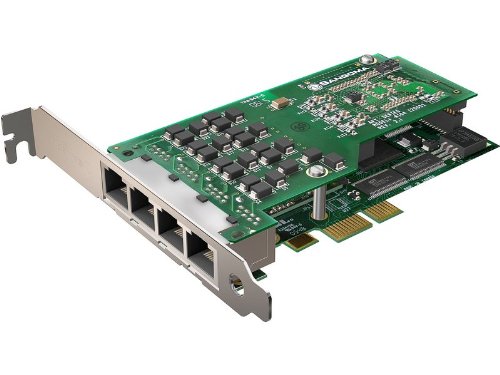
Image showing the Sangoma A104E QuadT1/E1 AFT Interface Card, highlighting its four RJ45 ports and PCIe connector.
2. Awọn ẹya Ọja
- Provides 4 T1/E1 ports for versatile connectivity.
- PCIe interface for high-speed data transfer.
- Equipped with 4 RJ45 connections.
- Supports mixing T1 Channel banks and E1 networks with full channel synchronization.
- Line decoding capabilities: HDB3, AMI, B8ZS.
- Framing options: CRC-4, Non CRC4, ESF, SF, D4, J1.
- Supports both T1/E1 and fractional T1/E1 configurations.
- Includes support for Robbed Bit Channel Associated Signaling (CAS) and ISDN PRI.
- Designed in a 2U form factor for rack-mount server compatibility.
- Comes with high-quality, tested RF45 cables and short 2U mounting clips.
- Features field-upgradeable firmware for future enhancements.
3. System Requirements and Compatibility
Ibamu sọfitiwia:
- Aami akiyesi
- Yate
- FreeSwitch
- Other Open Source and proprietary PBX, Switch, IVR, and VoIP gateway applications.
Atilẹyin Eto Iṣẹ:
- Windows 2003, Windows XP, Windows Server 2008, Windows Vista, Windows 7
- Linux (all versions, releases, and distributions from 1.0 up)
Awọn ibeere Hardware:
- Desktop PC with an available PCI Express (PCIe) slot.
4. Package Awọn akoonu
Jẹrisi pe package rẹ ni awọn nkan wọnyi ninu:
- 1 x Sangoma A104E QuadT1/E1 AFT Interface Card
- 4 x RF45 cables
- 1 x Set of short 2U mounting clips
5. Eto
5.1 Fifi sori ti ara
- Silẹ agbara: Completely power down your computer and disconnect all power cables and peripherals.
- Ẹran Ṣii: Open the computer case to access the internal components.
- Wa PCIe Iho: Identify an available PCI Express (PCIe) slot on your motherboard.
- Yọ Ideri Iho kuro: Carefully remove the metal slot cover corresponding to the chosen PCIe slot. If installing in a 2U rack-mount server, replace the standard bracket on the A104E card with the provided short 2U mounting clips.
- Fi Kaadi sii: Align the A104E card with the PCIe slot and gently but firmly press it down until it is fully seated.
- Kaadi to ni aabo: Secure the card in place using the retaining screw or clip provided by your computer case.
- Ọran pipade: Close the computer case and reconnect all power cables and peripherals.
5.2 Driver fifi sori
After physically installing the card and powering on your system, you will need to install the appropriate drivers. Refer to the official Sangoma webojula for the latest driver downloads and specific installation instructions tailored for your Linux or Windows operating system. Follow the on-screen prompts during the driver installation process.
6. Ṣiṣẹ
6.1 Iṣeto ni ibẹrẹ
Once the drivers are successfully installed, the A104E card will need to be configured within your chosen PBX or VoIP gateway application (e.g., Asterisk, FreeSwitch). This involves setting up the T1/E1 ports to match your telecommunication provider's specifications.
- Line Decoding: Configure the appropriate line decoding method (HDB3, AMI, B8ZS).
- Ṣiṣeto: Set the correct framing type (CRC-4, ESF, D4, etc.).
- Iforukọsilẹ: Define the signaling type, such as Robbed Bit Channel Associated Signaling (CAS) or ISDN PRI.
- Amuṣiṣẹpọ: If you are mixing T1 channel banks and E1 networks, ensure proper channel synchronization is configured within your application.
6.2 Software Integration
For detailed instructions on integrating and managing your Sangoma A104E hardware, consult the official documentation and community resources for your specific PBX software (e.g., Asterisk, Yate, FreeSwitch). These resources will provide guidance on creating extensions, configuring trunks, and managing call routing.
7. Itọju
7.1 famuwia iṣagbega
Lorekore ṣayẹwo awọn Sangoma webojula for firmware updates. Firmware upgrades can introduce new features, improve performance, and address potential issues. Always follow the provided instructions carefully when performing firmware updates to avoid damaging the device.
7.2 Itọju Gbogbogbo
Ensure the computer environment where the A104E card is installed is kept clean and free of dust. Proper airflow and a clean environment contribute to the longevity and stable operation of the card.
8. Laasigbotitusita
Abala yii n pese awọn ojutu si awọn ọran ti o wọpọ ti o le ba pade.
A ko ri Kaadi 8.1
- Verify the card is correctly seated in the PCIe slot.
- Ensure the correct drivers are installed for your operating system.
- Check the system's BIOS/UEFI settings to confirm the PCIe slot is enabled.
8.2 No Dial Tone or Connection Issues
- Confirm that the RJ45 cables are securely connected to both the A104E card and the telecommunication equipment.
- Verify that the T1/E1 line decoding, framing, and signaling configurations in your software match your provider's specifications.
- Check the status indicators (LEDs) on the card for any error codes or to confirm operational status.
8.3 Software Configuration Errors
- Review iṣeto ni files of your PBX software for any syntax errors or incorrect parameters related to the A104E card.
- Consult the Sangoma support resources or community forums for common configuration issues and solutions.
9. Awọn pato
| Brand | Sangoma |
| Nọmba awoṣe | A104E |
| Ni wiwo Hardware | PCI Express |
| Awọn ibudo | 4 x T1/E1/J1 |
| Awọn asopọ | 4 x RJ45 |
| Line Decoding | HDB3, AMI, B8ZS |
| Ṣiṣeto | CRC-4, Non CRC4, ESF, SF, D4, J1 |
| Ifihan agbara | Robbed Bit Channel Associated Signaling (CAS), ISDN PRI |
| Fọọmù ifosiwewe | 2U (with included clips) |
| Awọn ẹrọ ibaramu | Awọn PC tabili |
| Data Link Ilana | IEEE 802.3 |
| Iwọn Nkan | 3 iwon |
| UPC | 812431010271 |
10. Atilẹyin ọja ati Support
10.1 atilẹyin ọja Alaye
For detailed warranty terms and conditions applicable to your Sangoma A104E card, please refer to the official Sangoma webojula or the documentation included with your product purchase. Keep your proof of purchase for warranty claims.
10.2 Imọ Support
For technical assistance, driver downloads, and additional resources, visit the Sangoma support portal. When contacting support, ensure you have your product model number (A104E) and any relevant system information ready to facilitate a quicker resolution.
