
Technics SL-PD807
Technics SL-PD807 MASH 5 Disc CD Player User Manual
Model: SL-PD807
Ọrọ Iṣaaju
O ṣeun fun riraasing the Technics SL-PD807 MASH 5 Disc CD Player. This manual provides detailed instructions for the proper setup, operation, and maintenance of your new audio component. Please read this manual thoroughly before using the unit to ensure optimal performance and longevity.
The SL-PD807 features a 5-disc carousel changer, allowing for extended playback without interruption, and incorporates MASH (Multi-stage Noise Shaping) D/A conversion for high-quality audio reproduction.
Alaye Aabo pataki
- Orisun Agbara: Ensure the unit is connected to an AC 120V, 60Hz power supply.
- Afẹfẹ: Ma ṣe dina awọn ṣiṣi atẹgun. Gba aaye to peye ni ayika ẹyọ naa fun sisan afẹfẹ to dara lati ṣe idiwọ igbona.
- Ọrinrin: Ma ṣe fi ẹrọ naa han si ojo tabi ọrinrin. Ma ṣe gbe awọn nkan ti o kun fun awọn olomi, gẹgẹbi awọn vases, sori ẹyọ.
- Ninu: Yọọ kuro lati inu iṣan ogiri ṣaaju ṣiṣe mimọ. Lo asọ ti o gbẹ fun mimọ.
- Ṣiṣẹ: Ma ṣe gbiyanju lati ṣe iṣẹ fun ẹyọkan yii funrararẹ. Tọkasi gbogbo iṣẹ si awọn oṣiṣẹ iṣẹ ti o peye.
Package Awọn akoonu
Jọwọ ṣayẹwo pe gbogbo awọn nkan wa ninu package:
- Technics SL-PD807 MASH 5 Disc CD Player
- Okun agbara
- RCA Audio Cables
Note: A remote control is not included with this unit.
Ṣeto
1. Unpacking
Carefully remove the CD player and all accessories from the packaging. Retain the packaging materials for future transport or storage.
2. Ifiweranṣẹ
Place the CD player on a stable, level surface away from direct sunlight, heat sources, and excessive dust or vibrations. Ensure there is sufficient space around the unit for proper ventilation.

Nọmba 1: Iwaju view of the Technics SL-PD807 CD Player with included RCA cables.
3. Awọn isopọ
So ẹrọ orin CD pọ mọ ẹrọ orin rẹ amplifier or receiver using the supplied RCA audio cables.
- Connect one end of the RCA audio cables (red and white plugs) to the 'LINE OUT' jacks on the rear of the SL-PD807.
- Connect the other end of the RCA audio cables to an available 'CD IN' or 'AUX IN' input on your amplifier/receiver. Match the red plug to the 'R' (right) input and the white plug to the 'L' (left) input.
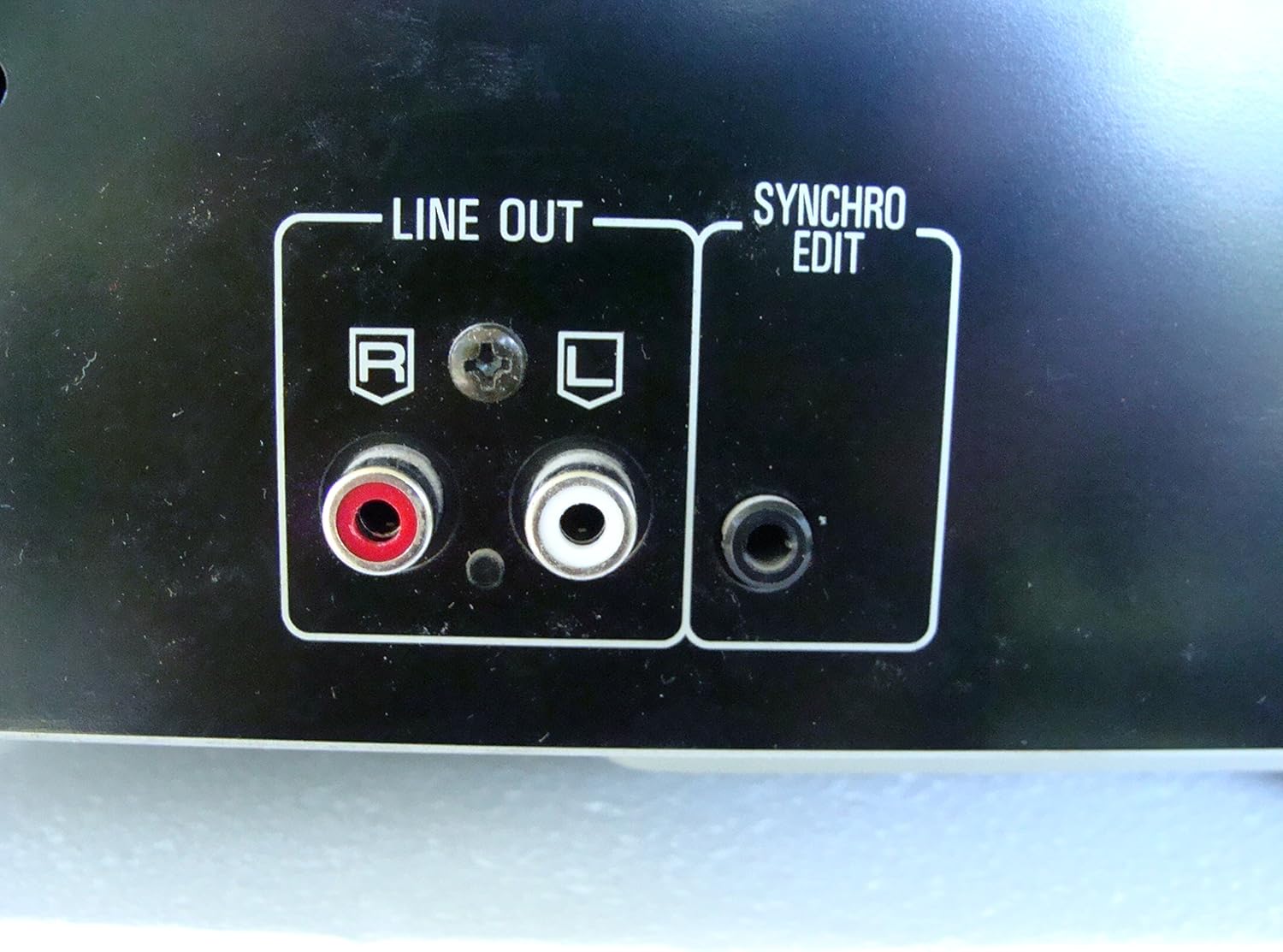
Nọmba 2: Rear panel connections, highlighting the 'LINE OUT' (RCA) and 'SYNCHRO EDIT' ports.
- Plug the power cord into the AC inlet on the rear of the CD player, then plug the other end into a standard AC wall outlet.
Awọn ilana Iṣiṣẹ
1. Agbara Tan / Paa
Tẹ awọn AGBARA button located on the front left of the unit to turn the CD player on or off.
2. Nfi awọn disiki n gbe
The SL-PD807 features a 5-disc carousel. Press the ŠI / PADE button to open the disc tray. Place up to five CDs onto the numbered disc slots with the label side facing up. Press ŠI / PADE lẹẹkansi lati pa awọn atẹ.

Nọmba 3: Front panel controls including disc tray, display, and playback buttons.
3. ipilẹ Sisisẹsẹhin
- Ṣiṣẹ: Tẹ awọn ERE bọ́tìnì (►) láti bẹ̀rẹ̀ sí í ṣeré.
- Duro: Tẹ awọn DÁYÉ button (⏸) to temporarily stop playback. Press again to resume.
- Duro: Tẹ awọn DURO bọtini (■) lati da ṣiṣiṣẹsẹhin duro.
- Rekọja Awọn orin: Tẹ awọn SILE buttons (⏭︎ / ⏮︎) to skip to the next or previous track.
- Wa Mu mọlẹ WÁ buttons (⏪︎ / ⏩︎) to fast forward or rewind within a track.
4. Disc Exchange
You can exchange discs while another disc is playing. Press the DIKA FIPẸ button to rotate the carousel to an empty slot or a disc you wish to remove/replace. The currently playing disc will continue to play until you select a new disc to play.
5. Playback Modes
- Ere laileto: Tẹ awọn ID button to play tracks on the current disc or all loaded discs in a random order.
- Ṣiṣẹ eto: Lo awọn ETO button to create a custom playback sequence of tracks from the loaded discs. Refer to the on-screen display for programming steps.
- Tun ṣe ṣiṣiṣẹsẹhin: Tẹ awọn Tun button to repeat the current track, current disc, or all discs.
Itoju
1. Ninu Unit
Fi aṣọ rírọrùn àti gbígbẹ nu òde ẹ̀rọ náà. Fún àwọn àbàwọ́n líle díẹ̀, fi díẹ̀ dì í.ampen the cloth with water and a mild detergent, then wipe dry. Do not use abrasive cleaners, benzene, thinner, or alcohol, as these can damage the finish.

Nọmba 4: Top surface of the unit, illustrating areas that may require cleaning or show wear.
2. Itọju Disiki
- Mu awọn disiki mu nipasẹ awọn egbegbe wọn lati yago fun awọn ika ọwọ lori ibi ere.
- Keep discs clean. Wipe from the center outwards with a soft, lint-free cloth if necessary.
- Tọju awọn disiki ni awọn ọran wọn lati daabobo wọn kuro ninu eruku ati awọn idọti.
Laasigbotitusita
If you experience problems with your CD player, please consult the following table before seeking service.
| Isoro | Owun to le Fa | Ojutu |
|---|---|---|
| Ko si agbara | Okun agbara ko ni asopọ ni aabo. | Ṣayẹwo asopọ okun agbara si ẹyọkan ati iṣan odi. |
| Ko si ohun | RCA audio cables not connected correctly. Amplifier/receiver input not selected. | Ensure RCA cables are securely connected to both the CD player and amplifier. Select the correct input on your amplifier / olugba. |
| Disc does not play / Skipping | Disc is dirty or scratched. Disc is inserted incorrectly. | Clean the disc with a soft, lint-free cloth. Ensure the disc is placed label-side up in the tray. Try another disc. |
| Carousel does not rotate | Obstruction in the disc tray. | Ensure no foreign objects are obstructing the carousel mechanism. |
Awọn pato
The following are the technical specifications for the Technics SL-PD807 MASH 5 Disc CD Player:
| Ẹya ara ẹrọ | Sipesifikesonu |
|---|---|
| Orukọ awoṣe | SL-PD807 |
| Olupese | Awọn imọ-ẹrọ |
| Agbara Disiki | 5 Disiki |
| Awọn ibeere agbara | AC 120V, 60Hz, 13W |
| Package Mefa | 17 x 17 x 5 inches |
| Iwọn Nkan | 15.02 iwon |
| Asopọmọra Technology | Auxiliary, Infrared |
| Pataki Ẹya | Idaabobo Anti-Rekọja |

Nọmba 5: Product label displaying model number and power specifications.
Atilẹyin ọja ati Support
For information regarding warranty coverage and customer support for your Technics SL-PD807 CD Player, please refer to the warranty card included with your purchase or visit the official Technics website. If you require further assistance, please contact Technics customer service.