
1. Ifihan
This manual provides detailed instructions for the safe and effective use of your Olympus IC Recorder Voice-Trek DS-61. Please read this manual thoroughly before using the device and keep it for future reference. The Olympus Voice-Trek DS-61 is a digital voice recorder designed for high-quality audio capture and playback, featuring 2 GB of internal memory and USB connectivity.
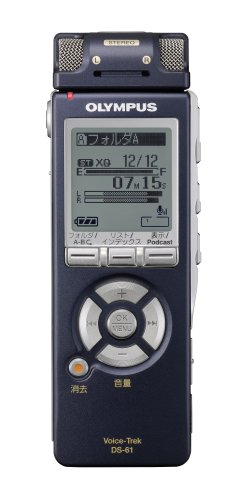
Nọmba 1: Iwaju view of the Olympus IC Recorder Voice-Trek DS-61, showing the display and control buttons.
2. Awọn iṣọra aabo
To ensure safe operation and prevent damage to the device, please observe the following precautions:
- Ma ṣe fi ẹrọ naa han si awọn iwọn otutu to gaju, imọlẹ orun taara, tabi ọriniinitutu giga.
- Yago fun sisọ ẹrọ naa silẹ tabi fifisilẹ si awọn ipa to lagbara.
- Keep the device away from water and other liquids. If liquid enters the device, discontinue use immediately and consult a service professional.
- Use only the specified batteries and accessories. Incorrect battery types may cause fire or explosion.
- Do not attempt to disassemble or modify the device. This may result in electric shock or damage and will void the warranty.
- Nu ẹrọ naa pẹlu asọ ti o tutu, ti o gbẹ. Ma ṣe lo abrasive ose tabi epo.
3. Package Awọn akoonu
Jẹrisi pe gbogbo awọn ohun kan wa ninu package:
- Olympus IC Recorder Voice-Trek DS-61
- Okun USB
- Stereo Microphone (optional, may be included depending on package)
- Remote Control (optional, may be included depending on package)
- Ilana Afowoyi (iwe yii)
4. Apakan Awọn orukọ ati Awọn iṣẹ
Familiarize yourself with the various parts of your Voice-Trek DS-61 and their functions.
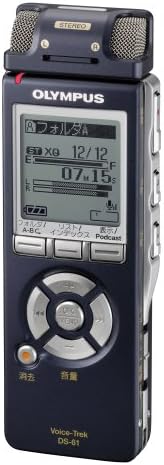
Nọmba 2: Olympus IC Recorder Voice-Trek DS-61, showing the main display and control layout.
4.1 Igbimọ iwaju
- Ifihan: Shows recording status, file information, menu options, and battery level.
- Control Buttons (Play, Stop, Record, Rewind, Fast Forward): Used for recording, playback, and navigation.
- O dara/Bọtini Akojọ aṣyn: Confirms selections and accesses the menu.
- Folder/Index Buttons: Navigates between folders and sets index marks.
4.2 Awọn panẹli ẹgbẹ
- Power/Hold Switch: Turns the device on/off and locks buttons.
- Awọn bọtini iwọn didun (+/-): Ṣe atunṣe iwọn didun ṣiṣiṣẹsẹhin.
- Ibudo USB: Connects the recorder to a computer.
- Gbohungbohun Jack: Fun sisopọ gbohungbohun ita.
- Jack Earphone: Fun sisopọ olokun.
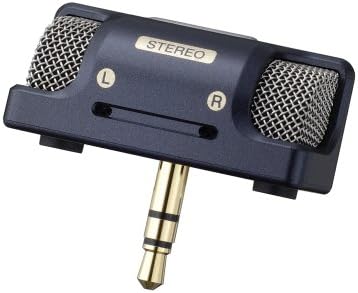
Nọmba 3: An external stereo microphone accessory, which can be connected to the device for enhanced audio capture.

Nọmba 4: A wired remote control accessory, allowing for convenient operation from a distance.
5. Eto
5.1 Fifi sori batiri
- Ṣii ideri iyẹwu batiri ni ẹhin ẹrọ naa.
- Fi awọn batiri AAA meji sii, ni idaniloju polarity ti o pe (+/-).
- Pa ideri batiri naa ni aabo.
5.2 Initial Settings (Date and Time)
Upon first use or after battery replacement, you may need to set the date and time.
- Turn on the device using the Power switch.
- If prompted, follow the on-screen instructions to set the year, month, day, hour, and minute.
- Use the navigation buttons to adjust values and the OK button to confirm.
5.3 Nsopọ si Kọmputa kan
The Voice-Trek DS-61 can be connected to a computer for file gbigbe.
- Ensure the recorder is powered on.
- Connect the smaller end of the USB cable to the USB port on the recorder.
- So opin nla ti okun USB pọ si ibudo USB ti o wa lori kọnputa rẹ.
- The recorder will appear as a removable disk drive on your computer, allowing you to drag and drop audio files.
6. Awọn ilana Iṣiṣẹ
6.1 Ipilẹ Gbigbasilẹ
- Tan ẹrọ naa.
- Tẹ awọn Gba silẹ button. The recording indicator will light up, and recording will begin.
- Lati da gbigbasilẹ duro, tẹ awọn Gba silẹ bọtini lẹẹkansi. Tẹ ẹ lekan si lati tun bẹrẹ.
- Lati da gbigbasilẹ duro, tẹ bọtini naa Duro bọtini. Awọn ti o ti gbasilẹ file yoo wa ni fipamọ laifọwọyi.
6.2 Sisisẹsẹhin
- Lilö kiri si ohun ti o fẹ file using the Folder and navigation buttons.
- Tẹ awọn Ṣiṣẹ bọtini lati bẹrẹ ṣiṣiṣẹsẹhin.
- Lo awọn Iwọn didun +/- awọn bọtini lati ṣatunṣe iwọn didun ṣiṣiṣẹsẹhin.
- Tẹ Duro lati pari ṣiṣiṣẹsẹhin.
6.3 File Isakoso
The Voice-Trek DS-61 allows you to organize and manage your recorded files.
- Awọn folda: Use the Folder buttons to switch between different recording folders (e.g., A, B, C).
- Erasing Files: Yan awọn file you wish to erase, then access the menu and select the 'Erase' option. Confirm your selection.
6.4 Lilọ kiri Akojọ aṣyn
Tẹ awọn Akojọ / O DARA button to access the device settings. Use the navigation buttons to scroll through options and OK lati yan. Tẹ Akojọ / O DARA lẹẹkansi lati jade kuro ni akojọ aṣayan.
7. Itọju
7.1 Ninu
Wipe the exterior of the recorder with a soft, dry cloth. Do not use liquid cleaners, solvents, or abrasive materials, as these can damage the finish or internal components.
7.2 Ibi ipamọ
Nigbati o ko ba wa ni lilo fun awọn akoko ti o gbooro sii, yọ awọn batiri kuro lati yago fun jijo. Tọju ẹrọ naa ni itura, aye gbigbẹ kuro lati orun taara ati awọn iwọn otutu to gaju.
8. Laasigbotitusita
If you encounter issues with your Voice-Trek DS-61, refer to the following common problems and solutions:
| Isoro | Owun to le Fa | Ojutu |
|---|---|---|
| Ẹrọ naa ko ṣiṣẹ. | Awọn batiri ti ku tabi fi sii lọna ti ko tọ. | Rọpo awọn batiri tabi ṣayẹwo polarity. |
| Ko si ohun nigba šišẹsẹhin. | Volume is too low; headphones not connected properly. | Increase volume; ensure headphones are fully inserted. |
| Ko le ṣe igbasilẹ. | Memory is full; device is in HOLD mode. | Pa atijọ rẹ files to free up space; slide the HOLD switch to the OFF position. |
| Computer does not recognize the device. | Okùn USB náà kò ní àbùkù tàbí kò sopọ̀ mọ́ra dáadáa. | Try a different USB port or cable; ensure the device is powered on. |
9. Awọn pato
| Ẹya ara ẹrọ | Ẹ̀kúnrẹ́rẹ́ |
|---|---|
| Brand | Olympus |
| Nọmba awoṣe | DS-61 |
| Agbara Ibi ipamọ Iranti | 2 GB |
| Ni wiwo Hardware | USB |
| Iwọn Nkan | 80 giramu |
| Orisun agbara | Awọn batiri AAA (x2) |
| Gbigbasilẹ kika | DSS, MP3 (check device for exact formats) |
| Gbohungbohun | Built-in stereo microphone, external microphone jack |
| Agbọrọsọ | Agbọrọsọ ti a ṣe sinu |
10. Atilẹyin ọja ati Support
Olympus products are manufactured to high-quality standards. For information regarding warranty coverage, please refer to the warranty card included with your product or visit the official Olympus website. For technical support, product registration, or service inquiries, please contact Olympus customer support through their official channels.
Atilẹyin Ayelujara: Visit the official Olympus support webAaye fun FAQs, awọn igbasilẹ sọfitiwia, ati alaye olubasọrọ.
Iṣẹ onibara: Refer to your product packaging or the Olympus webAaye fun awọn alaye olubasọrọ iṣẹ alabara agbegbe.