1. Ọja Ipariview
The Skytronic Compact Hifi Stereo Karaoke DJ PA Amplifier (Model 103.102) is designed for versatile audio applications, offering a blend of compact size and powerful performance. It features multiple input options for various audio sources and microphones, along with adjustable sound controls for an enhanced listening and karaoke experience.
1.1 Key Awọn ẹya ara ẹrọ
- Ultra-compact dimensions for easy placement.
- 400 W Max Power (equivalent to 2 x 50 W RMS).
- Two 6.3 mm jack microphone inputs with adjustable echo effect.
- Three RCA stereo line inputs (CD/VCD, AUX, AC-3).
- One 3.5 mm jack AUX input (front panel).
- One RCA stereo line output.
- Two sets of screw terminals for speaker connections.
- 2-band equalizer with adjustable bass and treble.
- Adjustable balance and master volume controls.
- Large input-selection knob for easy source switching.
1.2 Awọn iṣakoso Panel iwaju ati Awọn itọkasi

Figure 1: Front Panel Layout. This image displays the amplifier's front panel, highlighting the power button, input selection knob, volume control, microphone inputs, and tone controls.
- Bọtini AGBARA: Balu awọn amplifier lori / pa.
- Input Selector (CD/VCD, AUX, AC-3): Rotates to select the desired audio input source.
- KỌRỌ IWỌRỌ: Satunṣe awọn ìwò o wu iwọn didun.
- BALANCE Knob: Ṣe atunṣe iwọntunwọnsi ikanni osi/ọtun.
- KỌ́KÚN TẸ̀RÙBÙ: Ṣe atunṣe idahun igbohunsafẹfẹ-giga.
- BASS Knob: Ó ń ṣe àtúnṣe ìdáhùn ìgbohùn-ìgbó ...
- Àwọn ohun tí a fi MIC1 / MIC2 sí: 6.3mm jack inputs for microphones.
- M. VOL Knob: Ṣe atunṣe iwọn gbohungbohun.
- Knob ECHO: Ó ń ṣe àtúnṣe ipele ipa echo fún àwọn gbohùngbohùn.
- Ifihan itanna: Shows current input selection and audio level indicators.
1.3 Ru Panel Awọn isopọ
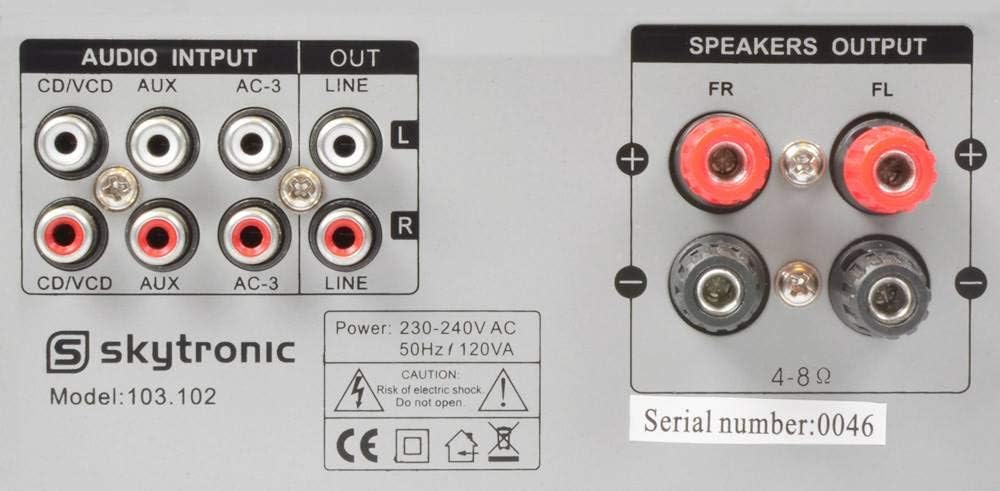
Figure 2: Rear Panel Connections. This image illustrates the various audio input and output ports, including RCA inputs, line output, and speaker terminals.
- AUDIO INPUTS (CD/VCD, AUX, AC-3): RCA stereo inputs for connecting external audio sources like CD/DVD players, media players, or other audio devices.
- ILA OUT: RCA stereo output for connecting to another amplifier tabi ẹrọ gbigbasilẹ.
- SPEAKERS OUTPUT (FR, FL): Screw terminals for connecting passive speakers. Ensure correct polarity (+ to + and - to -).
- Iṣagbewọle agbara: For connecting the 230V, 50Hz power supply cable.
2. Awọn ilana iṣeto
Follow these steps to properly set up your Skytronic amplifier.
2.1 Nsopọ Agbọrọsọ
- Rii daju pe amplifier ti wa ni pipa ati yọọ kuro lati inu iṣan agbara.
- Connect your passive speakers to the "SPEAKERS OUTPUT" terminals on the rear panel.
- Match the positive (+) terminal on the amplifier to the positive (+) terminal on your speaker, and the negative (-) terminal on the amplifier to the negative (-) terminal on your speaker.
- Ensure all speaker wire connections are secure and there are no loose strands that could short circuit.
- Awọn amplifier n ṣe atilẹyin fun awọn agbọrọsọ pẹlu impedance ti 4-8 ohms.
2.2 Nsopọ Awọn orisun ohun
- Connect your audio sources (e.g., CD player, DVD player, media streamer) to the appropriate RCA "AUDIO INPUTS" (CD/VCD, AUX, AC-3) on the rear panel using RCA cables.
- For devices with a 3.5mm output (e.g., smartphone, MP3 player), use a 3.5mm to 3.5mm audio cable to connect to the "AUX" input on the front panel.
- If connecting to another amplifier or recording device, use RCA cables from the "LINE OUT" on the rear panel of this amplifier to the input of the other device.
2.3 Nsopọ Microphones
- Insert 6.3mm jack microphones into the "MIC1" or "MIC2" inputs on the front panel.
2.4 Asopọ agbara
- Ni kete ti gbogbo awọn asopọ ohun ati agbọrọsọ ti ṣe, pulọọgi naa amplifier's power cable into a standard 230V, 50Hz AC power outlet.
3. Awọn ilana Iṣiṣẹ
This section details how to operate your Skytronic amplifier fun ti aipe išẹ.
3.1 Ipilẹ isẹ
- Tẹ awọn AGBARA bọtini lati tan-an amplifier. The illuminated display will light up.
- Yiyi awọn Aṣayan Input knob to choose the desired audio source (CD/VCD, AUX, AC-3).
- Start playback from your selected audio source.
- Ṣatunṣe awọn Iwọn didun knob to your desired listening level. Start with a low volume and gradually increase it.
3.2 Siṣàtúnṣe iwọn
- Mimọ: Turn the BASS knob clockwise to increase low frequencies (deeper sound) or counter-clockwise to decrease them.
- TẸRẸ: Turn the TREBLE knob clockwise to increase high frequencies (brighter sound) or counter-clockwise to decrease them.
- Iwontunwonsi: Adjust the BALANCE knob to shift the audio output between the left and right speakers. Set to the center for balanced sound.
3.3 Using Microphones for Karaoke
- Ensure microphones are connected to the MIC1 or MIC2 inputs.
- Ṣatunṣe awọn M. VOL (Microphone Volume) knob to control the microphone's output level.
- Ṣatunṣe awọn ECHO knob to add or remove echo effect to the microphone sound.
- Sing into the microphone while playing background music from your selected audio source.
4. Itọju
Itọju to dara ṣe idaniloju gigun ati iṣẹ ṣiṣe ti o dara julọ ti rẹ amplifier.
- Ninu: Lo asọ, gbẹ asọ lati nu awọn ode ti awọn ampìfọ́mọ́ra. Má ṣe lo àwọn ohun ìfọ́mọ́ra omi tàbí aerosol, nítorí wọ́n lè ba ìparí tàbí àwọn ohun èlò inú jẹ́.
- Afẹfẹ: Rii daju pe awọn iho ategun wa ni oke ati awọn ẹgbẹ ti yara naa amplifier are not blocked. Adequate airflow is crucial to prevent overheating.
- Ibi ipamọ: Ti o ba titoju awọn amplifier for an extended period, unplug it from the power outlet and store it in a cool, dry place away from direct sunlight and extreme temperatures.
- Okun Agbara: Regularly inspect the power cord for any signs of damage. If damaged, do not use the amplifier and seek professional repair.
5. Laasigbotitusita
Ti o ba pade awọn iṣoro rẹ amplifier, tọka si awọn iṣoro ati awọn ojutu ti o wọpọ wọnyi.
| Isoro | Owun to le Fa | Ojutu |
|---|---|---|
| Ko si agbara | Okùn agbára kò sopọ̀ mọ́; Ibùdó agbára kò ní àbùkù; Amplifier fiusi ti fẹ. | Ensure power cord is securely plugged in; Test power outlet with another device; Contact qualified service personnel for fuse replacement. |
| Ko si ohun jade | Incorrect input selected; Volume too low; Speakers not connected or faulty; Audio source not playing. | Select correct input source; Increase VOLUME knob; Check speaker connections and ensure speakers are functional; Verify audio source is playing correctly. |
| Ohun ti o daru | Volume too high; Incorrect impedance speakers; Loose connections. | Reduce VOLUME; Ensure speakers are 4-8 ohms; Check all audio and speaker connections. |
| Gbohungbohun ko ṣiṣẹ | Microphone not connected; M. VOL too low; Microphone faulty. | Ensure microphone is securely plugged into MIC1/MIC2; Increase M. VOL knob; Test microphone with another device if possible. |
| Ariwo ariwo tabi ariwo | Ground loop issue; Interference from other electronics; Loose audio cables. | Try plugging amplifier into a different outlet; Move amplifier away from other electronic devices; Ensure all audio cables are securely connected. |
Ti iṣoro naa ba wa lẹhin igbiyanju awọn solusan wọnyi, jọwọ kan si atilẹyin alabara.
6. Awọn pato
Detailed technical specifications for the Skytronic Stereo Karaoke Amplifier (Model 103.102).
| Ẹya ara ẹrọ | Sipesifikesonu |
|---|---|
| Nọmba awoṣe | 103.102 |
| Ijade agbara ti o pọju | 400 W (equivalent to 2 x 50 W RMS) |
| Idahun Igbohunsafẹfẹ | 20 Hz si 20 kHz |
| Ifihan Ibuwọlu-si-Noise | > 76dB |
| Ipalara | 4-8 Ohm |
| Ibi ti ina elekitiriki ti nwa | 230 V, 50 Hz |
| Awọn iwọn Ọja (L x W x H) | 11.02 x 8.66 x 37.4 inches |
| Iwọn Nkan | 5.73 iwon |
| Olupese | Skytronics |
7. Atilẹyin ọja ati Support
This section provides general information regarding product warranty and customer support.
7.1 atilẹyin ọja Alaye
Specific warranty details for the Skytronic Stereo Karaoke Amplifier (Model 103.102) are typically provided at the point of purchase or within separate warranty documentation included with the product. Please refer to your purchase receipt or the manufacturer's official website for the most accurate and up-to-date warranty terms and conditions. Standard warranties usually cover manufacturing defects for a specified period from the date of purchase.
7.2 Onibara Support
For technical assistance, troubleshooting beyond this manual, or inquiries regarding parts and service, please contact Skytronic customer support. Contact information can usually be found on the manufacturer's official website or on the product packaging. When contacting support, please have your product model number (103.102) and purchase details ready.
Note: As specific contact details are not provided in this manual, please refer to the official Skytronic website or your retailer for support contact information.