
Aroma AMT-530 Clip Tuner Metronome
Itọsọna olumulo
Ọrọ Iṣaaju
O ṣeun fun riraasing the Aroma AMT-530 Clip Tuner Metronome. This compact and versatile device is designed to assist musicians in tuning various instruments and maintaining precise rhythm during practice. It combines a highly accurate tuner with a functional metronome, all in a convenient clip-on design.
Please read this manual carefully to understand the features and operation of your AMT-530.
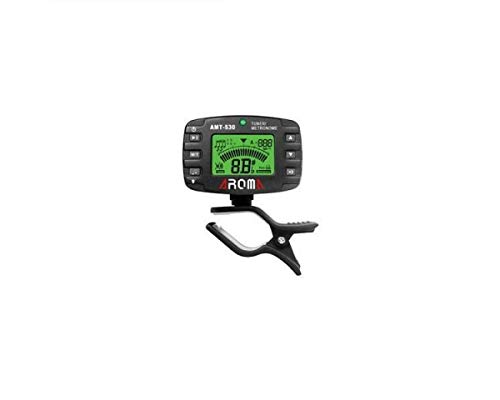
Aworan: Iwaju view of the Aroma AMT-530 Clip Tuner Metronome, showing the display and control buttons.
Ọja Awọn ẹya ara ẹrọ
- Awọn ọna Iyipada: Chromatic (C), Guitar (G), Bass (B), Ukulele (U), Violin (V).
- Ibi idanimọ: A0 (27.5Hz) – C8 (4186.00Hz).
- Tuning Type: Clip (vibration sensor).
- Pitch Base: 430 Hz – 450 Hz.
- Yiye Iyipada: ± 0.5 cent.
- Ifihan: Two-color backlight for improved readability.
- Awọn iṣẹ: Tuner and Metronome.
Ṣeto
1. Fifi sori batiri
The AMT-530 typically uses a CR2032 coin cell battery. To install or replace the battery:
- Wa awọn yara batiri lori pada ti awọn kuro.
- Ṣii ideri iyẹwu naa.
- Fi batiri CR2032 titun sii pẹlu ẹgbẹ rere (+) ti nkọju si oke.
- Pa ideri batiri naa ni aabo.
2. Agbara lori / Paa
Tẹ mọlẹ Bọtini agbara (usually located on the top left) for a few seconds to turn the device on or off.
3. Attaching to Instrument
The AMT-530 features a clip-on design. Attach the clip securely to the headstock of your instrument (for tuning) or to a music stand/sheet music (for metronome use). Ensure the display is visible for easy reading.
Awọn ilana Iṣiṣẹ
Ipo Tuner
In Tuner Mode, the device detects the vibration of your instrument to display the note and indicate whether it is sharp, flat, or in tune.
- Yan Ipo: Tẹ awọn M/T button (Mode/Tuner) to switch to Tuner Mode. The display will show "TUNER".
- Yan Ohun Èlò: Leralera tẹ awọn Tuning Item button (often labeled with a musical note icon) to cycle through the available tuning items: Chromatic (C), Guitar (G), Bass (B), Ukulele (U), Violin (V). Select the appropriate setting for your instrument.
- Adjust Pitch Base (A4): Tẹ awọn Bọtini A4 (often labeled with a speaker icon or A4) to adjust the A4 reference pitch, typically from 430 Hz to 450 Hz. The standard is 440 Hz.
- Tun ohun elo rẹ ṣe: Pluck a single string on your instrument. The display will show the detected note and a meter indicating if the note is flat, sharp, or in tune.
- If the backlight is pupa and the needle is to the left, the note is flat.
- If the backlight is pupa and the needle is to the right, the note is sharp.
- If the backlight is alawọ ewe and the needle is in the center, the note is in tune.

Image: The AMT-530 display showing tuner mode, indicating a note and the A4 reference pitch, clipped to a guitar headstock.
Ipo Metronome
In Metronome Mode, the device provides a steady beat to help you practice rhythm and timing.
- Yan Ipo: Tẹ awọn M/T button to switch to Metronome Mode. The display will show "METRONOME".
- Adjust Tempo (BPM): Lo awọn Awọn bọtini itọka oke/isalẹ (often on the right side) to adjust the Beats Per Minute (BPM).
- Select Beat: Tẹ awọn Bọtini lu (often labeled with a time signature icon) to cycle through different beat patterns (e.g., 1/4, 2/4, 3/4, 4/4, etc.).
- Yan Rhythm: Tẹ awọn Bọtini ilu (often labeled with a note value icon) to choose different rhythmic subdivisions (e.g., quarter notes, eighth notes, triplets).
- Start/Stop Metronome: Tẹ awọn Bọtini ṣiṣẹ/Sinmi (often a triangle icon) to start or stop the metronome click.

Image: The AMT-530 display showing metronome mode, with BPM and beat pattern visible.
Imọlẹ ẹhin
The AMT-530 features a two-color backlight (red/green) for clear visibility in various lighting conditions. The backlight color changes in tuner mode to indicate tuning status.
Itoju
- Ninu: Lo aṣọ rírọrùn tí ó gbẹ láti nu ẹ̀rọ náà. Má ṣe lo àwọn ohun èlò ìfọmọ́ omi tàbí àwọn ohun èlò ìpara.
- Ibi ipamọ: Store the AMT-530 in a cool, dry place away from direct sunlight and extreme temperatures.
- Batiri: Tí a kò bá lo ẹ̀rọ náà fún ìgbà pípẹ́, yọ bátìrì náà kúrò kí ó má baà jẹ́ kí ó jò.
- Mimu: Yago fun sisọ ẹrọ naa silẹ tabi fifisilẹ si awọn ipa to lagbara.
Laasigbotitusita
- Ẹrọ ko ni agbara lori:
- Check if the battery is installed correctly with the correct polarity.
- Rọpo batiri naa pẹlu batiri CR2032 tuntun.
- Tuner is not detecting notes accurately:
- Ensure the tuner is securely clipped to the instrument's headstock or a part that vibrates well.
- Check for excessive background noise that might interfere with vibration detection.
- Verify that the correct tuning item (C, G, B, U, V) is selected for your instrument.
- Metronome sound is too low or absent:
- Ensure the volume is not set to minimum (if applicable, though not explicitly mentioned for this model, it's a common feature).
- The metronome primarily provides a visual beat on the display; audible clicks might be subtle or absent depending on the model's design.
Awọn pato
| Ẹya ara ẹrọ | Ẹ̀kúnrẹ́rẹ́ |
|---|---|
| Awoṣe | AMT-530 |
| Brand | Aroma Housewares (AROMA) |
| Tuning Awọn ohun | Chromatic (C), Gita (G), Bass (B), Ukulele (U), Violin (V) |
| Ibiti wiwa | A0 (27.5Hz) – C8 (4186.00Hz) |
| Tuning Iru | Clip (vibration) |
| Pitch Base (A4) | 430 Hz – 450 Hz |
| Yiyi Yiyi | 0.5 ogorun |
| Nọmba apakan | 6943207680078 |
| ASIN | B002BFKV10 |
Atilẹyin ọja ati Support
For warranty information or technical support, please refer to the documentation provided with your purchase or contact Aroma Housewares customer service directly. Keep your proof of purchase for any warranty claims.