
Klip Xtreme KES-390
Klip Xtreme KES-390 Stereo Speakers 2.0 User Manual
Àwòṣe: KES-390
1. Ifihan
O ṣeun fun riraasing the Klip Xtreme KES-390 2.0 Stereo Speakers. These speakers are designed to provide a true stereo audio experience, offering flexibility in positioning each unit to optimize sound delivery. Please read this manual carefully to ensure proper setup, operation, and maintenance of your new speakers.
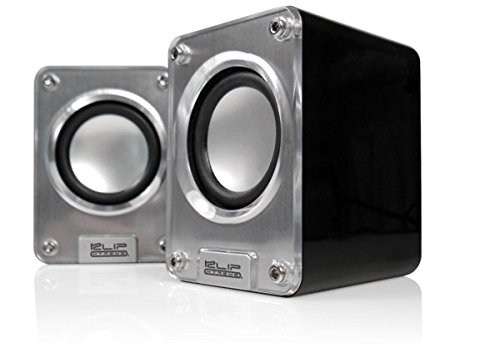
Image: Klip Xtreme KES-390 2.0 Stereo Speakers. The image shows two compact silver and black speakers positioned in front of a black laptop, highlighting their desktop use.
2. Package Awọn akoonu
Rii daju pe gbogbo awọn nkan wa ninu package:
- Klip Xtreme KES-390 2.0 Stereo Speakers (2 units)
- Okun Agbara USB
- 3.5mm Audio USB
- Itọsọna olumulo
3. Awọn ẹya Ọja
- 2.0 Channel Stereo Speakers
- USB Powered for convenience
- High-quality stereophonic sound
- 3.5mm audio input for versatile connectivity
- Iwapọ ati apẹrẹ to ṣee gbe
- Audio playback via USB and SD
4. Awọn ilana iṣeto
- Gbigbe awọn agbọrọsọ: Place the two speaker units on a stable, flat surface. For optimal stereo separation, position them equidistant from your listening position.
- Agbara asopọ: Connect the USB power cable from one of the speakers to an available USB port on your computer, laptop, or a USB wall adapter (not included). The speakers will power on automatically.
- Nsopọ Orisun Olohun:
- Via 3.5mm Audio Cable: Connect one end of the included 3.5mm audio cable to the audio input jack on the speaker (usually marked "Audio In" or with a headphone icon). Connect the other end to the audio output jack of your device (e.g., computer, smartphone, MP3 player).
- Via USB/SD Card: Insert your USB flash drive or SD card into the designated slot on the speaker. The speaker should automatically detect and begin playing audio files. Refer to the operating instructions for specific playback controls.
- Iṣatunṣe Iwọn didun: Adjust the volume using the volume control knob on the speaker or through your connected audio device.
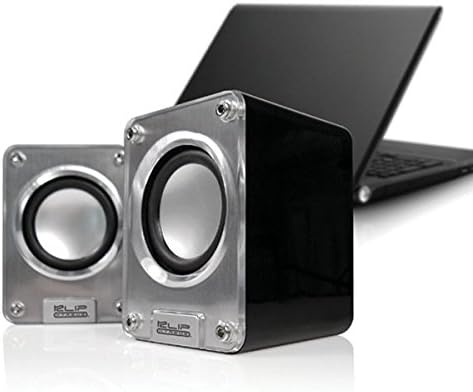
Aworan: A sunmọ-soke view of the two Klip Xtreme KES-390 speakers, showing their silver speaker cones and black casing, ready for connection.
5. Awọn ilana Iṣiṣẹ
5.1 Agbara Tan / Pa
The speakers are powered on automatically when connected to a USB power source. Disconnect the USB cable to power them off.
5.2 Iṣakoso iwọn didun
Locate the volume control knob on one of the speaker units. Rotate it clockwise to increase the volume and counter-clockwise to decrease it. You can also control the volume from your connected audio device.
5.3 Audio Playback (3.5mm Input)
Once the 3.5mm audio cable is connected to your device, ensure your device's volume is turned up and playback is initiated. The sound will be output through the speakers.
5.4 USB / SD Kaadi Sisisẹsẹhin
Insert the USB drive or SD card into the corresponding slot. The speakers should automatically detect and play compatible audio files. Use the integrated controls (if available) on the speaker to navigate tracks or adjust playback settings.
6. Itọju
- Ninu: Use a soft, dry cloth to clean the speaker surfaces. Do not use liquid cleaners or abrasive materials, as they may damage the finish.
- Ibi ipamọ: Nigbati o ko ba wa ni lilo fun awọn akoko ti o gbooro sii, tọju awọn agbohunsoke ni itura, aye gbigbẹ kuro lati orun taara ati awọn iwọn otutu to gaju.
- Mimu: Avoid dropping the speakers or subjecting them to strong impacts.
7. Laasigbotitusita
| Isoro | Owun to le Fa | Ojutu |
|---|---|---|
| Ko si ohun |
|
|
| Ohun ti o daru |
|
|
| Speakers not recognized (USB/SD playback) |
|
|
8. Awọn pato
| Ẹya ara ẹrọ | Ẹ̀kúnrẹ́rẹ́ |
|---|---|
| Brand | Tẹ Xtreme |
| Awoṣe | KES-390 |
| Agbọrọsọ Iru | 2.0 Channel Stereo Speakers |
| Asopọmọra Technology | USB (for power), 3.5mm Audio Jack (for input), USB/SD Card (for playback) |
| Max Agbọrọsọ o wu Power | 48 Wattis |
| Orisun agbara | Agbara USB |
| Iṣagbesori Iru | Ojú-iṣẹ Oke |
| Ohun elo | Akiriliki |
| Àwọ̀ | Fadaka |
| Iwọn Nkan | 453 giramu |
| UPC | 798304071054 |
| ASIN | B002KXZD02 |
9. Atilẹyin ọja ati Support
For warranty information, please refer to the warranty card included with your product or contact your retailer. For technical support or service inquiries, please visit the official Klip Xtreme webojula tabi kan si wọn onibara iṣẹ Eka.
Ask a question about this manual
Ask about setup, troubleshooting, compatibility, parts, safety, or missing instructions. Manuals+ will review the question and use this page’s manual context to help answer it.