
Ọrọ Iṣaaju
O ṣeun fun riraasing the Snakebyte Wireless Bluetooth Premium PS3 Controller. This manual provides detailed instructions for setting up, operating, maintaining, and troubleshooting your new controller. Please read this manual thoroughly before use to ensure optimal performance and longevity of your device.
Package Awọn akoonu
Jọwọ ṣayẹwo pe gbogbo awọn nkan wa ninu package:
- Snakebyte Wireless Bluetooth Premium PS3 Controller
- USB Charging Cable (approximately 3 meters)
- Ilana Afowoyi (iwe yii)

Image: The Snakebyte Wireless Bluetooth Premium PS3 Controller shown in its retail blister packaging, indicating the product and included cable.
Ṣeto
1. Gbigba agbara Alakoso
Before initial use, fully charge the controller. Connect the supplied USB charging cable to the controller's charging port and the other end to a USB port on your PlayStation 3 console or a compatible USB power adapter. The indicator lights on the controller will show charging status and turn off or change color when fully charged.
2. Connecting to PlayStation 3
To connect the controller wirelessly to your PlayStation 3 console:
- Rí i dájú pé console PlayStation 3 rẹ ti ṣiṣẹ́.
- Connect the controller to the PS3 console using the supplied USB charging cable. This will register the controller with the console.
- Tẹ awọn Bọtini PS (located in the center of the controller) once. The controller will power on and attempt to establish a connection.
- Once the controller is registered and connected, the indicator lights will illuminate, typically assigning a player number.
- You can now disconnect the USB cable for wireless gameplay. If the connection is lost, reconnect the USB cable and press the PS button again.

Aworan: Iwaju view of the Snakebyte Wireless Bluetooth Premium PS3 Controller, showing the button layout including the central PS button.
Awọn ilana Iṣiṣẹ
Ifilelẹ Adarí ati Awọn iṣẹ
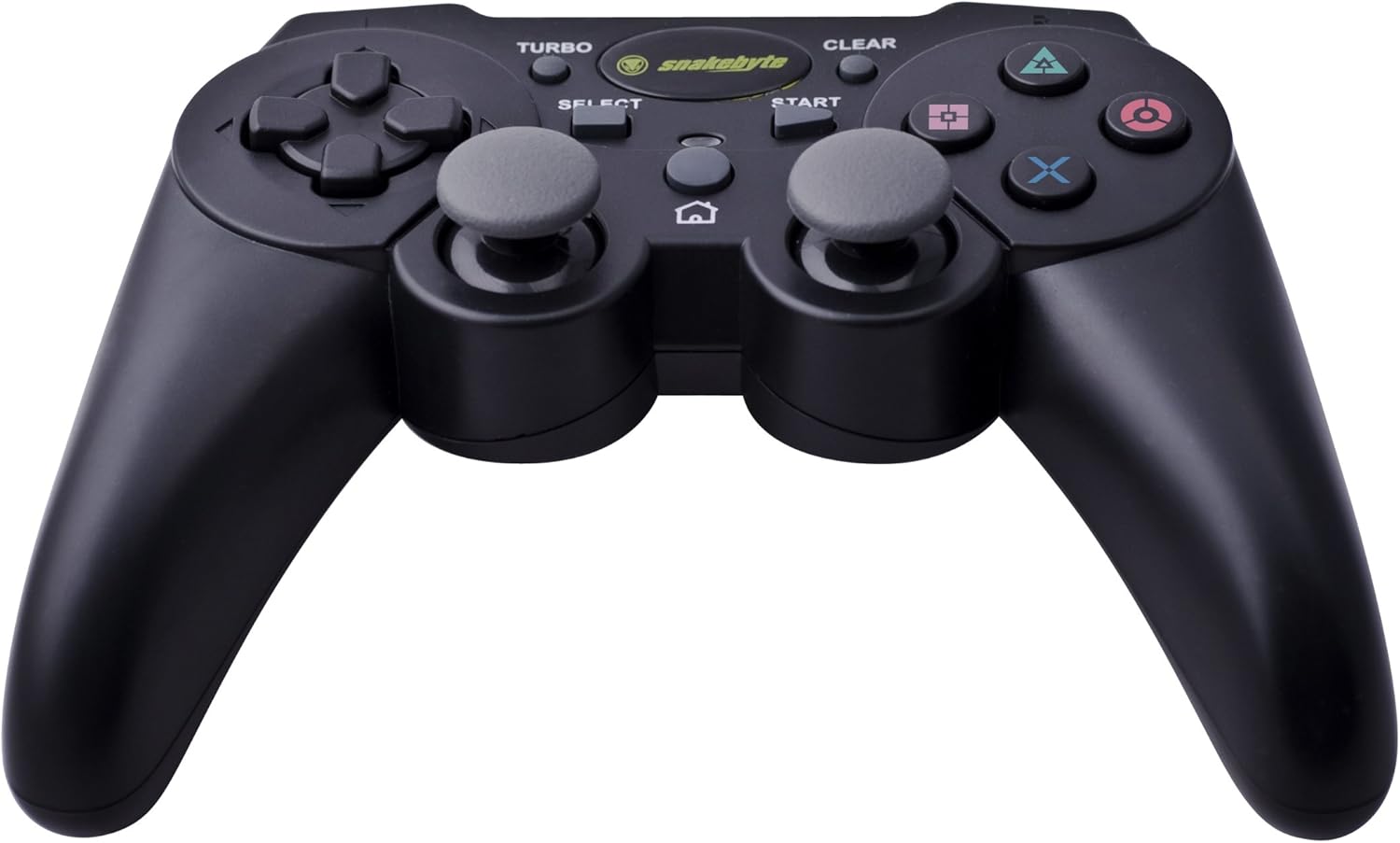
Image: The Snakebyte Wireless Bluetooth Premium PS3 Controller, highlighting the dual analog sticks and various buttons.
- Paadi itọsọna (D-paadi): For precise directional input in games.
- Ọpá Analog Osi: Iṣakoso iṣipopada akọkọ.
- Ọpá Analog Ọtun: Camera control or secondary movement.
- Awọn bọtini iṣe (Igun mẹta, Circle, Cross, Square): Àwọn ìgbésẹ̀ pàtó kan fún eré náà.
- Awọn bọtini L1/R1: Awọn bọtini ejika fun awọn iṣẹ inu-ere oriṣiriṣi.
- L2/R2 Triggers: Analog triggers for pressure-sensitive input, often used for acceleration/braking or aiming/firing.
- Bọtini Ibẹrẹ: Pauses games or opens menus.
- Bọtini Yan: Opens in-game maps, inventories, or other menus.
- Bọtini PS: Powers on the controller, accesses the PS3 XMB (Cross Media Bar) menu, or turns off the controller/console.
- Bọtini TURBO: Activates the turbo function for other buttons.
- Bọtini MO: Deactivates awọn turbo iṣẹ.
Iṣẹ Turbo
The controller features a TURBO function, allowing a selected button to register multiple presses rapidly with a single hold. This can be useful for certain game mechanics.
- To activate TURBO: Press and hold the Bọtini TURBO, then press the desired action button (e.g., Cross, Square, Circle, Triangle, L1, R1, L2, R2). Release both buttons. The selected button will now have the TURBO function enabled.
- To deactivate TURBO for a specific button: Press and hold the KO bọtini, then press the button for which TURBO is currently active. Release both buttons.
- To deactivate all TURBO functions: Press the KO bọtini once without holding it down.
Motion Sensing and Vibration Feedback
This controller supports motion sensing capabilities, allowing for intuitive control in compatible games. It also provides vibration feedback to enhance immersion during gameplay, reacting to in-game events such as impacts or explosions.
Agbara Tan ati Paa
- Lati fi agbara si: Tẹ bọtini naa Bọtini PS.
- To power off: The controller will automatically enter sleep mode after a period of inactivity to conserve battery. Alternatively, you can hold the Bọtini PS for several seconds to bring up the PS3 menu, where you can choose to turn off the controller.
Itoju
- Ninu: Use a soft, dry cloth to clean the controller. Do not use abrasive cleaners or solvents.
- Ibi ipamọ: Tọju olutọju naa ni itura, aye gbigbẹ kuro lati orun taara ati awọn iwọn otutu to gaju.
- Itọju Batiri: Lati pẹ aye batiri, yago fun gbigba agbara ni kikun oludari nigbagbogbo. Gba agbara rẹ nigbagbogbo, paapaa ti kii ṣe ni lilo igbagbogbo.
- Yago fun bibajẹ: Do not drop the controller or expose it to excessive force or moisture.
Laasigbotitusita
| Isoro | Owun to le Solusan |
|---|---|
| Adarí kò sopọ̀ mọ́ alailowaya. |
|
| Awọn bọtini tabi awọn igi afọwọṣe ko dahun. |
|
| Controller does not charge. |
|
Tunto Adarí
If the controller behaves erratically or becomes unresponsive, you can perform a reset. Locate the small reset button on the back of the controller (often in a small hole). Use a thin, pointed object (like a straightened paperclip) to press and hold the reset button for a few seconds. This will restart the controller's internal electronics.
Awọn pato
- Brand: Snakebyte
- Nọmba awoṣe: SB904714
- Platform ibamu: Sony PlayStation 3
- Asopọmọra: Ailokun (Bluetooth)
- Nọmba Awọn bọtini: 16
- Awọn iwọn (L x W x H): Isunmọ 23.01 x 16.31 x 8.51 cm (9.06 x 6.42 x 3.35 inches)
- Ìwúwo: Isunmọ 419.99 g (0.93 lbs)
- Àwọ̀: Dudu
Atilẹyin ọja ati Support
For warranty information and technical support, please refer to the documentation provided with your purchase or contact your retailer. You may also visit the official Snakebyte webAaye fun iranlọwọ siwaju ati alaye ọja.