
Ọrọ Iṣaaju
This manual provides comprehensive instructions for the setup and operation of your RCA RCU704 4-Function Universal Remote Control. This remote is designed to control up to four different audio/video components, simplifying your home entertainment experience.
Alaye Aabo
- Maṣe dapọ atijọ ati awọn batiri titun.
- Maṣe dapọ ipilẹ, boṣewa (carbon-zinc), tabi awọn batiri gbigba agbara (nickel-cadmium).
- Yọ awọn batiri kuro ti isakoṣo latọna jijin kii yoo lo fun igba pipẹ lati ṣe idiwọ jijo.
- Jeki awọn batiri kuro ni arọwọto awọn ọmọde.
Package Awọn akoonu
- RCA RCU704 Universal Remote Control
- Afowoyi Olumulo (iwe-ipamọ yii)
Ọja Pariview
The RCA RCU704 remote control features a straightforward layout for easy operation of your home entertainment devices.
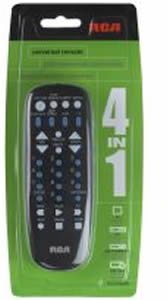
Aworan: Iwaju view of the RCA RCU704 universal remote control, showcasing ipilẹ bọtini rẹ ati apẹrẹ ergonomic.
Key buttons and their functions include:
- AGBARA: Ó máa ń tan tàbí pa ohun èlò tí a yàn.
- TV, VCR, DVD, AUX: Component selection buttons to switch control to the desired device.
- VOL +/-: Ṣe atunṣe ipele iwọn didun.
- CH +/-: Yipada awọn ikanni soke tabi isalẹ.
- DÁKÚN: O da igbejade ohun si ipalọlọ.
- INPUT/VIDEO: Selects the video input source on your TV or other display device.
- NỌ́MBÀ PAD (0-9): Fun titẹsi ikanni taara tabi lilọ kiri akojọ aṣayan.
Ṣeto
1. Fifi sori batiri
- Remove the battery compartment cover located on the back of the remote control.
- Insert two fresh AAA batteries, ensuring that the (+) and (-) terminals align correctly with the markings inside the compartment.
- Rọpo ideri iyẹwu batiri ni aabo.
2. Siseto awọn Remote
There are two primary methods to program your universal remote to control your devices:
Ọ̀nà A: Ìtẹ̀síwájú Kóòdù Taara
- Turn on the component (e.g., TV, DVD player) you wish to control.
- Tẹ mọlẹ IWADII CODE bọ́tìnì náà títí tí ìmọ́lẹ̀ ìtọ́kasí tó wà lórí ọ̀nà jíjìn náà yóò fi tàn.
- Lakoko ti o tẹsiwaju lati dimu IWADII CODE, press and release the component button (e.g., TV, DVD) corresponding to the device you want to program. The indicator light will blink once and then remain steadily on.
- Enter the 4-digit code for your brand from the provided code list (refer to the separate code booklet that came with your remote).
- If the code is valid, the indicator light will turn off. If the code is invalid, the light will flash rapidly.
- Ṣe ìdánwò latọna jijin nipa titẹ titẹ AGBARA button. If the component turns off, try other functions like VOL +/-Tí ó bá ṣiṣẹ́, ètò ìṣiṣẹ́ ti parí.
- If the component does not respond or functions incorrectly, repeat the process with the next code listed for your brand.
Ọ̀nà B: Wíwá Kóòdù Àìfọwọ́ṣe
- Tan apa ti o fẹ ṣakoso.
- Tẹ mọlẹ IWADII CODE bọ́tìnì náà títí tí ìmọ́lẹ̀ ìtọ́kasí tó wà lórí ọ̀nà jíjìn náà yóò fi tàn.
- Lakoko ti o tẹsiwaju lati dimu IWADII CODE, press and release the component button (e.g., TV, DVD) you want to program. The indicator light will blink once and then remain steadily on.
- Tọ́ka sí ẹ̀rọ latọna jijin náà kí o sì tẹ ẹ̀rọ náà léraléra AGBARA bọtini (tabi CH+ for TVs) until the component turns off.
- Once the component turns off, immediately press the WOLE bọ́tìnì láti fi kódù náà pamọ́. Ìmọ́lẹ̀ àmì náà yóò pa.
- Test the remote. If it does not work correctly, repeat the auto code search process.
Ṣiṣẹ Latọna jijin
To operate a component after it has been programmed:
- Press the corresponding component button (TV, VCR, DVD, tabi AUX) to select the device you want to control. The indicator light will flash once to confirm selection.
- Point the remote at the component and press the desired function button (e.g., AGBARA, VOL +/-, + +).
Itoju
- Clean the remote with a soft, dry cloth. Do not use liquid cleaners or abrasive materials.
- Avoid exposing the remote to extreme temperatures, high humidity, or direct sunlight.
- Do not drop the remote or subject it to strong impacts, as this may damage internal components.
Laasigbotitusita
| Isoro | Ojutu |
|---|---|
| Latọna jijin ko ṣiṣẹ paati rẹ. | Ensure batteries are fresh and installed correctly. Reprogram the remote using a different code for your brand or try the auto code search method. Ensure the remote is pointed directly at the component and there are no obstructions. |
| Imọlẹ atọka ko tan. | Check battery installation. Replace batteries if necessary. Ensure the battery compartment cover is closed properly. |
| Some buttons work, but others don't. | The programmed code may only partially match your component. Try programming with a different code for your brand or use the auto code search to find a more compatible code. |
| Latọna jijin padanu siseto. | This is typically due to low batteries. Replace batteries with fresh ones and reprogram the remote. |
Awọn pato
- Awoṣe: RCU704 (RCARC704)
- Awọn iṣẹ: 4 (TV, VCR, DVD, AUX)
- Asopọmọra: Infurarẹẹdi (IR)
- Agbara: Awọn batiri 2 x AAA (kii ṣe pẹlu)
- Ibiti o pọju: 10 Meters (approximately 33 feet)
- Nọmba Awọn bọtini: 4 component selection buttons + various function buttons
- Ìwúwo: Nǹkan bí 2.4 ounces (láìsí àwọn bátírì)
Atilẹyin ọja ati Support
For detailed warranty information or technical support, please refer to the documentation included with your original purchase or visit the official RCA webojula. A gba ọ niyanju lati tọju iwe rira rẹ bi ẹri rira fun awọn ẹtọ atilẹyin ọja.
Note: Specific warranty terms and support contact details may vary by region and retailer.