
1. Ifihan
The Antec TruePower TPQ-1200 is a high-performance 1200-watt power supply designed for demanding computer systems. It features an 80 PLUS Silver certification, indicating high energy efficiency, and provides stable power delivery through its six +12V rails. This manual provides essential information for the safe installation, operation, and maintenance of your TPQ-1200 power supply.
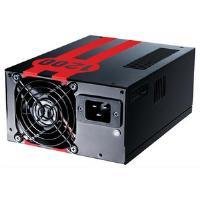
Image 1.1: The Antec TruePower TPQ-1200 Power Supply unit, showcasing its design and modular connectors.
2. Alaye Aabo
Please read and understand all safety instructions before installing or operating the power supply. Failure to do so may result in personal injury or damage to your equipment.
- Máa yọ okùn agbára kúrò nínú ihò ògiri kí o tó fi sori ẹ̀rọ, yọ kúrò, tàbí nu ìpèsè agbára náà.
- A ṣe apẹrẹ ipese agbara yii fun lilo ninu awọn kọnputa ti ara ẹni nikan. Maṣe lo o fun idi miiran.
- Maṣe ṣii ipese agbara casing. Iwọn gigatagÀwọn ẹ̀yà ara wọn wà nínú rẹ̀, kò sì sí àwọn ẹ̀yà ara tí a lè lò láti fi ṣiṣẹ́.asing yoo sọ atilẹyin ọja di ofo.
- Rii daju pe ilẹ ti o yẹ ti eto kọmputa rẹ.
- Avoid operating the power supply in high humidity or extreme temperature environments.
- Keep the power supply away from liquids and sources of heat.
3. Package Awọn akoonu
Jẹrisi pe package rẹ ni awọn nkan wọnyi ninu:
- Antec TruePower TPQ-1200 Power Supply Unit
- Modular Cable Set (PCIe, SATA, Molex, Floppy)
- AC Agbara okun
- Iṣagbesori skru
- Afowoyi Olumulo (iwe-ipamọ yii)
If any items are missing or damaged, please contact your retailer or Antec customer support.
4. Awọn ẹya ara ẹrọ
The Antec TruePower TPQ-1200 power supply offers advanced features for reliable and efficient performance:
- Agbara Itẹsiwaju 1200 Watts: Pese ample power for high-end gaming and workstation systems.
- 80 PLUS Silver Certified: Achieves up to 88% efficiency, reducing heat generation and operating costs.
- Six +12V Rails: Delivers stable and clean power to critical components.
- Advanced Cable Management: Semi-modular design allows for cleaner builds and improved airflow.
- PowerCache High Performance Capacitors: Enhances stability and transient response.
- Ultra-Quiet Pulse Width Modulation (PWM) Fan: Provides efficient cooling with minimal noise.
- Industrial Grade Protection Circuitry: Includes Over Current Protection (OCP), Over Voltage Idaabobo (OVP), Labẹ Voltage Protection (UVP), Short Circuit Protection (SCP), Over Power Protection (OPP), and Over Temperature Protection (OTP).
5. Eto ati fifi sori
Follow these steps carefully to install your Antec TruePower TPQ-1200 power supply.
5.1 Akojọ aṣyn fifi sori ẹrọ tẹlẹ
- Ensure your computer case supports an ATX power supply.
- Kó àwọn irinṣẹ́ pàtàkì jọ: Phillips head screwdriver.
- Unplug your computer from the wall outlet and discharge any residual power by pressing the power button.
5.2 Iṣagbesori Power Ipese
- Carefully place the power supply into the designated PSU bay in your computer case. Ensure the fan is oriented correctly (typically facing down for bottom-mounted PSUs, or according to case design for top-mounted).
- Ṣe àtúnṣe àwọn ihò ìdènà lórí ìpèsè agbára pẹ̀lú àwọn tí ó wà lórí àpótí náà.
- Secure the power supply using the provided mounting screws. Do not overtighten.
5.3 Nsopọ Power Cables
Connect the necessary cables to your motherboard and components. The TPQ-1200 features both fixed and modular cables.
- 24-Pin ATX Motherboard Power: Connect the main 24-pin connector to the corresponding port on your motherboard. Ensure it clicks into place.
- 8-Pin EPS12V (CPU) Power: Connect the 8-pin (or 4+4 pin) EPS12V connector to the CPU power port on your motherboard.
- PCIe (Graphics Card) Power: For graphics cards requiring additional power, connect the appropriate 6-pin or 6+2 pin PCIe modular cables from the power supply to your graphics card(s).
- Agbara SATA: Connect SATA modular cables to your SATA hard drives, SSDs, and optical drives.
- Molex (Peripheral) Power: Use Molex modular cables for older peripherals or case fans that require this connector type.
- Iṣakoso USB: Route cables neatly behind the motherboard tray or in other designated areas of your case to improve airflow and aesthetics.
5.4 Ibẹrẹ Agbara-On
- Rii daju pe gbogbo awọn asopọ wa ni aabo.
- So okun agbara AC pọ si ipese agbara ati lẹhinna si iṣan ogiri ti o wa lori ilẹ.
- Yipada agbara yipada lori ẹhin ipese agbara si ipo 'ON' (I).
- Agbara lori kọmputa rẹ.
6. Awọn ilana Iṣiṣẹ
The Antec TruePower TPQ-1200 is designed for continuous operation within its specified limits. Ensure adequate ventilation around your computer case to prevent overheating. The intelligent PWM fan will adjust its speed based on the power supply's temperature to maintain optimal cooling and noise levels.
Always shut down your computer properly through the operating system before turning off the power supply switch or unplugging the AC cord.
7. Itọju
Itọju deedee n ṣe iranlọwọ lati rii daju pe ipese agbara rẹ pẹ to ati iṣẹ ṣiṣe to dara julọ.
- Pipa eruku: Periodically (e.g., every 6-12 months), disconnect the power supply from the wall outlet and use compressed air to gently clean dust from the fan grille and ventilation openings. Do not open the power supply casing.
- Ayẹwo USB: Occasionally check all power cable connections to ensure they are secure and free from damage.
8. Laasigbotitusita
If you encounter issues with your power supply, refer to the following troubleshooting guide:
| Isoro | Owun to le Fa | Ojutu |
|---|---|---|
| Kọmputa ko ni agbara lori. | AC power cord not connected or loose. Power supply switch is OFF. Faulty power supply. | Ensure AC cord is firmly connected. Flip PSU switch to 'ON' (I). Test with another power supply if possible. |
| Eto naa n tan ṣugbọn o wa ni pipa lẹsẹkẹsẹ. | Overload, short circuit, or overheating. | Check for short circuits (e.g., loose screws). Ensure adequate ventilation. Disconnect non-essential components to check for overload. |
| Àìdúróṣinṣin ètò tàbí àtúnṣe àìròtẹ́lẹ̀. | Insufficient power, faulty component, or power supply issue. | Verify all power connectors are secure. Ensure total system wattage does not exceed PSU capacity. Test components individually if possible. |
| Ariwo alafẹfẹ ariwo lati PSU. | Dust accumulation, fan malfunction, or high load. | Clean dust from the fan grille. If noise persists and is excessive, contact support. |
If troubleshooting steps do not resolve the issue, contact Antec customer support for further assistance.
9. Awọn pato
Detailed technical specifications for the Antec TruePower TPQ-1200 power supply:
- Orukọ awoṣe: TruePower TPQ-1200
- Ijade Wattage: 1200 Wattis
- Okunfa Fọọmu: ATX12V
- Orisi Asopọmọra: ATX
- Iṣiṣẹ: 80 PLUS Silver Certified
- Ọna Itutu: Air (PWM Fan)
- Nọmba Olufẹ: 1
- Awọn ẹrọ ibaramu: Kọmputa ti ara ẹni
- Ìwọ̀n Nkan: 4.96 poun (2.25 kg)
- Awọn iwọn idii: 12.91 x 9.84 x 5.59 inches (32.8 x 25 x 14.2 cm)
- Ọjọ Akọkọ Wa: Oṣu Kẹrin Ọjọ 17, Ọdun 2012
10. Atilẹyin ọja ati Support
Fun alaye atilẹyin ọja ati atilẹyin imọ-ẹrọ, jọwọ tọka si Antec osise webojula tabi kan si wọn onibara iṣẹ taara. Awọn ofin ati ipo atilẹyin ọja le yatọ nipasẹ agbegbe ati ọjọ rira.
Antec Osise Webojula: www.antec.com