
Ọrọ Iṣaaju
O ṣeun fun riraasing the Optimus F-1760 16-inch Wave Oscillating Stand Fan. This manual provides important information regarding the safe operation, assembly, maintenance, and troubleshooting of your fan. Please read these instructions thoroughly before use and retain them for future reference.

Image: The Optimus F-1760 stand fan positioned in a bedroom, showcasing its design and size relative to furniture.
Awọn Itọsọna Aabo pataki
Nigbati o ba nlo awọn ohun elo itanna, awọn iṣọra ipilẹ yẹ ki o tẹle nigbagbogbo lati dinku eewu ina, mọnamọna, ati ipalara si eniyan, pẹlu atẹle naa:
- Ka gbogbo awọn ilana ṣaaju lilo olufẹ yii.
- Use this fan only as described in this manual. Other uses not recommended may cause fire, electric shock, or injury to persons.
- To protect against electrical shock, do not place fan in window, immerse unit, plug or cord in water or spray with liquids.
- Abojuto sunmọ jẹ pataki nigbati eyikeyi ohun elo ba lo nipasẹ tabi sunmọ awọn ọmọde.
- Unplug fan from outlet when not in use, when moving fan from one location to another, and before cleaning.
- Do not operate fan in the presence of explosive and/or flammable fumes.
- Ma ṣe gbe fan tabi awọn ẹya eyikeyi nitosi ina ṣiṣi, sise tabi ohun elo alapapo miiran.
- Do not operate fan with a damaged cord or plug, or after the fan malfunctions or has been dropped or damaged in any manner.
- Yago fun olubasọrọ pẹlu gbigbe awọn ẹya ara.
- Lati ge asopọ, di pulọọgi mu ki o fa lati iṣan ogiri. Maṣe yak lori okun.
- Nigbagbogbo lo lori kan gbẹ, ipele dada.
- Ma ṣe gbele tabi gbe afẹfẹ sori ogiri tabi aja.
- Ma ṣe ṣiṣẹ laisi awọn grills afẹfẹ daradara ni aaye.
- This product employs overload protection (fuse). A blown fuse indicates an overload or short-circuit situation. If the fuse blows, unplug the product from the outlet. Replace the fuse as per the servicing instructions (follow product marking for proper fuse rating) and check the product. If the replacement fuse blows, a short-circuit may be present and the product should be discarded or returned to an authorized service facility for examination and/or repair.
Eto ati Apejọ
The Optimus F-1760 fan requires minimal assembly. Ensure all components are present and undamaged before proceeding.
- Ipilẹ Ipilẹ: Attach the weighted base legs to the main pole. Ensure they are securely fastened to provide stability. The base is designed to be sturdy, with weights at the ends of the feet.
- Atunse Giga: The fan's height can be adjusted. Loosen the height adjustment knob on the pole, extend or retract the pole to the desired height, and then securely tighten the knob.
- Asomọ Ori Fan: Ensure the fan head is securely attached to the top of the pole. The motor housing and fan blade are plastic, while the grill is metal.
- Ibi: Place the fan on a dry, level surface. Ensure there is adequate space around the fan for proper air circulation and oscillation.
Awọn ilana Iṣiṣẹ
The Optimus F-1760 fan offers multiple control options and features for customized comfort.
Ibi iwaju alabujuto
The fan features a 4-position push-button switch on the pole for basic operation.
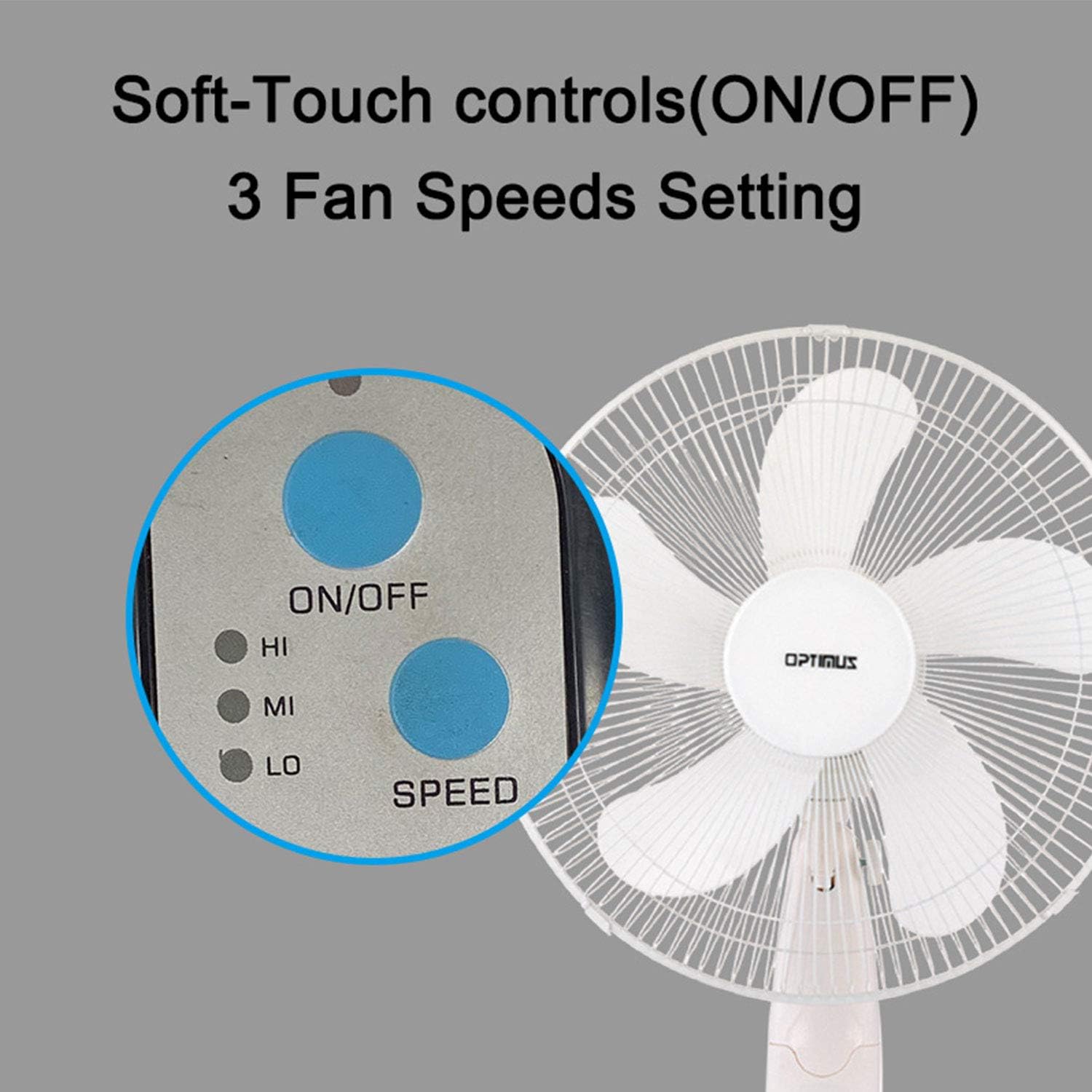
Image: The fan's soft-touch control panel, showing buttons for ON/OFF and SPEED, with indicators for High (HI), Medium (MI), and Low (LO) fan speeds.
- TAN/PA: Tẹ lati tan afẹfẹ tabi pa.
- Eto Iyara: Select from Low, Medium, or High speeds. The 3-speed, energy-saving, whisper-quiet operation motor provides efficient airflow.
Isakoṣo latọna jijin
The fan comes with a remote control for convenient operation from a distance. (Batteries not included).

Image: The remote control for the fan, featuring buttons for Mode, Time, Speed, and ON/OFF functions.
- TAN/PA: Titan afẹfẹ tabi pa.
- Iyara: Cycles through the three fan speeds (Low, Medium, High).
- Ipo: Selects between different wind modes.
- Àkókò: Activates and sets the shut-off timer.
Awọn igbe afẹfẹ
The fan offers three distinct wind modes to suit your preference:

Image: The fan's control panel highlighting the MODE button and indicators for Normal, Natural, and Sleep wind modes.
- Ipo deede: The fan blows at a constant speed based on your selected setting.
- Ipo Adayeba: The fan speed fluctuates to mimic a natural breeze.
- Ipo orun: The fan operates at a lower, quieter speed, ideal for sleeping, with gentle speed variations.
oscillation
The F-1760 features unique wave oscillation for comprehensive air distribution.

Image: A diagram illustrating the fan's capability for both vertical (up/down) and horizontal (left/right) wave oscillation, providing wider air coverage.
- Up/Down & Left/Right Wave Oscillating: Activates a unique oscillation pattern that moves the fan head both horizontally and vertically, distributing air throughout the room.
- To stop oscillation, press the oscillation button again.
Aago Išė
Ṣeto olufẹ lati pa a laifọwọyi lẹhin akoko kan pato.

Image: The fan's control panel showing the TIME button and indicators for 1 hour (1H), 2 hours (2H), and 4 hours (4H) timer settings. The fan can be programmed for up to 7 hours.
- The timer can be set for 1, 2, 4, or up to 7 hours. Press the TIME button repeatedly to cycle through the desired duration.
Itọju ati Cleaning
Ṣiṣe mimọ nigbagbogbo ṣe iranlọwọ lati ṣetọju iṣẹ alafẹfẹ ati fa igbesi aye rẹ pọ si.
- Ṣaaju ki o to sọ di mimọ: Yọọ afẹfẹ nigbagbogbo kuro ninu iṣan itanna ṣaaju ṣiṣe mimọ.
- Ode Ninu: Lo asọ, damp asọ lati mu ese awọn ita ita ti awọn àìpẹ. Ma ṣe lo abrasive ose tabi epo.
- Grill Cleaning: The metal grill can be cleaned with a soft brush or vacuum cleaner to remove dust. For thorough cleaning, the grill may need to be carefully removed.
- Isọfọ abẹfẹlẹ: If necessary, the fan blades can be cleaned. Ensure the fan is completely off and unplugged. The care instructions specify "Hand Wash" for components.
- Ibi ipamọ: Nigbati o ko ba wa ni lilo fun awọn akoko ti o gbooro sii, tọju afẹfẹ naa ni itura, aye gbigbẹ, ni pataki ninu apoti atilẹba rẹ.
Laasigbotitusita
| Isoro | Owun to le Fa | Ojutu |
|---|---|---|
| Fan ko ni tan-an. | No power supply. Blown fuse. | Ensure the fan is plugged into a working outlet. Check the fuse in the plug and replace if necessary (refer to safety instructions for fuse replacement). |
| Fan operates but air movement is weak. | Low speed setting. Dust accumulation on blades/grill. | Increase the fan speed. Clean the fan blades and grills as per maintenance instructions. |
| Isakoṣo latọna jijin ko ṣiṣẹ. | Dead batteries. Obstruction between remote and fan. | Replace batteries in the remote control. Ensure a clear line of sight between the remote and the fan's receiver. |
| Fan changes speed automatically or unexpectedly. | Interference from other remote controls (e.g., TV remote). | This fan may respond to frequencies from other remote controls. Try operating the fan manually or repositioning the fan/other devices to minimize interference. |
| Fan makes clicking noises during oscillation. | Normal operation of oscillation gears. | A slight clicking noise from the oscillation gears can occur during normal operation. If the noise is excessive or new, ensure the fan head is securely attached. |
| Fan feels unstable. | Base not properly assembled or tightened. Uneven surface. | Ensure all base components are securely fastened and the fan is placed on a firm, level surface. |
Awọn pato
- Orukọ awoṣe: F-1760
- Brand: Optimus
- Opin Fan: 16 inches
- Apẹrẹ Fan elekitiriki: Fan Fan
- Orisun Agbara: Okun Itanna
- Wattage: 60 watt
- Voltage: 6 Volts
- Nọmba ti Awọn abẹfẹlẹ: 3
- Eto Iyara: 3 RPM (Low, Medium, High)
- Ọna Iṣakoso: Remote, Push Button
- Awọn ẹya pataki: Up/Down & Left/Right Wave Oscillating, Adjustable Height, Timer Function (up to 7 hours), Wind Modes (Normal, Natural, Sleep)
- Lilo inu ile/ita gbangba: Ninu ile
- Ìwọ̀n Nkan: 9.9 iwon
- Awọn eroja to wa: Product, Manual
Alaye atilẹyin ọja
This Optimus F-1760 fan comes with a 1-odun lopin atilẹyin ọja from the date of purchase. This warranty covers defects in materials and workmanship under normal use. It does not cover damage resulting from misuse, accident, alteration, or unauthorized repair. Please retain your proof of purchase for warranty claims.
Onibara Support
For technical assistance, warranty claims, or questions regarding your Optimus F-1760 fan, please contact Optimus customer service. Refer to the product packaging or the official Optimus webojula fun awọn julọ lọwọlọwọ alaye olubasọrọ.