
Ọrọ Iṣaaju
This manual provides detailed instructions for the operation and maintenance of your Calypso K5558/2 Digital Quartz Watch. Please read this manual thoroughly to ensure proper use and to maximize the lifespan of your watch. This watch features a digital display, backlight, stopwatch, intermediate times, and an alarm function, all housed in a durable plastic case with a multicolored rubber strap.
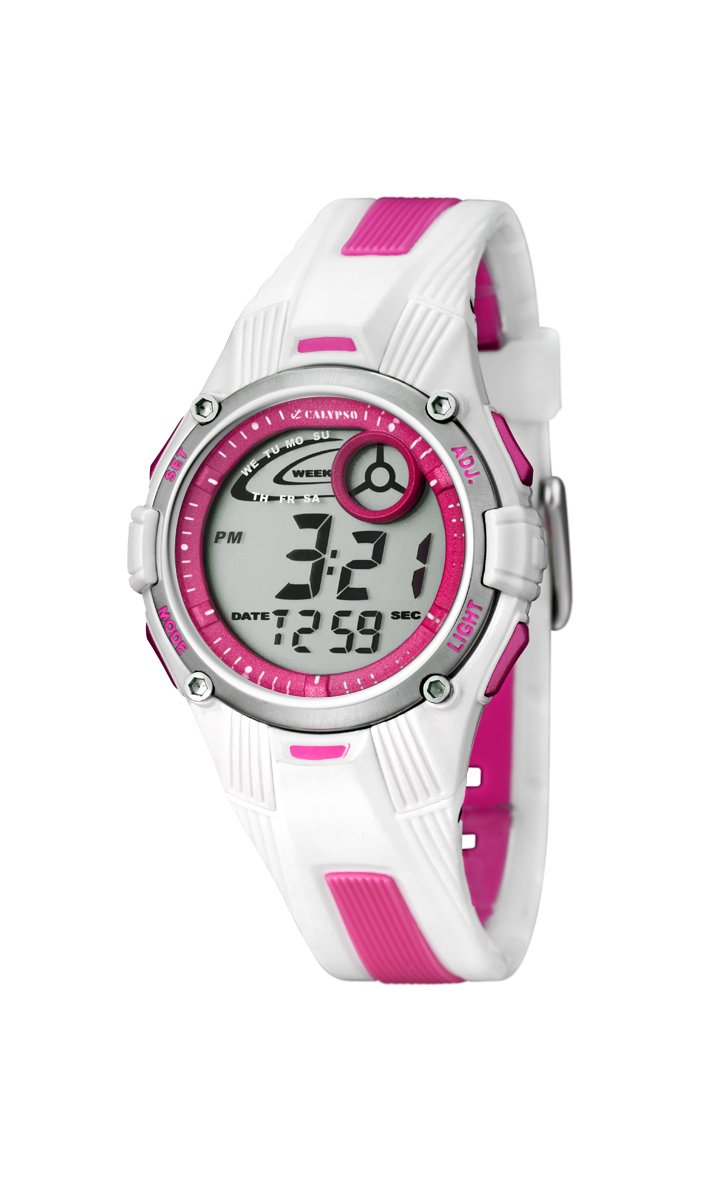
Aworan: Iwaju view of the Calypso K5558/2 Digital Quartz Watch. This image shows the watch's digital display and the overall design.
Ṣeto
Ibẹrẹ Ibẹrẹ
Your Calypso K5558/2 watch comes with a battery pre-installed. If the display is not active, gently press any button to activate it. If the watch remains inactive, the battery may need to be replaced (refer to the Maintenance section).
Eto Aago ati Ọjọ
- Tẹ Ipo Eto: Tẹ mọlẹ MODE button (usually located on the bottom left) until the seconds start flashing.
- Ṣatunṣe Awọn iṣẹju-aaya: Tẹ awọn Tunto button (usually top right) to reset the seconds to zero.
- Yan Ohun Tó Tẹ̀lé: Tẹ awọn MODE button again to move to the next setting item (e.g., hours, minutes, month, date, day).
- Ṣatunṣe iye: Lo awọn BERE button (usually top left) to increase the value of the flashing item.
- Jẹrisi Eto: Tesiwaju titẹ MODE to cycle through all settings. Once all adjustments are made, press MODE ìgbà ìkẹyìn láti jáde kúrò ní ipò ìṣètò.

Aworan: Angled view of the Calypso K5558/2 Digital Quartz Watch, showing the watch face and side buttons.
Awọn ilana Iṣiṣẹ
Àwọn Ìpo Ìfihàn Àkókò
Tẹ awọn MODE button to cycle through different display modes: Time, Stopwatch, and Alarm.
Lilo Imọlẹ-ẹhin
Lati tan imọlẹ ifihan ni awọn ipo ina kekere, tẹ awọn Imọlẹ button (usually located on the top right). The backlight will remain active for a few seconds.
Stopwatch Function (Chronometer and Intermediate Times)
- Tẹ Ipo aago iṣẹju-aaya: Tẹ awọn MODE button until "00:00:00" appears on the display.
- Bẹrẹ/Duro: Tẹ awọn BERE bọ́tìnì láti bẹ̀rẹ̀ àkókò. Tẹ̀ ẹ́ lẹ́ẹ̀kan síi láti dákẹ́.
- Àkókò ẹsẹ̀/Pípín: Lakoko aago iṣẹju-aaya ti n ṣiṣẹ, tẹ bọtini naa Tunto button to record an intermediate (lap/split) time. The display will show the lap time for a few seconds before returning to the running total.
- Tun: When the stopwatch is paused, press the Tunto button to clear the time to "00:00:00".
Eto ati Lilo Itaniji
- Tẹ Ipo Itaniji sii: Tẹ awọn MODE button until the alarm time is displayed (e.g., "AL").
- Ṣeto Aago Itaniji: Tẹ mọlẹ Tunto button until the alarm hours start flashing. Use the BERE bọtini lati ṣatunṣe awọn wakati. Tẹ MODE to move to minutes and adjust with BERE.
- Mu Itaniji ṣiṣẹ/Muu ṣiṣẹ: Ni ipo itaniji, tẹ bọtini naa BERE button to toggle the alarm ON/OFF. An alarm icon (e.g., a bell) will appear on the display when activated.
- Dá Ohùn Àkíyèsí dúró: Nigbati itaniji ba dun, tẹ bọtini eyikeyi lati da duro.
Omi Resistance
This watch is water-resistant up to 100 meters (10 ATM). This means it is suitable for swimming and snorkeling. Ma ṣe tẹ awọn bọtini eyikeyi nigba ti aago ba wa ni inu omi. Yẹra fún fífi aago náà sí omi gbígbóná tàbí èéfín, nítorí èyí lè ba àwọn èdìdì ìdènà omi jẹ́.
Itoju
Ninu Rẹ Watch
Nu apoti aago ati okun nigbagbogbo pẹlu asọ, damp cloth. For stubborn dirt, a mild soap solution can be used, followed by rinsing with clean water and drying thoroughly. Avoid using harsh chemicals or abrasive cleaners, as these can damage the watch materials.
Itọju okun
The rubber strap may show signs of discoloration over time, especially lighter colors, due to exposure to dirt, sweat, and UV light. Regular cleaning can help mitigate this. If discoloration becomes significant or the strap shows signs of wear, consider replacing it with an official Calypso replacement strap.
Batiri Rirọpo
When the display becomes dim or the watch stops functioning, the battery may need replacement. This watch uses a "C" type battery. Battery replacement should ideally be performed by a qualified watch technician to ensure proper sealing and maintain water resistance. Attempting to replace the battery yourself may void any implied warranty and compromise the watch's water resistance.
Laasigbotitusita
| Isoro | Owun to le Fa | Ojutu |
|---|---|---|
| Ifihan ti ṣofo tabi baibai. | Batiri kekere tabi dinku. | Replace the battery (refer to Maintenance section). |
| Awọn bọtini ko dahun. | Aago naa le wa ni ipo titiipa tabi iṣẹ ṣiṣe ti inu. | Try pressing all buttons firmly. If issue persists, consult a technician. |
| Akoko ko pe. | Eto akoko ti ko tọ tabi batiri kekere. | Reset the time (refer to Setup section). If problem continues, replace battery. |
| Omi inu aago. | Water resistance compromised (e.g., buttons pressed underwater, seals damaged). | Lẹsẹkẹsẹ mu aago naa lọ si ọdọ onimọ-ẹrọ ti o peye fun ayewo ati atunṣe. Maṣe gbiyanju lati gbẹ funrararẹ. |
Awọn pato
- Nọmba awoṣe: K5558/2
- Iru ifihan: Oni-nọmba
- Iru gbigbe: Kuotisi
- Ohun elo ọran: Ṣiṣu
- Ohun elo okun: Rubber (Multicolored)
- Opin Ọran: 36 millimeters
- Sisanra Ọran: 10 millimeters
- Ijinle Atako Omi: 100 Mita (ATM 10)
- Awọn ẹya pataki: Alarm, Stopwatch, Backlight, Intermediate Times
- Irú Àkọ́kọ́: Idinku
- Orisun Agbara: Agbara Batiri (Batiri 1C wa ninu rẹ)
- Ìwọ̀n Nkan: 34 giramu
Atilẹyin ọja ati Support
Atilẹyin ọja: This product is sold without a manufacturer's warranty ("Pas de garantie"). Please refer to your retailer's return policy for any initial defects.
Atilẹyin: For further assistance or inquiries regarding your Calypso K5558/2 watch, please contact your point of purchase or visit the official Calypso webojula fun onibara iṣẹ alaye.