
1. Ti pariview
The Casio AE1000W Digital Watch is designed for durability and functionality, offering a range of features suitable for daily wear and travel. This manual will guide you through its various functions and ensure optimal use.
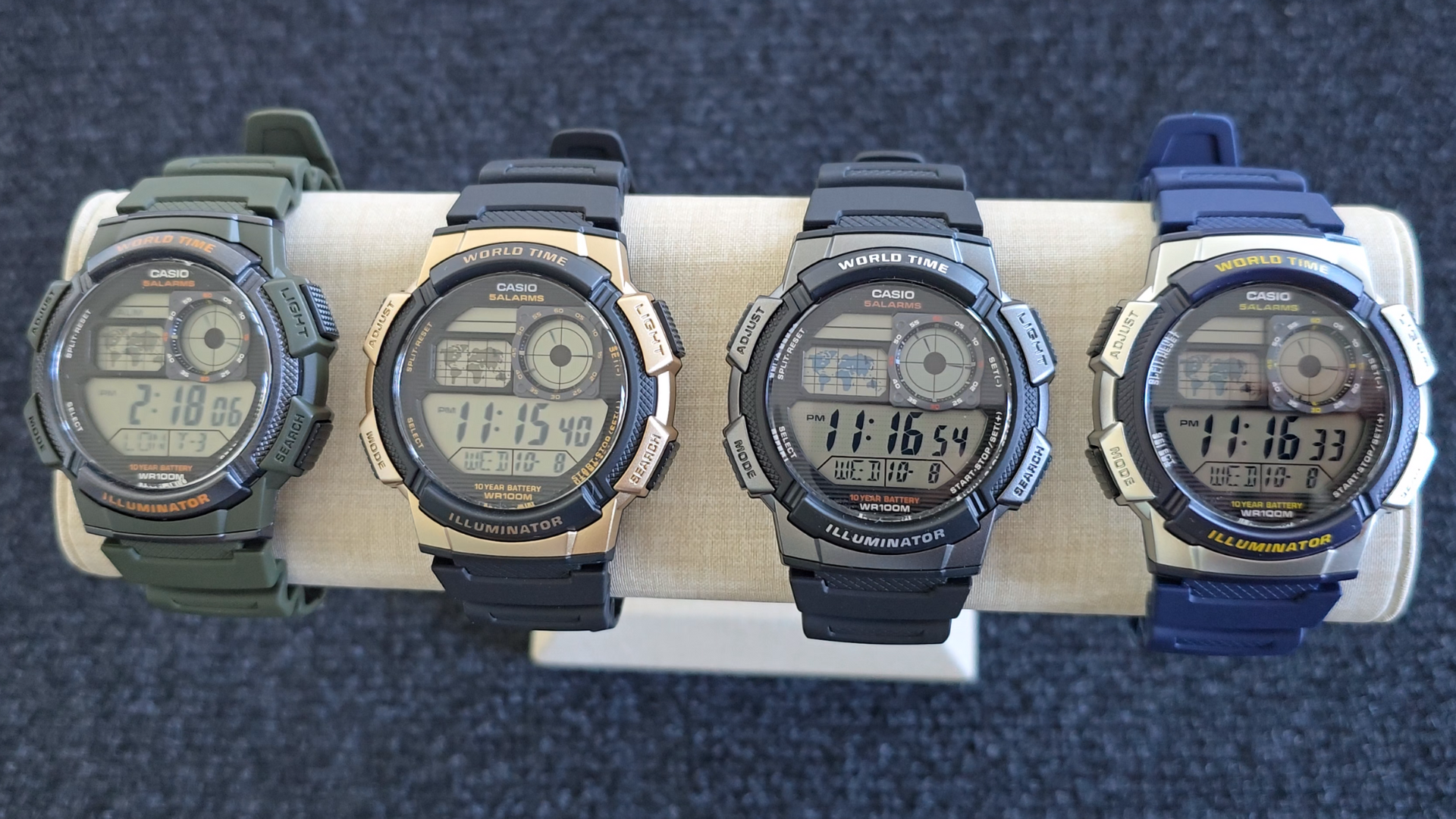
Image: Casio AE1000W Digital Watch series in various color options.
2. Key Awọn ẹya ara ẹrọ
- Àkókò Àgbáyé: Displays current time in 48 cities (31 time zones) with a world map indicator.
- Multi Alarms: Features five independent daily alarms.
- Aago iṣẹju-aaya: 1/100-second stopwatch with measuring modes: elapsed time, split time, 1st-2nd place times.
- Aago kika: Measuring unit: 1 second, Countdown range: 24 hours.
- Imọlẹ LED: Illuminates the watch face for easy reading in low light conditions.
- Omi Resistance: 100 meters (330 feet) suitable for swimming and snorkeling.
- Igbesi aye batiri Ọdun 10: Batiri pipẹ fun lilo gbooro sii.
- Iyika Quartz: Ṣe idaniloju ṣiṣe deede akoko.
- Glass Crystal: Durable watch face protection.

Image: Emblem highlighting the 10-year battery life feature.
3. Eto
3.1 Aago Ibẹrẹ ati Eto Ọjọ
- Ni Ipo Itọju akoko, tẹ mọlẹ ṢAtunṣe button until the city code starts to flash.
- Lo awọn WÁ ati MODE buttons to select your desired city code (Home City).
- Tẹ awọn ṢAtunṣe button to move to the DST (Daylight Saving Time) setting. Use WÁ to toggle DST On/Off.
- Tẹ ṢAtunṣe again to cycle through the settings: 12/24-hour format, Seconds, Hour, Minute, Year, Month, Day. Use WÁ ati MODE lati yi awọn iye.
- Ni kete ti gbogbo eto ba tọ, tẹ bọtini naa ṢAtunṣe bọtini lati jade ni ipo eto.
4. Awọn ilana Iṣiṣẹ
4.1 Ipo Lilọ kiri
Tẹ awọn MODE button to cycle through the different modes: Timekeeping, World Time, Alarm, Stopwatch, and Countdown Timer.
4.2 World Time Function
In World Time Mode, the watch displays the current time in 48 cities across 31 time zones. The world map indicator visually highlights the selected time zone.
- Enter World Time Mode by pressing the MODE bọtini.
- Lo awọn WÁ button to scroll through the different city codes. The time for the selected city will be displayed, and the corresponding area on the world map will be highlighted.
- To swap your Home City time with a World Time City, press and hold the ṢAtunṣe bọtini nigba ti o wa ni Ipo Akoko Agbaye.
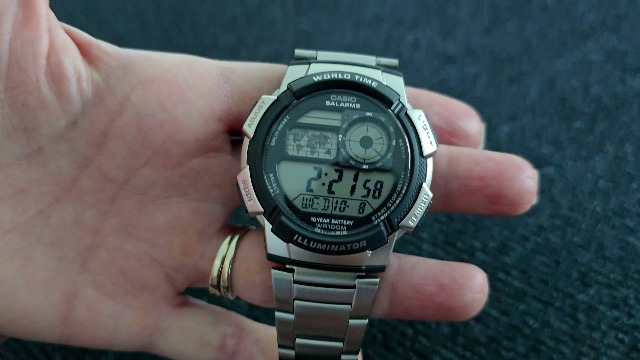
Aworan: Iwaju view of the Casio AE1000W watch, showing the digital display and world map.
4.3 Awọn itaniji
The watch features five daily alarms. You can set each alarm independently.
- Tẹ Ipo itaniji sii nipa titẹ awọn MODE button until "ALM" appears.
- Lo awọn WÁ button to cycle through the five alarms (AL1 to AL5) and the Hourly Ifihan akoko (SIG).
- To set an alarm, select the desired alarm (e.g., AL1) and press and hold the ṢAtunṣe bọtini titi ti wakati awọn nọmba filasi.
- Lo WÁ ati MODE lati ṣeto wakati ati iṣẹju.
- Tẹ ṢAtunṣe lati jẹrisi ati jade.
- To turn an alarm On/Off, select the alarm and press the ṢAtunṣe bọtini ni soki.
4.4 Aago iṣẹju-aaya
The stopwatch measures elapsed time, split times, and 1st-2nd place times.
- Tẹ Ipo aago iṣẹju-aaya nipa titẹ awọn MODE button until "STW" appears.
- Tẹ START/STOP/SET(+) lati bẹrẹ ati da aago iṣẹju-aaya duro.
- Tẹ PIPIN/TUNTUN to record split times or reset the stopwatch to zero.
4.5 Aago kika
Aago kika le ṣee ṣeto fun wakati 24.
- Tẹ Ipo Aago Kika sii nipa titẹ awọn MODE button until "TMR" appears.
- Láti ṣètò àkókò kíkà, tẹ kí o sì di mọ́lẹ̀ ṢAtunṣe bọtini titi ti wakati awọn nọmba filasi.
- Lo WÁ ati MODE lati ṣeto wakati ati iṣẹju.
- Tẹ ṢAtunṣe lati jẹrisi.
- Tẹ START/STOP/SET(+) to start and stop the countdown.
4.6 LED Backlight
Tẹ awọn Imọlẹ button to illuminate the watch face for a few seconds, making it easy to read in the dark.
5. Itọju
- Ninu: Wipe the watch with a soft, dry cloth. For water-resistant models, you can rinse it with fresh water after exposure to saltwater.
- Omi Resistance: While water-resistant to 100M, avoid operating buttons underwater to prevent water ingress.
- Batiri: The watch features a 10-year battery. When the display becomes dim or functions become erratic, it may be time for a battery replacement by a qualified technician.
- Iwọn otutu: Yago fun ṣiṣafihan aago si awọn iwọn otutu to gaju, imọlẹ orun taara fun awọn akoko gigun, tabi awọn aaye oofa to lagbara.
6. Laasigbotitusita
- Akoko ti ko tọ: Ensure your Home City is correctly set and Daylight Saving Time (DST) is adjusted as needed. Refer to Section 3.1.
- Awọn bọtini Ko Dahun: Check if the watch is in a specific setting mode. Exit any setting mode by pressing the ṢAtunṣe button. If the issue persists, a full reset may be required (refer to the full Casio manual for advanced reset procedures).
- Display is Dim: This may indicate a low battery. While rated for 10 years, environmental factors can affect battery life. Consider professional battery replacement.
7. Awọn pato
| Ẹya ara ẹrọ | Ẹ̀kúnrẹ́rẹ́ |
|---|---|
| Brand | Casio |
| Nọmba awoṣe | AE-1000W-1BVCF |
| Ọja Mefa | 2.4 x 4.09 x 3.78 inches |
| Iwọn Nkan | 1.41 iwon |
| Ohun elo | Resini |
| Awọn batiri | 1 Batiri Litiumu Irin (pẹlu) |
| Omi Resistance | 100 Mita (330 Ẹsẹ) |
| Gbigbe | Kuotisi |
| Ifihan Iru | Digital with LC Analog Display |
8. Atilẹyin ọja ati Support
Fun alaye atilẹyin ọja ati atilẹyin alabara, jọwọ tọka si Casio osise webojula tabi kan si wọn onibara iṣẹ taara. Tọju iwe-ẹri rira rẹ bi ẹri rira fun awọn iṣeduro atilẹyin ọja.
Atilẹyin Ayelujara: Ṣabẹwo si Casio Support Webojula for FAQs, manuals, and service center locations.