
1. Ifihan
This manual provides essential instructions for the safe and effective use of your Leica V-LUX 20 digital camera. Please read it thoroughly before operating the camera and keep it for future reference. The Leica V-LUX 20 is a 12.1-megapixel digital camera featuring a 12x optical zoom lens and a 3.0-inch LCD, designed for high-quality photography and HD video recording.
2. Alaye Aabo
- Aabo Batiri: Use only the specified Lithium-Ion battery and charger. Do not expose batteries to excessive heat, direct sunlight, or dispose of them in fire. Keep batteries out of reach of children.
- Omi Resistance: Kamẹra yii jẹ kii ṣe water resistant. Avoid exposure to water or high humidity.
- Itọju lẹnsi: Do not touch the lens surface directly. Clean with a soft, lint-free cloth designed for optical lenses.
- Ayika Ṣiṣẹ: Avoid using the camera in extreme temperatures, dusty environments, or near strong magnetic fields.
- Disas Karo: Ma ṣe gbiyanju lati tu tabi yi kamẹra pada. Tọkasi gbogbo iṣẹ si oṣiṣẹ oṣiṣẹ.
3. Bibẹrẹ ati Eto
3.1. Ngba agbara si Batiri naa
Insert the Lithium-Ion battery into the supplied charger and connect the charger to a power outlet. The charging indicator will show the charging status. Ensure the battery is fully charged before first use.
3.2. Fifi kaadi iranti sii
The camera supports SD, SDHC, and SDXC memory cards. Open the battery/card compartment cover. Insert the memory card into the slot with the contacts facing the correct direction until it clicks into place. Close the cover securely.
Note: A memory card is not included with the camera and must be purchased separately.
3.3. Agbara akọkọ Tan ati Eto
Slide the ON/OFF switch to the ON position. Upon first power-on, you may be prompted to set the language, date, and time. Follow the on-screen instructions using the directional pad and MENU/SET button.

Aworan: Oke view of the Leica V-LUX 20 camera. This image displays the camera's top panel, highlighting the ON/OFF slide switch on the right, the shutter button, and the mode dial with various shooting options like P, A, S, M, SCN, MS1, MS2, and CUST. The zoom lever (W/T) is integrated around the shutter button.
4. Ṣiṣẹ kamẹra
4.1. Awọn iṣakoso kamẹra ti pariview
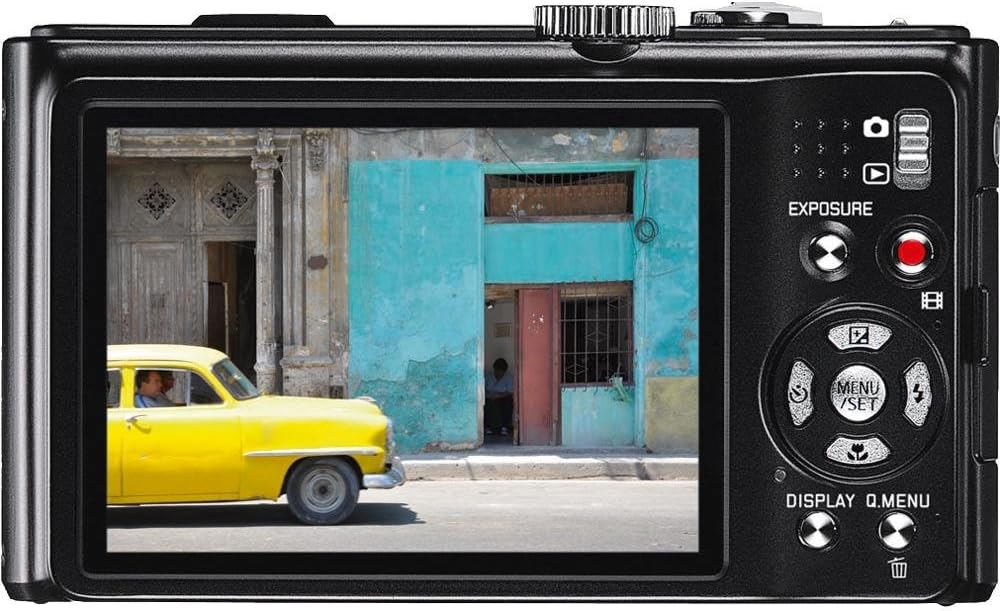
Aworan: Ẹyìn view of the Leica V-LUX 20 camera. This image shows the 3.0-inch LCD screen, the exposure compensation button, the dedicated video record button, and the directional pad with MENU/SET, DISPLAY, and Q.MENU functions. The zoom controls are also visible on the right side of the screen.
Mọ ara rẹ pẹlu awọn iṣakoso akọkọ:
- ON/PA Yipada: Located on the top panel, used to power the camera on or off.
- Bọtini Yiyọ: Tẹ ni agbedemeji si idojukọ, ni kikun lati ya aworan kan.
- Lefa Sún (W/T): Surrounds the shutter button, used to adjust the 12x optical zoom (W for wide, T for telephoto).
- Ṣiṣe ipe ipo: Selects various shooting modes (Program, Aperture Priority, Shutter Priority, Manual, Scene, Custom).
- MENU/SET Button: Accesses the camera's menu system and confirms selections.
- Paadi itọsọna: Navigates through menus and settings. Also controls flash, self-timer, and exposure compensation in shooting mode.
- DISPLAY/Q.MENU Button: Toggles display information or accesses the Quick Menu for common settings.
- Bọtini Gbigbasilẹ fidio: Dedicated button for starting and stopping video recording.
4.2. Autofocus and Exposure
The camera features automatic exposure control and various autofocus modes including Multi, Center-weighted, and Spot metering. The autofocus system uses TTL (Through-The-Lens) detection with 11 autofocus points. For optimal focus, press the shutter button halfway until the focus indicator appears.
4.3. Awọn ọna Filaṣi
The built-in flash offers several modes, including Auto and scene-specific flash modes. Access flash settings via the directional pad or Quick Menu to select the appropriate mode for your lighting conditions.
5. Awọn ọna iyaworan
The mode dial on the top of the camera allows you to select different shooting modes:
- Ipo Aifọwọyi: The camera automatically sets all parameters for optimal results.
- Eto AE (P): The camera sets aperture and shutter speed, but you can adjust other settings.
- Itoju Iho AE (A): O ṣeto iho, ati kamẹra ṣeto iyara oju.
- Shutter Priority AE (S): O ṣeto iyara oju, kamẹra naa si ṣeto iho.
- Ifihan Afọwọṣe (M): O ṣakoso mejeeji iho ati iyara oju.
- Awọn ipo Iwoye (SCN): Pre-set modes for specific situations (e.g., Portrait, Landscape, Sports) to optimize settings automatically.
- Custom Modes (CUST, MS1, MS2): Allows you to save and quickly recall your preferred camera settings.
The camera captures images at 12.1 megapixels and supports JPEG file format. Optical Image Stabilization helps reduce blur from camera shake.
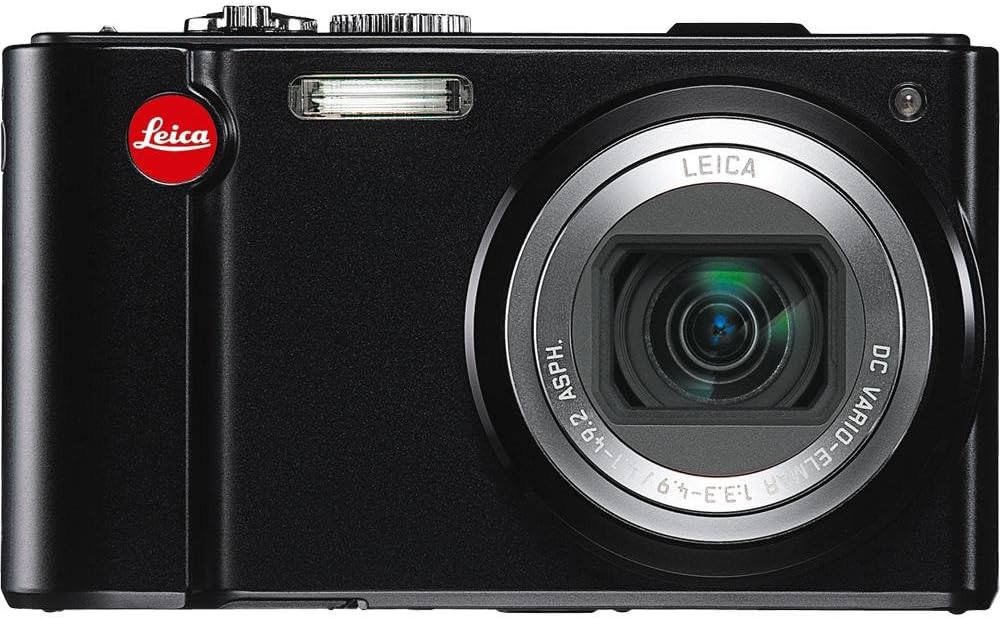
Aworan: Iwaju view of the Leica V-LUX 20 camera. This image showcases the camera's 12x Leica DC Vario-Elmar optical zoom lens, the built-in flash, and the Leica branding. The lens is shown in an extended position, indicating its zoom capability.
6. Gbigbasilẹ fidio
The Leica V-LUX 20 can record high-definition video. To start recording, press the dedicated red video record button on the back of the camera. Press it again to stop recording.
- Ipinnu fidio: Supports 720p HD video at 60 frames per second (1280 x 720), as well as lower resolutions like 848 x 480 (30 fps), 640 x 480 (30fps), and 320 x 240 (30 fps).
- Zoom during Video: The 12x optical zoom can be used while recording video.
- File Ilana: Videos are saved in MJPEG format.
7. Sisisẹsẹhin
Si view your photos and videos, slide the power switch to the 'Play' position (or press the playback button if available, though the review mentions a slide switch for viewing stored pictures). Use the directional pad to navigate through your captured media. You can zoom in on photos or play videos using the controls.
8. Nsopọ si Awọn ẹrọ miiran
8.1. USB Asopọ
Connect the camera to a computer using a USB cable (not included) to transfer photos and videos. The camera is compatible with USB 2.0 devices. Your computer will recognize the camera as a removable storage device.
8.2. HDMI o wu
Use an HDMI cable (not included) to connect the camera to an HDTV or monitor for viewing your media on a larger screen. The camera features a built-in HDMI port.
9. Itọju ati Itọju
- Ninu ara Kamẹra: Wipe the camera body with a soft, dry cloth. For stubborn dirt, use a slightly damp asọ ati lẹhinna gbẹ daradara.
- Fifọ lẹnsi naa: Use a lens brush to remove dust, then gently wipe with a lens cleaning cloth. Avoid using abrasive materials.
- Ninu iboju LCD: Lo aṣọ rírọrùn tí ó gbẹ. Fún àwọn ohun ìdọ̀tí, lo ohun ìfọmọ́ ìbòjú tí a ṣe pàtó fún àwọn LCD.
- Ipamọ Batiri: Tí o bá ń tọ́jú kámẹ́rà fún ìgbà pípẹ́, yọ bátírì náà kúrò. Tọ́jú bátírì náà sí ibi tí ó tutù tí ó sì gbẹ.
- Ibi ipamọ: Tọju kamẹra naa ni agbegbe gbigbẹ, agbegbe ti o ni afẹfẹ daradara, kuro lati oorun taara ati awọn iwọn otutu to gaju.
10. Laasigbotitusita
| Isoro | Owun to le Fa / Solusan |
|---|---|
| Kamẹra ko ṣiṣẹ. | Battery may be depleted. Recharge the battery. Ensure the battery is inserted correctly. |
| Ko le ya awọn aworan. | Memory card may be full or not inserted correctly. Check card status or replace. Battery may be low. |
| Awọn aworan jẹ blurry. | Ensure optical image stabilization is active. Check focus. Use a faster shutter speed in low light. |
| Filaṣi ko ina. | Flash mode may be set to 'Off' or 'Red-eye Reduction' (which delays firing). Check flash settings. |
| Ko le sopọ si kọmputa. | Ensure USB cable is securely connected. Check computer's USB port. Try a different USB cable. |
11. Awọn pato
- Orukọ awoṣe: V-LUX 20
- Ipinnu sensọ Fọto: 12.1 MP
- Orisi sensọ: CCD (1/2.33 inches)
- Sun-un Optical: 12x
- Lẹnsi: Leica DC Vario-Elmar 1:3.3-4.9 / 4.1-49.2mm ASPH (25-300mm equivalent in 35mm format)
- Iduroṣinṣin aworan: Opitika
- Iwọn iboju: 3.0 Inches LCD (460,800 dots)
- Atilẹyin File Awọn ọna kika: JPEG (Stills), MJPEG (Video)
- Ipinnu fidio: Up to 1280 x 720 (60 fps)
- Media Ibi ipamọ: SD/SDHC/SDXC cards
- Asopọmọra: HDMI, USB 2.0
- Iru Batiri: Litiumu Iwon
- Ìwọ̀n Nkan: 7.68 iwon
- Awọn ẹya pataki: GPS module for geographical data registration.
12. Atilẹyin ọja ati Support
For warranty information and technical support, please refer to the documentation provided at the time of purchase or visit the official Leica website. Contact Leica customer service for assistance with product issues or repairs.


