
Ọrọ Iṣaaju
O ṣeun fun riraasing the SENTRY CL933 Big Screen Weather Alarm Clock. This device combines a digital alarm clock with a large LCD display, providing essential information such as time, date, indoor temperature, humidity, and a weather forecast. This manual will guide you through the setup, operation, and maintenance of your new alarm clock.
Alaye Aabo
- Má ṣe fi ẹ̀rọ náà sí ojú ọjọ́ tí ó le koko, oòrùn tààrà, tàbí ọriniinitutu gíga.
- Yago fun gbigbe silẹ tabi tẹriba ẹyọ si awọn ipa to lagbara.
- Maṣe dapọ atijọ ati awọn batiri titun, tabi awọn oriṣiriṣi awọn batiri.
- Yọ awọn batiri kuro ti ẹrọ naa ko ba ni lo fun akoko ti o gbooro sii.
- Sọ ẹyọ kuro pẹlu asọ ti o gbẹ. Ma ṣe lo abrasive ose tabi epo.
- Ọja yii wa fun lilo inu ile nikan.
Package Awọn akoonu
Jọwọ ṣayẹwo pe gbogbo awọn nkan wa:
- SENTRY CL933 Big Screen Weather Alarm Clock
- Afowoyi Olumulo (iwe-ipamọ yii)
Ọja Pariview
The SENTRY CL933 features a large, easy-to-read LCD display and intuitive controls. Familiarize yourself with the main components:
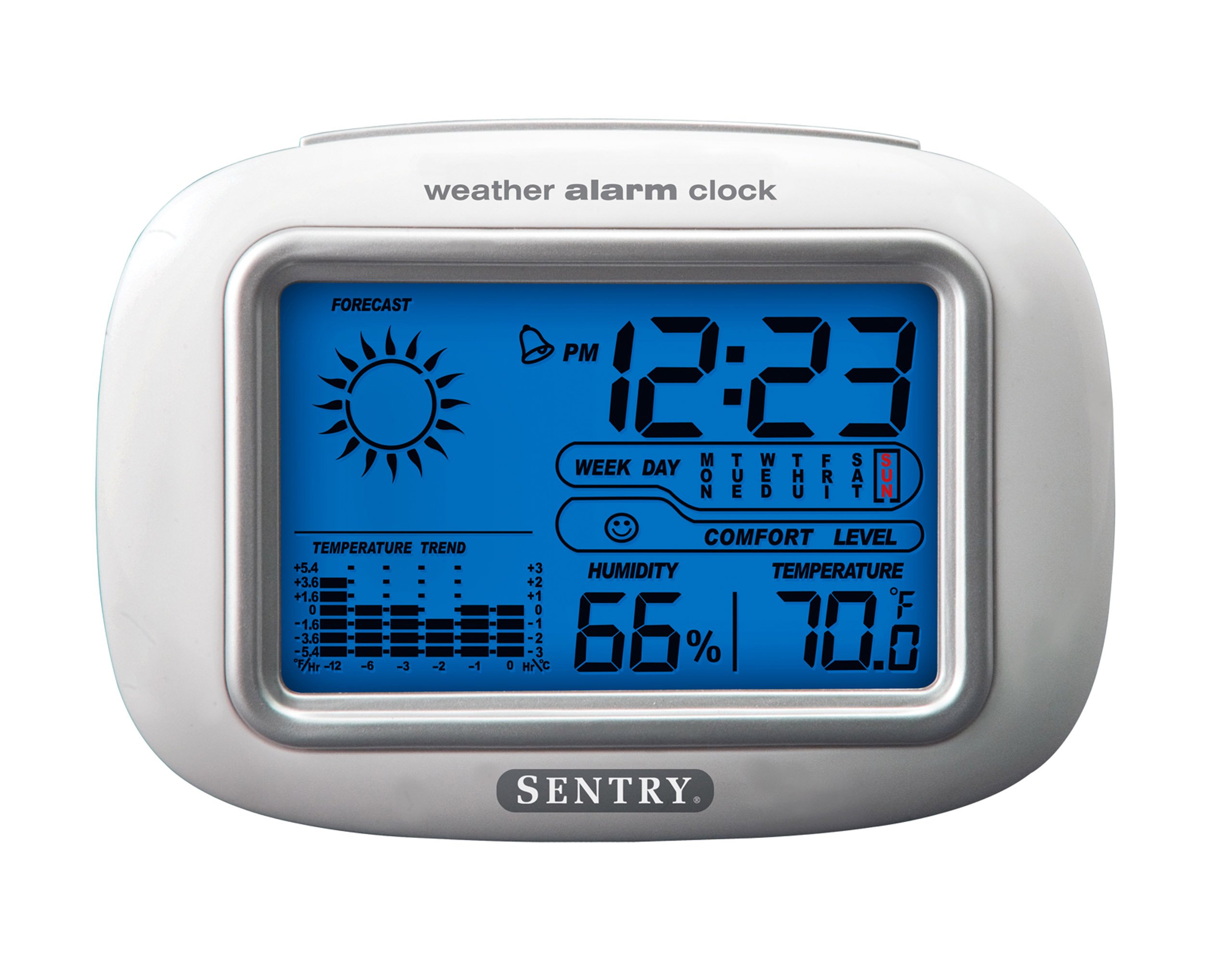
The SENTRY CL933 Big Screen Weather Alarm Clock displayed in its retail packaging, showing the clock face with time, weather forecast, humidity, and temperature readings.
Awọn eroja Ifihan:
- Ifihan akoko: Shows current time (12/24 hour format).
- Ọjọ & Ọjọ Ọsẹ: Displays the current date and day.
- Weather Forecast Icon: Indicates predicted weather conditions (e.g., sunny, cloudy, rainy).
- Moon Phase Icon: Shows the current moon phase.
- Ifihan otutu: Shows indoor temperature in Celsius or Fahrenheit.
- Ifihan ọriniinitutu: Shows indoor humidity percentage.
- Comfort Level Icon: Indicates the comfort level based on temperature and humidity.
- Atọka aṣa Aṣa otutu: Shows if the temperature is rising, falling, or stable over the last 12 hours.
- Aami itaniji: Indicates when the alarm is set.
Control Buttons (typically on the back or sides):
- Bọ́tìnì ÌṢE/ṢETÓ: Used to switch between display modes and enter setting mode.
- Awọn bọtini oke/isalẹ: Used to adjust values during setting and sometimes to toggle display options.
- Bọtini itaniji: A lo lati ṣeto tabi mu/mu itaniji naa ṣiṣẹ.
- Bọtini SINOOZE/Imọlẹ: Activates the backlight and functions as the snooze button when the alarm sounds.
- Bọtini C/°F: Yipada laarin Celsius ati Fahrenheit otutu ifihan.
Ṣeto
1. Fifi sori batiri
- Wa ideri iyẹwu batiri ni ẹhin ẹyọ naa.
- Yọ ideri naa kuro nipa gbigbe tabi gbigbe e soke.
- Insert two (2) new AAA batteries (not included) according to the polarity indicators (+ and -) inside the compartment.
- Rọpo ideri iyẹwu batiri ni aabo.
- The clock will power on and the display will activate.
2. Ibi Ibẹrẹ
Place the alarm clock on a stable, flat surface away from direct heat sources, strong vibrations, or areas with extreme temperature fluctuations for accurate readings.
Awọn ilana Iṣiṣẹ
1. Eto Aago ati Ọjọ
- Tẹ mọlẹ Ipo/Ṣeto button for approximately 3 seconds to enter time setting mode. The hour digit will start flashing.
- Lo awọn UP or SILE awọn bọtini lati ṣatunṣe awọn wakati.
- Tẹ Ipo/Ṣeto again to confirm the hour and move to the minute setting.
- Tún ìgbésẹ̀ 2 àti 3 ṣe fún ìṣẹ́jú, ọdún, oṣù, àti ọjọ́.
- Lẹ́yìn tí o bá ti ṣètò ọjọ́ náà, tẹ Ipo/Ṣeto ìgbà ìkẹyìn láti jáde kúrò ní ipò ìṣètò.
- To switch between 12-hour and 24-hour time format, press the UP bọtini nigba ti wakati ti wa ni ìmọlẹ nigba akoko eto.
2. Ṣiṣeto Itaniji
- Tẹ awọn Itaniji bọ́tìnì lẹ́ẹ̀kan láti fi àkókò ìkìlọ̀ lọ́wọ́lọ́wọ́ hàn.
- Tẹ mọlẹ Itaniji button for approximately 3 seconds. The alarm hour digit will start flashing.
- Lo awọn UP or SILE awọn bọtini lati ṣatunṣe aago itaniji.
- Tẹ Itaniji lẹ́ẹ̀kan síi láti jẹ́rìí sí wákàtí náà kí o sì gbé e lọ sí ètò ìṣẹ́jú ìkìlọ̀.
- Lo awọn UP or SILE awọn bọtini lati satunṣe iṣẹju itaniji.
- Tẹ Itaniji one last time to confirm and exit alarm setting mode.
- Lati muu ṣiṣẹ tabi mu maṣiṣẹ itaniji, tẹ awọn Itaniji button briefly when the current time is displayed. An alarm icon will appear on the display when the alarm is active.
3. Iṣẹ́ Ìsùn àti Ìmọ́lẹ̀ Ẹ̀yìn
- Nigbati itaniji ba dun, tẹ bọtini naa SNOOZE / LIGHT button to activate the snooze function. The alarm will temporarily stop and sound again after a few minutes (typically 5-10 minutes).
- Lati paa itaniji patapata, tẹ bọtini eyikeyi miiran (fun apẹẹrẹ, Itaniji, Ipo/Ṣeto) when the alarm is sounding.
- Tẹ awọn SNOOZE / LIGHT button at any time to activate the backlight for a few seconds, illuminating the display for easy viewing in low light conditions. The backlight is not designed to stay on continuously to conserve battery life.
4. Yíyan Ẹ̀yà Ìwọ̀n Òtútù (°C/°F)
Tẹ awọn ° C / ° F button (usually located on the back or side) to toggle the temperature display between Celsius and Fahrenheit.
5. Understanding Weather and Environmental Displays
- Àfojúsùn ojú ọjọ: The icon (e.g., sun, clouds, rain) represents a prediction of the weather for the next 12-24 hours based on atmospheric pressure changes detected by the internal sensor. This is an estimate and may not always match official weather reports.
- Ọriniinitutu: Displays the current indoor relative humidity percentage.
- Ipele itunu: An icon (e.g., smiley face, neutral face, frowny face) indicates the indoor comfort level based on the combination of temperature and humidity.
- Iyipada iwọn otutu: The arrow indicator shows if the indoor temperature has been rising, falling, or remaining stable over the past 12 hours.
- Alakoso Oṣupa: The moon icon changes to reflect the current phase of the moon.
Itoju
- Ninu: Pa ẹyọ kuro pẹlu asọ, die-die damp asọ. Maṣe lo awọn kẹmika lile tabi awọn ohun elo abrasive.
- Rirọpo Batiri: When the display becomes dim or functions become erratic, replace the two AAA batteries. Ensure correct polarity.
- Ibi ipamọ: Ti o ba tọju aago fun akoko ti o gbooro sii, yọ awọn batiri kuro lati yago fun jijo.
Laasigbotitusita
| Isoro | Owun to le Fa / Solusan |
|---|---|
| Ifihan ti ṣofo tabi baibai. | Batteries are low or incorrectly installed. Replace with new AAA batteries, ensuring correct polarity. |
| Time/Date cannot be set. | Rii daju pe o tẹ ati didimu Ipo/Ṣeto bọtini fun iṣẹju 3 lati tẹ ipo eto sii. |
| Itaniji ko dun. | The alarm may not be activated. Press the Itaniji button briefly to ensure the alarm icon is displayed. Check alarm time setting. |
| Inaccurate temperature/humidity. | The unit may be placed near a heat source, vent, or in direct sunlight. Move the clock to a more stable environment. Readings are for indoor conditions only. |
| Asọtẹlẹ oju-ọjọ dabi pe ko tọ. | The weather forecast is an estimate based on internal barometric pressure changes and may not always align with local weather reports. It is a general trend indicator. |
Awọn pato
- Awoṣe: CL933
- Brand: SENTRY
- Iru ifihan: LCD oni-nọmba pẹlu imọlẹ ẹhin
- Orisun Agbara: Agbara Batiri
- Awọn batiri ti a beere: 2 x AAA (ko si)
- Awọn iwọn: 6.5 x 2.25 x 4.25 inches (16.5 x 5.7 x 10.8 cm)
- Ìwúwo: 6.2 iwon (176 giramu)
- Awọn ẹya: Time, Date, Day of Week, Alarm, Snooze, Indoor Temperature (°C/°F), Indoor Humidity, Weather Forecast Icons, Moon Phase, Comfort Level Indicator, 12-hour Temperature Trend.
- Iru fifi sori: Tabili
Atilẹyin ọja ati Support
SENTRY products are designed for reliability and performance. For any questions, technical support, or warranty inquiries, please refer to the contact information provided with your purchase or visit the official SENTRY webojula. Jọwọ ṣe idaduro ẹri rira rẹ fun awọn iṣeduro atilẹyin ọja.