
Ọrọ Iṣaaju
The GIGABYTE GM-M7600 is a wireless precision optical mouse designed for comfortable and reliable use. This manual provides instructions for setting up, operating, maintaining, and troubleshooting your device.
Package Awọn akoonu
Jọwọ ṣayẹwo awọn akoonu package lati rii daju pe gbogbo awọn ohun kan wa:
- GIGABYTE GM-M7600 Wireless Optical Mouse
- Portable Nano USB Receiver
- 2 x AAA batiri
Ṣeto
1. Fifi awọn batiri
The GM-M7600 mouse requires two AAA batteries for operation. The batteries are included in the package.
- Wa ideri kompaktimenti batiri ni apa isalẹ ti Asin.
- Rọra rọra tabi gbe ideri soke lati ṣii iyẹwu naa.
- Insert the two AAA batteries, ensuring the positive (+) and negative (-) terminals align correctly with the markings inside the compartment.
- Pa ideri batiri naa ni aabo.
2. Nsopọ Olugba USB
The mouse connects to your computer via a portable Nano USB receiver.
- Locate the Nano USB receiver. It may be stored inside the mouse's battery compartment or packaged separately.
- Plug the Nano USB receiver into an available USB port on your computer (Laptop or Personal Computer).
- Your operating system (e.g., Windows XP, Linux) should automatically detect and install the necessary drivers. This process may take a few moments.
- Ni kete ti awọn awakọ ti fi sori ẹrọ, Asin ti šetan fun lilo.
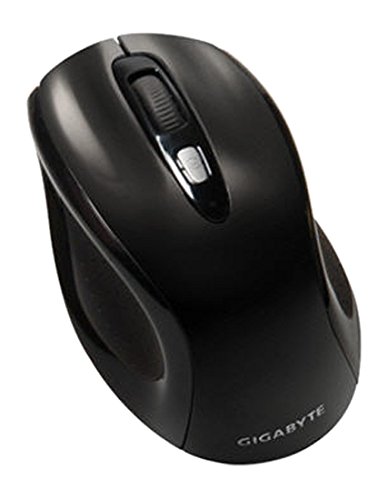
Nọmba 1: GIGABYTE GM-M7600 Wireless Optical Mouse. This image displays the ergonomic design of the mouse, highlighting its form factor and the location of its buttons. The Nano USB receiver is typically stored within the mouse or connected to a computer's USB port.
Awọn ilana Iṣiṣẹ
1. Agbara lori / Paa
The mouse typically has a power switch on its underside. Slide the switch to the 'ON' position to activate the mouse. Slide it to 'OFF' when not in use to conserve battery life.
2. Ṣatunṣe DPI (Ifaramọ)
The GM-M7600 features an adjustable DPI switch, allowing you to change the mouse sensitivity between 800 DPI and 1600 DPI. This switch is usually located near the scroll wheel. Press the DPI button to toggle between the two sensitivity settings.
3. Awọn iṣẹ Asin Ipilẹ
- Tẹ osi: Bọ́tìnì àkọ́kọ́ fún yíyan àwọn ohun kan, ṣíṣí files, àti ìbáṣepọ̀ pẹ̀lú sọ́fítíwọ́ọ̀dù.
- Tẹ-ọtun: Bọ́tìnì kejì fún wíwọlé sí àwọn àkójọ àṣàyàn àti àwọn àṣàyàn afikún.
- Yi lọ Kẹkẹ: A lo fun lilọ kiri nipasẹ awọn iwe aṣẹ ati web awọn oju-iwe. O tun le ṣiṣẹ bi bọtini titẹ aarin.
Itoju
1. Ninu
Lati ṣetọju iṣẹ ti o dara julọ ati irisi:
- Disconnect the mouse from your computer and turn off the power switch.
- Lo asọ asọ, ti ko ni lint die-die dampened pẹlu omi tabi a ìwọnba ninu ojutu lati mu ese awọn dada ti awọn Asin.
- Yẹra fún lílo àwọn kẹ́míkà líle, àwọn ohun ìfọmọ́ tí ó máa ń pa ara, tàbí fífún omi ní omi taara sí orí eku.
- Clean the optical sensor area on the underside of the mouse with a dry cotton swab to remove any dust or debris.
2. Batiri Rirọpo
When the mouse performance degrades or it stops responding, it may be time to replace the batteries.
- Pa asin naa nipa lilo iyipada agbara.
- Open the battery compartment as described in the 'Installing Batteries' section.
- Yọ awọn batiri AAA atijọ kuro.
- Insert two new AAA batteries, observing the correct polarity (+/-).
- Ti ibi ipamọ batiri naa ki o si yi asin pada.
Laasigbotitusita
If you encounter issues with your GIGABYTE GM-M7600 mouse, try the following solutions:
- Asin ko dahun:
- Rii daju pe asin naa ti tan.
- Ṣayẹwo boya awọn batiri ti fi sori ẹrọ daradara ati pe wọn ni idiyele ti o to. Rọpo ti o ba wulo.
- Ensure the Nano USB receiver is securely plugged into a working USB port on your computer. Try a different USB port.
- Tun kọmputa rẹ bẹrẹ.
- Gbigbe kọsọ alaiṣe:
- Nu sensọ opitika ni isalẹ ti Asin naa.
- Rii daju pe o nlo asin lori aaye ti o dara. Yago fun gíga afihan tabi sihin roboto.
- Check for any wireless interference. Move the mouse closer to the receiver or away from other wireless devices.
- DPI switch not working:
- Rii daju pe asin naa ti tan ati ti sopọ.
- Tẹ bọtini DPI ni iduroṣinṣin.
Awọn pato
| Orukọ awoṣe | GM-M7600 |
| Brand | GIGABYTE |
| Asopọmọra Technology | 2.4GHz Radio Frequency Wireless |
| Aṣayan Iṣipopada | Opitika |
| Adijositabulu DPI | 800/1600 DPI |
| Nọmba ti Awọn bọtini | 3 (Osi, ọtun, Yi lọ Kẹkẹ/Tẹ Aarin) |
| Orisun agbara | 2 x Awọn batiri AAA (pẹlu) |
| Olugba Iru | Portable Nano USB Receiver |
| Awọn ẹrọ ibaramu | Kọǹpútà alágbèéká, Kọmputa ti ara ẹni |
| Awọn ọna System Support | Linux, Windows XP |
| Ohun elo apade | Plastic with Rubberized Finish |
| Àwọ̀ | Dudu |
Atilẹyin ọja ati Support
For warranty information and technical support, please refer to the warranty card included with your product or visit the official GIGABYTE webojula. Tọju iwe-ẹri rira rẹ fun awọn ẹtọ atilẹyin ọja.