
Awọn Itọsọna Aabo pataki
Please read these instructions carefully before installation and use. Keep this manual for future reference. Incorrect installation or use may cause damage to the product or injury.
- Rii daju pe gbogbo awọn paati wa ati ti ko bajẹ ṣaaju apejọ.
- Maṣe kọja agbara iwuwo ti o pọju ti òke naa.
- Lo awọn irinṣẹ ti o yẹ fun fifi sori ẹrọ.
- Tí o kò bá ní ìdánilójú nípa apá kan nínú ìfisílé náà, wá ìrànlọ́wọ́ ọ̀jọ̀gbọ́n.
- Pa awọn ọmọde ati awọn ohun ọsin kuro lakoko fifi sori ẹrọ.
- Nigbagbogbo ṣayẹwo gbogbo awọn asopọ ati awọn fasteners fun wiwọ.
Ọja Pariview
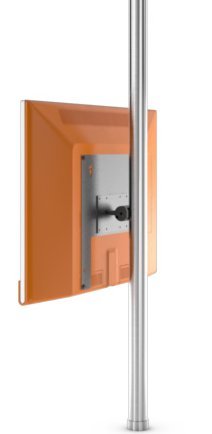
Image showing the Loewe Screen LIFT PLUS (65486B10) TV mount, designed for floor mounting. This image illustrates the overall design and structure of the product.
The Loewe Screen LIFT PLUS (65486B10) is a floor-standing mount designed to securely hold compatible Loewe televisions. It offers a stable and elegant solution for positioning your display.
Package Awọn akoonu
Before proceeding with the installation, please verify that all the following components are included in your package:
- Loewe Screen LIFT PLUS main assembly
- Mounting hardware kit (screws, washers, spacers)
- Awọn ilana apejọ (afọwọṣe yii)
- Tools required for assembly (not included): Phillips head screwdriver, Allen wrench set, level.
Eto ati fifi sori
1. Unpacking ati Igbaradi
- Ni ifarabalẹ yọ gbogbo awọn paati kuro ninu apoti.
- Tú gbogbo àwọn ẹ̀yà ara sí orí ilẹ̀ rírọ̀ tí ó mọ́ kí ó má baà jẹ́ kí wọ́n gé wọn.
- Identify all components against the package contents list.
2. Assembling the Floor Stand
Follow the diagrams provided in the separate assembly guide (if applicable) to connect the base to the main support column. Ensure all screws are tightened securely but do not overtighten.
3. Attaching the VESA Mount to the TV
This mount supports VESA 75 x 75 standard. Refer to your television's manual for specific VESA mounting hole locations.
- Carefully place your television face down on a soft, clean surface.
- Align the VESA mounting plate from the Screen LIFT PLUS with the mounting holes on the back of your TV.
- Secure the mounting plate using the appropriate screws and washers from the hardware kit. Ensure a snug fit without overtightening.
4. Mounting the TV onto the Stand
- With assistance, carefully lift the television with the attached VESA plate.
- Hook the VESA plate onto the corresponding bracket on the Screen LIFT PLUS stand.
- Secure the TV to the stand using the provided locking mechanism or screws, as detailed in the assembly guide.
- Ensure the TV is level and securely attached before releasing o.
Awọn ilana Iṣiṣẹ
The Loewe Screen LIFT PLUS is primarily a static floor mount. Once installed, its operation involves ensuring the television is securely positioned.
- Ipo: Place the assembled unit in your desired viewing location. Ensure it is on a stable, level surface.
- Iṣakoso USB: Utilize any integrated cable management features of the stand to route power and signal cables neatly and safely.
Itoju
Regular maintenance ensures the longevity and safety of your Loewe Screen LIFT PLUS.
- Ninu: Mu ese duro pẹlu asọ ti o gbẹ. Ma ṣe lo abrasive ose tabi epo.
- Ṣayẹwo Fastener: Máa ṣàyẹ̀wò gbogbo àwọn skru àti bọ́ọ̀lù láti rí i dájú pé wọ́n wà ní ìdúró. Tún di mọ́ ọn tí ó bá pọndandan.
- Ṣayẹwo iduroṣinṣin: Ensure the stand remains stable and level. If it appears wobbly, re-check the assembly.
Laasigbotitusita
Abala yii n ṣalaye awọn ọran ti o wọpọ ti o le ba pade.
| Isoro | Owun to le Fa | Ojutu |
|---|---|---|
| Stand is wobbly. | Awọn fasteners alaimuṣinṣin; aiṣedeede pakà. | Ensure all screws are tightened. Move to a level surface or use shims under the base. |
| TV not securely attached. | Incorrect VESA plate attachment; locking mechanism not engaged. | Re-check VESA plate installation on TV. Ensure TV is properly hooked onto the stand and locking screws are tightened. |
| Scratches on TV during installation. | Lack of protective surface. | Always place TV face down on a soft, clean blanket or cloth during assembly. |
Awọn pato
- Awoṣe: Loewe Screen LIFT PLUS (65486B10)
- Nọmba apakan: 65486B10
- Iru fifi sori: Floor Oke
- Maximum VESA Standard: VESA 75 x 75
- Awọn ẹrọ ibaramu: Loewe Individual 40 Compose, Loewe Individual 46 Compose
- Ibamu Iwọn iboju: Up to 46 Inch (as per compatible devices)
- Awọn batiri To wa: Rara
- Ọjọ akọkọ ti o wa: Oṣu Kẹta Ọjọ 15, Ọdun 2020
Atilẹyin ọja ati Support
For warranty information and technical support, please refer to the documentation provided with your original purchase or visit the official Loewe webojula. Jeki ẹri rira rẹ fun awọn iṣeduro atilẹyin ọja.
Olupese: Loewe
Webojula: www.loewe.tv
