
Quantum J-32U Portable CD/MP3 Player, USB, Radio, and Cassette Recorder User Manual
Model: J-32U
1. Ifihan
O ṣeun fun riraasing the Quantum J-32U Portable CD/MP3 Player, USB, Radio, and Cassette Recorder. This device is designed to provide versatile audio playback and recording capabilities in a compact, portable unit. Please read this manual thoroughly before operating the unit to ensure proper use and to maximize its performance.
Jeki iwe afọwọkọ yii fun itọkasi ọjọ iwaju.
2. Awọn Ilana Aabo pataki
- Orisun Agbara: Ṣiṣẹ ẹrọ naa nikan lati orisun agbara ti a fihan lori aami ami naa.
- Afẹfẹ: Ma ṣe dina eyikeyi awọn ṣiṣi atẹgun. Fi sori ẹrọ ni ibamu pẹlu awọn ilana ti olupese.
- Omi ati Ọrinrin: Maṣe lo ohun elo yii nitosi omi tabi ọrinrin.
- Ninu: Mọ pẹlu asọ gbigbẹ nikan.
- Ooru: Maṣe fi sori ẹrọ nitosi awọn orisun ooru gẹgẹbi awọn imooru, awọn iforukọsilẹ ooru, awọn adiro, tabi awọn ohun elo miiran (pẹlu ampliifiers) ti o gbe ooru jade.
- Ṣiṣẹ: Tọkasi gbogbo iṣẹ si awọn oṣiṣẹ iṣẹ ti o peye. Iṣẹ iṣẹ nilo nigbati ohun elo ba ti bajẹ ni ọna eyikeyi.
- Awọn batiri: Sọ awọn batiri ti a lo ni ibamu si awọn ilana agbegbe. Ma ṣe fi awọn batiri han si ooru ti o pọju.
3. Package Awọn akoonu
Jọwọ ṣayẹwo pe awọn nkan wọnyi wa ninu package rẹ:
- Quantum J-32U Portable Audio System
- AC Agbara okun
- Afowoyi Olumulo (iwe-ipamọ yii)
4. Ọja Ipariview
4.1 Igbimọ iwaju
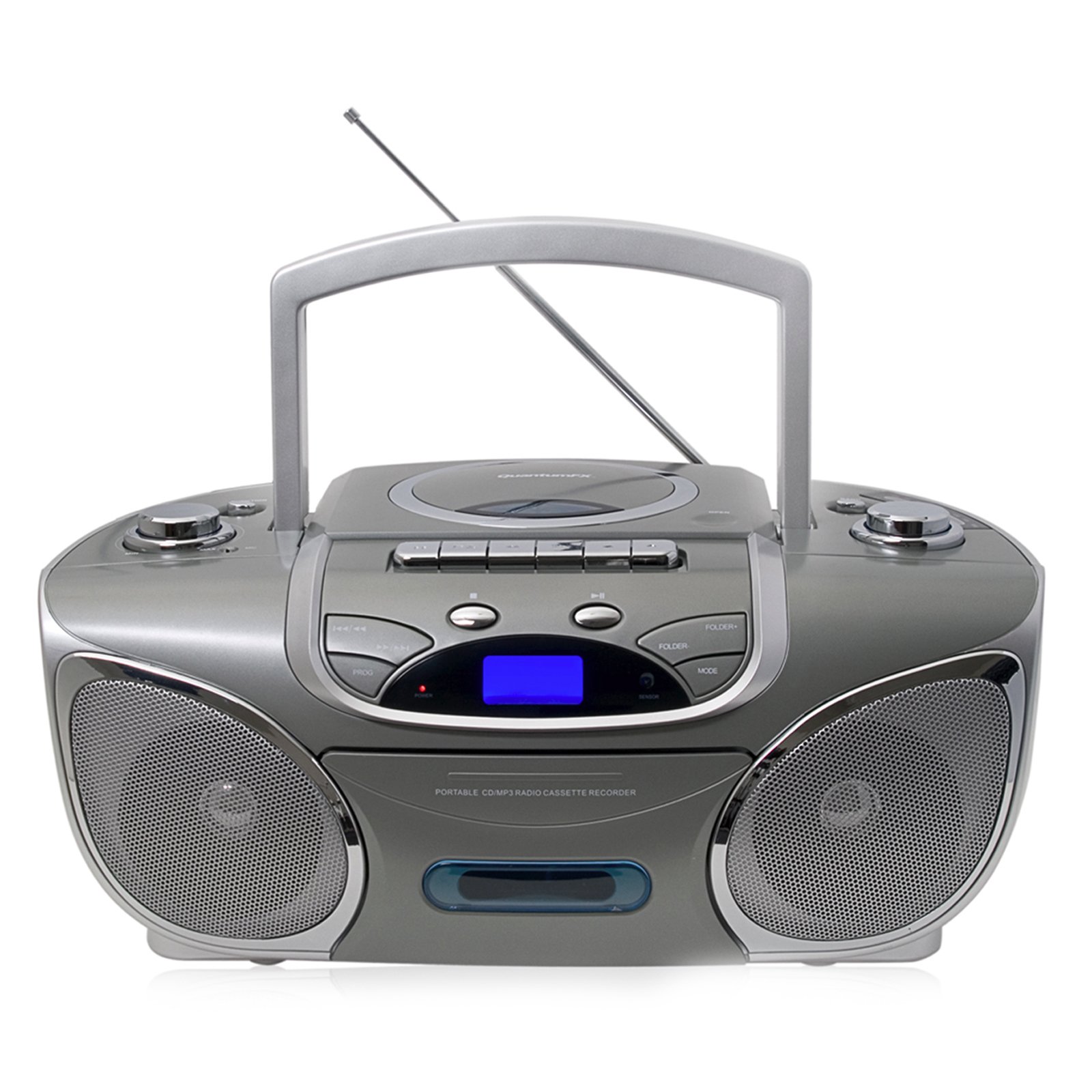
Aworan: Iwaju view of the Quantum J-32U, showing the speaker grilles, display, and control buttons.
- Awọn agbọrọsọ: Àwọn agbọ́hùnsọ̀ sítéróónù fún ìjáde ohùn.
- Ifihan LCD: Shows current mode, track number, and radio frequency.
- Awọn bọtini iṣẹ: Play/Pause, Stop, Skip/Search (Forward/Backward).
- Iṣakoso iwọn didun: Kọ́bù Rotary láti ṣàtúnṣe ìpele ìjáde ohùn.
- Bọtini Ipo: Selects between CD, USB/SD, Radio, and Cassette modes.
4.2 Igbimọ Top
Aworan: Oke view of the Quantum J-32U, highlighting the CD compartment, cassette deck, USB port, and SD/MMC slot.
- Iyẹwu CD: Top-loading CD/MP3 disc tray.
- Dekini Kasẹti: Fun ṣiṣere ati gbigbasilẹ awọn teepu kasẹti.
- Ibudo USB: Fun asopọ awọn awakọ filasi USB.
- Iho Kaadi SD/MMC: For inserting SD or MMC memory cards.
- Knob Tuntun: For manual radio frequency selection.
- Awọn bọtini Iṣakoso Kasẹti: Play, Record, Fast Forward, Rewind, Stop/Eject.
4.3 ru Panel
Aworan: Ẹyin view of the Quantum J-32U, showing the AC power input and battery compartment.
- Input Agbara AC: Connect the supplied AC power cord here.
- Abala Batiri: For inserting batteries for portable operation.
- Eriali FM: Eriali telescopic fun gbigba redio FM.
5. Eto
5.1 Agbara Unit
The J-32U can be powered by AC mains or batteries.
AC Agbara
- Rii daju pe ẹrọ naa wa ni pipa.
- Connect the supplied AC power cord to the AC power input on the rear panel of the unit.
- Pulọọgi awọn miiran opin AC agbara okun sinu kan boṣewa iṣan iṣan.
Agbara Batiri
- Ṣí ideri yàrá batiri náà lórí páànẹ́lì ẹ̀yìn.
- Insert the required number of "C" size batteries (not included), ensuring correct polarity (+/-).
- Pa ideri batiri naa ni aabo.
- Akiyesi: Disconnect the AC power cord when operating on batteries.
6. Awọn ilana Iṣiṣẹ
6.1 Gbogbogbo isẹ
- Titan/Apapa: Tẹ awọn AGBARA bọtini lati tan tabi pa kuro.
- Aṣayan Ipo: Tẹ awọn MODE button repeatedly to cycle through CD, USB/SD, Radio (AM/FM), and Cassette modes.
- Atunse iwọn didun: Yiyi awọn Iwọn didun bọtini lati mu iwọn didun pọ si tabi dinku.
6.2 CD/MP3 Playback
- Tẹ awọn MODE bọtini lati yan ipo CD.
- Ṣii ideri iyẹwu CD.
- Place a CD or MP3 CD with the label side facing up.
- Pa ideri CD iyẹwu naa. Ẹyọ naa yoo ka disiki naa.
- Tẹ awọn ERE/SINMI bọtini lati bẹrẹ ṣiṣiṣẹsẹhin.
- Tẹ FOJU IWAJU or FO Sẹhin to navigate tracks.
- Tẹ mọlẹ FOJU IWAJU or FO Sẹhin to fast forward or rewind within a track.
- Tẹ awọn DURO bọtini lati da sẹhin duro.
6.3 USB/SD/MMC Playback
- Insert a USB flash drive into the USB port or an SD/MMC card into the card slot.
- Tẹ awọn MODE button to select USB/SD mode. The unit will automatically detect and begin playing MP3 files.
- Lo ERE/SINMI, DURO, FOJU IWAJU, ati FO Sẹhin awọn bọtini bi pẹlu CD playback.
6.4 Radio Operation (AM/FM Stereo)
- Tẹ awọn MODE bọtini lati yan Ipo Redio.
- Extend the FM telescopic antenna for better FM reception. For AM, rotate the unit for optimal reception.
- Yiyi awọn TUNTUN bọtini lati yan ibudo redio ti o fẹ.
- The frequency will be displayed on the LCD screen.
6.5 Sisisẹsẹhin kasẹti ati Gbigbasilẹ
Sisisẹsẹhin
- Tẹ awọn MODE bọtini lati yan ipo kasẹti.
- Tẹ awọn Duro/EJECT button to open the cassette deck.
- Insert a cassette tape and close the deck.
- Tẹ awọn ERE bọtini lati bẹrẹ ṣiṣiṣẹsẹhin.
- Lo Siwaju Siwaju or TUNTUN awọn bọtini lati lilö kiri ni teepu.
- Tẹ Duro/EJECT lati da ṣiṣiṣẹsẹhin duro.
Recording (from CD/USB/SD/Radio)
- Fi teepu kasẹti alafo sinu apoti kasẹti naa.
- Select the desired source (CD, USB/SD, or Radio) using the MODE bọtini.
- Start playback on the source (e.g., play a CD track, tune to a radio station).
- While the source is playing, press the Igbasilẹ bọtini lori kasẹti dekini. Awọn ERE bọtini yoo tun olukoni.
- Lati da gbigbasilẹ duro, tẹ bọtini naa Duro/EJECT bọtini.
- Akiyesi: Ensure the cassette tape has its record protection tabs intact for recording.
7. Itọju
- Ninu Ẹka naa: Lo asọ asọ ti o gbẹ lati nu ode ti ẹyọ naa. Ma ṣe lo abrasive ose tabi epo.
- Isọsọ lẹnsi CD: If CD playback becomes erratic, use a commercially available CD lens cleaner disc to clean the laser lens.
- Isọsọ ori kasẹti: Periodically clean the cassette deck's heads, pinch rollers, and capstan with a cotton swab lightly dampened pẹlu isopropyl oti.
- Ibi ipamọ: When not in use for extended periods, disconnect the AC power cord and remove batteries. Store the unit in a cool, dry place.
8. Laasigbotitusita
| Isoro | Owun to le Fa | Ojutu |
|---|---|---|
| Ko si agbara | Okun AC ko ni asopọ; Awọn batiri ti dinku tabi fi sii lọna ti ko tọ. | Ṣayẹwo asopọ okun AC; Rọpo awọn batiri tabi rii daju polarity ti o pe. |
| Ko si ohun | Volume too low; Incorrect mode selected. | Mu iwọn didun pọ si; Tẹ MODE to select correct source. |
| CD fo tabi ko ṣiṣẹ | Disc dirty or scratched; CD compartment not closed; Disc inserted incorrectly. | Clean or replace disc; Close CD compartment firmly; Insert disc label side up. |
| Gbigba redio ti ko dara | Eriali ko tesiwaju; Unit ipo. | Fa eriali FM ni kikun; Yiyi kuro fun gbigba AM to dara julọ. |
| Teepu kasẹti ko dun/gbigbasilẹ | Tape incorrectly inserted; Record protection tab removed (for recording). | Ensure tape is correctly inserted; Cover record protection tab with tape for recording. |
9. Awọn pato
- Awoṣe: J-32U
- Orisun Agbara: AC 120V ~ 60Hz tabi DC 9V (awọn batiri iwọn 6 x "C")
- Akọrin CD: Top-loading CD/MP3 compatible
- USB/SD/MMC: Supports MP3 audio playback
- Awọn Igbohunsafẹfẹ Redio: Sitẹrio AM/FM
- Dekini Kasẹti: Playback and Recording function
- Awọn agbọrọsọ: Sitẹrio
- Awọn ẹrọ ibaramu: MP3 Player, Smartphone (via USB/SD for file playback, not direct audio input)
- GTIN: 606540009864
10. Atilẹyin ọja ati Support
Quantum products are designed for reliability and performance. For warranty information, please refer to the warranty card included with your purchase or visit the official Quantum website. For technical support or service inquiries, please contact Quantum customer service.
Atilẹyin Ayelujara: www.quantumfx.com/support (Akiyesi: Eyi jẹ aaye ibi URL as no specific support link was provided.)
Iṣẹ onibara: Refer to your product packaging or warranty card for contact details.