
Ọrọ Iṣaaju
The My Weigh CTS-3000 Digital Counting Scale is a versatile and precise instrument designed for accurate weighing and counting of various items. With a robust 30,000 gram capacity and 0.5 gram resolution, it is suitable for a wide range of applications including kitchen use, business inventory, and educational purposes. This manual provides comprehensive instructions to help you set up, operate, and maintain your scale for optimal performance.
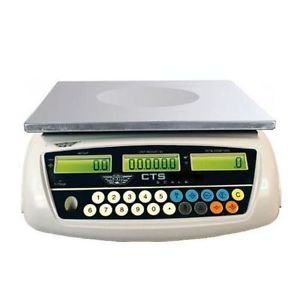
Image: The My Weigh CTS-3000 Digital Counting Scale, featuring a stainless steel platform and a blue backlit LCD display.
Ṣeto
- Ṣii silẹ: Carefully remove the scale from its packaging. Ensure all components are present: the scale unit, stainless steel platform, clear protective cover, and AC adapter.
- Ibi: Place the scale on a stable, flat, and level surface. Avoid areas with excessive vibration, drafts, or direct sunlight, as these can affect accuracy. The scale features adjustable feet for leveling.
- Asopọ agbara:
- Agbara AC: Connect the provided AC adapter to the scale's power input port and then plug it into a standard electrical outlet.
- Agbara Batiri: The scale can also operate on 5 AA batteries (not included). Open the battery compartment on the underside of the scale and insert the batteries, ensuring correct polarity. The scale features overcharge and over-discharge protection when using the rechargeable battery pack (if included).
- Fifi sori ẹrọ Platform: Place the stainless steel weighing platform securely onto the scale base.
- Ideri Aabo: Position the clear protective cover over the display and control panel to guard against spills and debris.
- Agbara Ibẹrẹ Tan: Tẹ awọn TAN/PA button to power on the scale. The display will show a self-test sequence before settling at 0.00.
Awọn ilana Iṣiṣẹ
1. Ipilẹ Iwon
- Agbara Tan: Tẹ awọn TAN/PA button. Wait for the display to stabilize at 0.00.
- Nkan Ibi: Gently place the item(s) to be weighed onto the center of the stainless steel platform.
- Ka Iwọn: The weight will be displayed on the main LCD screen.
2. Yíyípadà Àwọn Ìwọ̀n Ìwọ̀n (Àwọn Ẹ̀yà)
The CTS-3000 supports multiple weighing modes: grams (g), ounces (oz), kilograms (kg), and pounds (lb).
- Tẹ MODE: Pẹlu iwọn lori, tẹ awọn MODE button repeatedly to cycle through the available units.
- Yan Ẹka: Stop pressing when your desired unit (e.g., "g" for grams, "lb" for pounds) is displayed.
Video: Demonstration of the scale's accurate weighing and unit conversion functions. The video shows how to switch between grams, kilograms, and pounds.
3. Iṣẹ́ Tare
Iṣẹ́ Tare gba ọ laaye lati yọ iwuwo ti apoti kan kuro, nitorinaa iwuwo akoonu rẹ nikan ni a le wọn.
- Apoti Ibi: Gbe ohun elo ti o ṣofo sori pẹpẹ iwọn. Ifihan naa yoo fihan iwuwo rẹ.
- Press TARE: Tẹ awọn Tọju button. The display will reset to 0.00, effectively subtracting the container's weight.
- Add Items: Ṣafikun awọn nkan ti o fẹ lati ṣe iwọn sinu apoti naa. Ifihan naa yoo fihan iwuwo apapọ ti awọn nkan naa.
4. Iṣẹ Isiro
The counting function allows you to count a large number of identical items quickly.
- Sample Oye: Fi nọmba ti a mọ ti awọn s silẹample items (e.g., 10, 20, 50, 100) on the platform. The more samples, the more accurate the count.
- Iṣawọle Sample: Using the numeric keypad, enter the exact number of samples you placed on the platform.
- Tẹ SAMPIWO: Tẹ awọn SAMPLE button. The scale will calculate the average unit weight and display the quantity.
- Add More Items: Yọ awọn samples and add the bulk quantity of items. The scale will automatically count them.
Video: Demonstration of the counting function, showing how to input a sample quantity and then count a larger batch of items.
5. Alarm Function (Weight & Quantity)
The scale features an alarm function that can be set for both weight and quantity thresholds.
- Tẹ Ipo Itaniji sii: Tẹ mọlẹ '.' bọtini, lẹhinna tẹ '5' to enter the alarm mode setting.
- Select Alarm Type: Lo awọn M+ key to cycle through alarm modes: "no" (alarm off), "in" (alarm within range), "out" (alarm outside range), "up" (alarm when exceeding set value).
- Set Alarm Value: Tẹ awọn ALAGBARA SET key. Input the desired alarm value using the numeric keypad. For weight, input the value in grams (e.g., 10000 for 1kg on a 0.1g scale). For quantity, input the number of pieces.
- Jẹrisi: Tẹ awọn Tọju bọtini lati jẹrisi eto naa.
Video: Detailed instructions on setting up the weight and quantity alarm functions on the counting scale.
Itoju
- Ninu: Wipe the scale platform and display with a soft, damp cloth. Do not use abrasive cleaners or immerse the scale in water. The removable "gunk shield" protects the display from spills.
- Ibi ipamọ: Store the scale in a clean, dry environment away from extreme temperatures and humidity.
- Itọju Batiri: If using battery power, ensure batteries are replaced when low to maintain accuracy. If storing for extended periods, remove batteries to prevent leakage.
Laasigbotitusita
| Isoro | Owun to le Fa | Ojutu |
|---|---|---|
| Iwọn ko ni tan-an. | Kò sí agbára, àwọn bátìrì tí ó ti kú, tàbí adaptà tí ó ní àbùkù. | Check AC adapter connection or replace batteries. |
| Awọn kika ti ko pe. | Unstable surface, drafts, or scale not level. | Place on a stable, level surface. Avoid drafts. Ensure feet are adjusted. |
| Àpapọ̀ ṣàfihàn “Ọ̀pọ̀lọpọ̀”. | Iwọn ju agbara ti o pọju lọ. | Yọ iwuwo ti o pọ ju kuro lẹsẹkẹsẹ lati yago fun ibajẹ. |
| Counting function is inaccurate. | Àìtó sample size or inconsistent unit weight. | Lo s ti o tobi juample size (e.g., 50 or 100 pieces) for calibration. Ensure all items are identical. |
Awọn pato
- Brand: Iwọn Mi
- Awoṣe: CTS-3000
- Agbara: 30,000 grams (30 kg / 66.078 lb / 1057.24 oz)
- Ipinnu: 0.5 grams (0.0005 kg / 0.001 lb / 0.02 oz)
- Weighing Modes: Grams (g), Ounces (oz), Kilograms (kg), Pounds (lb), Counting Mode
- Ifihan: Three backlit LCD displays (Total Weight, Unit Weight, Number of Pieces)
- Ohun elo Platform: Irin ti ko njepata
- Awọn ẹya: Tare function, Batching feature, Counting feature, Removable "gunk shield", RS-232 serial port, Liquid level indicator
- Agbara: Rechargeable battery pack and AC adapter included
- Awọn iwọn ọja: 14.5 x 7 x 15 inches
- Ìwọ̀n Nkan: 8.9 iwon
Atilẹyin ọja ati Support
For warranty information and technical support, please refer to the official My Weigh webojula tabi kan si wọn onibara iṣẹ Eka. Tọju iwe-ẹri rira rẹ bi ẹri rira fun eyikeyi awọn ibeere atilẹyin ọja.
Fun awọn orisun afikun ati iforukọsilẹ ọja, ṣabẹwo si: www.myweigh.com