
Oludasile M1360
Edifier M1360 Wired Multimedia Speaker System User Manual
Awoṣe: M1360
1. Ifihan
O ṣeun fun riraasing the Edifier M1360 Wired Multimedia Speaker System. This 2.1 speaker system is designed to provide a convenient and high-quality audio solution for various multimedia applications, including computers, laptops, gaming consoles, and MP3 players. Featuring upward-angled satellites and a downward-angled subwoofer, the system delivers clear sound with steady bass output. The wired remote control offers easy volume adjustment and includes a headphone jack for private listening.
2. Alaye Aabo pataki
- Ka awọn ilana wọnyi daradara ṣaaju ṣiṣe ọja naa.
- Jeki iwe afọwọkọ yii fun itọkasi ọjọ iwaju.
- Ma ṣe fi ẹrọ naa han si ojo tabi ọrinrin lati yago fun ina tabi mọnamọna.
- Ma ṣe dina eyikeyi awọn ṣiṣi atẹgun. Fi sori ẹrọ ni ibamu pẹlu awọn ilana ti olupese.
- Maṣe fi sori ẹrọ nitosi awọn orisun ooru gẹgẹbi awọn imooru, awọn iforukọsilẹ ooru, awọn adiro, tabi awọn ohun elo miiran (pẹlu ampliifiers) ti o gbe ooru jade.
- Dabobo okun agbara lati ma rin lori tabi pin, ni pataki ni awọn pilogi, awọn ohun elo irọrun, ati aaye nibiti wọn ti jade kuro ninu ohun elo naa.
- Lo awọn asomọ/awọn ẹya ara ẹrọ ti olupese pato.
- Yọọ ohun elo yi nigba iji manamana tabi nigba lilo fun igba pipẹ.
- Tọkasi gbogbo iṣẹ si awọn oṣiṣẹ iṣẹ ti o peye. Iṣẹ nilo nigbati ohun elo ba ti bajẹ ni ọna eyikeyi, gẹgẹbi okun ipese agbara tabi plug ti bajẹ, omi ti ta silẹ tabi awọn nkan ti ṣubu sinu ẹrọ, ohun elo naa ti farahan si ojo tabi ọrinrin, ko ṣiṣẹ deede. , tabi ti lọ silẹ.
3. Package Awọn akoonu
Jọwọ ṣayẹwo awọn awọn akoonu ti rẹ package. Ti awọn ohun kan ba nsọnu tabi bajẹ, kan si alagbata rẹ.
- 1x Edifier M1360 Subwoofer
- 2x Satellite Agbọrọsọ
- 1x Iṣakoso latọna jijin ti firanṣẹ
- 1x 3.5mm Audio Input Cable
- 1x Itọsọna olumulo (iwe yii)
4. Ọja Ipariview
4.1 System irinše
- Subwoofers: Houses the main amplifier and bass driver. Connects to the satellite speakers and the audio source.
- Àwọn Agbọrọsọ Satẹlaiti: Two compact speakers for mid-range and high-frequency audio.
- Iṣakoso Latọna jijin ti firanṣẹ: Features a volume dial, power switch, and headphone output.
4.2 Idanimọ paati

olusin 1: Iwaju view of the Edifier M1360 speaker system, showing the central subwoofer, two angled satellite speakers, and the wired remote control unit.
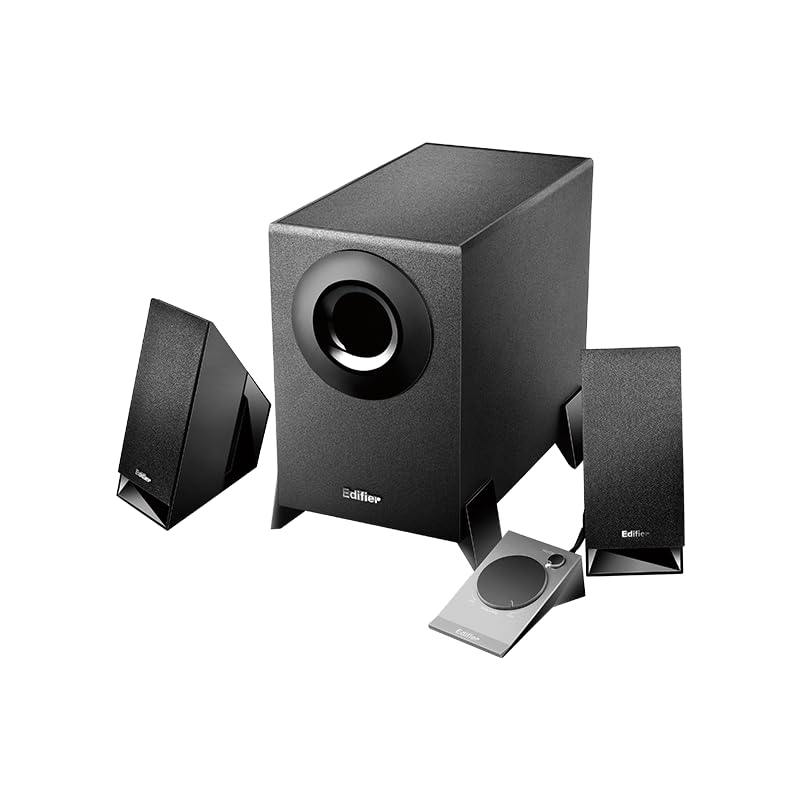
Figure 2: Another perspective of the Edifier M1360 speaker system, highlighting the compact design of the satellite speakers and the wired remote's placement.
5. Eto
5.1 Ibi
- Place the subwoofer on the floor or a sturdy surface near your computer or audio source.
- Position the satellite speakers on either side of your monitor or listening area, ensuring they are angled towards you for optimal sound.
- Ensure adequate ventilation around all components.
5.2 Awọn isopọ
- Connect the satellite speakers to the corresponding output jacks on the back of the subwoofer. Ensure the left and right speakers are connected correctly.
- Connect the wired remote control cable to the dedicated port on the subwoofer.
- Connect the 3.5mm audio input cable from the "AUDIO IN" port on the subwoofer to the audio output (headphone jack) of your computer, laptop, MP3 player, or other audio source.
- Plug the power cord of the subwoofer into a standard AC power outlet.
6. Awọn ilana Iṣiṣẹ
6.1 Agbara Tan / Pa
- To turn on the speaker system, press the power button located on the wired remote control. The power indicator light will illuminate.
- To turn off the speaker system, press the power button again. The power indicator light will turn off.
6.2 Iṣakoso iwọn didun
- Rotate the large dial on the wired remote control clockwise to increase the volume.
- Rotate the large dial counter-clockwise to decrease the volume.
6.3 Agbekọri o wu
- To listen privately, plug your headphones into the 3.5mm headphone jack on the wired remote control.
- When headphones are connected, the speaker output will automatically mute.
- Unplug the headphones to resume audio playback through the speakers.
7. Itọju ati Itọju
- Ninu: Use a soft, dry cloth to clean the surfaces of the speakers and subwoofer. Do not use liquid cleaners or aerosol sprays.
- Afẹfẹ: Ensure that the ventilation openings on the subwoofer are not blocked. Proper airflow prevents overheating.
- Ibi ipamọ: If storing the system for an extended period, disconnect it from power and store it in a cool, dry place away from direct sunlight and extreme temperatures.
- Yago fun Ọrinrin: Keep the speaker system away from water, humidity, and other liquids.
8. Laasigbotitusita
| Isoro | Owun to le Fa | Ojutu |
|---|---|---|
| Ko si ohun |
|
|
| Ohun ti o daru |
|
|
| Ọkan agbọrọsọ ko ṣiṣẹ |
|
|
9. Awọn pato
| Ẹya ara ẹrọ | Ẹ̀kúnrẹ́rẹ́ |
|---|---|
| Orukọ awoṣe | M1360 |
| Agbọrọsọ Iru | Multimedia |
| Kakiri Ohun ikanni iṣeto ni | 2.1 |
| Asopọmọra Technology | Wired (3.5mm stereo input) |
| Ipo Ijade Ohun | Sitẹrio |
| Agbọrọsọ Agbara Ijade ti o pọju | 8.5 Wattis |
| Subwoofer Opin | 5 inches |
| Opin Tweeter | 1 inches |
| Ifihan Ibuwọlu-si-Noise | 85 dB |
| Idahun Igbohunsafẹfẹ | 20 KHz (Note: This is likely the upper limit, not the full range. Common for speakers to list only max freq.) |
| Awọn ẹrọ ibaramu | Smartphone, Laptop, Desktop, Gaming Console, MP3 Player |
| Ọja Mefa | 6.4D x 11.2W x 14H |
| Iwọn Nkan | 2.5 kg (2500 Giramu) |
| Orisun agbara | AC |
| Àwọ̀ | Dudu |
| Ilu isenbale | China |
10. Atilẹyin ọja ati Support
For detailed warranty information and customer support, please refer to the warranty card included with your product packaging or visit the official Edifier webojula.
Manufacturer: Edifier
Importer: Nikita Distributors - Green Terrace Building, Lane Number 5, South Koregaon Park, Pune 411001, MH, India
Ask a question about this manual
Ask about setup, troubleshooting, compatibility, parts, safety, or missing instructions. Manuals+ will review the question and use this page’s manual context to help answer it.