
1. Ifihan
This manual provides essential instructions for the safe and efficient operation of your Sharp CD-DH950P 240W Mini-Component System. This system features a 5-disc CD changer, a cassette deck, an iPod/iPhone docking station, a USB host for digital audio playback, and an AM/FM tuner. Please read this manual thoroughly before using the system and retain it for future reference.
2. Alaye Aabo
- Orisun Agbara: So ẹrọ naa pọ mọ ibudo AC ti vol ti a sọ tẹlẹ nikantage.
- Afẹfẹ: Rii daju pe fentilesonu to peye. Ma ṣe dina awọn ṣiṣi atẹgun.
- Omi ati Ọrinrin: Do not expose the unit to rain, moisture, or dripping/splashing liquids.
- Ooru: Jeki ẹyọ kuro lati awọn orisun ooru gẹgẹbi awọn imooru, awọn iforukọsilẹ ooru, awọn adiro, tabi awọn ohun elo miiran ti o nmu ooru jade.
- Ninu: Unplug the unit from the wall outlet before cleaning. Use a soft, dry cloth.
- Ṣiṣẹ: Maṣe gbiyanju lati ṣiṣẹ ọja yi funrararẹ. Tọkasi gbogbo iṣẹ si oṣiṣẹ oṣiṣẹ ti o peye.
3. Package Awọn akoonu
Jẹrisi pe package rẹ ni awọn nkan wọnyi ninu:
- Main Unit (CD-DH950P)
- Osi Agbọrọsọ
- Agbọrọsọ ọtun
- Isakoṣo latọna jijin pẹlu awọn batiri
- AM Loop Eriali
- Eriali FM Waya
- Okun agbara
4. Eto
4.1 Nsopọ awọn Agbọrọsọ
Connect the speaker wires from the main unit to the corresponding terminals on the back of each speaker. Ensure correct polarity (red to red, black to black) for optimal sound quality. The left speaker connects to the left speaker output, and the right speaker to the right speaker output.
4.2 Connecting the Antennas
- Eriali FM: Connect the supplied FM wire antenna to the FM antenna terminal on the rear of the main unit. Extend the wire for better reception.
- Eriali AM: Connect the supplied AM loop antenna to the AM antenna terminals on the rear of the main unit. Position the antenna for best reception.
4.3 Asopọ agbara
Plug the power cord into the AC IN jack on the rear of the main unit, then plug the other end into a standard AC wall outlet.
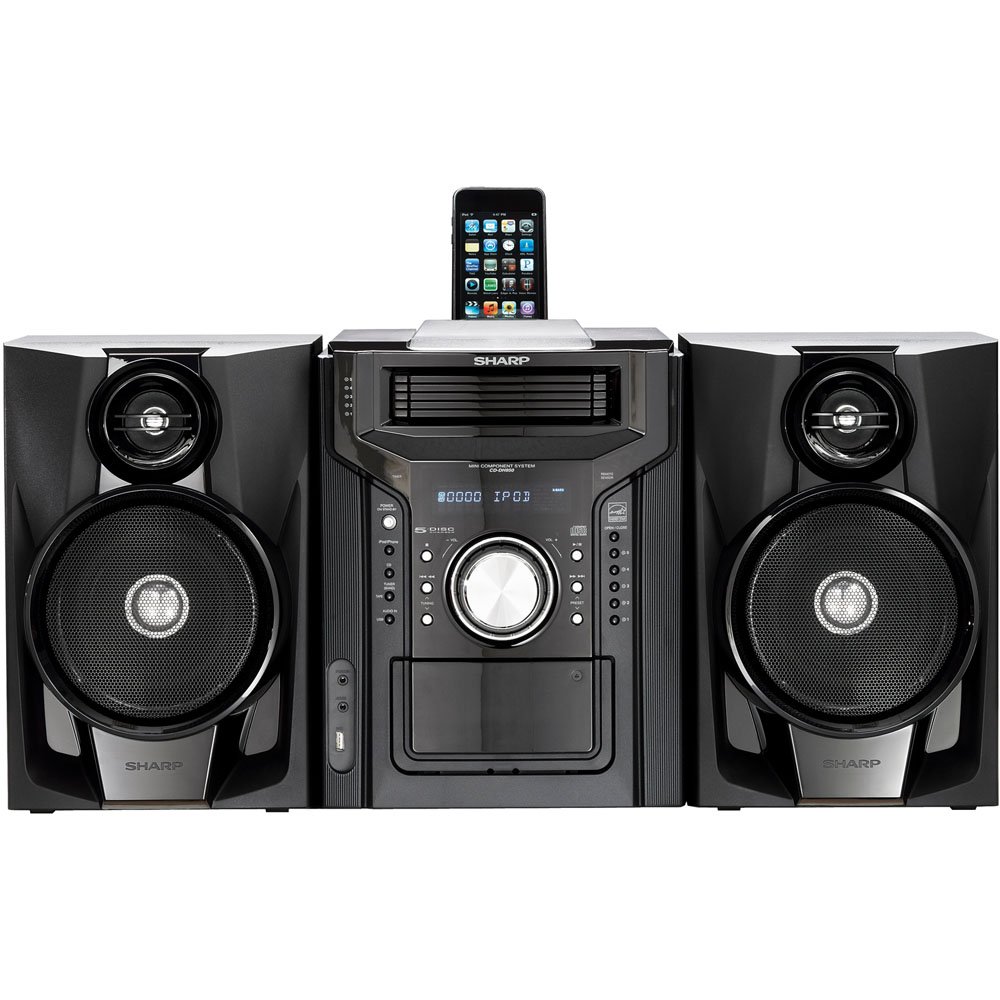
Nọmba 4.3.1: Lapapọ view of the Sharp CD-DH950P Mini-Component System, showing the main unit flanked by two speakers, with an iPhone docked on top of the main unit.
5. Awọn ilana Iṣiṣẹ
5.1 Agbara Tan / Pa ati Iṣakoso iwọn didun
- Tẹ awọn AGBARA bọ́tìnì lórí iwájú páànẹ́lì tàbí ìṣàkóso láti tan tàbí pa ẹ̀rọ náà.
- Yiyi awọn Iwọn didun koko lori ni iwaju nronu tabi lo awọn VOL +/- awọn bọtini lori isakoṣo latọna jijin lati ṣatunṣe ipele ohun.
5.2 CD Sisisẹsẹhin
This system features a 5-disc CD changer.
- Tẹ awọn ŠI / PADE bọtini lati ṣii CD atẹ.
- Place up to five CDs on the disc trays, label side up.
- Tẹ ŠI / PADE lẹẹkansi lati pa awọn atẹ.
- Tẹ awọn CD bọtini lati yan iṣẹ CD naa.
- Tẹ awọn ERE/SINMI bọtini lati bẹrẹ ṣiṣiṣẹsẹhin.
- Lo awọn SILE buttons to navigate between tracks or discs.
5.3 Iṣẹ́ Àwòrán Káàsìtì
- Tẹ awọn TAPE OPEN/CLOSE button to open the cassette deck.
- Fi teepu kasẹti kan sii.
- Tẹ awọn Teepu bọ́tìnì láti yan iṣẹ́ kásẹ́ẹ̀tì náà.
- Tẹ ERE lati bẹrẹ ṣiṣiṣẹsẹhin.
- To record, ensure the source is selected (e.g., CD, Tuner) and press the Igbasilẹ button on the cassette deck.
5.4 iPod/iPhone docking
The system includes a top-mounted docking slot for compatible iPod and iPhone devices (30-pin connector).
- Carefully place your iPod or iPhone into the docking slot.
- The system will automatically switch to iPod/iPhone mode or you may need to press the iPod / iPhone bọtini.
- Use the system's controls or your device's controls to play music. The device will also charge while docked.
5.5 USB Host Playback
Connect a USB storage device containing MP3 or WMA audio files to the USB port on the front panel.
- Fi ẹrọ USB sii sinu ibudo USB.
- Tẹ awọn USB button to select the USB function.
- Use the playback controls to navigate and play files.
5.6 AM / FM Tuner
- Tẹ awọn OWO bọtini lati yan AM tabi redio FM.
- Lo awọn TUNTUN +/- awọn bọtini lati tune si ibudo pẹlu ọwọ.
- To auto-scan, press and hold the TUNTUN +/- awọn bọtini.
- To store a preset, tune to the desired station, then press ÌRÁNTÍ atẹle nipa nọmba tito tẹlẹ.
5.7 Ohun igbewọle
Connect an external audio device (e.g., MP3 player, smartphone) to the AUDIO IN jack on the front panel using a 3.5mm stereo cable.
- Connect your device to the AUDIO IN jack.
- Tẹ awọn AUDIO NI button to select this source.
- Ṣàkóso ìṣiṣẹ́ orin láti inú ẹ̀rọ tí o sopọ̀ mọ́.
6. Itọju
6.1 Ninu Unit
Wipe the exterior of the unit with a soft, dry cloth. Do not use abrasive cleaners, waxes, or solvents. Ensure the unit is unplugged before cleaning.
6.2 CD and Cassette Care
- Handle CDs by their edges to avoid fingerprints and scratches. Clean discs with a soft, lint-free cloth from the center outwards.
- Store cassette tapes away from strong magnetic fields and direct sunlight.
7. Laasigbotitusita
| Isoro | Owun to le Fa | Ojutu |
|---|---|---|
| Ko si agbara | Okun agbara ko sopọ; Agbara iṣan ti ko tọ | Rii daju pe okun agbara ti wa ni edidi ni aabo; Gbiyanju iṣan ti o yatọ |
| Ko si ohun | Iwọn ti o kere ju; Awọn agbọrọsọ ko sopọ; Ti yan orisun ti ko tọ | Mu iwọn didun pọ si; Ṣayẹwo awọn asopọ agbọrọsọ; Yan orisun titẹ sii to tọ |
| CD ko dun | Disc inserted incorrectly; Disc is dirty or scratched | Insert disc correctly (label side up); Clean or replace disc |
| Gbigba redio ti ko dara | Antenna not positioned correctly; Weak signal | Adjust position of AM/FM antennas; Try auto-tuning or manual fine-tuning |
| iPod/iPhone not charging/playing | Device not properly docked; Device not compatible (e.g., newer connector) | Re-dock the device; Note that this system uses a 30-pin connector, newer devices may require an adapter (not included) |
8. Awọn pato
- Brand: Dinku
- Awoṣe: CD-DH950P
- Lapapọ Agbara Ijade: 240 Watts RMS (85W/ch FTC)
- Iṣeto Agbọrọsọ: 2.1 ikanni
- Awọn ọna kika ohun ti o ni atilẹyin: CD, MP3, WMA
- Eto Ifihan-si-Noise: 100 dB
- Awọn ẹrọ ibaramu: MP3 Player, Smartphone (via 30-pin dock or USB/Audio In)
- Awọn iwọn (L x W x H): 27.6 x 13.6 x 13.5 inches
- Ìwọ̀n Nkan: 24.4 iwon
- UPC: 074000369863
9. atilẹyin ọja Information
This product is covered by a 1-year limited warranty from the date of purchase. Please refer to the warranty card included with your product for full terms and conditions, or contact Sharp customer service for details.
10. Atilẹyin
For further assistance, technical support, or service inquiries, please contact Sharp customer service. Contact information can typically be found on the Sharp official webaaye tabi ninu iwe ti a pese pẹlu ọja rẹ.