
Ọrọ Iṣaaju
This manual provides detailed instructions for the proper setup, operation, and maintenance of your Denon AVR-1312 5.1-channel AV Surround Receiver. The AVR-1312 is designed to deliver a powerful surround sound experience, supporting 3D video when connected to compatible equipment. It features Compressed Audio Restorer technology for enhanced sound from portable audio players and Quick Select buttons for easy source and surround mode selection.
Eto Ibẹrẹ
1. Unpacking
Carefully remove the receiver from its packaging. Ensure all accessories, such as the remote control, batteries, and FM/AM antennas, are present. Retain the packaging for future transport or storage.
2. Ifiweranṣẹ
Place the receiver on a stable, level surface with adequate ventilation. Avoid placing it near heat sources or in direct sunlight. Ensure there is sufficient space around the unit for proper airflow to prevent overheating.
3. Awọn isopọ
Kí o tó ṣe àwọn ìsopọ̀, rí i dájú pé a ti pa ẹ̀rọ ìgbàlejò àti gbogbo àwọn ẹ̀rọ tí a so pọ̀ mọ́ ara wọn, a sì ti yọ wọ́n kúrò nínú ihò ìtajà ògiri.

Figure 1: Rear panel connections of the Denon AVR-1312. This view displays HDMI inputs and output, analog audio inputs, digital audio inputs (optical and coaxial), video inputs, and speaker terminals.
Awọn asopọ HDMI:
- Connect your video sources (e.g., Blu-ray player, game console, cable box) to the HDMI-IN ports (HDMI 1-4).
- Connect your TV or projector to the HDMI OUT MONITOR port. This single cable will carry both video and audio signals to your display.
Awọn isopọ Olohun:
- Digital Audio Inputs (OPTICAL/COAXIAL): For devices with digital audio outputs (e.g., CD player, older game consoles).
- Analog Audio Inputs (AUDIO IN): For devices with analog stereo outputs (e.g., CD player, tape deck).
- Stereo Mini Jack (FRONT PANEL): For connecting portable audio players.
Video Connections (Legacy):
- Component Video (DVD, GAME, SAT/CBL): For devices using component video cables (red, green, blue).
- Composite Video (DVD, GAME, SAT/CBL, VCR): For devices using composite video cables (yellow).
Awọn isopọ Agbọrọsọ:
- Connect your speakers to the corresponding terminals on the rear panel: IWAJU L/R, AARIN, YI L/R.
- Ensure correct polarity (+ to + and - to -) for all speakers.
- For the subwoofer, connect a single RCA cable from the SUBWOOFER ṢE to the subwoofer's LFE input.
- The receiver supports 6-8 ohm speakers.
Awọn isopọ Antenna:
- Connect the supplied FM indoor antenna to the ANTENNA FM ebute.
- Connect the supplied AM loop antenna to the AM ANTENNA ebute oko.
Isẹ ipilẹ
1. Agbara Tan / Paa
Tẹ awọn AGBARA bọtini lori ni iwaju nronu tabi awọn LORI / DURO bọtini lori iṣakoso latọna jijin lati tan tabi pa olugba naa.
2. Aṣayan Input
Select the desired input source using the input selector buttons on the front panel (e.g., DVD, GAME, SAT/CBL) or the corresponding buttons on the remote control.
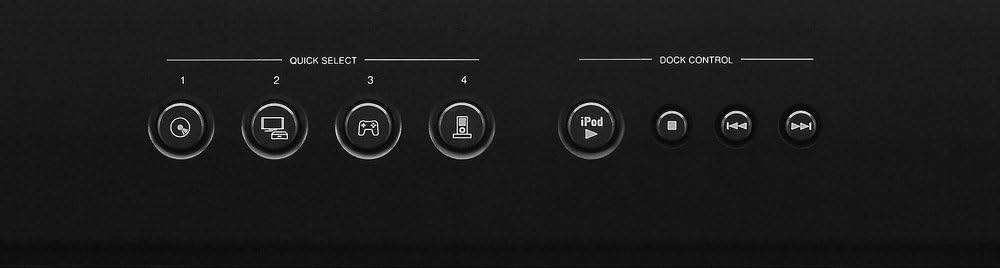
Figure 2: Front panel Quick Select and Dock Control buttons. These buttons allow for quick access to frequently used sources and sound modes.
Àwọn bọ́tìnì yíyàn kíákíá:
The AVR-1312 features four Yiyan ni kiakia buttons on the front panel and remote control. These buttons allow you to instantly switch to a pre-registered input source and surround mode. To register a setting, select the desired input and surround mode, then press and hold one of the Quick Select buttons (1-4) for a few seconds until the display flashes.
3. Iṣakoso iwọn didun
Ṣatunṣe iwọn didun titunto si nipa lilo nla Iwọn didun koko lori ni iwaju nronu tabi awọn Idibo +/- awọn bọtini lori isakoṣo latọna jijin.
4. Awọn ọna ohun
Tẹ awọn MODE or YIKA buttons on the remote control to cycle through available sound modes (e.g., Stereo, Dolby Digital, DTS, Multi-Channel Stereo). The receiver automatically detects the incoming audio signal and suggests optimal modes.

Figure 3: Denon RC-1158 Remote Control. This remote provides full control over the receiver's functions, including power, input selection, volume, sound modes, and menu navigation.
Itoju ati Itọju
- Ninu: Wipe the exterior of the receiver with a soft, dry cloth. Do not use abrasive cleaners, solvents, or chemical cloths, as these may damage the finish.
- Afẹfẹ: Ensure that the ventilation openings on the top and sides of the receiver are not blocked. Proper airflow is essential to prevent internal heat buildup.
- Okun agbara: When unplugging the power cord, always grasp the plug, not the cord itself.
- Ibi ipamọ: If storing the unit for an extended period, disconnect the power cord and store it in a clean, dry place.
Laasigbotitusita Itọsọna
If you encounter issues with your receiver, refer to the following common problems and solutions before contacting customer support.
| Isoro | Owun to le Fa | Ojutu |
|---|---|---|
| Ko si agbara | Okun agbara ko sopọ; agbara iṣan oro. | Ensure power cord is securely plugged in. Check if the power outlet is functional. |
| Ko si ohun | Incorrect input selected; speakers not connected; volume too low; mute activated. | Select correct input. Check speaker connections. Increase volume. Deactivate mute. |
| Ko si fidio | Incorrect input selected; HDMI cable issue; TV input issue. | Select correct input. Check HDMI cable connections. Ensure TV is on correct input. |
| Isakoṣo latọna jijin ko ṣiṣẹ | Batteries depleted; obstruction; incorrect remote mode. | Replace batteries. Remove obstructions. Ensure remote is in the correct operating mode for the receiver. |
Imọ ni pato
| Brand | Denon |
| Nọmba awoṣe | AVR1312 |
| Agbara Ijade | 75 Wattis fun ikanni |
| Nọmba ti awọn ikanni | 5.1 |
| Lapapọ HDMI Ports | 5 (4 In / 1 Out) |
| Asopọmọra Technology | Ti firanṣẹ |
| Ipo Ijade Ohun | Sitẹrio, Agbegbe |
| Pataki Awọn ẹya ara ẹrọ | 3D Pass-Through, Equal Power Amp Design, High-Definition Audio Support |
| Awọn ẹrọ ibaramu | Game Console, Television |
| Iwọn Nkan | 19.8 iwon |
Alaye atilẹyin ọja
The Denon AVR-1312 AV Surround Receiver comes with a 2-odun atilẹyin ọja from the date of purchase. This warranty covers defects in materials and workmanship under normal use. Please retain your proof of purchase for warranty claims. For full terms and conditions, refer to the warranty card included with your product or visit the official Denon webojula.
Onibara Support
For further assistance, technical support, or service inquiries, please visit the official Denon website or contact their customer service department. You can typically find contact information, FAQs, and additional resources on the manufacturer's support pages.