
1. Ifihan
The SainSmart HC-SR04 Ultrasonic Distance Sensor module is designed for precise non-contact distance measurement. It utilizes ultrasonic waves to determine the distance to an object, making it suitable for various applications such as robotics, obstacle avoidance, and level sensing. This module offers a measurement range from 2 cm to 400 cm with high accuracy.
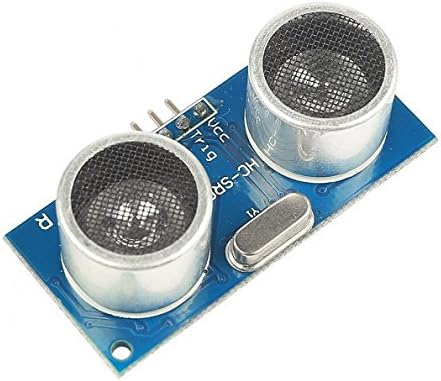
olusin 1: Iwaju view of the HC-SR04 Ultrasonic Distance Sensor, showing the two ultrasonic transducers and the module's pins.
2. Awọn ẹya Ọja
- Awọn ọna Voltage: 5V DC
- Idaduro lọwọlọwọ: O kere ju 2mA
- Effective Angle: O kere ju iwọn 15 lọ
- Ijinna Aarin: 2cm si 400cm
- Ipinnu: 0.3cm
- Iṣagbewọle okunfa: 10us high-level signal
- Isẹ aladaaṣe: Module automatically sends eight 40 kHz ultrasonic pulses.
3. Awọn pato
| Ọja Mefa | 1.3 x 0.4 x 0.05 inches |
| Iwọn Nkan | 0.8 iwon |
| Nọmba awoṣe | HC-SR04 |
| Ibi ti ina elekitiriki ti nwa | 5V DC |
| Quiescent Lọwọlọwọ | <2mA |
| Munadoko Igun | Awọn iwọn 15 |
| Ijinna laarin | 2cm - 400cm |
| Ipinnu | 0.3cm |
4. Pinout ati awọn isopọ
The HC-SR04 module features four pins for connection to a microcontroller or other circuit:
- VCC: Power supply (5V DC).
- Trig (Trigger): Input pin to initiate the ultrasonic burst. A 10us high-level pulse is required.
- Echo: Output pin that goes high when the ultrasonic pulse is sent and stays high until the echo is received. The duration of this high-level signal is proportional to the distance.
- GND: Asopọ ilẹ.

olusin 2: Pada view of the HC-SR04 module, showing the electronic components and the four connection pins.
Ensure correct polarity when connecting VCC and GND to avoid damage to the module.
5. Eto
To set up the HC-SR04 sensor for operation, follow these steps:
- Asopọ agbara: Sopọ awọn VCC pin to a 5V DC power source and the GND pin to the ground of your microcontroller or power supply.
- Trigger Pin Connection: Sopọ awọn Trig pin to a digital output pin on your microcontroller (e.g., Arduino, Raspberry Pi).
- Echo Pin Connection: Sopọ awọn Eko pin to a digital input pin on your microcontroller.
- Iṣagbesori: Securely mount the sensor in the desired location, ensuring a clear line of sight to the target object. Avoid mounting in areas with excessive vibrations or acoustic interference.
Akiyesi: For microcontrollers operating at 3.3V (like some Raspberry Pi models), a voltage divider or level shifter may be required for the Echo pin to prevent damage, as the Echo pin outputs 5V.
6. Isẹ
The HC-SR04 operates by emitting an ultrasonic sound wave and measuring the time it takes for the echo to return. The process is as follows:
- Nfa: To initiate a measurement, the microcontroller sends a short high-level pulse (at least 10 microseconds) to the Trig pinni.
- Ultrasonic Burst: Upon receiving the trigger pulse, the HC-SR04 module automatically emits eight 40 kHz ultrasonic sound waves.
- Echo Reception: The module then waits for the echo of these sound waves. When an echo is detected, the Eko pin goes high.
- Duration Measurement: The microcontroller measures the duration for which the Eko pin remains high. This duration represents the time taken for the ultrasonic wave to travel from the sensor to the object and back.
- Iṣiro Ijinna: The distance to the object can be calculated using the following formula:
Distance (cm) = (Duration of high level on Echo pin (microseconds) * Speed of Sound (cm/µs)) / 2
The speed of sound in air is approximately 340 meters per second (0.034 cm per microsecond). Therefore, the formula simplifies to:
Distance (cm) = Duration (µs) / 58
(Alternatively, Distance (inches) = Duration (µs) / 148)
It is recommended to introduce a small delay (e.g., 60ms) between consecutive measurements to allow the ultrasonic waves to dissipate and prevent interference with subsequent readings.
7. Itọju
The HC-SR04 module is a low-maintenance device. To ensure optimal performance and longevity:
- Jeki mimọ: Ensure the ultrasonic transducers are free from dust, dirt, or obstructions. Gently clean with a soft, dry cloth if necessary. Avoid using liquids or abrasive materials.
- Awọn ipo Ayika: Operate the sensor within its specified temperature and humidity ranges. Avoid exposure to extreme temperatures, direct sunlight for prolonged periods, or high moisture environments.
- Idaabobo ti ara: Protect the module from physical impact or excessive force, which could damage the transducers or circuit board.
- Ibi ti ina elekitiriki ti nwa: Always use a stable 5V DC power supply. Fluctuations in voltage can affect performance or damage the module.
8. Laasigbotitusita
If you encounter issues with your HC-SR04 sensor, consider the following common problems and solutions:
- No Readings or Erratic Readings:
- Ṣayẹwo Awọn isopọ: Verify that VCC, GND, Trig, and Echo pins are correctly wired and securely connected.
- Ibi ti ina elekitiriki ti nwa: Ensure the module is receiving a stable 5V DC power supply.
- Trigger Pulse: Confirm that the Trig pin is receiving a clean 10us high-level pulse. Incorrect pulse duration can lead to no or inaccurate readings.
- Echo Pin Reading: Ensure your microcontroller code is correctly measuring the pulse duration on the Echo pin.
- Ìjánu: Ultrasonic sensors can be affected by other ultrasonic devices, strong air currents, or noisy environments. Try testing in a quiet area.
- Object Characteristics: Very soft, sound-absorbing materials (like fabric or wool) or very small/thin objects may not reflect enough sound for detection. Highly angled surfaces can also cause issues.
- Inaccurate Distance Readings:
- Speed of Sound: The speed of sound varies slightly with temperature and humidity. For highly precise applications, consider temperature compensation. The provided formula uses an average speed.
- Igun tan ina: The sensor has an effective angle of less than 15 degrees. Objects outside this cone may not be detected accurately or at all.
- Ijinna to kere julọ: The sensor has a minimum detection distance of 2cm. Objects closer than this may yield unreliable results.
- Ijinna to pọju: While rated up to 400cm, practical maximum range can be affected by object size, material, and environmental conditions.
- Modulu Ko Dahun:
- Yiyipo Agbara: Disconnect and reconnect power to the module.
- Voltage ibamu: If using a 3.3V microcontroller, ensure proper voltage level shifting for the Echo pin.
- Bibajẹ: Inspect the module for any visible physical damage.
9. Atilẹyin ọja ati Support
SainSmart products are designed for reliability and performance. For specific warranty information, please refer to the documentation provided with your purchase or visit the official SainSmart website. For technical support, troubleshooting assistance, or inquiries about product functionality, please contact SainSmart customer service through their official channels.
Awọn orisun Ayelujara: Many online communities and forums dedicated to Arduino, Raspberry Pi, and electronics projects offer extensive resources and examples for using the HC-SR04 sensor. Searching for "HC-SR04 Arduino tutorial" or "HC-SR04 Raspberry Pi Python" can provide valuable code examples and project ideas.