
Ọrọ Iṣaaju
This manual provides instructions for setting up and operating your RCA 2-Device Universal Remote Control, model RCRH02BR. This remote is designed to control up to two different audio/video devices, such as a television and a cable box or DVD player, simplifying your home entertainment experience.
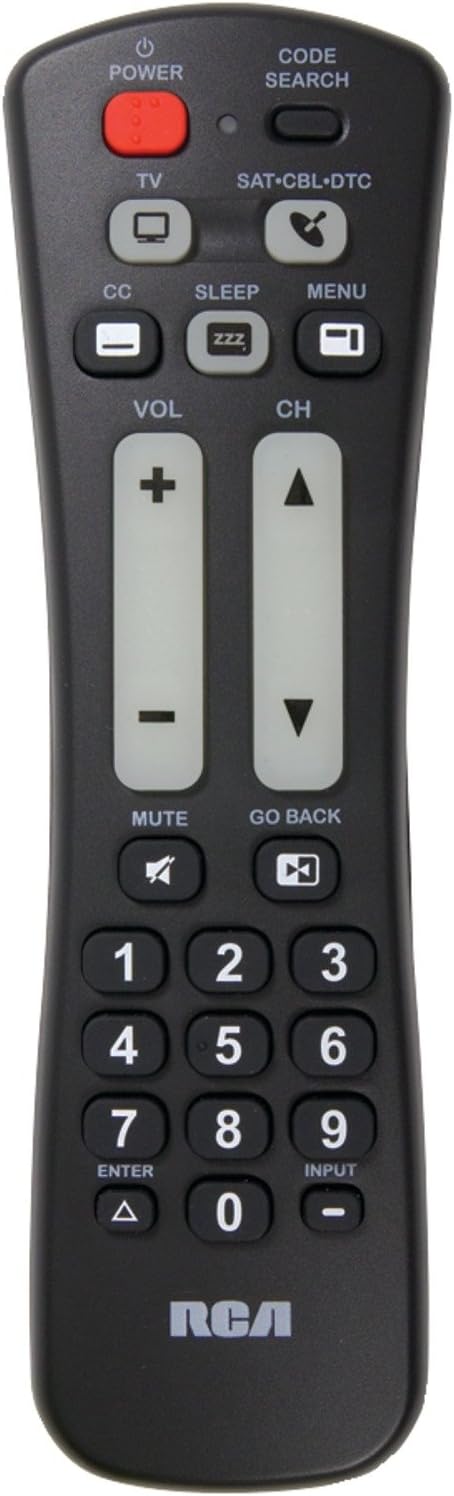
Iwaju view of the RCA 2-Device Universal Remote Control, showing its ergonomic design and large, clearly labeled buttons for power, volume, and channel.
Package Awọn akoonu
Daju pe gbogbo awọn nkan wa ninu apo rẹ:
- RCA 2-Device Universal Remote Control (RCRH02BR)
- Afowoyi Olumulo (iwe-ipamọ yii)
Awọn ẹya ara ẹrọ
The RCA RCRH02BR remote control offers the following key features:
- Controls up to 2 different audio/video devices.
- Oversized buttons for frequently used functions, enhancing ease of use.
- Volume and channel buttons feature a glow-in-the-dark design for visibility in low light conditions.
Fifi sori batiri
Isakoṣo latọna jijin nilo awọn batiri AAA meji (ko si ninu rẹ).
- Wa yara batiri ni ẹhin isakoṣo latọna jijin.
- Tẹ mọlẹ lori latch ki o si rọra yọ ideri batiri kuro.
- Insert two new AAA batteries, ensuring the positive (+) and negative (-) terminals align with the markings inside the compartment.
- Gbe ideri batiri pada si aaye titi yoo fi tẹ ni aabo.
Akiyesi: If the remote does not function after battery installation, ensure the batteries are correctly oriented and make firm contact with the terminals. Sometimes, gently pressing the batteries against the positive connector can resolve connection issues.
Setup: Programming the Remote
To control your devices, the remote must be programmed with the correct codes. You can program the remote using either Manual Code Entry or Auto Code Search.
Ọna 1: Titẹ koodu afọwọṣe
This method requires you to find the specific code for your device's brand from a code list (typically provided with the physical manual or available online).
- Tan ẹ̀rọ tí o fẹ́ ṣàkóso (fún àpẹẹrẹ, TV, DVD player).
- Tẹ mọlẹ IWADII CODE bọ́tìnì títí tí iná àmì náà yóò fi tàn.
- Tẹ bọtini ẹrọ ti o fẹ ṣe eto ki o si tu silẹ (fun apẹẹrẹ, TV, DVD) Ìmọ́lẹ̀ àmì náà yóò tàn lẹ́ẹ̀kan, lẹ́yìn náà yóò wà ní títàn.
- Enter the 4-digit code for your device's brand using the number buttons. After entering the last digit, the indicator light should turn off.
- Point the remote at your device and press the AGBARA button. If the device turns off, the remote is successfully programmed.
- If the device does not turn off, repeat steps 2-5 with the next code listed for your brand.
Method 2: Auto Code Search
Ọna yii n wa koodu to pe fun ẹrọ rẹ laifọwọyi.
- Tan ẹrọ ti o fẹ lati ṣakoso.
- Tẹ mọlẹ IWADII CODE bọ́tìnì títí tí iná àmì náà yóò fi tàn.
- Tẹ bọtini ẹrọ ti o fẹ ṣe eto ki o si tu silẹ (fun apẹẹrẹ, TV, DVD) Ìmọ́lẹ̀ àmì náà yóò tàn lẹ́ẹ̀kan, lẹ́yìn náà yóò wà ní títàn.
- Tọ́ka sí ẹ̀rọ rẹ láti mọ ibi tí agbára remote wà, kí o sì tẹ ẹ̀rọ náà léraléra. AGBARA button (approximately once per second) until your device turns off.
- Ni kete ti ẹrọ naa ba wa ni pipa, tẹ lẹsẹkẹsẹ WOLE bọ́tìnì láti fi kódù náà pamọ́. Ìmọ́lẹ̀ àmì náà yóò pa.
- Test other functions (e.g., volume, channel) to ensure the remote controls your device correctly. If not, repeat the auto code search process.
Awọn ilana Iṣiṣẹ
Once programmed, use the following buttons to control your devices:
- DEVICE BUTTONS (TV, DVD, etc.): Press the corresponding device button to select which device the remote will control. The indicator light will briefly illuminate.
- AGBARA: Tan ẹrọ ti o yan tan tabi pa.
- VOL (+/-): Adjusts the volume of the selected device. These buttons glow in the dark.
- CH (+/-): Changes the channel on the selected device. These buttons glow in the dark.
- NOMBA bọtini (0-9): Used to enter channel numbers or codes during programming.
- Fi sii: Cycles through the input sources on your television.
- DÁKÚN: Mutes the audio on the selected device.
Laasigbotitusita
| Isoro | Owun to le Solusan |
|---|---|
| Latọna jijin ko ṣiṣẹ ẹrọ rẹ. |
|
| Some functions (e.g., MENU) do not work. |
|
| Imọlẹ atọka ko tan. |
|
Awọn pato
- Awoṣe: RCRH02BR
- Brand: RCA
- Maximum Number of Supported Devices: 2
- Awọn ẹrọ ibaramu: Television, DVD Player, VCR, Cable Box, Satellite Receiver (depending on programming)
- Imọ-ẹrọ Asopọmọra: Infurarẹẹdi (IR)
- Iru Adari: Iṣakoso bọtini
- Ibiti o pọju: Isunmọ awọn mita 10 (ẹsẹ 33)
- Awọn batiri ti a beere: 2 x AAA (ko si)
- Ìwọ̀n Nkan: Nǹkan bí 4 ounces (láìsí àwọn bátírì)
Atilẹyin ọja ati Support
Alaye atilẹyin ọja
This RCA RCRH02BR Universal Remote Control is covered by a 90-ọjọ atilẹyin ọja lati ọjọ ti o ra. Atilẹyin ọja yi ni wiwa awọn abawọn ninu awọn ohun elo ati iṣẹ ṣiṣe labẹ lilo deede. Jọwọ ṣe idaduro ẹri rira rẹ fun awọn iṣeduro atilẹyin ọja.
Onibara Support
For further assistance, troubleshooting, or to access the latest code lists, please visit the official RCA support website or contact their customer service. You can often find support resources by searching for "RCA RCRH02BR support" online.
For more information about RCA products, visit the Ile itaja RCA.