
1. Ifihan
This manual provides comprehensive instructions for the setup, operation, and maintenance of your RadioShack CTR-121 Desktop Cassette Recorder. Please read this manual thoroughly before using the device to ensure proper function and longevity.
Key features of the CTR-121 include voice-activated (VOX) recording, auto-level recording, auto stop mechanism, and various input/output jacks for enhanced functionality.
2. Alaye Aabo
Ṣe akiyesi awọn iṣọra aabo wọnyi lati yago fun ibajẹ si ẹrọ naa ki o rii daju aabo olumulo:
- Ma ṣe fi ẹrọ naa han si ojo tabi ọrinrin.
- Yago fun gbigbe ẹrọ naa si nitosi awọn orisun ooru tabi ni imọlẹ orun taara.
- Lo oluyipada agbara pàtó kan.
- Maṣe ṣii casing; tọka gbogbo iṣẹ si oṣiṣẹ ti o peye.
- Jeki kuro ni arọwọto awọn ọmọde.
3. Package Awọn akoonu
Jẹrisi pe gbogbo awọn ohun kan wa ninu package:
- RadioShack CTR-121 Desktop Cassette Recorder
- AC Agbara okun
- Ìtọ́sọ́nà Olùlò (ìwé yìí)
- Awọn Itọsọna Aabo
4. Ọja Ipariview
Familiarize yourself with the various parts of your CTR-121 recorder.

Nọmba 1: Iwaju view of the RadioShack CTR-121 Desktop Cassette Recorder, showing the speaker, cassette compartment, and control buttons.
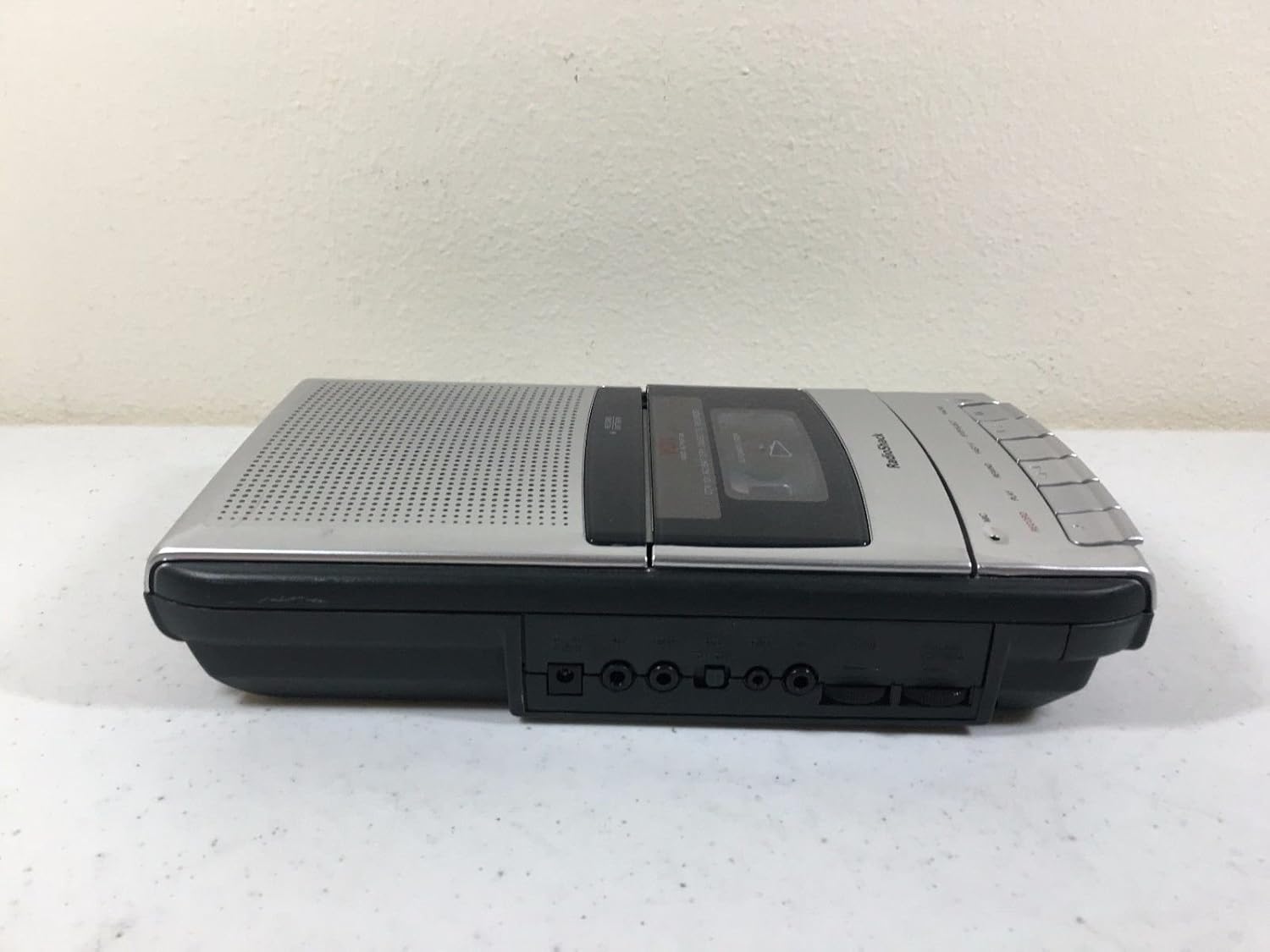
Nọmba 2: Apa osi view of the recorder, illustrating the microphone, earphone, and remote control jacks.

Nọmba 3: Apa ọtun view of the recorder, showing the DC power input jack.
The front panel includes controls for Record, Play, Rewind, Fast-F (Fast Forward), Stop/Eject, and Pause. A built-in microphone is located on the front, along with a speaker grille.
5. Eto
5.1 Agbara Unit
The CTR-121 can be powered by either AC power or batteries.
Agbara AC:
- Ensure the recorder is turned off.
- Connect the supplied AC power cord to the DC IN jack on the right side of the unit (refer to Figure 3).
- Pulọọgi opin miiran ti okun agbara sinu iṣan odi AC boṣewa kan.
Agbara Batiri:
(Note: Battery compartment details are not provided in the product data, so this section will be generic.)
- Open the battery compartment cover, usually located on the bottom or rear of the unit.
- Insert the required number of C-size batteries (not included), observing the correct polarity (+/-) as indicated inside the compartment.
- Pa ideri batiri naa ni aabo.
5.2 Nsopọ Awọn ẹya ẹrọ
The CTR-121 features several jacks for external devices (refer to Figure 2):
- MIC Jack: Connect an external microphone for improved recording quality or hands-free operation.
- EARPHONE Jack: Connect headphones or an earphone for private listening.
- REMOTE Jack: Connect a compatible remote control for convenient operation (remote control sold separately).
6. Awọn ilana Iṣiṣẹ
6.1 Fífi teepu kasẹti sori ẹrọ
- Tẹ awọn Duro/EJECT bọtini lati ṣii kasẹti iyẹwu ilekun.
- Insert a standard audio cassette tape with the open edge facing upwards and the full reel on the left.
- Gently close the cassette compartment door until it clicks shut.
6.2 Gbigbasilẹ
Gbigbasilẹ deede:
- Fi teepu kasẹti ti o ṣofo tabi igbasilẹ silẹ.
- Tẹ awọn Igbasilẹ bọtini. Awọn ERE bọtini naa yoo tun ṣiṣẹ laifọwọyi.
- The recording indicator light will illuminate.
- Speak into the built-in microphone or ensure an external microphone is connected and active.
- Lati da gbigbasilẹ duro, tẹ bọtini naa Duro/EJECT bọtini.
Voice-Activated (VOX) Recording:
The VOX feature allows the recorder to start recording automatically when sound is detected and pause when silence occurs, conserving tape.
- Ensure the VOX switch (if present, location not specified in data) is set to the ON position.
- Tẹ awọn Igbasilẹ button. The recorder will enter standby mode.
- Recording will begin when sound is detected and pause during periods of silence.
- To stop VOX recording, press the Duro/EJECT bọtini.
Auto Level Recording:
The CTR-121 features an automatic level control (ALC) system that adjusts the recording volume to an optimal level, preventing distortion from overly loud sounds and ensuring softer sounds are audible.
6.3 Sisisẹsẹhin
- Insert a recorded cassette tape.
- Tẹ awọn ERE bọtini.
- Adjust the volume control (if present, location not specified in data) to your desired listening level.
- Lati da ṣiṣiṣẹsẹhin duro, tẹ awọn Duro/EJECT bọtini.
6.4 Yára síwájú àti ìpadàsẹ̀yìn
- To fast forward the tape, press the FAST-F bọtini.
- To rewind the tape, press the TUNTUN bọtini.
- Tẹ Duro/EJECT to stop fast forwarding or rewinding.
6.5 Iṣẹ idaduro
During recording or playback, press the DÁYÉ button to temporarily stop the tape movement. Press it again to resume.
6.6 Iṣakoso ohun orin
The CTR-121 includes a tone control feature (if present, location not specified in data) to adjust the audio output's treble and bass frequencies, allowing for a customized listening experience.
7. Itọju
7.1 Fífọ àwọn orí teepu náà
Regular cleaning of the tape heads, capstan, and pinch roller is essential for optimal sound quality and to prevent tape damage. Clean these components after every 10-12 hours of use or if sound quality deteriorates.
- Ṣii yara kasẹti naa.
- Using a cotton swab lightly moistened with isopropyl alcohol or a specialized head cleaning fluid, gently wipe the tape heads, capstan, and pinch roller.
- Jẹ́ kí àwọn èròjà náà gbẹ pátápátá kí o tó fi teepu sí i.
7.2 Itọju Gbogbogbo
- Keep the unit free from dust and dirt. Use a soft, dry cloth for cleaning the exterior.
- Ma ṣe lo abrasive ose tabi epo.
- When not in use for extended periods, remove batteries to prevent leakage.
8. Laasigbotitusita
| Isoro | Owun to le Fa | Ojutu |
|---|---|---|
| Ẹka ko ni agbara lori. | No AC power; dead batteries; incorrect battery polarity. | Check AC cord connection and outlet; replace batteries; ensure correct battery polarity. |
| Ko si ohun nigba šišẹsẹhin. | Volume too low; headphones connected; dirty tape heads; faulty tape. | Increase volume; disconnect headphones; clean tape heads; try another tape. |
| Didara gbigbasilẹ ko dara. | Dirty tape heads; microphone too far; faulty tape. | Clean tape heads; speak closer to microphone; try a new tape. |
| Teepu ko gbe. | Tape jammed; auto stop engaged; unit not powered. | Open compartment and re-seat tape; ensure power is on. |
9. Awọn pato
| Nọmba awoṣe | CTR-121 |
| Brand | RadioShack |
| Package Mefa | 12.8 x 7 x 2.9 inches |
| Iwọn Nkan | 2.25 poun (isunmọ 1.02 kg) |
| Olupese | Radio shack |
| Awọn ẹrọ ibaramu | Personal Computer (via USB, if applicable) |
| Ni wiwo Hardware | USB (for data transfer, if applicable) |
| Gbohungbo Fọọmù ifosiwewe | Ti a ṣe sinu |
| Ọna kika | MP3 Audio (for digital output, if applicable) |
| Awọn agbekọri Jack | 3.5 milimita |
| Agbara Ibi ipamọ Iranti | 2.2 GB (for digital storage, if applicable) |
| UPC | 040293153236 |
Note: Specifications are subject to change without notice. The "Compatible Devices", "Hardware Interface", "Format", and "Memory Storage Capacity" listed may refer to digital conversion capabilities or compatibility with modern systems, as the primary function is analog cassette recording.
10. Atilẹyin ọja ati Support
For warranty information, please refer to the warranty card included with your product or contact RadioShack customer support. Keep your purchase receipt as proof of purchase.
For technical support or service inquiries, please visit the official RadioShack website or contact their customer service department using the information provided in your product packaging or on their webojula.