
1. Ifihan
O ṣeun fun riraasing the Caliber RMD 068-2 Car Radio USB/SD Player. This manual provides detailed instructions for the installation, operation, and maintenance of your new car radio. Please read this manual thoroughly before using the product to ensure proper functionality and safety. Keep this manual for future reference.
2. Alaye Aabo
- Fifi sori: Ensure the unit is installed by a qualified technician to prevent damage to the vehicle's electrical system. Incorrect wiring can cause fire or electrical shock.
- Ibi ti ina elekitiriki ti nwa: Connect the unit only to a 12V DC car battery with a negative ground.
- Fiusi: Always replace fuses with new ones of the specified rating. Using an incorrect fuse can cause damage to the unit or vehicle.
- Ipele Iwọn: Do not operate the unit at excessively high volume levels, as this may impair your ability to hear external traffic sounds and could be dangerous.
- Ninu: Lo asọ asọ ti o gbẹ fun mimọ. Ma ṣe lo abrasive ose tabi epo.
- Ọrinrin: Ma ṣe fi ẹrọ naa han si ọrinrin tabi omi.
3. Package Awọn akoonu
Jọwọ ṣayẹwo pe gbogbo awọn nkan wa:
- Caliber RMD 068-2 Car Radio Unit
- Detachable Front Panel
- ISO relays ijanu
- Fireemu Fifi
- Disassembly Keys (2 pcs)
- Afowoyi Olumulo (iwe-ipamọ yii)
4. Ọja Ipariview
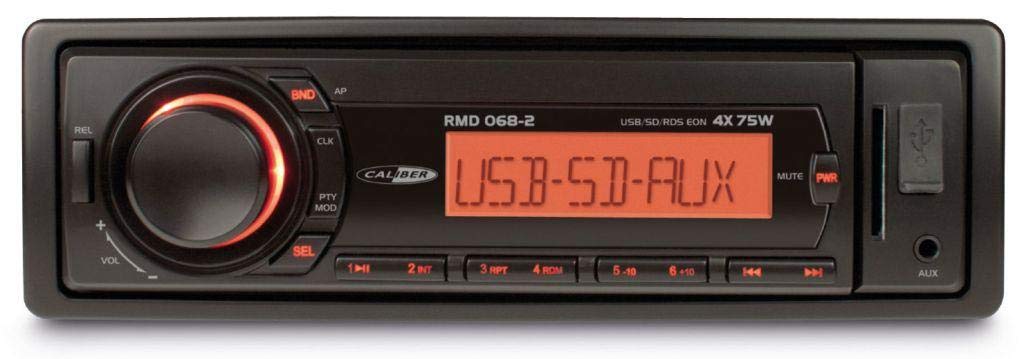
olusin 1: Iwaju view of the Caliber RMD 068-2 Car Radio. This image shows the main unit with its detachable front panel, including the display, control buttons, USB port, and SD card slot.
4.1 Iwaju Panel idari
- POWER/MODE Button: Press to turn on/off. Short press to switch between Radio, USB, SD, AUX modes.
- KỌRỌ IWỌRỌ: Rotate to adjust volume. Press to access audio settings (Bass, Treble, Balance, Fader).
- Ifihan: Shows current time, radio frequency, track information, etc.
- Ibudo USB: So awọn awakọ filasi USB pọ fun ṣiṣiṣẹsẹhin media.
- Iho kaadi SD: Fi awọn kaadi SD sii fun ṣiṣiṣẹsẹhin media.
- Ìbáwọlé AUX (Jack 3.5mm): So awọn ẹrọ ohun ita.
- BAND/AMS Button: In radio mode, press to select radio band (FM1, FM2, FM3). Long press for Automatic Memory Store.
- Àwọn bọ́tìnì TẸ̀SẸ̀ TẸ̀LẸ̀ (1-6): Store and recall radio stations. In USB/SD mode, use for direct track selection.
- Bọ́tìnnì SÍré/Dúró: Mu ṣiṣẹ tabi da duro ṣiṣiṣẹ media.
- FORWARD/BACKWARD Buttons: Skip tracks or tune radio frequency.
- Bọ́tìnì ÌṢẸ́JÚ: Release the detachable front panel.
4.2 Àwọn ìsopọ̀ ẹ̀yìn
The rear of the unit features standard ISO connectors for power and speakers, along with an antenna input.
- ISO Power Connector: For connecting to the vehicle's power supply (constant 12V, ignition 12V, ground).
- ISO Speaker Connector: For connecting to the vehicle's speakers (Front Left, Front Right, Rear Left, Rear Right).
- Iṣawọle eriali: Fún sísopọ̀ eriali rédíò ọkọ̀ ayọ́kẹ́lẹ́ náà.
5. Eto
5.1 fifi sori ẹrọ
- Ge batiri kuro: Before starting, disconnect the negative terminal of your car battery to prevent short circuits.
- Yọ Ẹka Atijọ kuro: Fi ìṣọ́ra yọ rédíò ọkọ̀ rẹ tó wà tẹ́lẹ̀ kúrò lórí dasibodu náà.
- Fi sori ẹrọ fireemu fifi sori ẹrọ: Insert the supplied mounting frame into the dashboard opening and bend the tabs to secure it.
- Asopọmọra Waya: Refer to the wiring diagram in section 5.2. Connect the ISO wiring harness to the car's wiring and then to the Caliber RMD 068-2 unit. Connect the antenna cable.
- Slide Unit In: Carefully slide the Caliber RMD 068-2 unit into the mounting frame until it clicks into place.
- Batiri Atunso: Reconnect the negative terminal of your car battery.
- So Igbimo Iwaju: So panẹli iwaju ti a le yọ kuro mọ ẹrọ akọkọ.
5.2 Wiring aworan atọka
The Caliber RMD 068-2 uses standard ISO connectors. Ensure correct connections as shown below. If your vehicle does not have ISO connectors, an adapter may be required.
| PIN Bẹẹkọ. | Àwọ̀ Wáyà (Àṣà) | Išẹ |
|---|---|---|
| 4 | Yellow | Ibakan 12V (Batiri) |
| 7 | Pupa | Yipada 12V (Ina) |
| 8 | Dudu | Ilẹ |
| 5 | Buluu | Antenna Remote Out |
| PIN Bẹẹkọ. | Àwọ̀ Wáyà (Àṣà) | Išẹ |
|---|---|---|
| 1 | eleyi ti | Ẹhin Ọtun (+) |
| 2 | eleyi ti/dudu | Ẹyin Ọtun (-) |
| 3 | Alawọ ewe | Ti osi (+) |
| 4 | Alawọ ewe/dudu | Ti osi (-) |
| 5 | Grẹy | Iwaju Ọtun (+) |
| 6 | Grẹy/dudu | Iwaju Ọtun (-) |
| 7 | Funfun | Iwaju osi (+) |
| 8 | Funfun/dudu | Iwaju Osi (-) |
Note: Wire colors may vary depending on vehicle manufacturer. Always consult your vehicle's wiring diagram.
6. Awọn ilana Iṣiṣẹ
6.1 Ipilẹ Awọn iṣẹ
- Titan/Apapa: Tẹ awọn AGBARA / Ipo bọtini lati tan tabi pa kuro.
- Iṣakoso iwọn didun: Yiyi awọn Iwọn didun tẹ bọtini ni apa aago lati mu iwọn didun pọ si, ni ọna lodi si aago lati dinku.
- Aṣayan Ipo: Kukuru tẹ awọn AGBARA / Ipo button to cycle through available modes: Radio (FM), USB, SD, AUX.
- Eto ohun: Tẹ awọn Iwọn didun knob to enter audio settings. Rotate the knob to select settings like BASS, TREBLE, BALANCE, FADER. Press the knob again to confirm or move to the next setting.
6.2 Radio isẹ
- Aṣayan Ẹgbẹ: Ni ipo Redio, tẹ bọtini naa BAND/AMS button to switch between FM1, FM2, and FM3 bands.
- Itọsọna Afowoyi: Kukuru tẹ awọn Siwaju / Sẹhin awọn bọtini lati itanran-tune awọn igbohunsafẹfẹ.
- Laifọwọyi Search: Gun tẹ awọn Siwaju / Sẹhin awọn bọtini lati wa laifọwọyi fun awọn nigbamii ti lagbara ibudo.
- Awọn iṣeto ile itaja: Tune to your desired station. Long press one of the TẸTẸ (1-6) buttons until you hear a beep. The station is now stored.
- Ṣe iranti awọn tito tẹlẹ: Short press one of the TẸTẸ (1-6) buttons to recall a stored station.
- Automatic Memory Store (AMS): Gun tẹ awọn BAND/AMS button to automatically scan and store the strongest stations into the current band's presets.
6.3 Sisisẹsẹhin USB/SD
- Fi Media sii: Insert a USB flash drive into the USB port or an SD card into the SD card slot. The unit will automatically switch to USB/SD mode and begin playback.
- Ṣiṣẹ/Daduro: Tẹ awọn ERE/SINMI bọtini lati da duro tabi bẹrẹ šišẹsẹhin.
- Rekọja Orin: Kukuru tẹ awọn Siwaju / Sẹhin awọn bọtini lati fo si atẹle tabi orin ti tẹlẹ.
- Siwaju / Dapada sẹhin: Gun tẹ awọn Siwaju / Sẹhin awọn bọtini lati yara siwaju tabi sẹhin laarin orin kan.
- Lilọ kiri folda: Lo awọn TẸTẸ 5 ati TẸTẸ 6 buttons to navigate between folders on your USB/SD media.
6.4 Iṣawọle AUX
- So ẹrọ pọ: Connect your external audio device (e.g., smartphone, MP3 player) to the 3.5mm AUX input jack on the front panel using an audio cable.
- Yan Ipo AUX: Tẹ awọn AGBARA / Ipo button repeatedly until "AUX" is displayed.
- Iṣakoso Sisisẹsẹhin: Control playback (play, pause, skip) directly from your connected external device. The car radio will control the volume.
7. Itọju
- Ninu Ẹka naa: Use a soft, dry cloth to wipe the front panel and display. Do not use harsh chemicals, cleaning sprays, or abrasive cloths, as these can damage the surface.
- Detachable Front Panel: When detaching the front panel, handle it carefully. Store it in a protective case (if supplied) to prevent scratches or damage.
- Àwọn Ibudo USB/SD: Keep the USB port and SD card slot free from dust and debris.
8. Laasigbotitusita
| Isoro | Owun to le Fa | Ojutu |
|---|---|---|
| Ko si agbara | Fúúsì tí a fẹ́; Wáyà tí kò tọ́; Ìsopọ̀ tí kò dáa | Check and replace fuse; Verify wiring connections (Yellow to constant 12V, Red to ignition 12V, Black to ground); Ensure front panel is securely attached. |
| Ko si ohun | Volume too low; Mute activated; Incorrect speaker wiring; Damaged speakers | Increase volume; Check if mute is active; Verify speaker connections; Test with known good speakers. |
| Gbigba redio ko dara | Antenna not connected; Damaged antenna; Weak signal area | Ensure antenna is securely connected; Check antenna for damage; Try tuning to a stronger station or move to a different location. |
| USB/SD ko dun | Ti ko ni atilẹyin file format; Corrupted media; Incorrectly inserted media; Max capacity exceeded | Rii daju files are MP3/WMA format; Try a different USB/SD card; Reinsert media correctly; Check media capacity (max 32GB recommended). |
| Front panel cannot be detached | Eject button not fully pressed; Mechanism jammed | Press the EJECT button firmly; Do not force the panel. |
If the problem persists after trying these solutions, please contact your dealer or a qualified service center.
9. Awọn pato
- Awoṣe: Caliber RMD 068-2
- Ijade agbara: 4 x 75 Watts Max
- Ibi ti ina elekitiriki ti nwa: 12V DC (10.8V-15.6V), Negative Ground
- Fiusi: 10A
- Awọn ọna kika ohun ti o ni atilẹyin: MP3, WMA (via USB/SD)
- USB/SD Compatibility: Titi di 32GB (kika FAT32)
- FM tuna: RDS, 18 Presets
- Iṣawọle AUX: 3.5mm Sitẹrio Jack
- Detachable Front Panel: Bẹẹni
- Ìwúwo: Isunmọ 0.95 kg (2.09 lbs)
10. Atilẹyin ọja ati Support
This Caliber product is covered by a warranty in accordance with applicable European laws. For detailed warranty terms and conditions, please refer to the warranty card included with your product or visit the official Caliber website. For technical support, troubleshooting assistance, or service inquiries, please contact your authorized Caliber dealer or the customer service department in your region. Please have your product model number (RMD 068-2) and proof of purchase ready when contacting support.
Note: Specifications and design are subject to change without notice for improvement.