
1. Ifihan
This manual provides essential information for the safe and efficient operation of your Datalogic PowerScan M8300-AR910RB Handheld Laser Bar Code Reader. Please read this manual thoroughly before using the device to ensure proper setup, operation, and maintenance. Keep this manual for future reference.
2. Alaye Aabo
Nigbagbogbo ṣe akiyesi awọn iṣọra ailewu atẹle lati yago fun ipalara tabi ibajẹ si ẹrọ naa:
- Aabo lesa: This device emits a laser beam. Do not stare directly into the laser beam or point it at others. Avoid direct eye exposure.
- Aabo Batiri: Use only Datalogic-approved batteries and charging accessories. Do not expose batteries to extreme temperatures, puncture, or disassemble them. Dispose of batteries according to local regulations.
- Awọn ipo Ayika: Do not operate the device in explosive atmospheres or near flammable materials. Keep the device dry and away from extreme temperatures.
- Itọju: Refer all servicing to qualified service personnel. Do not attempt to open or modify the device.
3. Package Awọn akoonu
Jẹrisi pe gbogbo awọn ohun kan wa ninu package:
- Datalogic PowerScan M8300-AR910RB Handheld Laser Bar Code Reader
- Batiri yiyọ kuro
- Charging/Communication Cradle (may be sold separately depending on configuration)
- USB or Serial Cable (for cradle connection, may be sold separately)
- Power Supply (for cradle, may be sold separately)
- Quick Bẹrẹ Itọsọna
4. Ọja Ipariview
The Datalogic PowerScan M8300 is a robust, cordless handheld laser bar code reader designed for industrial applications. It features a durable casing and a 910MHz radio for reliable wireless communication.
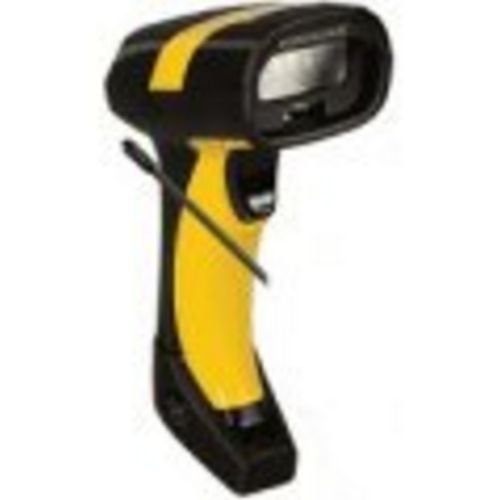
Aworan 1: Datalogic PowerScan M8300 Handheld Laser Bar Code Reader. This image displays the front view of the scanner, highlighting its ergonomic design, scan window, and trigger button.
Awọn eroja pataki:
- Wiwo Ferese: Located at the front, where the laser beam exits to read barcodes.
- Nfa: Activates the laser for scanning.
- Awọn imọlẹ Atọka: Provide feedback on scan status, battery level, and communication.
- Abala Batiri: Located at the base of the handle, housing the removable battery.
- Ibaraẹnisọrọ Ibaraẹnisọrọ: For wireless data transmission via the 910MHz radio.
5. Eto
5.1. Fifi sori batiri
- Rii daju pe ẹrọ iwo naa ti wa ni pipa.
- Locate the battery compartment cover at the bottom of the handle.
- Open the cover and insert the removable battery, ensuring correct polarity.
- Pa ideri batiri naa ni aabo.
5.2. Ngba agbara si Batiri naa
- Place the scanner into its charging cradle. Ensure the contacts on the scanner align with those on the cradle.
- Connect the power supply to the charging cradle and plug it into an electrical outlet.
- The scanner's indicator light will show charging status (typically amber for charging, green for fully charged).
- Allow the battery to fully charge before first use (approximately 4 hours).
5.3. Connecting to a Host System
The PowerScan M8300 uses a 910MHz radio for wireless communication. It typically connects to a host system (e.g., PC, laptop) via a base station or cradle connected by a USB or serial cable.
- Connect the communication cable (USB or serial) from the charging/communication cradle to your host system.
- Connect the power supply to the cradle and plug it in.
- Place the scanner in the cradle. The scanner and cradle will automatically establish a wireless link.
- Install any necessary drivers or software on your host system as prompted or as instructed by Datalogic documentation for your specific cradle model.
6. Awọn ilana Iṣiṣẹ
6.1. Agbara lori / Paa
- Lati Fi agbara: The scanner typically powers on automatically when removed from the cradle or when the trigger is pressed.
- Lati Paarẹ: The scanner will enter a low-power sleep mode after a period of inactivity. To fully power off, remove the battery.
6.2. Antivirus Barcodes
- Aim the scan window at the barcode you wish to read.
- Press and hold the trigger button. A laser line will appear.
- Position the laser line across the entire barcode.
- Once the barcode is successfully read, the scanner will emit an audible beep and/or an indicator light will illuminate.
- Release the trigger. The scanned data will be transmitted to the connected host system.
6.3. Data Gbigbe
The PowerScan M8300 transmits scanned data wirelessly to its paired base station/cradle. Ensure the scanner is within range of its base station for successful data transfer. Out-of-range scanning capabilities may vary by configuration; refer to advanced programming guides for details.
7. Itọju
7.1. Ninu ẹrọ
- Lo aṣọ rirọ, mimọ dampened pẹlu omi tabi kan ìwọnba ninu ojutu.
- Ma ṣe lo awọn afọmọ abrasive, nkanmimu, tabi awọn kẹmika lile.
- Gently wipe the scan window and the exterior of the scanner.
- Rii daju pe ko si omi ti o wọ inu awọn ṣiṣi ẹrọ naa.
7.2. Itọju batiri
- Gba agbara si batiri nigbagbogbo.
- Yago fun gbigba agbara si batiri ni kikun nigbagbogbo.
- Store the scanner and spare batteries in a cool, dry place when not in use.
7.3. Ibi ipamọ
When storing the scanner for extended periods, ensure the battery is partially charged (around 50%) and remove it from the device if possible. Store in a temperature-controlled environment.
8. Laasigbotitusita
If you encounter issues with your PowerScan M8300, refer to the following common problems and solutions:
| Isoro | Owun to le Fa | Ojutu |
|---|---|---|
| Scanner ko ni agbara lori. | Batiri ti ku tabi ti fi sori ẹrọ ti ko tọ. | Check battery installation. Charge the battery. Replace battery if necessary. |
| Scanner ko ka barcodes. | Barcode damaged or poorly printed; scan window dirty; incorrect symbology enabled. | Try scanning a different barcode. Clean the scan window. Refer to the programming guide to enable/disable symbologies. |
| No data transmitted to host. | Scanner out of range; base station not connected; communication issue. | Move scanner closer to the base station. Verify base station connection to host. Check base station power. |
| Aye batiri jẹ kukuru. | Battery nearing end of life; frequent use; improper charging. | Replace battery. Ensure full charges. Reduce backlight/power settings if configurable. |
If the problem persists, contact Datalogic technical support.
9. Awọn pato
The following specifications apply to the Datalogic PowerScan M8300-AR910RB model:
- Nọmba awoṣe: PM8300-AR910RB
- Awọn iwọn ọja: 2.72 x 4.49 x 8.15 inches
- Ìwọ̀n Nkan: 13.9 iwon
- Olupese: Datalogic ADC
- Orisun Agbara: Agbara Batiri
- Imọ-ẹrọ Asopọmọra: Alailowaya (910MHz)
- Awọn ẹrọ ibaramu: Ojú-iṣẹ, Kọǹpútà alágbèéká
- UPC: 053926383351
10. atilẹyin ọja Information
Datalogic products are covered by a limited warranty against defects in materials and workmanship. The specific terms and duration of the warranty may vary by region and product. Please refer to the warranty card included with your product or visit the official Datalogic webAaye fun alaye atilẹyin ọja alaye ati awọn ilana iforukọsilẹ.
11. Atilẹyin
For technical assistance, product inquiries, or to report issues, please contact Datalogic customer support:
- Webojula: Visit the official Datalogic website for support resources, FAQs, and driver downloads.
- Olubasọrọ: Refer to the 'Contact Us' section on the Datalogic website for phone numbers and email addresses specific to your region.
When contacting support, please have your product model number (PM8300-AR910RB) and serial number ready.