
1. Ọja Ipariview
The Mitel MiVoice 5304 IP Phone is a compact and cost-effective entry-level display phone designed for various environments such as hotel rooms, university dorms, classrooms, and retail spaces. It provides essential communication features and integrates seamlessly with Mitel IP-based communication platforms.
This phone supports both MiNet and SIP protocols, offering flexibility in deployment. It features a backlit display, two lines with LED indication, and programmable keys for enhanced functionality.
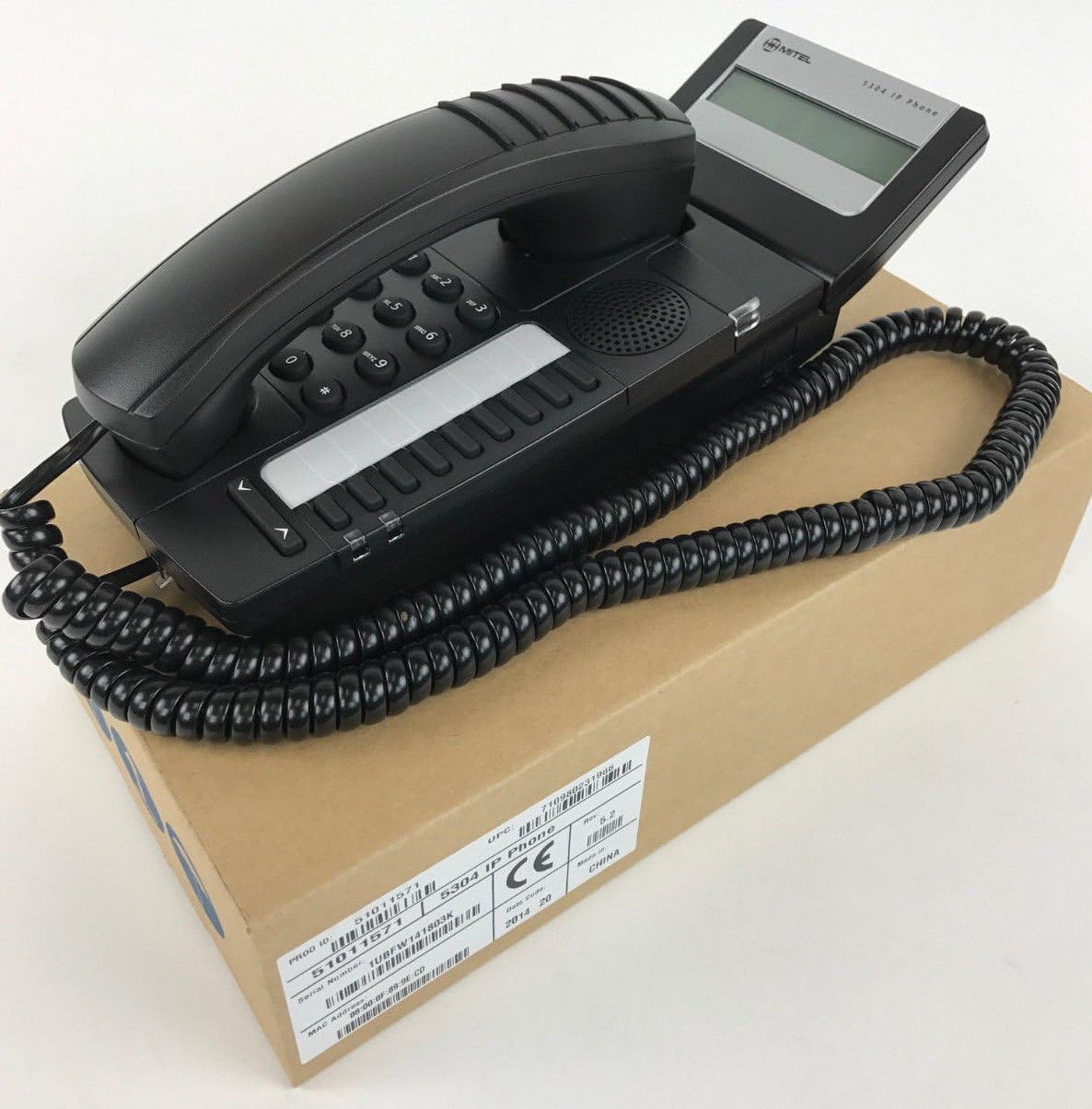
Figure 1: Mitel MiVoice 5304 IP Phone. This image shows the black IP phone with its coiled handset cord, resting on a brown cardboard box. The phone features a numeric keypad, several function buttons, and a small display screen.
2. Key Awọn ẹya ara ẹrọ
- Ifihan: Two x 20 character backlit display with auto-dimming.
- Awọn ila: Two lines with LED indication (one prime line, one programmable key).
- Awọn bọtini eto: Eight programmable keys for speed dials, feature access codes, paging, conferencing, voicemail access, etc.
- oju-iwe: Paging and page receive capability, including direct page and group page support.
- Atilẹyin Ipo-meji: Compatible with both MiNet and SIP protocols.
- Awọn Atọka wiwo: Incoming call visual indication and message waiting indication.
- Awọn iṣakoso ohun: Adjustable volume and ringing controls.
- Iṣagbesori: Wall-mountable (optional accessory may be required).
- Ngba agbara: Multiple powering options, including 802.3af compliant Power over Ethernet (PoE).
- Wiwọle: ADA-compliant (HAC handset).
- Apẹrẹ Iwapọ: Small footprint (approximately 26.5 cm x 10 cm or 10.5 x 4 inches).
- Agbara Lilo: Designed for power conservation to reduce overall energy consumption.
3. Eto ati fifi sori
3.1 Package Awọn akoonu
Ṣaaju ki o to bẹrẹ, rii daju pe gbogbo awọn eroja wa:
- Mitel MiVoice 5304 IP Phone unit
- Aimudani
- Okun ti a fi foonu pa
- okun àjọlò
- (Optional) Power adapter if PoE is not used
3.2 Nsopọ foonu
- So foonu pọ: Pulọọgi opin okun foonu ti a fi sinu foonu ati opin keji sinu ibudo foonu lori ipilẹ foonu.
- Sopọ si Nẹtiwọọki: Connect one end of the Ethernet cable to the LAN port on the back of the phone and the other end to an active network port (e.g., a wall jack or network switch). If using Power over Ethernet (PoE), the phone will power on automatically.
- Sopọ Agbara (ti ko ba lo PoE): If your network does not provide PoE, connect an optional Mitel-approved power adapter to the power port on the phone and then to a standard electrical outlet.
- Ibẹrẹ ibẹrẹ: The phone will power on and begin its boot-up sequence. This may take a few moments as it obtains an IP address and registers with your communication system.
3.3 Iṣagbesori odi (aṣayan)
The Mitel 5304 IP Phone can be wall-mounted. An optional wall-mount kit (sold separately) may be required. Follow the instructions provided with the wall-mount kit for proper installation.
4. Awọn ilana Iṣiṣẹ
4.1 Ṣiṣe ati Idahun Awọn ipe
- Lati Ṣe Ipe:
- Gbe foonu soke tabi tẹ awọn Agbọrọsọ bọtini.
- Tẹ nọmba ti o fẹ nipa lilo bọtini foonu.
- Tẹ awọn Kiakia or Firanṣẹ button (if available) or wait for the call to connect automatically.
- Lati Dahun Ipe kan:
- Lift the handset or press the flashing line button or the Agbọrọsọ bọtini.
- Lati Pari Ipe kan:
- Rọpo foonu tabi tẹ awọn Ipe Ipari or Agbọrọsọ bọtini.
4.2 Using Programmable Keys
The Mitel 5304 features eight programmable keys. Their functions are typically configured by your system administrator and can include:
- Speed Dial numbers
- Access to specific features (e.g., Call Forward, Do Not Disturb)
- Paging functions
- Voicemail access
- Apejọ
To use a programmable key, simply press the button corresponding to the desired function.
4.3 Siṣàtúnṣe iwọn
Use the volume control buttons (usually located below the keypad or on the side of the phone) to adjust the handset, speakerphone, or ringer volume. Press the + bọtini lati mu iwọn didun pọ si ati - bọtini lati dinku iwọn didun.
4.4 Message Waiting Indication
A flashing LED indicator on the phone signifies that you have new voicemail messages. To retrieve messages, press the dedicated Ifiranṣẹ button (if configured) or dial your voicemail access code.
5. Itọju ati Itọju
- Ninu: Lo asọ, die-die damp cloth to clean the phone's surface. Do not use abrasive cleaners, solvents, or strong chemicals, as these can damage the finish.
- Eruku: Regularly dust the phone, especially around the keypad and display, to prevent accumulation that could affect performance.
- Ayika: Keep the phone away from excessive heat, direct sunlight, and moisture. Ensure proper ventilation if placed in an enclosed space.
- Awọn kebulu: Rii daju pe gbogbo awọn kebulu ti sopọ ni aabo ati pe wọn ko pin tabi bajẹ.
6. Laasigbotitusita
| Isoro | Owun to le Fa | Ojutu |
|---|---|---|
| Foonu ko ṣiṣẹ. | No power from Ethernet (PoE) or power adapter not connected/faulty. |
|
| Ko si ohun orin ipe tabi ko le ṣe awọn ipe. | Network connectivity issue, phone not registered, or system configuration problem. |
|
| Ifihan ti ṣofo tabi ko ṣee ka. | Power issue or display fault. |
|
| Ko le gbo olupe tabi olupe ko le gbo temi. | Volume settings, handset/speaker issue, or network audio problem. |
|
7. Awọn pato
| Iwa | Ẹ̀kúnrẹ́rẹ́ |
|---|---|
| Nọmba awoṣe | 51011571 |
| Awọn iwọn Ọja (L x W x H) | 10 x 10 x 6 inches (25.4 x 25.4 x 15.24 cm) |
| Iwọn Nkan | 1.9 poun (0.86 kg) |
| Àwọ̀ | Dudu |
| Tẹlifoonu Iru | Foonu IP ti o ni okun waya |
| Orisun agbara | Corded Electric (PoE 802.3af compliant or optional power adapter) |
| Iru olupe | Keypad Nikan |
| Ifihan | Two x 20 character backlit display |
| Atilẹyin ila | 2 Lines with LED indication |
| Ilana ti ni atilẹyin | MiNet, SIP |
| Awọn ẹrọ ibaramu | VoIP services, IP-based communication systems, Mitel 3300, Mitel SX-200 IP Communications Platforms |
| Ipe alapejọ Agbara | 2-ọna |
8. Atilẹyin ọja ati Support
Fun alaye nipa atilẹyin ọja, jọwọ wo kaadi atilẹyin ọja ti o wa pẹlu rira rẹ tabi ṣabẹwo si Mitel osise website. For technical support, service, or further inquiries, please contact your Mitel authorized dealer or system administrator.
You can also find additional resources and contact information on the official Mitel webojula: www.mitel.com