
1. Ifihan
This manual provides essential information for the safe and efficient installation, operation, and maintenance of your Antec MT-352 Micro ATX Power Supply. Please read this manual thoroughly before installation and retain it for future reference. The Antec MT-352 is a 350W Micro ATX power supply designed for personal computer systems, offering 88% efficiency and compatibility with 110V AC and 220V AC input voltages.
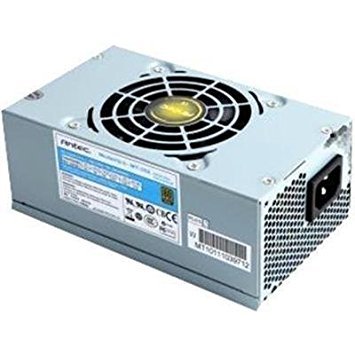
Figure 1: Antec MT-352 Micro ATX Power Supply unit.
2. Alaye Aabo
Nigbagbogbo ṣe akiyesi awọn iṣọra ailewu atẹle lati yago fun ipalara ati ibajẹ si ohun elo rẹ:
- Ewu Itanna: Ma ṣe ṣii ẹrọ ipese agbara. Iwọn gigatages are present inside, even when the system is turned off and unplugged. There are no user-serviceable parts inside.
- Ge asopọ agbara: Always disconnect the power cord from the wall outlet before installing, removing, or servicing the power supply or any other system components.
- Ilẹ-ilẹ ti o tọ: Ensure your system is properly grounded. Use only the power cord provided with the unit or a suitable replacement that meets local safety standards.
- Afẹfẹ: Rii daju pe sisan afẹfẹ to peye ni ayika ipese agbara. Ma ṣe dina awọn ṣiṣi atẹgun.
- Ọrinrin ati Iwọn otutu: Do not operate the power supply in high humidity environments or near water. Avoid extreme temperatures.
- Ikojọpọ: Do not overload the power supply beyond its specified wattage.
3. Package Awọn akoonu
Verify that all items are present in your Antec MT-352 package:
- Antec MT-352 Micro ATX Power Supply Unit
- AC Agbara okun
- Iṣagbesori skru
- Afowoyi Olumulo (iwe-ipamọ yii)
4. Eto ati fifi sori
Follow these steps carefully to install your Antec MT-352 power supply:
- Igbaradi: Turn off your computer and disconnect the power cord from the wall outlet. Open your computer case. If replacing an existing power supply, disconnect all cables from the old PSU and remove it.
- Gbigbe PSU: Carefully slide the Antec MT-352 into the power supply bay of your Micro ATX case. Ensure the fan faces the correct direction for optimal airflow (typically facing downwards or towards the rear vent, depending on case design). Secure the power supply to the case using the provided mounting screws. (An image showing the PSU being mounted into a case would be helpful here.)
- Connecting the Motherboard:
- 20+4 Pin ATX Connector: Connect the main 20+4 pin ATX power connector to the corresponding socket on your motherboard. Ensure both parts of the connector are securely latched. (An image illustrating the 20+4 pin ATX connector connection would be helpful here.)
- 4-Pin ATX 12V (CPU) Connector: Connect the 4-pin ATX 12V connector to the CPU power socket on your motherboard. This is usually located near the CPU socket. (An image showing the 4-pin ATX 12V connector connection would be helpful here.)
- Awọn Agbeegbe Nsopọ: Connect the SATA power connectors to your hard drives, SSDs, and optical drives. Use the 4-pin Molex connectors for older peripherals or case fans if needed. Ensure all connections are firm. (An image demonstrating SATA and Molex connections would be helpful here.)
- Iṣakoso USB: Máa lo àwọn okùn náà dáadáa láti mú kí afẹ́fẹ́ àti ẹwà rẹ̀ sunwọ̀n síi. Lo okùn okùn tí ó bá yẹ.
- Awọn ayẹwo Ipari: Ṣe àyẹ̀wò gbogbo àwọn ìsopọ̀ lẹ́ẹ̀mejì láti rí i dájú pé wọ́n wà ní ààbò. Ti àpótí kọ̀ǹpútà rẹ.
5. Isẹ
After successful installation, follow these steps to operate your system:
- So agbara: Plug the AC power cord into the power supply's AC inlet and then into a grounded wall outlet.
- Agbara Tan: Press the power button on your computer case. The system should boot up normally.
- Agbara Pa: To turn off your system, use the operating system's shutdown procedure. For a hard shutdown, press and hold the power button on your case for several seconds. Always ensure the system is fully shut down before disconnecting the power cord.
6. Itọju
Itọju to dara ṣe idaniloju igbesi aye gigun ati iṣẹ ti o dara julọ ti ipese agbara rẹ:
- Yiyọ eruku kuro: Periodically clean the power supply's fan and vents to prevent dust buildup, which can impede airflow and cause overheating. Use compressed air to gently blow dust out of the unit. Ensure the system is powered off and unplugged before cleaning.
- Fife ategun: Ensure that your computer case has good airflow. Avoid placing the computer in enclosed spaces that restrict ventilation.
- Iṣakoso USB: Maintain tidy cable routing to prevent obstruction of airflow within the case.
7. Laasigbotitusita
If you encounter issues with your Antec MT-352 power supply, refer to the following common problems and solutions:
| Isoro | Owun to le Fa | Ojutu |
|---|---|---|
| System ko ni agbara lori. | Okùn agbára tí ó dẹ́kun, PSU spark pa, ohun èlò tí ó ní àbùkù. | Check AC power cord connection. Ensure PSU switch (if present) is ON. Verify all internal power connectors are secure. Test with a different power outlet. |
| Eto naa n tan ṣugbọn lẹsẹkẹsẹ tiipa. | Overload, short circuit, overheating, faulty component. | Disconnect non-essential peripherals to check for overload. Inspect for any loose screws or components causing a short. Ensure adequate ventilation. |
| Awọn ariwo dani lati PSU. | Fan obstruction, faulty fan bearing. | Power off and unplug the system. Carefully inspect the fan for obstructions (e.g., loose cables). If noise persists, contact support. |
| Àìdúróṣinṣin ètò tàbí àtúnṣe àìròtẹ́lẹ̀. | Insufficient power, faulty PSU, other component issues. | Ensure your system's power requirements do not exceed 350W. Check for other faulty components (RAM, GPU). |
If troubleshooting steps do not resolve the issue, contact Antec customer support for further assistance.
8. Awọn pato
The following are the technical specifications for the Antec MT-352 Micro ATX Power Supply:
- Awoṣe: MT-352
- Okunfa Fọọmu: Micro ATX
- Ijade Wattage: 350 Wattis
- Iṣiṣẹ: 88%
- Iṣagbewọle Voltage: 110V AC - 220V AC (Minimum Input Voltage: 110 Volts, Maximum Input Voltage: 220Volt)
- Ọna Itutu: Afẹfẹ
- Orisi Asopọmọra: ATX (20+4 Pin, 4-Pin ATX 12V, SATA, Molex)
- Awọn ẹrọ ibaramu: Kọmputa ti ara ẹni
- Ìwọ̀n Nkan: 3.1 Poun (isunmọ 1.4 kg)
- Olupese: Antec
- ASIN: B0065OD10G
- Ọjọ Akọkọ Wa: Oṣu kọkanla ọjọ 10, ọdun 2011
9. Atilẹyin ọja ati Support
Antec products are backed by a manufacturer's warranty. For specific warranty terms and conditions, please refer to the warranty card included with your product or visit the official Antec webojula. Jeki ẹri rira rẹ fun awọn iṣeduro atilẹyin ọja.
For technical support, troubleshooting assistance, or warranty inquiries, please contact Antec customer service through their official webaaye tabi alaye olubasọrọ ti a pese ninu apoti ọja rẹ.
Akiyesi: Ko si awọn fidio ọja osise ti a rii ninu data ti a pese fun ifibọ.