
1. Ifihan ati Ọja Loriview
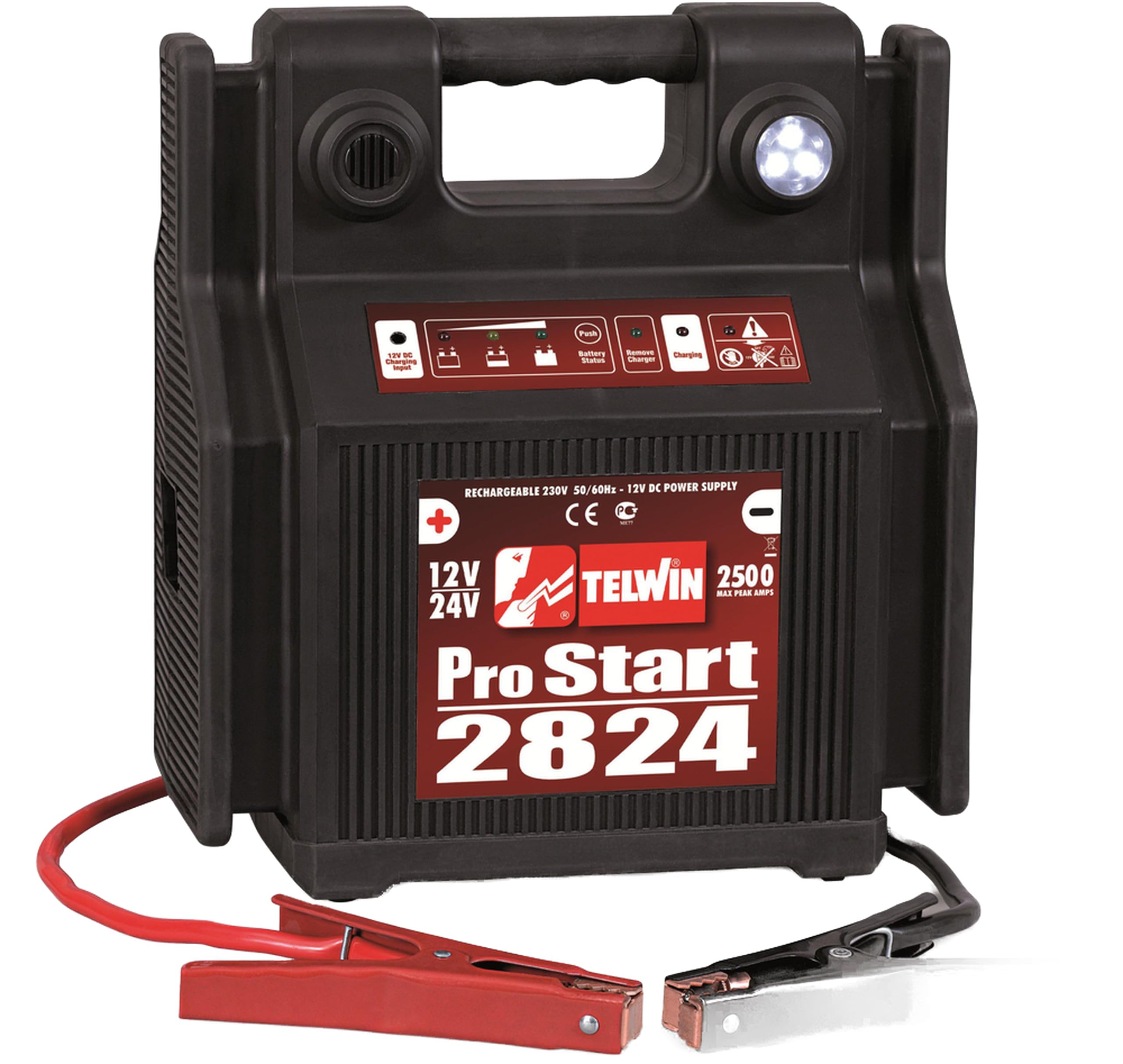
The Telwin PRO Start 2824 is a professional-grade portable jump starter designed for starting vehicles with 12V or 24V batteries. This device is equipped with a high-efficiency LED lamp for illumination and an LED indicator to monitor the internal battery charge status. It also features an acoustic and visual alarm system to protect against reverse polarity connections, ensuring safe operation.
This manual provides essential information for the safe and effective use, maintenance, and troubleshooting of your Telwin PRO Start 2824 jump starter.

Nọmba 1: The Telwin PRO Start 2824 12-24 V Jump Starter. This image shows the compact design of the unit, highlighting its portability and robust construction suitable for automotive use.
2. Alaye Aabo
Always read and understand all safety warnings and instructions before using the Telwin PRO Start 2824. Failure to follow these instructions may result in electric shock, fire, or serious injury.
- Idaabobo Oju: Máa lo ààbò ojú tó yẹ nígbà gbogbo nígbà tí o bá ń lo bátìrì.
- Afẹfẹ: Ensure adequate ventilation when charging or jump-starting, as batteries can emit explosive gases.
- Sparks and Flames: Keep sparks, flames, and smoking materials away from batteries.
- Polarity: Always connect the cables with correct polarity. The device includes an acoustic/visual alarm for reverse polarity protection.
- Awọn ọmọde: Jeki ẹrọ naa kuro ni arọwọto awọn ọmọde.
- Bibajẹ: Do not use the device if it is damaged. Contact qualified service personnel for repairs.
- Gbigba agbara: Recharge the internal battery after each use to maintain its lifespan and readiness.
Nọmba 2: Safety and Compliance Label. This label indicates that the product is EMF (Electromagnetic Fields) safe and complies with CE (Conformité Européenne) standards, signifying adherence to European health, safety, and environmental protection directives.
3. Eto
Before first use, and after each use, ensure the internal battery of the PRO Start 2824 is fully charged.
- Gbigba agbara akọkọ: Connect the jump starter to a standard electrical outlet using the provided charging cable. The LED indicator will show the charging status. Charge until the LED indicates a full charge.
- Ayẹwo USB: Before each use, inspect the jump starter cables and clamps for any damage, fraying, or corrosion. Do not use if damaged.
- Igbaradi Ọkọ: Ensure the vehicle's ignition is off and all accessories (lights, radio, etc.) are turned off.
4. Awọn ilana Iṣiṣẹ
4.1. Jump Starting a Vehicle (12V or 24V)
- Identify Battery Voltage: Confirm the vehicle's battery voltage (12V or 24V). The PRO Start 2824 is capable of both.
- Connect Positive Clamp: So pupa pọ (rere, +) clamp ti ibẹrẹ fo si ebute rere (+) ti batiri ọkọ ayọkẹlẹ naa.
- Connect Negative Clamp: So dudu (odi, -) clamp of the jump starter to a solid, unpainted metal part of the vehicle's engine block or chassis, away from the battery and fuel lines. Do not connect directly to the negative battery terminal unless specified by the vehicle manufacturer.
- Check Polarity Alarm: If the acoustic/visual alarm activates, it indicates a reverse polarity connection. Immediately disconnect the clamps kí o sì tún so wọ́n pọ̀ dáadáa.
- Ọkọ Bẹrẹ: Once connected correctly, attempt to start the vehicle. Do not crank for more than 5 seconds. If the vehicle does not start, wait at least 30 seconds before trying again.
- Ge asopọ Clamps: Once the vehicle starts, disconnect the black (negative) clamp akọkọ, lẹhinna pupa (rere) clamp.
- Recharge Jump Starter: Recharge the PRO Start 2824 immediately after use.
4.2. Using the LED Lamp
The PRO Start 2824 features an efficient LED lamp for illumination in low-light conditions. Locate the lamp switch on the unit and toggle it to turn the lamp tan tabi pa bi o ti nilo.
4.3. Monitoring Battery Charge
The integrated LED indicator allows you to monitor the charge level of the internal battery. Refer to the markings near the LED for specific charge status indications (e.g., low, medium, full).
5. Itọju
Proper maintenance ensures the longevity and optimal performance of your Telwin PRO Start 2824.
- Ngba agbara: Always recharge the internal battery immediately after each use, even if only for a short period. This prevents deep discharge and extends battery life. For long-term storage, recharge the unit every 3 months.
- Ninu: Clean the exterior of the unit with a soft, dry cloth. Do not use harsh chemicals or abrasive cleaners. Keep the clamps mọ ki o si free ti ipata.
- Ibi ipamọ: Store the jump starter in a cool, dry place, away from direct sunlight, moisture, and extreme temperatures. Ensure the cables are neatly wrapped and secured to prevent damage.
- Ayẹwo USB: Ṣe àyẹ̀wò àwọn okùn àti cl déédééamps for any signs of wear, cuts, or damage. Replace damaged components immediately.
6. Laasigbotitusita
If you encounter issues with your PRO Start 2824, refer to the following common troubleshooting steps:
| Isoro | Owun to le Fa | Ojutu |
|---|---|---|
| Ọkọ ayọkẹlẹ ko bẹrẹ | Low charge in jump starter; incorrect connection; severely discharged vehicle battery. | Recharge jump starter; check cable connections and polarity; allow more time for the jump starter to provide power before cranking. |
| Polarity alarm sounds | Yiyipada polarity asopọ. | Lẹsẹkẹsẹ ge asopọ clamps and reconnect them correctly (red to positive, black to chassis/engine block). |
| LED lamp ko ṣiṣẹ | Lamp switch off; internal battery low. | Rii daju lamp switch is on; recharge jump starter. |
| Jump starter not charging | Charging cable not properly connected; faulty outlet; internal battery issue. | Check charging cable connections; try a different outlet; if problem persists, contact support. |
If the problem persists after attempting these solutions, please contact Telwin customer support or your retailer.
7. Awọn pato
Key technical specifications for the Telwin PRO Start 2824:
- Nọmba awoṣe: 829517
- Brand: Telwin
- Voltage: 12 Volts / 24 Volts
- Ampigba: 2824 A
- Internal Battery Composition: Olori Acid
- Ìwúwo: 10 kilo
- Irú Ọkọ́ tó bára mu: Car (and other vehicles requiring 12V/24V jump start)
8. Atilẹyin ọja ati Support
For warranty information, please refer to the warranty card included with your product or contact your point of purchase. Telwin provides customer support for product inquiries, technical assistance, and service requests.
Jọwọ ṣe idaduro ẹri rira rẹ fun eyikeyi awọn ibeere atilẹyin ọja.