
Ọrọ Iṣaaju
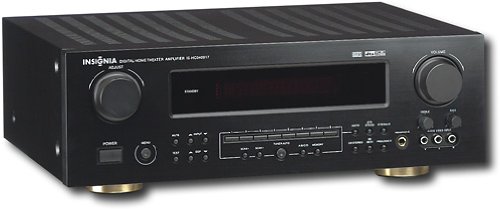
This manual provides essential instructions for the setup, operation, maintenance, and troubleshooting of your Insignia 6.1-Channel 600W Digital Home Theater Receiver, model IS-HC040917. Please read this manual thoroughly before using the receiver to ensure proper and safe operation.
Awọn Itọsọna Aabo pataki
- Ma ṣe dina eyikeyi awọn ṣiṣi atẹgun. Fi sori ẹrọ ni ibamu pẹlu awọn ilana ti olupese.
- Maṣe fi sori ẹrọ nitosi awọn orisun ooru gẹgẹbi awọn imooru, awọn iforukọsilẹ ooru, awọn adiro, tabi awọn ohun elo miiran (pẹlu ampliifiers) ti o gbe ooru jade.
- Dabobo okun agbara lati ma rin lori tabi pin, ni pataki ni awọn pilogi, awọn ohun elo irọrun, ati aaye nibiti wọn ti jade kuro ninu ohun elo naa.
- Lo awọn asomọ/awọn ẹya ara ẹrọ ti olupese pato.
- Yọọ ohun elo yi nigba iji manamana tabi nigba lilo fun igba pipẹ.
- Tọkasi gbogbo iṣẹ si awọn oṣiṣẹ iṣẹ ti o peye. Iṣẹ iṣẹ nilo nigbati ohun elo ba ti bajẹ ni ọna eyikeyi.
Eto Itọsọna
1. Unpacking
Carefully remove the receiver and all accessories from the packaging. Ensure all components are present:
- Insignia IS-HC040917 Receiver
- Isakoṣo latọna jijin
- AM Loop Eriali
- Eriali FM Waya
- Afowoyi Olumulo (iwe-ipamọ yii)
2. Nsopọ Agbọrọsọ
The IS-HC040917 receiver supports a 6.1-channel speaker configuration. Connect your speakers to the corresponding terminals on the rear panel. Ensure correct polarity (+ to + and - to -) for each speaker.
- Iwaju Apa osi/Ọtun: Fun ohun sitẹrio akọkọ.
- Aarin: Fun ibaraẹnisọrọ.
- Yika Apa osi/Ọtun: For ambient sound effects.
- Yika Pada: For additional rear channel effects in 6.1 setups.
- Subwoofer (Pre-out): Connect to a powered subwoofer's LFE input.
Note: The receiver is designed for speakers with an impedance of 8 ohms.
3. Sísopọ̀ Àwọn Orísun Ohun/Fídíò
Connect your external devices (e.g., DVD player, Blu-ray player, game console, cable box) to the appropriate input jacks on the receiver.
- HDMI: Use HDMI cables for high-definition audio and video signals. The receiver has 3 HDMI input ports.
- Ohùn Oní-díjítàlì (Ojú/Kóosíìkì): For digital audio from devices like CD players or set-top boxes.
- Analog Audio (RCA): For standard stereo audio connections from devices like VCRs or older CD players.
- S-Fidio: For video signals from compatible devices.
4. Eriali Asopọ
Connect the supplied AM loop antenna and FM wire antenna to their respective terminals on the rear panel for radio reception.
5. Asopọ agbara
Once all audio/video and speaker connections are made, plug the receiver's power cord into a standard AC wall outlet.
Aworan: Rear panel of the Insignia IS-HC040917 receiver, showing various input and output connections for speakers, audio/video sources (HDMI, RCA, S-Video, Digital), and antenna terminals. This diagram is crucial for correctly wiring the home theater system.
Awọn ilana Iṣiṣẹ
1. Agbara Tan / Paa
Tẹ awọn AGBARA bọtini lori iwaju nronu tabi isakoṣo latọna jijin lati tan olugba tabi pa.
2. Aṣayan Input
Lo awọn Oluyanju INPUT knob/buttons on the front panel or the remote control to choose the desired audio/video source (e.g., HDMI 1, DVD, CD, Tuner).
3. Iṣakoso iwọn didun
Ṣatunṣe iwọn didun titunto si nipa lilo nla Iwọn didun koko lori ni iwaju nronu tabi awọn Idibo +/- awọn bọtini lori isakoṣo latọna jijin.
4. Àwọn Ìgbékalẹ̀ Ohùn
The receiver supports various audio modes, including 6.1-channel surround sound. Use the MODE or DSP buttons on the remote to cycle through available sound modes (e.g., Stereo, Dolby Digital, DTS, Pro Logic).
5. Tuner Operation (AM/FM Radio)
Select the "Tuner" input. Use the BAND button to switch between AM and FM. Use the TUNE +/- buttons to manually tune to stations or TẸTẸ +/- to select stored stations. Refer to the remote control for specific tuner functions.
Itoju
1. Ninu
Wipe the exterior of the receiver with a soft, dry cloth. Do not use liquid cleaners or aerosol sprays, as they may damage the finish or internal components. Ensure the unit is unplugged before cleaning.
2. Afẹfẹ
Ensure that the ventilation openings on the top and sides of the receiver are not blocked. Proper airflow is essential to prevent overheating and ensure long-term performance.
3. Iṣakoso USB
Periodically check all cable connections to ensure they are secure. Loose connections can lead to poor audio or video quality.
Laasigbotitusita
| Isoro | Owun to le Fa | Ojutu |
|---|---|---|
| Ko si agbara | A ti yọ okùn agbára kúrò; ibi tí agbára ń jáde kò ṣiṣẹ́. | Ṣayẹwo asopọ okun agbara; gbiyanju kan ti o yatọ iṣan. |
| Ko si ohun | Ti yan igbewọle ti ko tọ; awọn onirin agbọrọsọ alaimuṣinṣin; iwọn didun ju kekere; dakẹ ṣiṣẹ. | Yan ìtẹ̀síwájú tó tọ́; ṣàyẹ̀wò àwọn ìsopọ̀ agbọ́hùnsọ; mu ohùn pọ̀ sí i; mú kí ohùn má balẹ̀. |
| Ko si fidio | Incorrect input selected; video cables loose or incorrect. | Select correct input; check video cable connections (HDMI, S-Video, RCA). |
| Isakoṣo latọna jijin ko ṣiṣẹ | Àwọn bátìrì ti dínkù; ìdènà láàrín ọ̀nà jíjìn àti olùgbà; ipò jíjìn tí kò tọ́. | Replace batteries; remove obstructions; ensure remote is in the correct operating mode. |
Awọn pato
- Awoṣe: IS-HC040917
- Brand: BADGE
- Agbara Ijade: 600 Wattis
- Nọmba awọn ikanni: 6.1 ikanni
- Ipo Ijade Ohun: Ayika
- Lapapọ Awọn ibudo HDMI: 3
- Awọn oriṣi asopọ: 3.5mm Jack, HDMI, RCA, USB
- Awọn ẹrọ ibaramu: Agbọrọsọ
- Ọna Iṣakoso: Latọna jijin
- Àwọ̀: Dudu
- UPC: 799530659962
- ASIN: B0075C3DN2
Atilẹyin ọja ati Support
For warranty information and customer support, please refer to the warranty card included with your product or visit the official Insignia webojula. Tọju iwe-ẹri rira rẹ fun awọn ẹtọ atilẹyin ọja.
For further assistance, you may contact Insignia customer service. Contact details are typically available on the manufacturer's webaaye tabi ni apoti ọja.