
Ọrọ Iṣaaju
O ṣeun fun riraasing the RCA 32LB45RQ 32-Inch Full 1080p 60Hz LCD HDTV. This manual provides essential information for the safe and efficient operation of your television. Please read it thoroughly before using the product and retain it for future reference.
Alaye Aabo
Ṣe akiyesi awọn iṣọra ailewu atẹle lati yago fun ibajẹ ati rii daju iṣẹ ailewu:
- Orisun Agbara: So TV pọ nikan si ipese agbara ti a sọ.
- Afẹfẹ: Rii daju pe fentilesonu to ni ayika TV. Ma ṣe dina awọn ṣiṣi atẹgun.
- Awọn olomi: Keep the TV away from water and moisture. Do not place liquid-filled objects on the TV.
- Ninu: Yọ TV kuro ṣaaju ki o to di mimọ. Lo asọ asọ ti o gbẹ. Yago fun olomi ose.
- Ibi: Gbé TV sori ibi ti o duro ṣinṣin, ti o dada tabi so o mọ odi lailewu.
- Ṣiṣẹ: Má ṣe gbìyànjú láti ṣe àtúnṣe sí tẹlifíṣọ̀n fúnra rẹ. Tọ́ka gbogbo iṣẹ́ ìtọ́jú sí àwọn òṣìṣẹ́ tó péye.
Ohun ti o wa ninu Apoti
Rii daju pe gbogbo awọn eroja wa:
- RCA 32LB45RQ 32-Inch LCD HDTV
- Duro
- Isakoṣo latọna jijin
- 2 AA batiri
- Okun agbara
- Afowoyi Olumulo (iwe-ipamọ yii)
Ṣeto
So Iduro
To attach the included stand, carefully place the TV screen-down on a soft, clean surface to prevent scratches. Align the stand with the mounting holes on the bottom of the TV and secure it using the provided screws. Ensure the stand is firmly attached before placing the TV upright.

Iwaju view of the RCA 32LB45RQ HDTV with its stand attached.
Iṣagbesori odi
The RCA 32LB45RQ is wall mountable. A VESA-compatible wall mount kit (sold separately) is required. Refer to the wall mount kit's instructions for proper installation. Ensure the wall can support the weight of the TV and the mount.
Asopọmọra Peripherals
Your TV offers various input ports for connecting external devices:
- HDMI: Connect Blu-ray players, game consoles, cable/satellite boxes, and other HD devices. The TV has 3 HDMI ports.
- USB: So awọn ẹrọ ibi ipamọ USB pọ fun ṣiṣiṣẹsẹhin media. TV naa ni ibudo USB 1.
- Ẹya ara (YPbPr): Connect older video devices using component video and stereo audio cables. The TV has 1 component input.
- VGA: Connect a computer. The TV has 1 VGA input.
- Antenna/Cable: So eriali kan pọ fun awọn igbesafefe lori afẹfẹ tabi asopọ TV USB kan.

Ẹyìn view of the RCA 32LB45RQ HDTV, highlighting the various input ports for external devices.
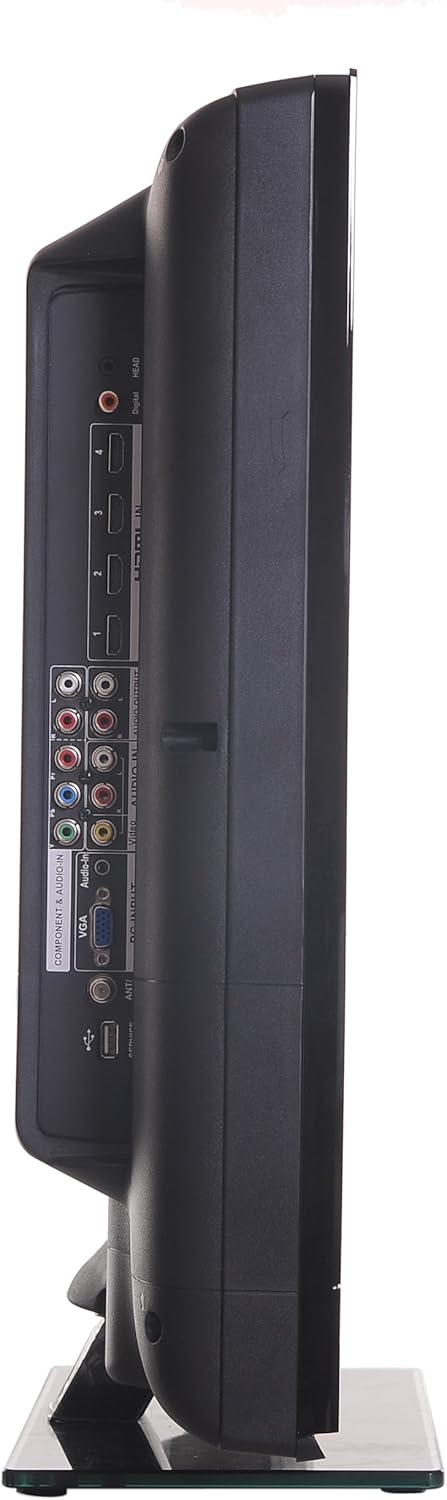
Apa view of the RCA 32LB45RQ HDTV, showing additional input ports for convenient access.
Agbara Tan ati Eto Ibẹrẹ
After connecting all desired devices and the power cord, press the power button on the TV or remote control. Follow the on-screen prompts for initial setup, including language selection, time zone, and channel scanning for over-the-air or cable channels.
Ṣiṣẹ
Iṣakoso latọna jijinview
The included remote control allows you to access all TV functions. Insert the two AA batteries (included) into the remote control, observing polarity.
Awọn iṣẹ ipilẹ
- Agbara: Tẹ lati tan TV tabi pa.
- Iwọn didun Soke/Isalẹ: Ṣatunṣe ipele ohun.
- Ikanni Soke/Isalẹ: Yi TV awọn ikanni.
- Pa ẹnu mọ́: Silence the TV audio.
- Iṣawọle: Cycle through available input sources (HDMI 1, HDMI 2, Component, VGA, TV).
Lilọ kiri Akojọ aṣyn
Press the 'Menu' button on your remote to access the TV's settings. Use the arrow keys to navigate and 'OK' or 'Enter' to select options.
- Eto aworan: Adjust brightness, contrast, color, tint, sharpness, and select picture modes (e.g., Standard, Dynamic, Movie).
- Eto Ohun: Ṣàtúnṣe bass, treble, balance, kí o sì yan àwọn ìpele ohùn (fún àpẹẹrẹ, Standard, Music, Movie).
- Settings/Setup: Access general TV settings such as language, time, parental controls (V-Chip), and software updates.
Awọn iṣẹ Ayelujara
The TV supports a built-in browser for basic internet access. Use the remote control to navigate web awọn oju-iwe.
Itoju
Ninu iboju
Rọra nu iboju naa pẹlu asọ ti ko ni lint. Fun awọn ami alagidi, die-die dampen the cloth with water or a specialized screen cleaner (ensure it is safe for LCD screens) and wipe gently. Do not spray liquid directly onto the screen.
Gbogbogbo Itọju
- Yẹra fún fífi tẹlifíṣọ̀n sí oòrùn tààrà tàbí ooru tó le gan-an.
- Maṣe gbe awọn nkan ti o wuwo si oke TV naa.
- Yọ TV kuro lakoko iji manamana tabi nigba ti kii yoo lo fun awọn akoko ti o gbooro sii.
Laasigbotitusita
If you encounter issues with your TV, refer to the following table for common problems and solutions:
| Isoro | Owun to le Fa / Solusan |
|---|---|
| Ko si agbara | Ensure the power cord is securely plugged into the TV and a working electrical outlet. Check the power indicator light. |
| Ko si aworan, ṣugbọn ohun wa | Check the input source selection. Ensure the connected device is powered on and sending a signal. |
| Ko si ohun, ṣugbọn aworan wa | Ṣàyẹ̀wò ìwọ̀n ohùn kí o sì rí i dájú pé TV kò parọ́. Ṣàyẹ̀wò àwọn ìsopọ̀ okùn ohùn fún àwọn ẹ̀rọ ìta. |
| Didara aworan ti ko dara | Adjust picture settings (brightness, contrast, sharpness). Check antenna or cable connections. Ensure the input source is providing a high-quality signal. |
| Isakoṣo latọna jijin ko ṣiṣẹ | Ṣayẹwo ki o si ropo awọn batiri. Rii daju pe ko si awọn idena laarin isakoṣo latọna jijin ati sensọ IR ti TV. |
Awọn pato
Detailed technical specifications for the RCA 32LB45RQ HDTV:
| Ẹya ara ẹrọ | Sipesifikesonu |
|---|---|
| Orukọ awoṣe | 32LB45RQ |
| Iwon iboju | 32 inches |
| Ifihan ọna ẹrọ | LCD |
| Ipinnu | 1080p (1920 x 1080) |
| Oṣuwọn sọtun | 60Hz |
| Apakan Ipin | 16:9 |
| Ipin Itansan | 5000:1 |
| Akoko Idahun | 8 Milise-aaya |
| Tuner Iru | ATSC, NTSC |
| Lapapọ HDMI Ports | 3 |
| Lapapọ Awọn ibudo USB | 1 |
| Àwọn Ìwọlé Àwọn Ẹ̀yà Ara | 1 |
| Awọn igbewọle VGA | 1 |
| Asopọmọra Technology | HDMI, USB |
| Awọn iṣẹ Intanẹẹti atilẹyin | Aṣàwákiri |
| Iṣagbesori Iru | Ògiri Ògiri |
| Àwọ̀ | Dudu |
| Iwọn Nkan | 17.4 iwon |
| Awọn irinše to wa | Duro, TV |
| Parental Control Technology | V-Chip |
| Odun awoṣe | 2017 |

Energy Guide label for the RCA 32LB45RQ HDTV, showing estimated yearly energy cost.
Atilẹyin ọja ati Support
Alaye atilẹyin ọja
This RCA 32LB45RQ HDTV comes with a Limited 1 year parts and labor warranty. Please retain your proof of purchase for warranty claims. For specific terms and conditions, refer to the warranty card included with your product or contact RCA customer support.
Onibara Support
For technical assistance, troubleshooting beyond this manual, or warranty service, please contact RCA customer support. Contact information can typically be found on the RCA official webaaye tabi lori apoti ọja.