
Jay-Tech Speed SHOT DC 100
Jay-Tech Speed Shot DC 100 Digital Camera User Manual
Model: Speed SHOT DC 100
Ọrọ Iṣaaju
This manual provides comprehensive instructions for the operation, maintenance, and troubleshooting of your Jay-Tech Speed Shot DC 100 digital camera. Please read this manual thoroughly before using the camera to ensure proper functionality and to maximize your user experience.

Figure 1: Jay-Tech Speed Shot DC 100 Digital Camera. This image shows the compact black digital camera from the front, highlighting its lens, flash, and control buttons.
Package Awọn akoonu
Daju pe gbogbo awọn ohun kan wa ninu package ṣaaju ki o to tẹsiwaju pẹlu iṣeto.
- Jay-Tech Speed Shot DC 100 Digital Camera
- Okun USB
- Okun Ọwọ
- Iwe afọwọkọ olumulo (iwe yii)
- Akiyesi: 3 x AAA batteries are required for operation and may not be included.

Figure 2: Product Packaging Front. This image displays the front of the camera's retail box, listing key features such as 3 Megapixel resolution, 1.8-inch TFT LCD, 4x Digital Zoom, USB 2.0, JPEG/AVI format, and microSD card slot.
Ṣeto
1. Fifi awọn batiri
- Wa ideri iyẹwu batiri ni isalẹ kamẹra.
- Gbe ideri ṣi silẹ ni itọsọna ti itọka tọka si.
- Insert three (3) AAA batteries, ensuring correct polarity (+/-) as marked inside the compartment.
- Pa ideri batiri naa ni aabo titi yoo fi tẹ si aaye.
2. Fi kaadi microSD sii
The camera requires a microSD card (not included) for storing photos and videos.
- Locate the microSD card slot, typically next to the battery compartment or on the side of the camera.
- Gently insert the microSD card with the gold contacts facing down (or as indicated by the diagram near the slot) until it clicks into place.
- To remove the card, gently push it in until it springs out.
Akiyesi: Ensure the camera is powered off before inserting or removing the microSD card to prevent data corruption.
Awọn ilana Iṣiṣẹ
Titan / Pipa agbara
- To power on, press and hold the Power button (usually marked with a circle and a vertical line).
- Láti pa agbára, tẹ bọtini agbara náà kí o sì di mọ́lẹ̀ lẹ́ẹ̀kan sí i títí tí iboju náà yóò fi pa.
Ipilẹ Photography
- Ṣiṣeto: Use the 1.8-inch TFT LCD display to compose your shot.
- Sun-un: Use the zoom buttons (often marked 'W' for Wide and 'T' for Telephoto) to adjust the 4x digital zoom.
- Yaworan: Press the Shutter button (usually on top of the camera) firmly to take a photo.
Gbigbasilẹ fidio
- Switch to video mode (if applicable, via a mode button or menu setting).
- Tẹ bọtini Igbasilẹ (tí a sábà máa ń fi àmì pupa sí) láti bẹ̀rẹ̀ sí í gba ohùn sílẹ̀.
- Tẹ bọtini igbasilẹ lẹẹkansi lati da gbigbasilẹ duro.
Ipo Sisisẹsẹhin
- Press the Playback button (often marked with a triangle icon) to enter playback mode.
- Use the navigation buttons to scroll through your photos and videos.
- Press the Shutter button or OK button to view ohun kan ti o yan.
Connecting to a Computer (USB 2.0)
- Rii daju pe kamẹra ti wa ni titan.
- Connect one end of the supplied USB cable to the camera's USB port and the other end to an available USB port on your computer.
- The camera should appear as a removable disk drive on your computer, allowing you to transfer files.
Itoju
Ninu Kamẹra
- Lo asọ ti o rọ, ti o gbẹ lati nu ara kamẹra mọ.
- For the lens and LCD screen, use a lens cleaning cloth specifically designed for optical surfaces. Avoid abrasive materials or harsh chemicals.
- Má ṣe fọ́n omi ìwẹ̀nùmọ́ sí ara kámẹ́rà náà tààrà.
Itọju Batiri
- Yọ awọn batiri kuro ti a ko ba lo kamẹra fun igba pipẹ lati dena jijo.
- Use high-quality AAA alkaline or rechargeable batteries.
- Sọ awọn batiri ti a lo ni ifojusọna ni ibamu si awọn ilana agbegbe.
Ibi ipamọ
- Tọ́jú kámẹ́rà náà sí ibi tí ó tutù tí ó sì gbẹ, tí kò sí ìmọ́lẹ̀ oòrùn tààrà àti ooru tó le koko.
- Protect the camera from dust and moisture.
Laasigbotitusita
| Isoro | Owun to le Fa | Ojutu |
|---|---|---|
| Kamẹra ko ṣiṣẹ. | Awọn batiri kekere tabi okú; ifibọ batiri ti ko tọ. | Replace batteries with fresh ones; ensure correct polarity. |
| Ko le ya awọn fọto. | No microSD card; card full; card error. | Insert a microSD card; delete some files; format the card (this will erase all data). |
| Awọn aworan jẹ blurry. | Camera shake; dirty lens; subject too close. | Hold camera steady; clean the lens; ensure subject is within focus range. |
| Kamẹra ko ṣe idanimọ nipasẹ kọnputa. | Loose USB connection; camera not in correct mode. | Reconnect USB cable; ensure camera is powered on and in data transfer mode. |
Awọn pato
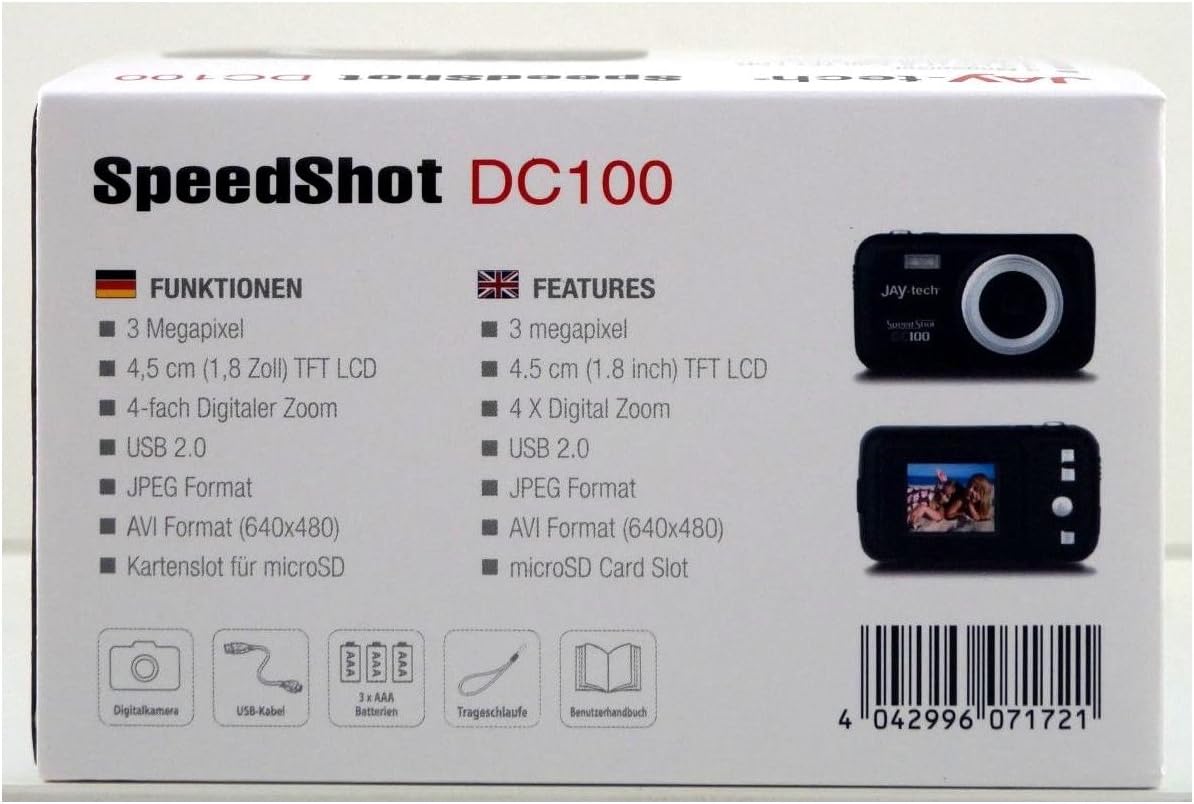
Figure 3: Technical Specifications. This image shows the detailed specifications of the camera, including sensor type, display size, resolution options, video capabilities, and power requirements.
| Ẹya ara ẹrọ | Ẹ̀kúnrẹ́rẹ́ |
|---|---|
| Orukọ awoṣe | Speed SHOT DC 100 |
| Sensọ Aworan | Sensọ CMOS |
| Ifihan | 4.5 CM (1.8 Inch) TFT LCD |
| Ipinnu Fọto | 5M (2592x1944) / 3M (2048x1536) / 1.3M (1280x1024) / VGA (640x480) |
| Ipinnu fidio | 640x480 / 320x240 @ 30fps |
| Sun-un | 4 X Digital Zoom |
| Ifojusi Gigun | f = 6.5 mm |
| Iho | F/3.1 |
| Iṣafihan Biinu | -2.0 ~ +2.0 EV |
| Meta | Center / Multi / Aami |
| Iwontunws.funfun | Auto / Daylight / Cloudy / Fluorescent / Tungsten |
| Didara Aworan | Super Fine / Fine / Deede |
| Ita Iranti | microSD |
| File Ọna kika | JPEG/AVI |
| Ni wiwo | USB 2.0 |
| Awọn ede OSD | German / English / French / Spanish / Portuguese / Italian |
| Ibi ti ina elekitiriki ti nwa | 3 x AAA batiri |
| Awọn iwọn | 101 x 59.9 x 26.8 mm |
| Iwọn | Approx. 57 g (batteries excluded) |
| Ibamu System isẹ | Microsoft® Windows® 7 / Vista / XP |
Atilẹyin ọja ati Support
For warranty information and technical support, please refer to the official Jay-Tech webojula tabi kan si wọn onibara iṣẹ. Tọju iwe-ẹri rira rẹ bi ẹri rira fun awọn iṣeduro atilẹyin ọja.
UPC Ọja: 4042996071721