
Ọrọ Iṣaaju
The CEM DT-123 is a compact, handheld device designed for measuring the moisture content in wood. It provides quick and accurate readings, essential for woodworking, construction, and home inspection applications. The meter utilizes two sharp, integrated pins to penetrate the wood surface and determine its moisture level, displayed clearly on an LCD screen.
Alaye Aabo
- Keep the device out of reach of children. The measurement pins are sharp and can cause injury.
- Do not attempt to measure live electrical circuits or materials. This device is not designed for electrical testing.
- Yẹra fún fífi mita náà sí àwọn iwọn otutu tó le koko, ọriniinitutu gíga, tàbí oòrùn tààrà.
- Ma ṣe fi ẹrọ naa bọ omi tabi omi miiran.
- Yọ awọn batiri kuro ti ẹrọ naa ko ba ni lo fun igba pipẹ lati ṣe idiwọ jijo.
- Use only the specified battery type (9V).
Ọja Pariview
The CEM DT-123 features a durable casing, an easy-to-read LCD display, and integrated measurement pins. A protective cap covers the pins when not in use.
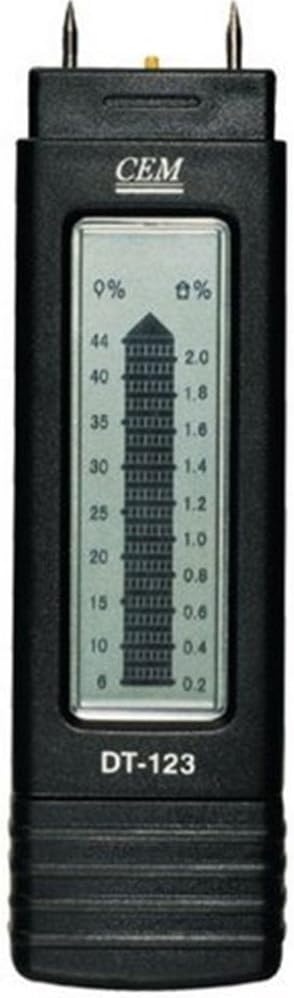
olusin 1: Iwaju view of the CEM DT-123 moisture meter, highlighting the LCD display and measurement pins.

olusin 2: Pada view of the CEM DT-123, showing the battery cover and product markings.
Ṣeto
Fifi sori batiri
- Rii daju pe ẹrọ ti wa ni pipa.
- Wa ideri ibi ipamọ batiri naa ni ẹhin mita naa (wo Aworan 2).
- Gbe tabi yọ ideri naa kuro lati ṣii yara naa.
- Insert a new 9V battery, observing the correct polarity (+/-) as indicated inside the compartment.
- Rọpo ideri iyẹwu batiri ni aabo.
The meter is now ready for operation.
Awọn ilana Iṣiṣẹ
- Yọ fila aabo kuro lati awọn pinni wiwọn.
- Press the power button to turn on the meter. The LCD display will illuminate.
- Carefully push the two measurement pins into the wood surface to be tested. Ensure the pins are fully inserted and parallel to the wood grain for accurate readings.
- Ka ogorun akoonu ọrinrintage directly from the LCD display. The display shows the moisture percentage on the left scale (0% to 44%) and a corresponding value on the right scale (0.2 to 2.0), which may represent a different unit or a relative scale.
- After taking the reading, gently pull the meter out of the wood.
- Press the power button again to turn off the meter. If left idle, the meter may have an auto-off function to conserve battery life.
- Replace the protective cap over the pins for storage.

Figure 3: The CEM DT-123 in use, demonstrating proper pin insertion into wood.
Itoju
Ninu
Wipe the meter's body with a soft, dry cloth. Do not use abrasive cleaners or solvents. Ensure the measurement pins are clean and free of debris after each use.
Ibi ipamọ
Store the meter in a cool, dry place, away from direct sunlight and extreme temperatures. Always replace the protective cap over the pins before storage.
Laasigbotitusita
| Isoro | Owun to le Fa | Ojutu |
|---|---|---|
| Meter does not turn on. | Batiri ti ku tabi ti ko tọ. | Ṣàyẹ̀wò ìsopọ̀mọ́ra bátírì. Fi bátírì 9V tuntun rọ́pò rẹ̀. |
| Awọn kika ti ko pe tabi iyipada. | Pins not fully inserted; pins dirty or damaged; measuring wet surface. | Ensure pins are fully inserted. Clean pins. Avoid measuring standing water. |
| Display shows "LO" or low battery indicator. | Low batiri voltage. | Rọpo batiri 9V naa. |
Awọn pato
- Awoṣe: DT-123
- Measurement Range (Wood): 6% si 44%
- Ifihan: LCD
- Orisun Agbara: Batiri 9V (ko si)
- Ìwọ̀n Nkan: 6.4 iwon (isunmọ 181g)
- Awọn iwọn idii: 10.5 x 6.4 x 1.8 inches (iwọn 26.7 x 16.3 x 4.6 cm)
Atilẹyin ọja ati Support
Fún àlàyé nípa àtìlẹ́yìn tàbí ìrànlọ́wọ́ ìmọ̀ ẹ̀rọ, jọ̀wọ́ wo àwọn ìwé tí a pèsè pẹ̀lú ohun tí o rà tàbí kí o kàn sí olùpèsè náà tààrà. Pa ẹ̀rí ìràwọ́ rẹ mọ́ fún àwọn ẹ̀tọ́ àtìlẹ́yìn.