
Ọrọ Iṣaaju
This manual provides essential instructions for the safe and efficient operation of your VisionTek Pitbull RockDoc Power Portable MP3 Speaker. Please read this manual thoroughly before using the device and retain it for future reference.
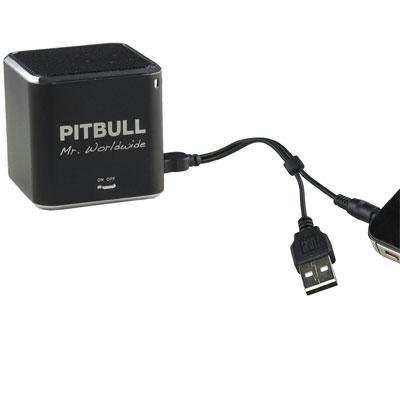
This image displays the compact, black cube-shaped Pitbull RockDoc Power Portable MP3 Speaker. The front face features the 'PITBULL Mr. Worldwide' logo and an 'ON OFF' switch. An integrated cable with a USB connector and a 3.5mm audio jack is shown connected to the speaker, ready for charging or audio input.
Ọja Awọn ẹya ara ẹrọ
- Apẹrẹ to gbe: Iwapọ ati iwuwo fẹẹrẹ fun gbigbe irọrun.
- Integrated MP3 Player: Features 4GB of internal memory for direct music playback.
- Asopọ Alailowaya: Supports Bluetooth for audio streaming from compatible devices.
- Wired Audio Input: Includes a 3.5 mm audio jack for connecting non-Bluetooth devices.
- Batiri Agbara: Operates on an internal battery for cordless use.
- 1-Way Speaker System: Delivers clear audio output.
Ṣeto
Gbigba agbara si Agbọrọsọ
- Locate the integrated USB cable attached to the speaker.
- Connect the USB-A end of the cable to a powered USB port (e.g., computer, USB wall adapter).
- The speaker's indicator light will illuminate to show charging status. Refer to the device for specific light indications.
- Nígbà tí o bá ti gba agbára tán pátápátá, yọ okùn USB náà kúrò.
Titan / Pipa agbara
- To power on, slide the 'ON OFF' switch to the 'ON' position.
- To power off, slide the 'ON OFF' switch to the 'OFF' position.
Nsopọ Awọn orisun ohun
Your speaker supports three primary methods for audio input:
1. Using Internal 4GB Memory (MP3 Playback)
- To load music onto the internal 4GB memory, connect the speaker to a computer using the USB cable. The speaker should appear as a removable storage device.
- Fa ati ju ohun MP3 rẹ silẹ files into the speaker's storage.
- Ni ẹẹkan files are transferred, safely eject the speaker from your computer.
- The speaker will automatically play files from its internal memory when powered on and no other audio source is connected.
2. Asopọ Bluetooth
- Rii daju pe agbọrọsọ ti wa ni titan.
- Mu Bluetooth ṣiṣẹ lori foonu alagbeka rẹ, tabulẹti, tabi ẹrọ ibaramu miiran.
- Wa fun available Bluetooth devices. The speaker should appear as "Pitbull RockDoc" or similar.
- Select the speaker from the list to pair. A confirmation sound or light indication may occur upon successful pairing.
3. 3.5 mm Audio Jack Connection
- Locate the integrated 3.5 mm audio jack on the speaker's cable.
- Connect this jack to the headphone output or audio-out port of your external audio device (e.g., MP3 player, phone, laptop).
- Ensure the speaker is powered on. Audio will be routed through this connection.
Awọn ilana Iṣiṣẹ
Awọn iṣakoso Sisisẹsẹhin Ipilẹ
The speaker features basic controls for media playback. These controls typically include:
- Ṣiṣẹ/Daduro: Press to start or pause audio playback.
- Orin t’okan: Press to skip to the next audio file.
- Tẹlẹ Orin: Press to go back to the beginning of the current track or to the previous track.
- Iṣakoso iwọn didun: Adjust the volume level. (Specific button layout not provided, assume standard controls).
Note: When connected via Bluetooth or 3.5mm audio jack, playback controls on the speaker may control the connected device, or you may need to control playback directly from the source device.
Itoju
Ninu
- Mu ese ita ti agbọrọsọ pẹlu asọ, gbẹ, asọ ti ko ni lint.
- Ma ṣe lo awọn olutọpa abrasive, awọn nkanmimu, tabi awọn kemikali to lagbara.
- Yago fun gbigba ọrinrin sinu eyikeyi awọn ṣiṣi.
Ibi ipamọ
- Tọju agbohunsoke ni itura, aye gbigbẹ kuro lati orun taara ati awọn iwọn otutu to gaju.
- Ti o ba wa ni ipamọ fun akoko ti o gbooro sii, rii daju pe batiri naa ti gba agbara kan (ni ayika 50%) lati pẹ ni igbesi aye rẹ.
Laasigbotitusita
| Isoro | Owun to le Fa | Ojutu |
|---|---|---|
| Ko si agbara | Batiri ti bajẹ | Gba agbara si agbọrọsọ naa nipa lilo okun USB. |
| Ko si ohun lati agbọrọsọ | Volume too low; Incorrect input source; Device not paired (Bluetooth); Cable not connected (3.5mm) | Increase speaker volume; Ensure correct mode (internal MP3, Bluetooth, or AUX); Re-pair Bluetooth device; Check 3.5mm cable connection. |
| Sisopọ Bluetooth kuna | Agbọrọsọ kii ṣe ni ipo sisopọ; Ẹrọ ti o jinna pupọ; kikọlu | Ensure speaker is discoverable; Move device closer to speaker; Turn off other Bluetooth devices. |
| Ko le gbe lọ files to 4GB memory | Incorrect USB connection; Driver issue; Memory full | Ensure speaker is connected to computer via USB; Try a different USB port/cable; Check available memory space. |
Awọn pato
| Ẹya ara ẹrọ | Ẹ̀kúnrẹ́rẹ́ |
|---|---|
| Nọmba awoṣe | 900584 |
| Agbọrọsọ Iru | 1-Way Portable Speaker |
| Ti abẹnu Memory | 4GB (fún ṣíṣe MP3) |
| Asopọmọra | Bluetooth, 3.5 mm Audio Jack |
| Orisun agbara | Agbara Batiri |
| Agbọrọsọ Agbara Ijade ti o pọju | 3 Wattis |
| Iwọn Nkan | 159 g |
| Awọn iwọn Ọja (LxWxH) | 5 x 5 x 4.9 cm |
| Olupese | VISIONTEK MASS STORAGE |
Alaye atilẹyin ọja
For detailed warranty information regarding your VisionTek Pitbull RockDoc Power Portable MP3 Speaker, please refer to the warranty card included with your purchase or contact the manufacturer directly. Amazon's buying options mention a 'Warranty Policy', indicating manufacturer coverage.
Atilẹyin
If you require technical assistance or have questions not covered in this manual, please contact VisionTek Mass Storage, the manufacturer of this product. Contact details can typically be found on their official webaaye tabi apoti ọja.