
1. Ifihan
O ṣeun fun riraasing the KLH R5100 Surround Sound Receiver. This receiver is designed to provide high-quality audio and video performance for your home entertainment system. It features multiple audio and video inputs, surround sound processing, and a powerful amplifier to deliver an immersive listening experience. Please read this manual thoroughly before operating the unit to ensure proper setup and optimal performance.
2. Alaye Aabo pataki
Lati dinku eewu ina mọnamọna, ina, tabi ibaje si ẹyọkan, jọwọ ṣe akiyesi awọn iṣọra ailewu wọnyi:
- Orisun Agbara: Connect the unit only to an AC 120V, 60Hz power supply.
- Afẹfẹ: Rí i dájú pé afẹ́fẹ́ ń tàn kálẹ̀ tó. Má ṣe dí àwọn ihò afẹ́fẹ́. Jẹ́ kí àyè tó wà ní àyíká ẹ̀rọ náà fún afẹ́fẹ́ tó yẹ.
- Omi ati Ọrinrin: Ma ṣe fi ẹrọ naa han si ojo, ọrinrin, tabi ọriniinitutu ti o pọ ju. Ma ṣe gbe awọn nkan ti o kun fun awọn olomi, gẹgẹbi awọn vases, sori ẹyọ.
- Ooru: Jeki ẹyọ kuro lati awọn orisun ooru gẹgẹbi awọn imooru, awọn iforukọsilẹ ooru, awọn adiro, tabi awọn ohun elo miiran (pẹlu ampliifiers) ti o gbe ooru jade.
- Ninu: Yọọ kuro lati inu iṣan ogiri ṣaaju ṣiṣe mimọ. Lo asọ ti o gbẹ fun mimọ.
- Ṣiṣẹ: Ma ṣe gbiyanju lati ṣe iṣẹ fun ẹyọkan yii funrararẹ. Tọkasi gbogbo iṣẹ si awọn oṣiṣẹ iṣẹ ti o peye.
- Awọn kebulu: Dabobo okun agbara lati ma rin lori tabi pin, ni pataki ni awọn pilogi, awọn ohun elo irọrun, ati aaye nibiti wọn ti jade kuro ni ẹyọkan.
3. Package Awọn akoonu
Jọwọ ṣayẹwo pe apo rẹ ni awọn nkan wọnyi:
- KLH R5100 Surround Sound Receiver
- Latọna Iṣakoso Unit
- Itọsọna olumulo
- Awọn okun Olohun/Fidio (Iru RCA)
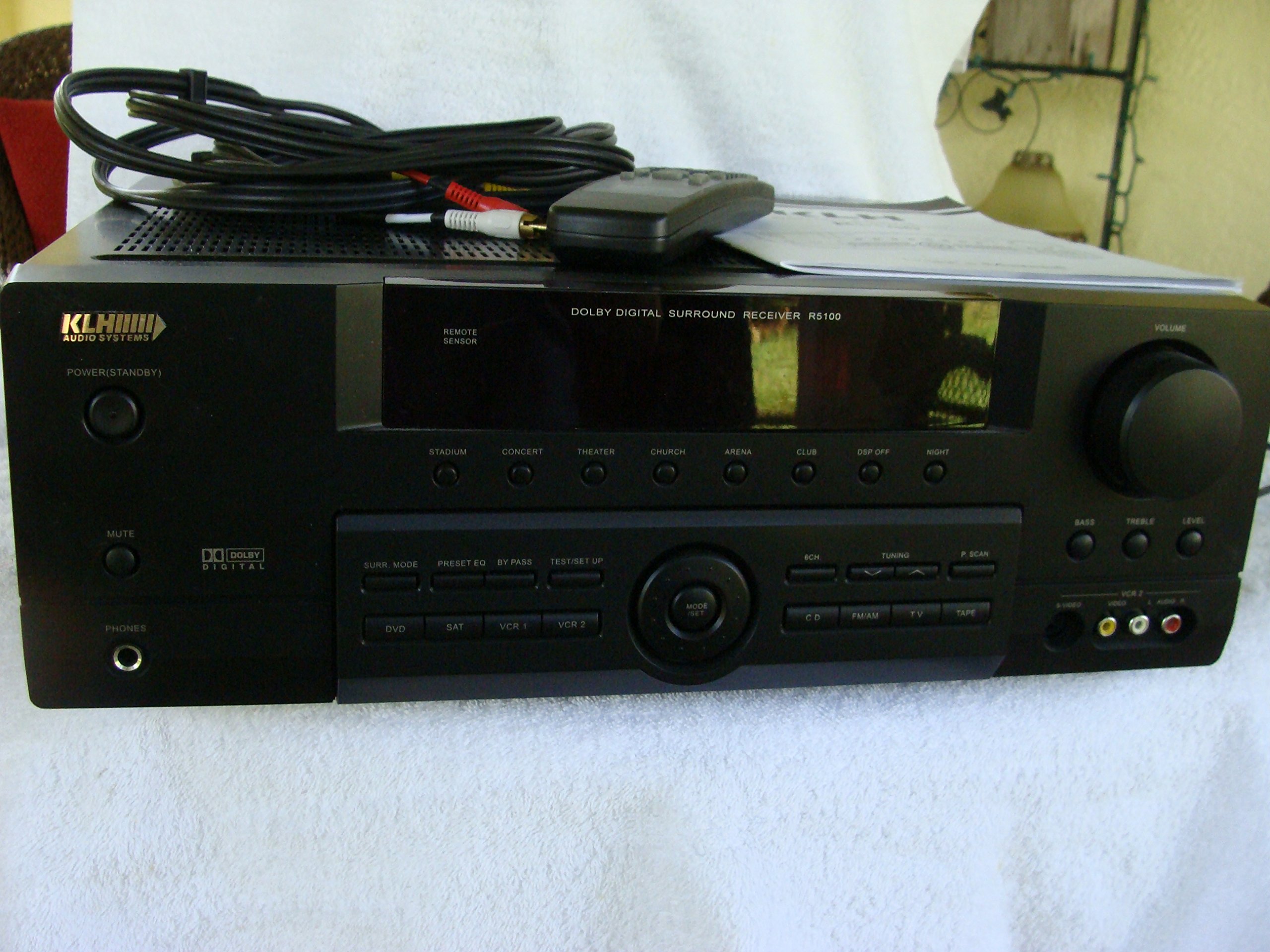
Image: The KLH R5100 receiver, its remote control, user manual, and included audio/video cables.
4. Ọja Ipariview
4.1 Iwaju Panel idari
The front panel provides access to essential controls and indicators for daily operation.

Aworan: A alaye view of the receiver's front panel, highlighting the display, volume control, and input selection buttons.
- Bọtini agbara: Tan olugba naa tan tabi pa.
- Awọn yiyan igbewọle: Buttons for DVD, SAT, VCR 1, VCR 2, CD, FM/AM, TV, TAPE to choose your audio/video source.
- Bọtini Iwọn didun: Satunṣe awọn ìwò o wu iwọn didun.
- Surround Mode Buttons: Select various sound fields like Stadium, Concert, Theater, Church, Arena, Club, DSP Off, Night.
- Bass/Treble/Level: Controls for adjusting audio tone and individual channel levels.
- Jack agbekari: Fun ikọkọ gbigbọ.
4.2 Ru Panel Awọn isopọ
The rear panel houses all input and output terminals for connecting your audio and video components, as well as speakers.

Image: The full rear panel of the receiver, displaying all connection ports for audio, video, and speakers.
- Awọn ebute Agbọrọsọ: Connections for Main (Front Left/Right), Center, and Rear (Surround Left/Right) speakers.
- Àwọn Ìtẹ̀wọlé Ohùn (RCA): For connecting CD players, tape decks, VCRs, TVs, and other stereo audio sources.
- Video Inputs/Outputs (RCA/S-Video): For connecting video sources like DVD players, VCRs, and TVs.
- Àwọn Ìbáwọlé Ohùn Oní-nọ́ńbà (Ojú/Kóákíìlì): For connecting digital audio sources like DVD players or set-top boxes.
- 6CH Direct Input: For connecting external multi-channel decoders or players with 5.1 analog outputs.
- Subwoofer Jade: RCA o wu fun sisopọ subwoofer ti nṣiṣe lọwọ.
- Awọn ibudo eriali: For FM and AM antennas.
4.3 Isakoṣo latọna jijin
The remote control provides convenient access to all receiver functions from your listening position.

Aworan: A sunmọ-soke view of the remote control unit, detailing its buttons for various functions.
- Titan/Apapa: Tan olugba naa tan tabi pa.
- Awọn yiyan igbewọle: Dedicated buttons for each input source (DVD, CD, TV, etc.).
- Iwọn didun Soke/Isalẹ: Ṣatunṣe iwọn didun oluwa.
- Pa ẹnu mọ́: Temporarily silences the audio output.
- Ipo ayika: Cycles through available surround sound modes.
- Level/Test: For adjusting individual speaker levels and running a test tone.
- Awọn iṣakoso Tuner: For FM/AM station tuning and memory functions.
5. Eto
5.1 Connecting Your Speakers
Ensure the receiver is unplugged from the power outlet before making any connections.
- Awọn Agbọrọsọ iwaju: Connect your main left and right speakers to the 'MAIN SPEAKERS (8Ω)' terminals. Ensure correct polarity (+ to + and - to -).
- Agbọrọsọ aarin: Connect your center channel speaker to the 'CENTER SPEAKER (8Ω)' terminals.
- Awọn Agbọrọsọ Tẹhin: Connect your surround left and right speakers to the 'REAR SPEAKERS (8Ω)' terminals.
- Subwoofers: Connect an active subwoofer to the 'SUBWOOFER OUT' RCA jack using a single RCA cable.

Aworan: Alaye view of the speaker connection terminals on the rear panel.
5.2 So Àwọn Orísun Ohun/Fídíò pọ̀
Use appropriate cables (RCA, Optical, Coaxial) to connect your source components to the receiver.
- Ẹrọ DVD: Connect the audio output of your DVD player to the 'DVD' audio input jacks (RCA) on the receiver. For digital audio, use either the 'DIGITAL IN OPTICAL' or 'DIGITAL IN COAXIAL' input. Connect the video output to the 'DVD' video input.
- Akọrin CD: Connect the audio output of your CD player to the 'CD' audio input jacks (RCA).
- TV/Cable Box: Connect the audio output of your TV or cable box to the 'TV' audio input jacks (RCA). Connect video output to the 'TV' video input.
- Awọn ẹrọ miiran: Use 'SAT', 'VCR 1', 'VCR 2', or 'TAPE' inputs for other audio/video components as needed.

Image: A close-up of the digital audio inputs (Coaxial, Optical) and the 6-channel direct input section on the rear panel.
5.3 Eriali Asopọ
So FM ati awọn eriali AM ti a pese si awọn ebute oniwun wọn lori ẹgbẹ ẹhin fun gbigba redio.
6. Awọn ilana Iṣiṣẹ
6.1 Ipilẹ isẹ
- Agbara Tan: Tẹ bọtini agbara lori iwaju nronu tabi iṣakoso latọna jijin.
- Yan Igbewọle: Press the desired input selector button (e.g., 'DVD', 'CD') on the front panel or remote control to choose your source.
- Ṣatunṣe Iwọn didun: Turn the Volume knob on the front panel or use the Volume Up/Down buttons on the remote control.
6.2 Surround Sound Modes
The R5100 offers various sound modes to enhance your listening experience:
- Papa iṣere: Simulates the acoustics of a large stadium.
- Ere orin: Creates a concert hall ambiance.
- Tiata: Optimized for movie playback, enhancing dialogue and effects.
- Ijo: Replicates the spaciousness of a church.
- Arena: Provides a wide, open sound field.
- Ologba: Simulates a lively club environment.
- DSP Off: Disables digital sound processing for a direct stereo signal.
- Oru: Reduces dynamic range for late-night listening without disturbing others.
Press the 'SURR. MODE' button on the remote or front panel to cycle through these modes.
6.3 Iṣakoso ohun orin
Use the BASS and TREBLE controls on the front panel or remote to adjust the low and high frequency response. The LEVEL controls allow for fine-tuning of individual speaker output levels.
6.4 Tuner isẹ
To listen to radio:
- Press the 'FM/AM' input selector.
- Use the 'TUNING' buttons on the front panel or remote to find stations.
- Press 'MEMORY' to store favorite stations, and 'P.SCAN' to scan through presets.
7. Itọju
To ensure the longevity and optimal performance of your KLH R5100 receiver, follow these maintenance guidelines:
- Ninu: Fi aṣọ rírọrùn, gbígbẹ, nu àwọn ojú ìta. Má ṣe lo àwọn ohun ìfọṣọ, epo tàbí àwọn ohun olómi nítorí wọ́n lè ba ìparí rẹ̀ jẹ́.
- Afẹfẹ: Regularly check that the ventilation openings are not obstructed by dust or debris. Use a soft brush or vacuum cleaner to gently remove any build-up.
- Okun Agbara: Inspect the power cord periodically for any signs of damage. If damaged, discontinue use and contact qualified service personnel.
- Ibi ipamọ: Ti o ba tọju ẹyọ naa fun akoko ti o gbooro sii, yọọ kuro lati inu iṣan agbara ki o bo lati daabobo lodi si eruku.
8. Laasigbotitusita
If you encounter problems with your receiver, refer to the following common issues and solutions before seeking professional service.
| Isoro | Owun to le Fa | Ojutu |
|---|---|---|
| Ko si agbara | A ti yọ okùn agbára kúrò; Ibùdó agbára kò ṣiṣẹ́ | Rí i dájú pé okùn agbára náà wà ní ààbò; Ṣàyẹ̀wò ibi tí agbára ń jáde pẹ̀lú ẹ̀rọ mìíràn |
| Ko si ohun | Incorrect input selected; Speakers not connected properly; Volume too low; Mute function active | Select correct input source; Check speaker connections and polarity; Increase volume; Deactivate Mute |
| Isakoṣo latọna jijin ko ṣiṣẹ | Batteries depleted; Obstruction between remote and receiver; Remote sensor blocked | Replace batteries; Remove any obstructions; Ensure remote sensor on receiver is clear |
| Gbigba redio ti ko dara | Antenna not connected or poorly positioned | Connect antennas securely; Adjust antenna position for better reception |
| Ohun ti o daru | Input signal too high; Speaker impedance mismatch; Damaged cables | Reduce source volume; Ensure speakers match 8Ω impedance; Check and replace damaged cables |
9. Awọn pato
The following are the technical specifications for the KLH R5100 Surround Sound Receiver:
- Nọmba awoṣe: R5100
- Awọn iwọn ọja: 16.88 x 6.88 x 15.75 inches
- Ìwọ̀n Nkan: 24.2 iwon
- Orisun Agbara: AC 120V, 60Hz
- Lilo Agbara: 320W
- Ipo Ijade Ohun: Ayika
- Atunto ikanni Ohun Yika: 5.1
- Imọ-ẹrọ Asopọmọra: RCA, 3.5mm Jack, Optical, Coaxial
- Awọn ẹrọ ibaramu: Awọn agbọrọsọ
- Iru Adari: Latọna jijin
- Ẹya Pataki: Advanced Room Calibration (as per product listing, though specific details may vary)
- Àwọ̀: Dudu
10. Atilẹyin ọja ati Support
For warranty information and customer support, please refer to the documentation included with your purchase or contact KLH customer service directly. Keep your proof of purchase for any warranty claims.